

In our IPC article, we mentioned CPU pipelining many times. I told you that to add more instruction inside the clock cycles, manufacturers do major architectural changes in their new CPUs, which, in turn increase the IPC (Instructions per Cycle) of the CPU. CPU Pipelining has a major role to play in this, and we are going to discuss it in detail in this article.
Every modern CPU uses pipelining, and there are strong reasons for it.
Modern CPUs are very strong. They come with multiple cores, threads, and many execution units. Utilizing those resources is a task in itself. So, CPU pipelining comes into the scene, letting the processor work on multiple instructions at the same time. It does that by putting different instructions into different stages of execution.
See, at the very basic level, a CPU is just doing very basic tasks like fetching data from the memory, adding numbers, comparing numbers, and many other things. However, the speed at which things happen is unimaginably fast.
There is a lot that we can do inside a single clock cycle. And don’t think that CPU pipelining is a new technology. It was introduced back in the late 1950s. However, it is one of the major reasons why CPUs are capable of doing what they are doing these days. I find this really interesting and thought of refreshing my knowledge and making this article for you. So, let’s get started.
The steps for executing any instruction
A simple version of how a CPU executes any instruction looks something like this:
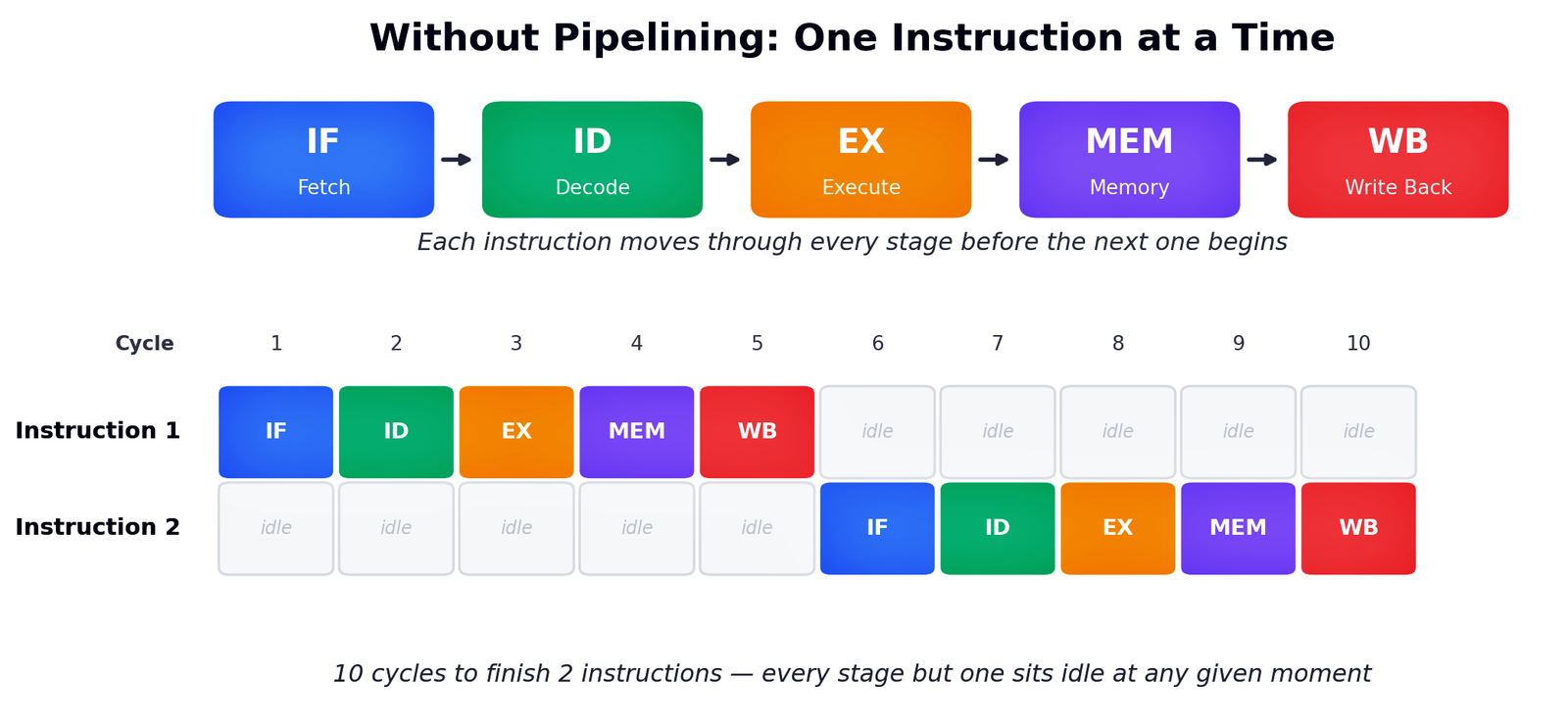
We can see that if we want two instructions with five stages (e.g., Fetch, Decode, Execute, Memory, and Write Back), we have to wait for one instruction to finish before we can start another one. Let’s discuss a little what these stages mean.
- Fetch: Get the instruction from memory.
- Decode: Figure out what it means and which registers it needs.
- Execute: Do the actual math (add, compare, shift, whatever).
- Memory access: Read or write memory if the instruction needs to.
- Write back: Store the result in a register.
Because there are millions and millions of instructions trying to run parallel in modern computers, this can result in a big restriction in hardware usage. Most of the hardware sits idle most of the time this way because it has to wait for the other parts to finish their job first.
While the ALU is busy executing instruction 1, the fetch unit is doing nothing. While the CPU is writing back the result of instruction 1, the decoder is doing nothing. So, this is a big problem that came with this sequential sort of CPU processing.
The Fix: Overlap the stages
CPU pipelining fixes this issue by separating pieces of hardware inside one CPU.
What does that mean?
The CPU has many hardware blocks for performing different tasks. We all know that ALU is where most of the computational work happens inside the CPU. Just like that, the fetch cycle is dependent mainly on the program counter, memory data register, control unit, etc.
Basically, different hardware parts of a CPU are there for different instructions. For example, while the fetch hardware is fetching Instruction a, the decode hardware can decode Instruction b, while the execution hardware executes Instruction c.
A simplified CPU pipeline with overlapping instructions may look something like this:
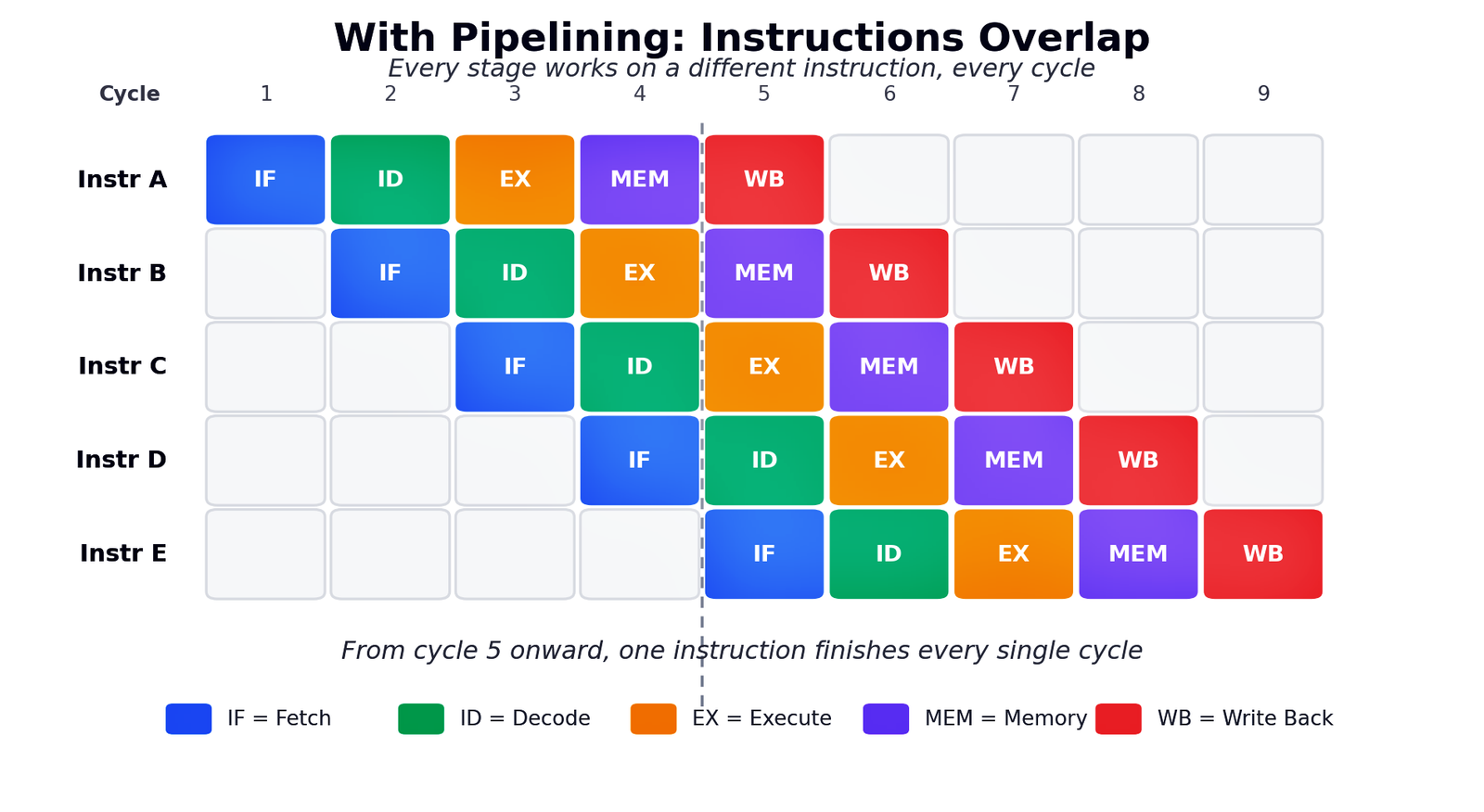
Note: If you are confused, CPU pipelining is the method while instruction overlap is the result. Basically, CPU pipelining is the hardware technique that makes instruction overlapping possible.
Above is the classic 5-stage pipeline with five instructions moving through the stages, i.e., IF → ID → EX → MEM → WB.
As you can see, by cycle 5, all the five pipeline stages are occupied. At this point, each stage is working on a different instruction. After that, one instruction finishes every single cycle. This is called the pipeline’s steady state. Basically, the CPU no longer has to wait for one instruction to finish before starting the next.
In case you are into computer science, you can use Ripes. It is a free graphical simulator that lets you step through this cycle by cycle and watch the stages fill and empty. However, if it is confusing for you, let’s proceed.
How is CPU pipelining implemented in a CPU?
CPU pipelining may sound like a software element inside the CPU, but it is actually implemented in the hardware. Inside every CPU core, there will be dedicated hardware resources for pipelining, such as pipeline stages, pipeline registers, control logic, instruction queues, schedulers, etc.
So, don’t think that the operating system tells the CPU, “Hey, bro! Pipeline these instructions.” The CPU’s microarchitecture is designed by AMD, Intel, Apple, etc., and they do this automatically. However, it is worth mentioning that the compiler and software can arrange instructions in ways that make pipelining easier.
The issues with the instruction overlapping
Instruction overlapping sounds and looks good only until the instructions don’t interfere with each other. We have already discussed that pipelining is the hardware thing, and when we design programs to run on the hardware, bugs are inevitable. In the real world, instruction often interferes, and these conflicts are called hazards. There can be three kinds of hazards.
Structural hazards
This one gets the least attention because it is fairly easy to solve with more transistors and money. So, a structural hazard happens when two instructions need the same piece of hardware at the same time. It can be as simple as two instructions colliding at the same memory port for the data fetch cycle. Modern CPUs handle that beautifully by duplicating hardware. We have separate instructions, a data cache, multiple ALUs, and multiple memory load and store ports so that each instruction has extra options available for them.
Data Hazards
This one can be a little serious if not handled properly. So, we saw above that multiple instructions can run at the same time, and there will be many situations where two or more instructions overlap in ways that conflict. However, if an instruction needs a value that a previous, still-ongoing instruction hasn’t produced yet, a data hazard will occur.
Here is an example where we require the results from a previous instruction to continue with our new instruction, but the first one isn’t finished yet.
ADD R1, R2, R3   ; R1 = R2 + R3
SUB R4, R1, R5   ; R4 = R1 - R5   <- needs R1, but the ADD hasn't written it back yet
Even if you don’t understand the example above, keep in mind that if the result from the previous cycle hasn’t yet been received, there can be two fixes.
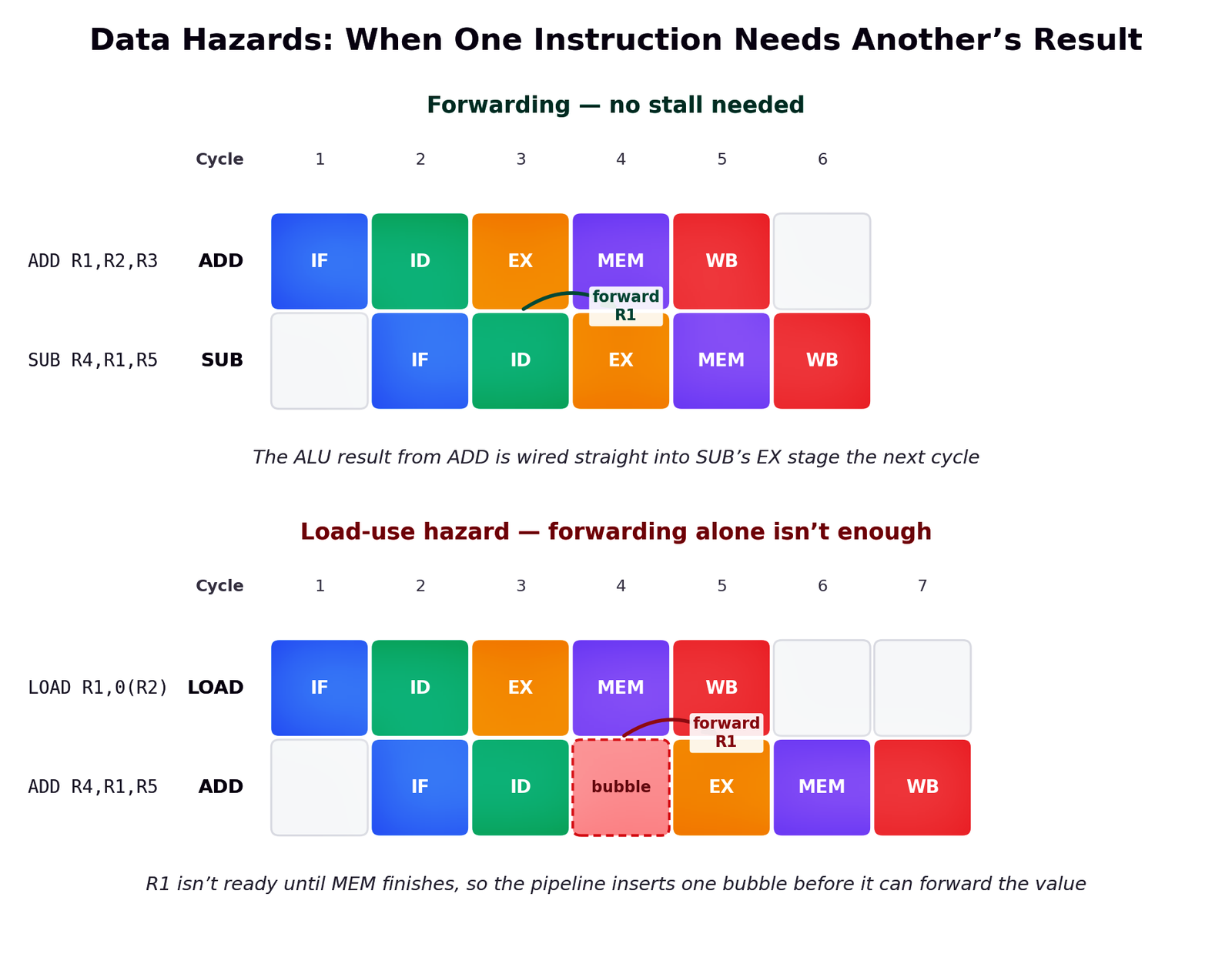
The first solution is forwarding. In this, the moment the ADD computes its result in the EX stage, that value is wired directly to the input of the next instruction that needs it. This skips the registry file entirely. It costs no lost cycle and solves the data hazards for free.
The second solution is stalling because forwarding can’t fix everything. A classic case is a load followed immediately by an instruction that uses the loaded value. In this case, the data isn’t available until the MEM stage completes, and there is no way to forward it earlier because it doesn’t exist yet. So, the pipeline will insert a one-cycle stall (a bubble) and waits.
Control Hazards
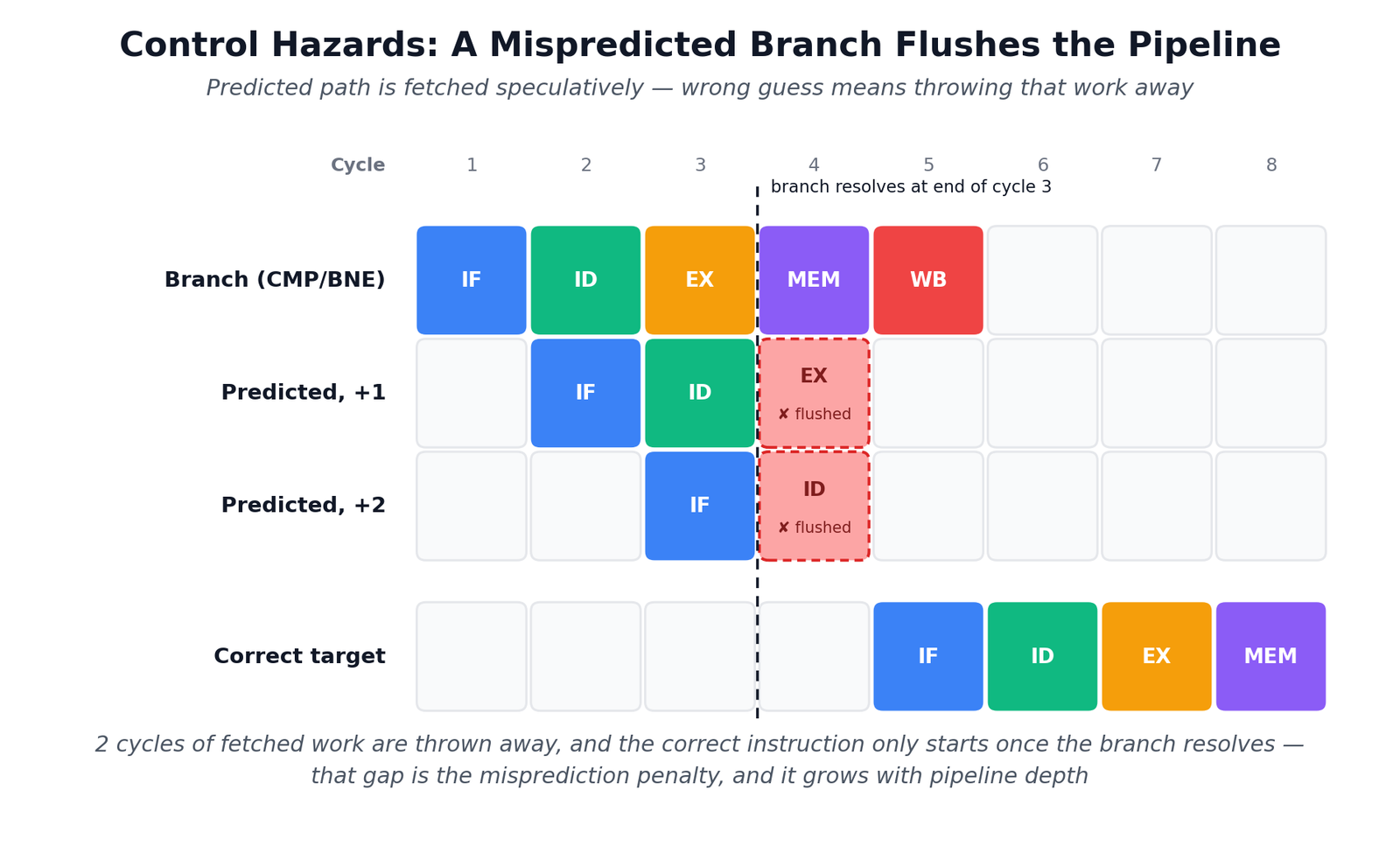
These hazards mainly come from branches working with functions like if, loops, and function calls. So CPU doesn’t inherently know which instruction will come next until a branch is fully resolved. However, many instructions have already passed in the pipeline behind it. So, if the CPU guesses a wrong path, everything it fetched down the wrong path is thrown away, and the pipeline has to be filled again from the correct one.
Control hazards are of the most serious type. However, CPUs handle them with another important strategy called branch prediction, which we will discuss later in the article.
Does pipelining improve performance?
CPU pipelining improves performance mainly by increasing the instruction throughput, as we have seen in the images and explanations above. However, it doesn’t make an individual instruction run faster in any way.
The purpose of pipelining is to divide the work into stages and processes. If we take the example of our five-stage pipeline again, the CPU can potentially complete one instruction every clock cycle once the pipeline is full. Still, each instruction will still take about five cycles to pass through the pipeline. So, it is about keeping the throughput high, reducing idle time, and ensuring better resource usage.
In an ideal case, a pipeline with n stages and equally sized stages and no stalls can approach n times the throughput of an equivalent of a non-pipeline design. However, this isn’t always possible because of the pipeline register overhead, branch misprediction, instruction dependencies, cache misses, etc. In fact, it can make one instruction’s latency worse because of the overhead. It is explained beautifully in these notes from CS 3410.
Branch Prediction: The Real Help in Pipelining
Let’s consider a simple loop or, in the language of CPU ISA, a branch. If you are not into computer science, you can go further to the explanation.
for (int i = 0; i < n; i++) {
    if (data[i] >= 128)
        sum += data[i];
}
In this loop, every time the CPU reaches if (data[i] >= 128), it has two possible paths, i.e., execute sum += data[i] or skip it. Rather than waiting to find out which path is correct, the CPU guesses the outcome and starts fetching and executing instructions from that path.
If the guess is right, the pipeline keeps moving. However, if it guesses wrong, the CPU has to discard the incorrectly fetched instruction and start fetching from the correct path. It results in a small but certain performance penalty.
The main idea is that branches can disrupt a CPU pipeline because the processor may not know which instruction comes next. Branch prediction is how the modern CPUs tackle this problem.
Branch prediction is essentially a set of hardware algorithms and data structures inside the CPU. Its purpose is mainly to predict which direction a branch will take and, often, where execution will continue.
An example to understand branches better
Let’s take a much simpler example this time.
if (x > 10)
    A();
else
    B();
When the CPU reaches the if statement, it essentially has two possibilities.
x > 10? → Yes → fetch A()
        → No  → fetch B()
The issue is that the CPU’s pipeline wants to keep fetching instructions every cycle mainly to stop the wastage of the CPU’s hardware.
So, the CPU predicts with its own algorithms.
“I think x > 10 will be true.”
It then continues to fetch the instruction from A() while the branch is still being resolved. If it guessed correctly, the pipeline keeps moving, and it is basically a success.
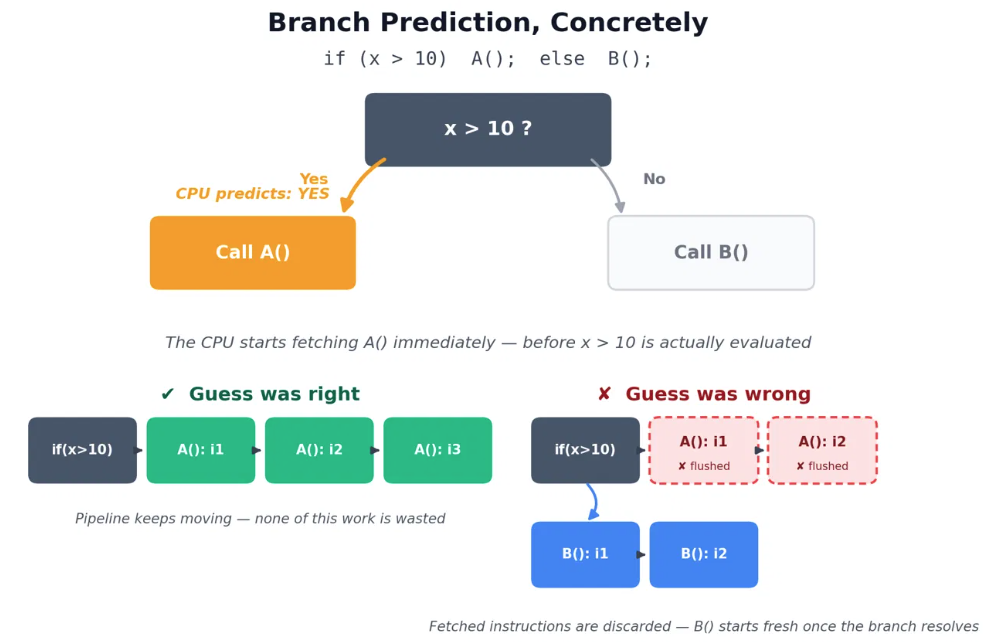
However, if it guessed incorrectly, the CPU has already fetched some instructions A() that shouldn’t have been executed. It flushes those instructions from the pipeline and starts fetching from B() instead. This is what a control hazard is and where branch prediction exists. It basically allows the CPU to keep the pipeline busy instead of waiting for every branch to be resolved first.
Now, whether the loops run fast or result in hazards depends on whether the data is sorted. Same data in the same size with the same instructions, just reordered. In fact, this is one of the most read questions on Stack Overflow. The problem is that when an array is unsorted, the branch flips unpredictably, the predictor guesses wrong roughly half the time, and every wrong guess flushes the pipeline.
The mechanics of branch prediction
If we talk about the types of branch prediction, there is static prediction, which has fixed rules with no runtime learning. Basically, it can’t adapt to what code is actually doing. So, basically, if it has some rules, it will always follow them.
Dynamic prediction actually watches each branch’s actual history and adapts accordingly. Modern CPUs have gone much further with their own predictors. AMD calls its family TAGE-based, which tracks long and correlated histories across many branches. It is very good at catching patterns that a simple counter would miss.
Branch prediction is a very deep and completely different topic, but it was important to discuss it in this article because of its relationship with the CPU pipeline. If you still don’t understand, keep in mind that pipelining makes branch prediction necessary, and branch prediction helps keep the pipeline full.
Real CPUs are much more complex than this simple 5-stage pipeline
The 5-stage pipeline that we discussed above was just for understanding. Modern CPUs don’t look that simple at all. Although CPUs fundamentally work on the fetch-decode-execute cycle, each of the five classic stages is then divided into much finer sub-steps, letting each stage do less work, which finally lets the clock run faster.
We discussed that there is one instruction running per stage per cycle. But real chips push multiple instructions through each stage. Skylake from Intel, for example, can decode up to 5 instructions per cycle, and its µop cache can feed six µops per cycle downstream. This is what they call superscalar execution.
Modern CPUs generally use out-of-order execution with register renaming. So, instead of executing instructions strictly in the order they appear, the CPU looks at a large window of upcoming instructions and finds ones that don’t depend on each other. It then executes the ones that are ready first.
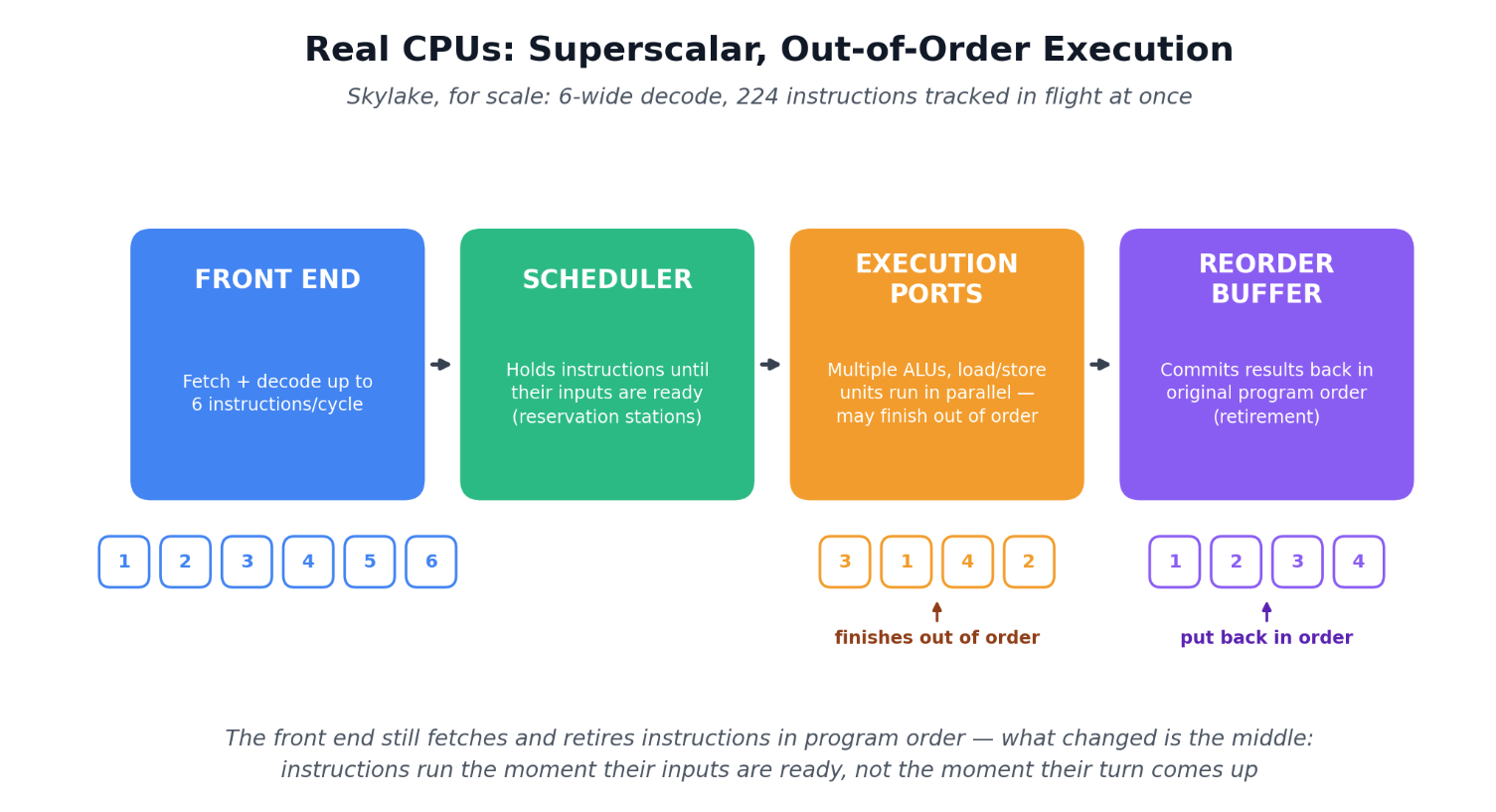
Skylake’s out-of-order window, tracked in its reorder buffer, holds 224 instructions in flight at once.
CPU pipelining is one of the amazing strategies by which the CPU resources are utilized at their best. It, along with other things like branch prediction, wider execution, better caches, and a lot more, helps CPUs achieve higher and higher IPC. I hope I have helped you understand the concept better. However, the deeper you go, the more information you will find about CPU pipelining. But, I promise, this rabbit hole is worth going in.