

Let’s get cleared up with the terminology first.
Branch instruction is a part of the CPU’s ISA.
Branch prediction is a microarchitectural technique used by the CPU to predict the outcome of a branch instruction.
The branch predictor is the actual hardware structure and logic that make those predictions.
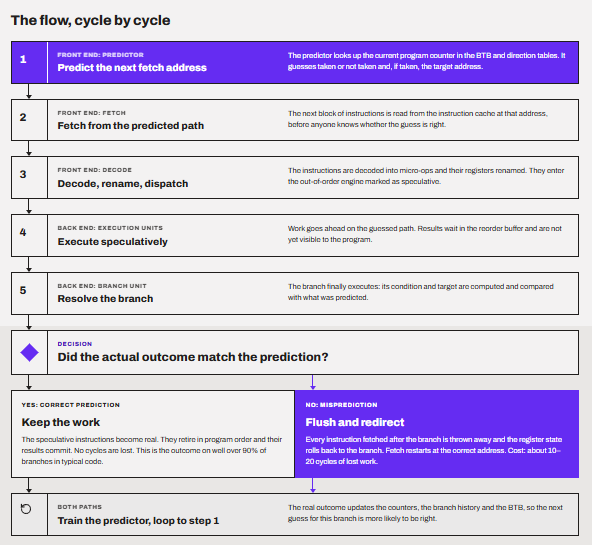
In my CPU pipelining article, I called branch prediction the fix for control hazards. I promised a proper deep dive, and this is it.
To start with, branch prediction is the part of a CPU that guesses which instructions come next, before the current ones have even been decoded, so the pipeline can keep working instead of waiting. Modern predictors are right far more than 95% of the time. But even a small number of wrong predictions can waste substantial work on wide, deeply out-of-order CPUs such as AMD’s Zen 5 and Intel’s Lion Cove. That is why modern CPU designers put a lot of effort and silicon into improving branch prediction.
An important thing to mention here is that the CPU doesn’t guess data or instructions. It only guesses one thing: the address of the next instruction to fetch.
Most people think branch prediction is just a simple if/else statement. It is true but not the whole story.
Branch prediction basically answers four questions in every cycle before it even sees the instruction byte. Is there a branch here? Will it be taken? Where does it go? And if it is a return, where do we return to?
In this article, I am going to answer a lot of questions. Why must a CPU guess at all? What a wrong guess costs? Then, how the guessing works, from simple counters to TAGE. Then, real numbers for real chips, an experiment you can run yourself, the security side, and finally what all of this means when you buy a CPU.
So, let’s get started.
What is a branch?
To put it simply, a branch is any instruction that can make the CPU jump somewhere other than the next instruction in memory. Normally, a CPU runs instructions one after another, like reading lines in a book. A branch says, “Stop reading here and continue on page 47.” Branches exist because real programs constantly have to make decisions, repeat operations, and call functions or maybe change their execution paths. Modern CPUs want to keep executing instructions before they have finished determining which path a conditional branch will take. It is more about utilizing the resources properly, even if we have to do the work that might have to be discarded at last.
Let’s see the instructions and addresses again. So, instructions are stored in memory one after another, and each one has its own number, called an address. Think of addresses as page numbers in a book. Normally, the CPU works through the list in order, again, just like you read a book. Page 1, then page 2, then page 3. A branch is an instruction that can break this order.
Below is a simple temperature example of branches.
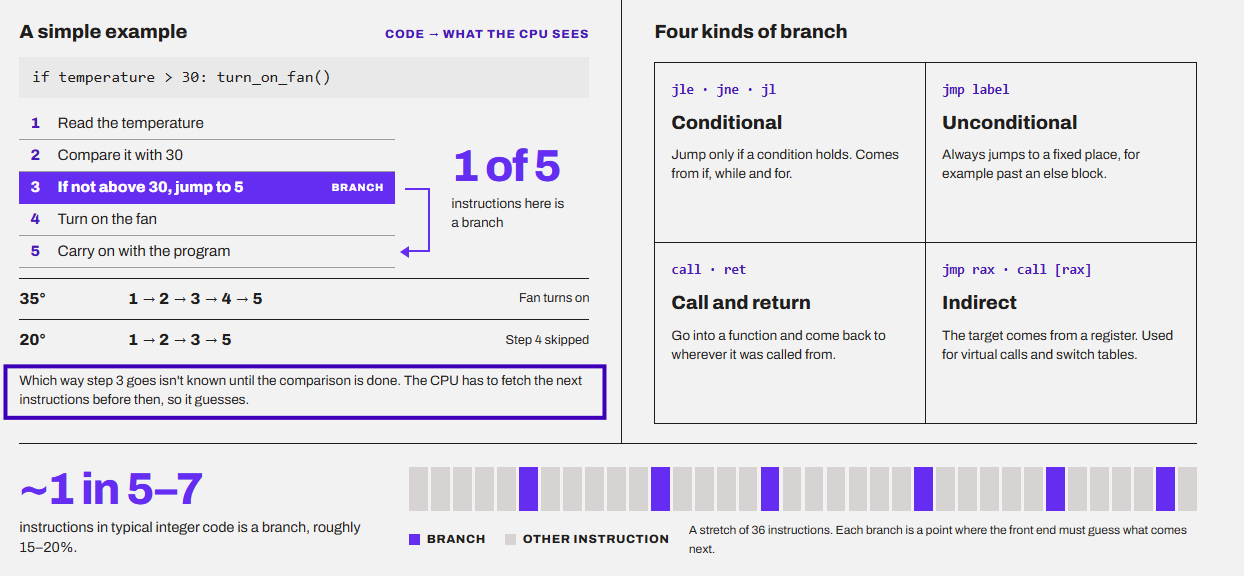
Every program on your PC, whether it’s a game, Chrome, or Windows itself, is just a long list of tiny, simple steps called instructions.
The thing about an instruction is that it does a very simple and small job like
- Add two numbers
- Copy a value from one place to another
- Compare two numbers
When we add a very heavy amount of abstraction to this, we get operating systems like Windows or programs like Premiere Pro doing the real things for us. But, under the hood, there are always these simple executions but at a very high speed (sometimes billions of times per second). This is the reason why it feels almost impossible that just by adding or comparing numbers, we can send emails from our computers.
Imagine a storybook where you decide what happens next. One page says, “If you want to open the door, turn to page 47. Otherwise, keep reading.” That page is a branch.
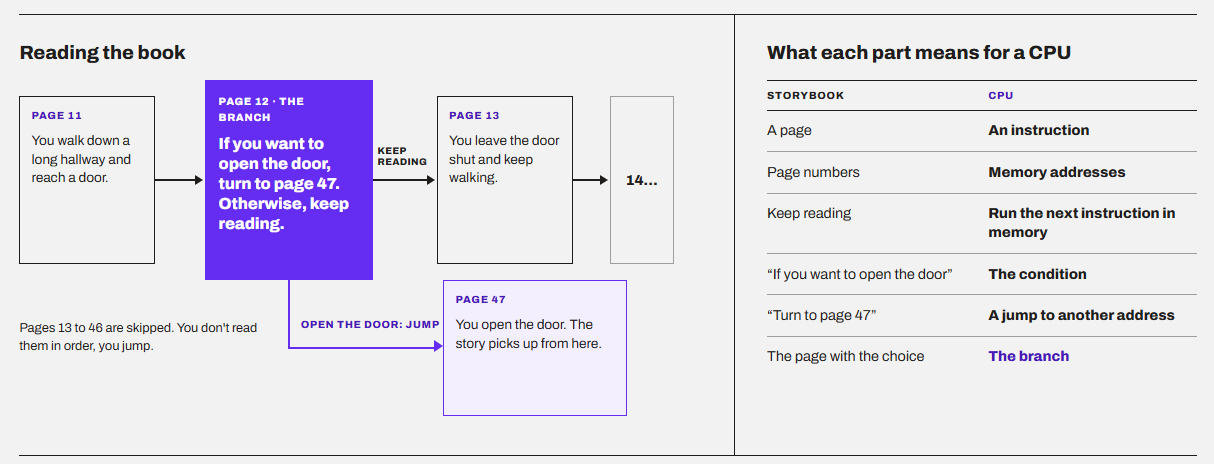
By the way, the name comes from a tree. At a branch, the path splits in two, and the program can go either way.
Taken means the branch jumped to a different place in the program. Not taken means it didn’t jump, and the CPU just moved on to the next instruction. Think of a fork in the road. Taken means you turn off the main road, and not taken means you keep going straight. Every time the CPU guesses, it is really guessing “taken or not taken?”
What does a branch look like inside a real program?
Don’t worry if you know nothing about coding. I will try to keep it as simple as possible. Let’s take an example.
// If x is 128 or more, add it to sum. If not, skip it.
if (x >= 128) {
    sum = sum + x;
}
In plain words, the program written above says check the number x. If it is 128 or more, add it to a running total called sum. If it is less than 128, do nothing.
Now, the CPU can’t read it directly. A compiler has to translate it into the tiny instructions your CPU understands. The result looks something like this (I have numbered the addresses 1 to 4 to keep it simple):
| Address | Instruction (in plain words) |
|---|---|
| 1 | Compare x with 128. |
| 2 | If x is less than 128, jump to address 4 (this is the branch). |
| 3 | Add x to the sum. |
| 4 | Continue with the rest of the program |
The address 2 gives us two possible next steps.
If x is less than 128, the CPU jumps straight to address 4 and skips the addition. We call this a taken branch.
If x is 128 or more, the CPU simply moves on to address 3, the next instruction in line. We call this a not taken branch.
Here is an x86 version example of the same thing.
cmp   edi, 128      ; address 1: compare x with 128
jl    .skip         ; address 2: THE BRANCH. If x < 128, jump to .skip
add   eax, edi      ; address 3: sum = sum + x (runs only if we did NOT jump)
.skip:              ; address 4: the rest of the program continues here
However, not all branches are the same. There are four main types, but we do not have to go really deep into them. I have added all of them in the image below.
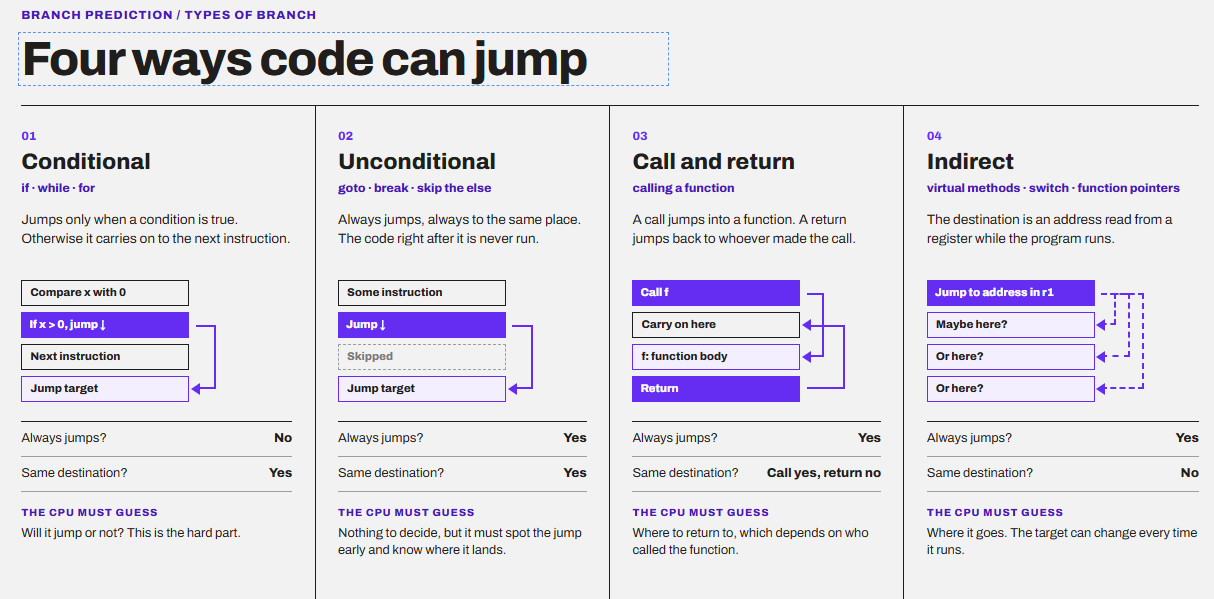
But branch prediction is not a simple if/else statement
I would like to clarify here that while an if/else program is a very good example to understand the practical implementation of branch prediction, it is much more complex and comprehensive than that. Most people picture branch prediction as a small piece of logic that solves an if/else early. It isn’t.
Rather than a statement with some values to compare, branch prediction is the CPU guessing the next address it should fetch, using nothing but what the program did in the past. The predictor doesn’t decide anything. It only guesses what the program will decide, so the CPU never has to stop and wait.
The predictor never sees the condition. It doesn’t read a value or compare two numbers, and it has no idea what the program is trying to decide. All it sees are addresses and a record of what happened at those addresses before.
I imagine a branch prediction in a very different way.
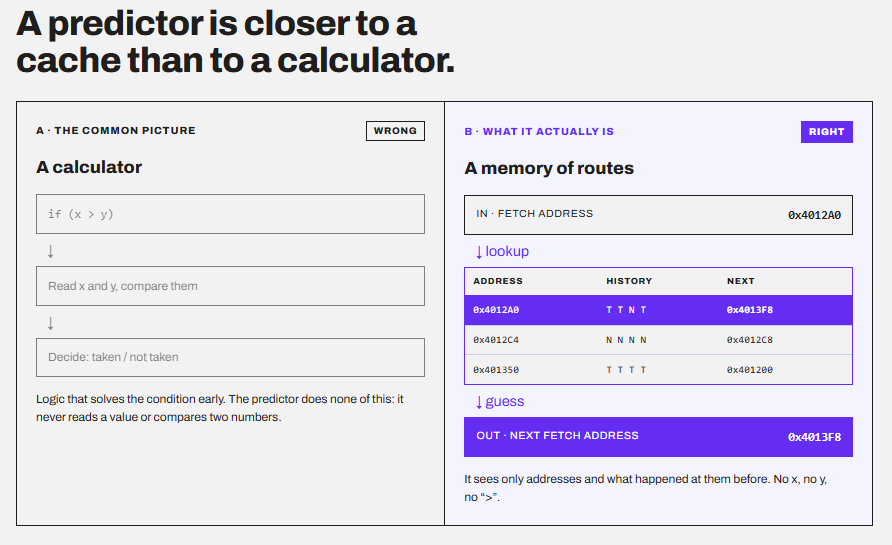
I imagine a branch predictor closer to a cache than to a calculator. A cache remembers data so the CPU doesn’t have to fetch it again. A branch predictor remembers the route the program took so the CPU doesn’t have to wait to learn it again. The reason is simple. The front of the CPU has one job every cycle: know the next address to fetch. It has to answer before it has even decoded the bytes, so it can’t tell whether a branch is there at all. Waiting to find out would stall everything behind it and predictor answers from memory.
Why does a pipelined CPU have to predict at all?
The problem is that a modern CPU is not reading one instruction at a time. It is working on hundreds at once. As we discussed in the CPU Pipelining article, a CPU splits each instruction into stages, like an assembly line. Fetch, decode, execute, and so on. While one instruction executes, the next ones are already being decoded and fetched.
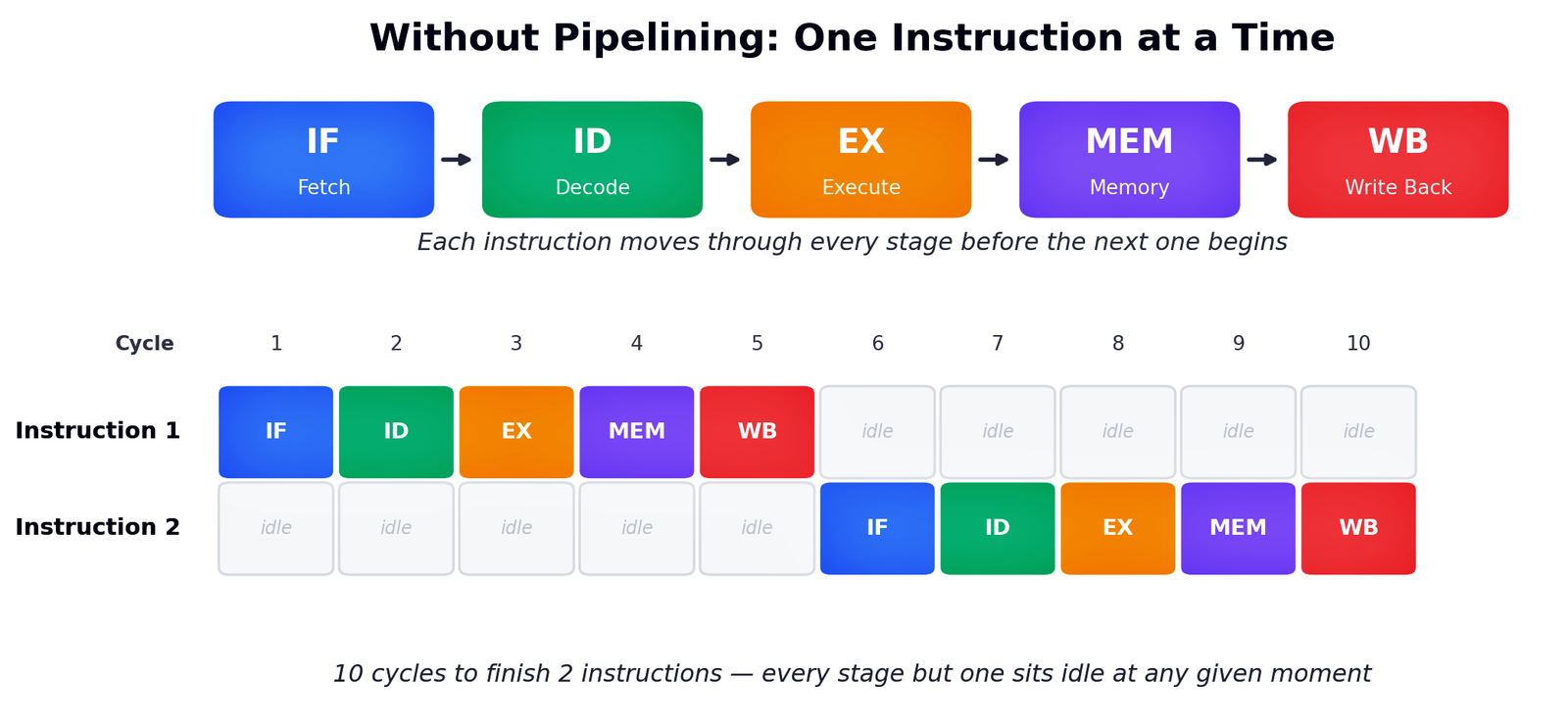
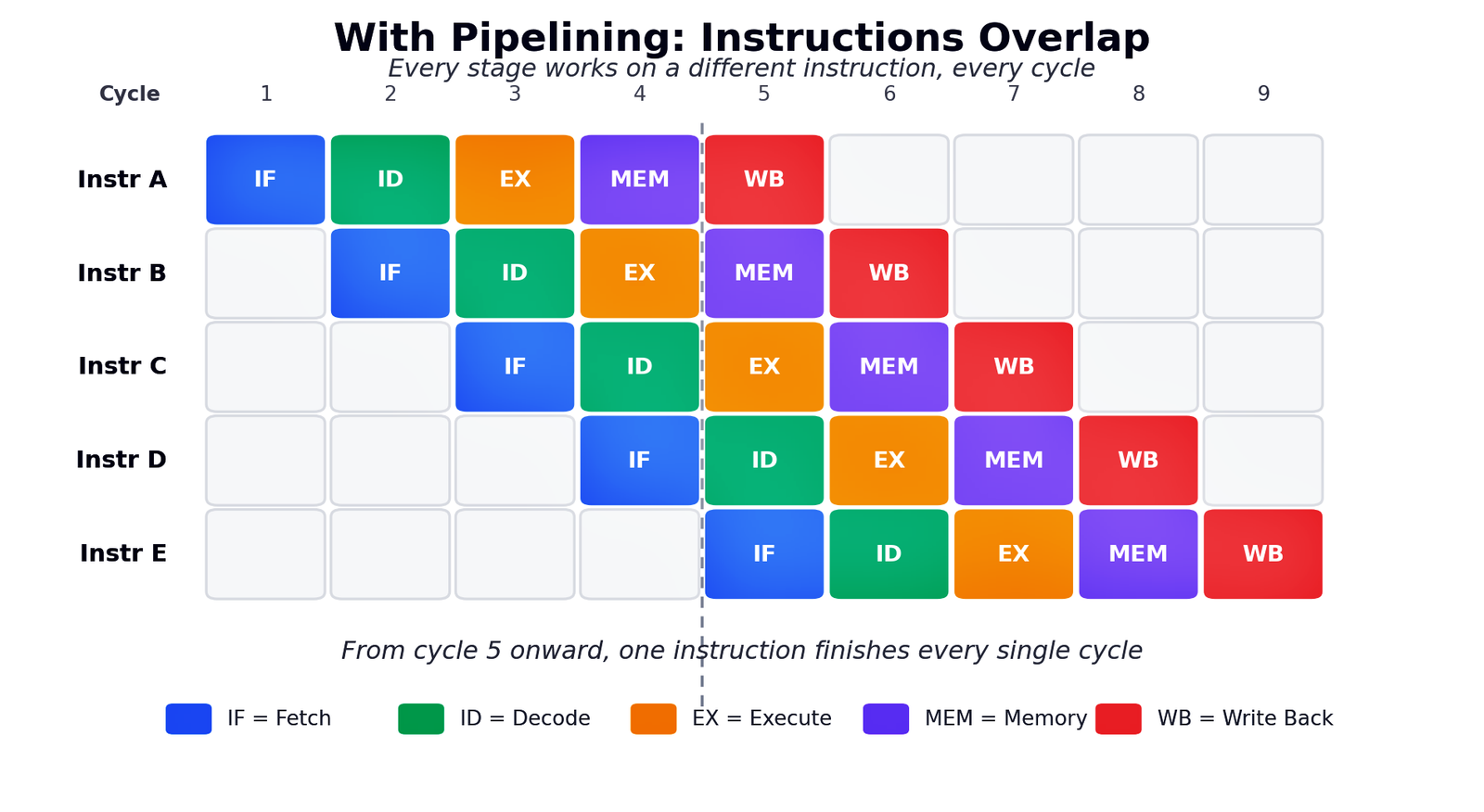
The fetch stage is at the very front. Every cycle, it has to ask one question: “Which address do I fetch from next?” For normal code, the answer is easy. Just the next bytes in memory. But when a branch comes along, the real answer is only known when the branch executes. And that happens many stages later.
Without prediction, the front end has no option but just to wait.
In the image below, you can see a simple five-stage pipeline. The five stages are Fetch (F), Decode (D), Execute (E), Memory (M), and Write-back (W). The branch is instruction 2. Its outcome is known at the end of Execute.
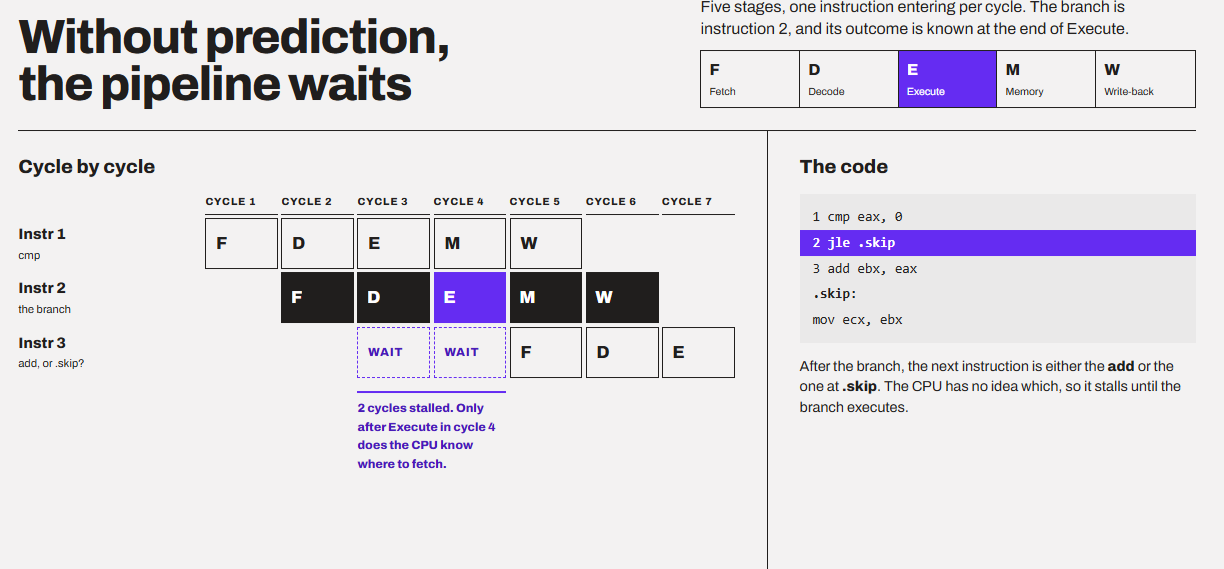
The CPU has no idea whether instruction 3 is the one to add or the one to skip. So, it stalls for two cycles until the branch executes. Two skipped cycles doesn’t sound too big, right? But it’s a lot. A modern core like Zen 5 has a branch misprediction penalty of 12 to 18 cycles. According to AMD’s own optimization guide for Zen 5, the actual pipelines are very long and can handle up to eight instructions per cycle. Stalling for 15 cycles at every branch, when a branch comes every five instructions, would make the CPU crawl.
With prediction, the goal is to keep the front-end busy
In this example image, you can see that the predictor makes a guess at cycle 3. The fetch unit trusts it and keeps going. If the guess was right, there was no pause at all.
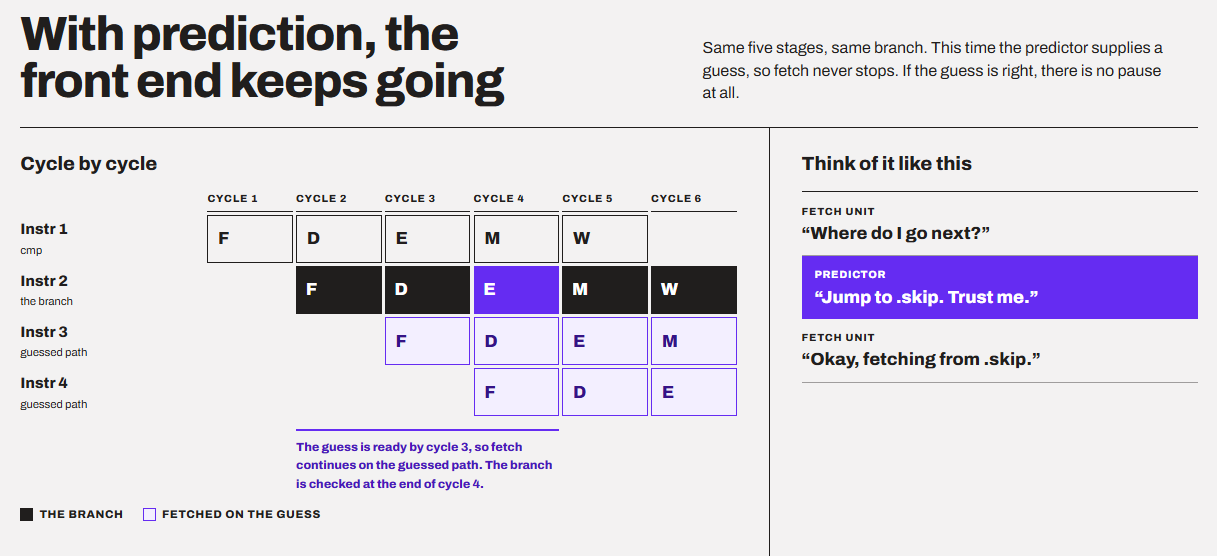
I like to imagine it in this way:
Fetch unit: “Where do I go next?”
Predictor: “Jump to .skip. Trust me.”
Fetch unit: “Okay, fetching from .skip.”
I would like to mention something very important here. Prediction is not the same as speculative execution. People use these two words as if they mean the same thing. They don’t.
Branch prediction picks the path. Speculative execution does the work down that path before the CPU knows it is the right one. In other words, prediction is the navigator. Speculation is the driver who starts driving before the navigator’s guess is confirmed. A modern out-of-order core does both.
Basically, prediction is done first. Then speculative execution comes into the game. It is what the CPU does with that prediction. It starts fetching, decoding, and potentially executing instructions along the predicted path before the branch has been fully resolved. If the prediction is correct, the work can be kept. If it is wrong, the CPU discards the affected speculative work and resumes from the correct path. Let’s discuss more on the wrong guesses.
What happens when a CPU guesses wrong?
There is a probabilistic/trade-off angle here. Basically, the CPU is made to run responsibly towards an end goal to complete an instruction cycle. It waits until it knows the correct path, or it makes an informed prediction just to keep working. It basically says, if I’m usually right, the work I save is worth more than the work I occasionally throw away.
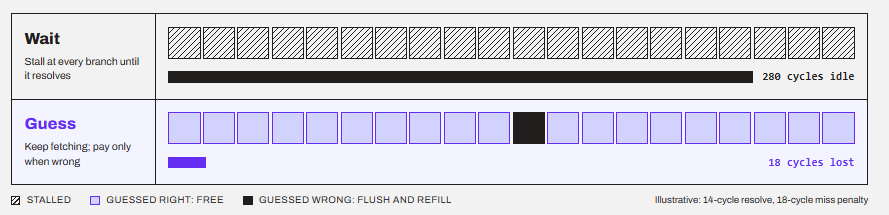
A lot of people assume a wrong guess means a wrong answer. It does not.
The wrong-path work is thrown away, and your results stay correct.
When the branch finally executes, the CPU checks the real outcome against the guess. If they match, nothing happens. The work continues.
If they don’t match, the CPU does three things:
- Squashes every instruction fetched after the branch
- Restores the internal state (register mappings, queues) to the moment of the branch
- Restarts fetch from the correct address
This is safe because instructions on the guessed path are never allowed to be retired. Retiring means making results permanent in the architectural registers and memory. Out-of-order cores keep those results in a waiting area called the reorder buffer (ROB) until every older branch is confirmed.
In other words, the CPU does the work in pencil. Only after the branch is confirmed does it write in ink.
But “safe” doesn’t mean “free.”
The CPU pays for the wrong guess in two ways. First
The first cost is time. All the cycles spent on the wrong path are gone, and the pipeline has to refill from the front.
The second is energy, obviously.
There is a third cost as of cache as well, but we will come to that later.
A wrong guess throws away roughly 11 to 18 cycles on current desktop CPUs.
In the AMD Zen 4, the branch misprediction penalty is in the range from 11 to 18 cycles, depending on the type of mispredicted branch and whether or not the instructions are being fed from the Op Cache.
I found another source for Qualcomm Oryon that the mispredicted branch can result in a loss of 13 cycles.
For older Intel cores, Agner Fog’s measurements put Skylake somewhere in the 15- to 20-cycle range (Chips and Cheese quotes it as 15-20 cycles, while other summaries say 16 to 17). However, I am not fully sure, and you may have to dig inside it yourself.
Another thing to mention is that a wider core loses more than just cycles. A penalty of 15 cycles on a 1-wide CPU wastes 15 instruction slots. An 8-wide front end can potentially have up to 120 instruction-delivery slots over 15 cycles. The actual amount of wrong-path work may vary depending on how much of the machine is being fed and where the branch resolves.
Here is some math (only if you want to read)
Imagine a core that can sustain 4 instructions per cycle (IPC) when everything goes right. That is 0.25 cycles per instruction.
Now, add branches. Say 20% of instructions are branches, the predictor is 97% accurate (3% miss rate), and each miss costs 15 cycles.
Extra cycles per instruction = branch fraction × miss rate × penalty
0.2 × 0.03 × 15 = 0.09 extra cycles per instruction
So, cycles per instruction go from 0.25 to 0.34. Effective IPC = 1 / 0.34 = 2.94 IPC. That is 26.5% lower IPC (2.94 vs. 4) just from 3% of branches going wrong.
Now, improve the predictor to 99%:
0.2 × 0.01 × 15 = 0.03 extra cycles per instruction
Cycles per instruction becomes 0.28. Effective IPC = 1 / 0.28 = 3.57 IPC, which is 10.7% lower (3.57 vs. 4).
Can you see what is going on? Going from 97% to 99% accuracy sounds like a tiny improvement. But it cuts the lost performance from 26.5% to 10.7%. Here is a calculator for you.
How does a simple click on the mouse reach branch prediction?
We discussed that an instruction is a simple command that the CPU can carry out directly. But you don’t give orders to the CPU directly. You give them to a program, and a translator turns them into instructions for the CPU. Let’s take an example of a simple mouse click and see how it eventually triggers branch prediction.
Here is what happens broadly.
1. The mouse sends a signal.
When you press the button, the mouse sends a tiny message to your PC saying, “Left button pressed.” This travels through the USB or wireless connection depending on your setup.
2. CPU Interruption
Your CPU is most probably busy running something else, maybe a game, Chrome, or simply some task from the OS. The message arrives as an interrupt, which is like a tap on the shoulder saying, “Something needs your attention now.”
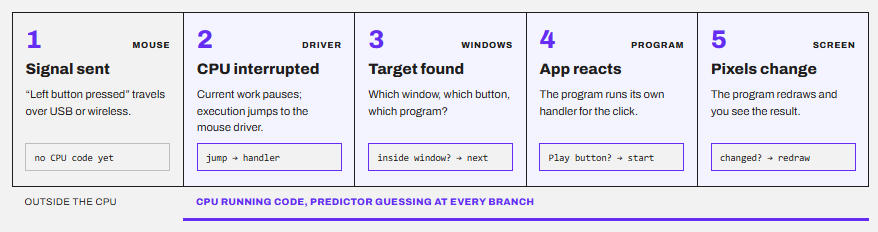
The CPU pauses its current work and jumps to a piece of Windows code (the driver) that deals with the mouse. That jump is already a branch.
3. OS works on what you have clicked
The driver hands the click to Windows or your operating system. Windows now has to answer a series of questions:
- Which window is under the cursor?
- Which button on that window is at that spot?
- Which program owns that window?
Each question is a decision in code: “Is the cursor inside this window? If yes, go here. If no, check the next window. “That is a lot of if checks, and each one becomes a branch.
4. The program reacts.
Windows tells the program, “The user clicked here.” The program runs its own code, for example, “Is this the Play button? If yes, start the video.” More decisions, and more branches.
5. Something changes on your screen.
The program updates what it draws, and you see the result. All of this often happens within a few thousandths of a second.
Every step above is the CPU running a long list of instructions. Roughly one in five of them is a branch, as we saw earlier. So, your single click means the CPU meets thousands of branches on the way.
For each one, the CPU can’t wait to find out the answer. It guesses, using what it learned from the last times it ran that same code.
The code that finds the window under your cursor runs on every click and every mouse move. So, the predictor has seen those branches thousands of times. It already knows, for example, that the answer to “Is this the desktop background?” is usually “No, keep checking.”
In other words, your click doesn’t start branch prediction. It hands the CPU a long, familiar stretch of code, and the predictor uses its memory of past clicks to keep the CPU moving without pauses.
How does a CPU learn from a branch’s past?
The earlier CPUs used static prediction, and they used simple and fixed rules that never changed.
The first rule is to never jump. The CPU just assumes it will keep going to the next instruction. It is right whenever the branch doesn’t jump and wrong whenever it does. The second rule is to look at which way the jump goes. Loops were utilized in this. A loop repeats a job many times, so at the end of each round, the program jumps back to the start. That means a jump going backward is almost always a loop, and the CPU guesses, “Yes, it will jump.” A jump going forward usually skips over some code, so the CPU guesses, “No, it won’t jump.”
Static rules are free, but their biggest drawback is that they cannot learn, and the real programs are too messy to work with fixed rules. The fix is to remember the behavior of each branch. This is dynamic prediction, and the basic building block is tiny.
A 1-bit predictor just remembers the last outcome.
Store one bit per branch. 1 means “last time it was taken,” and 0 means “last time it was not taken.” Predict the same thing again. This sounds reasonable. However, it has a flaw with loops.
Imagine a loop that runs 4 times, and the whole loop runs again and again. The loop branch goes: Taken, Taken, Taken, Not taken (exit). Then again: T, T, T, N.
| Run | Actual | 1-bit state before | Prediction | Correct? |
|---|---|---|---|---|
| 1 | T | N (from last exit) | N | ❌ |
| 2 | T | T | T | ✅ |
| 3 | T | T | T | ✅ |
| 4 | N | T | T | ❌ |
You can see that there are two mistakes per loop. It’s ok to have a wrong exit, but the first iteration of the next loop is also wrong, because the predictor over-learned from one exit.
A 2-bit saturating counter fixes that with a bit of stubbornness.
Now, there are two bits instead of one. That gives four states:
| Counter value | Meaning | Prediction |
|---|---|---|
| 0 | Strongly not taken | Not taken |
| 1 | Weakly not taken | Not taken |
| 2 | Weakly taken | Taken |
| 3 | Strongly taken | Taken |
On a taken branch, add 1 (but stop at 3). On a not-taken branch, subtract 1 (but stop at 0). “Saturating” just means it doesn’t wrap around.
The idea is that one surprise only moves you from “strongly” to “weakly”. It takes two surprises in a row to flip the prediction.
Now, if we come to the loop again, it appears something like this.
| Run | Actual | Counter before | Prediction | Correct? | Counter after |
|---|---|---|---|---|---|
| 1 | T | 2 | T | ✅ | 3 |
| 2 | T | 3 | T | ✅ | 3 |
| 3 | T | 3 | T | ✅ | 3 |
| 4 | N | 3 | T | ❌ | 2 |
| 1 (next loop) | T | 2 | T | ✅ | 3 |
Now, you can see that there is only one mistake per loop, at the exit. The 2-bit counter halved the errors. Basically, a 2-bit counter is a tiny memory with a bit of stubbornness, and it is the building block of everything that follows.
CPU learns patterns
The 2-bit counter is good at learning habits. But real code has patterns, not just habits. But, before we get into the patterns, it is important to know where these counters live.
The CPU keeps them in a big table of 2-bit counters called the pattern history table. To find the right table for a branch, the CPU takes a few bits from the branch’s address and uses them as the counter number.
For example, if the table has 4,096 counters, the CPU can use the last 12 bits of the address as the index, because 2¹² = 4,096. It doesn’t need anything smarter than that, and it can do this within the same cycle.
But it is possible that two different branches have the same last 12 bits. So, they can share one counter. Imagine one of them is almost always taken and the other almost never is. They keep pushing the same counter in opposite directions, and both get mispredicted again and again. This is called aliasing.
Branches depend on each other.
Look at this code:
if (x > 0) {    // branch A
    ...
}
if (x > 5) {    // branch B
    ...
}
If branch A finds that x is not greater than 0, then branch B’s condition is false too. Its outcome is already decided. A counter that only looks at branch B’s own past can never learn this, because the answer lives in branch A.
So, modern predictors keep a global history. It is a short record of the last few branch outcomes, stored as bits. 1 means taken, and 0 means not taken. Every time a branch resolves, its outcome is pushed in and the oldest bit falls out. The CPU also mixes this history with the branch’s address to pick the counter.
TAGE: The longest memory wins.
TAGE stands for TAgged GEometric history length. André Seznec proposed it in 2006, and designs based on it have dominated branch prediction research since then.
Let’s understand it with another example.
Imagine you are guessing what your friend will order at a restaurant. Your first instinct will be to use memories. You can use memories of different lengths, something like this:
- Short memory: “Last time, he ordered a burger.”
- Medium memory: “When we come here after work, he orders a burger.”
- Long memory: “On Fridays after a match, when his team lost, he orders pizza.”
If the long memory matches today’s situation, and he orders a pizza, you trust it because it is the most specific. If it doesn’t match, you fall back to the shorter ones.
TAGE works exactly like this. It keeps several tables that look at short, medium, and long histories, and when more than one of them matches, the prediction from the longest matching history wins.
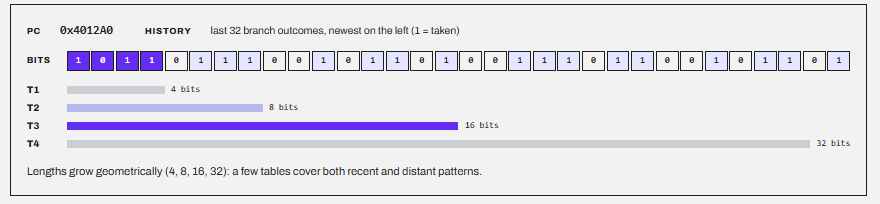
The “tagged” part fixes the locker problem from earlier. Each entry stores a small fingerprint (a tag) of the branch and its history. Before trusting an entry, TAGE checks the fingerprint. If it belongs to some other branch, TAGE ignores it. So, two branches sharing a locker no longer confuse each other.
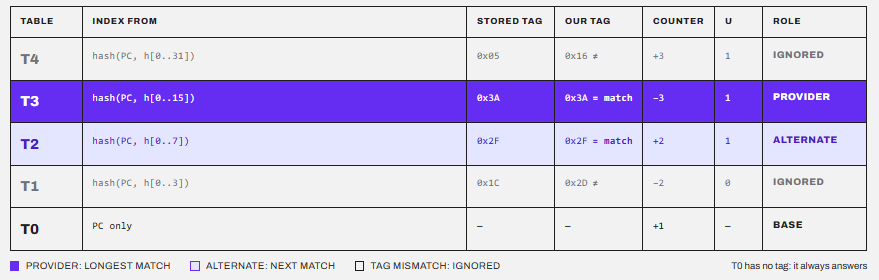
AMD adopted this with Zen 2. Zen and Zen+ used a hashed perceptron predictor. Zen 5 went one step further with a two-ahead predictor. Previous Zen cores could predict one taken branch per cycle. Zen 5 can predict up to two, which helps keep its wide 8-instruction front end fed.
Where does the branch go?
The CPU has to know a branch exists before it has decoded anything. So, it keeps a cache called the Branch Target Buffer (BTB). You give it a fetch address, and it answers, “There is a branch here, it is this type, and its target is this address.”
Remember my cache analogy from earlier? This is literally a cache, but for branch routes instead of data.
On Zen 5, according to AMD’s Zen 5 Software Optimization Guide, the L1 BTB has 16K entries. It predicts direct branches with zero bubbles, which means no wasted cycles. Behind it sits an 8K-entry L2 BTB that stores branches pushed out of the L1, much like a victim cache. All in all, Zen 5 can track around 24K branch targets.
When your code calls a function, it has to come back to the right place afterwards. The same function can be called from hundreds of places, so the BTB can’t store just one return target.
The fix is simple. Every time a function is called, the CPU pushes the return address onto a small stack, like a stack of plates. When the function returns, the CPU takes the top plate off. Nested calls stack up naturally, and the returns unstack in the right order.
Zen 5 has a 52-entry return stack, as measured by Chips and Cheese, with a copy for each SMT thread.
Some branches don’t have a fixed target. The target address sits in a register and is only known at runtime. Switch statements, virtual function calls in C++, and scripting engines in games and browsers are full of these. One branch might jump to ten different places.
For these, the CPU uses an indirect target predictor. It uses the global history to guess which of the branch’s known targets comes next. Zen 5 has a 3,072-entry indirect target array for this.
| Question | Structure | Zen 5 size |
|---|---|---|
| Is there a branch, and where does it go? | L1 / L2 BTB | 16K / 8K entries |
| Will it be taken? | Direction predictor (perceptron + TAGE) | AMD doesn’t publish sizes |
| Where do we return to? | Return address stack | 52 entries |
| Which of many targets? | Indirect target array | 3,072 entries |
Conclusion
A branch predictor is the CPU’s memory of where your code went last time. It started as a single bit, became a 2-bit counter, learned patterns through history, and now uses TAGE to pick the longest memory that matches. The better that memory is, the less work the CPU throws away.
So, all in all, branch prediction is what lets a deep, wide pipeline keep running at full speed, and every wrong guess is the price the CPU pays for not waiting.
I hope this helps!