

Read CPU Overclocking Safety and Warranty Guidelines first.
To be precise, CPU overclocking means making your CPU operate at a higher frequency than its specified or default operating point. The CPU manufacturers set some limits so that it keeps running properly under any circumstances. However, with overclocking, we make tweaks to these values.
The main values that can be changed are CPU multiplier, CPU voltage (Vcore), BCLK, power/current limits, and memory settings. Modern CPUs complicate this because of technologies like Intel Turbo Boost and AMD Precision Boost. These technologies dynamically change frequency and voltage whenever the workload demands.
I know it sounds very technical and out of the world if you are new to this. But this article is just to make you familiar with all these things. In fact, this is the first article in our CPU Overclocking series, where I will be covering everything related to it. So, let’s get started.
The need for overclocking
For most PC users, overclocking is irrelevant. Others are afraid that they will burn their processor by doing so. But there are some people who can really benefit from it. At its core, overclocking is the process of increasing the performance from the existing hardware without replacing the CPU.
People use overclocking for general higher performance, better gaming performance, longer useful life from old hardware, performance tuning, and basically free performance that would otherwise be wasted.
However, one thing to note is that overclocking does not always provide huge performance gains. Modern CPUs already boost close to their practical limits. So, the performance improvements from manual overclocking can be relatively small on modern processors. You can expect higher gains from older processors.
Overclocking vs. CPU Boost
Both of these are aimed at increasing the CPU frequency, which in turn increases the performance. But there are some differences. The CPU boost is handled automatically by the CPU based on the workload and whether there is power and temperature headroom available. Overclocking is done manually by the user, and there is a strict need to monitor voltage, temperature, and current along with the multipliers.
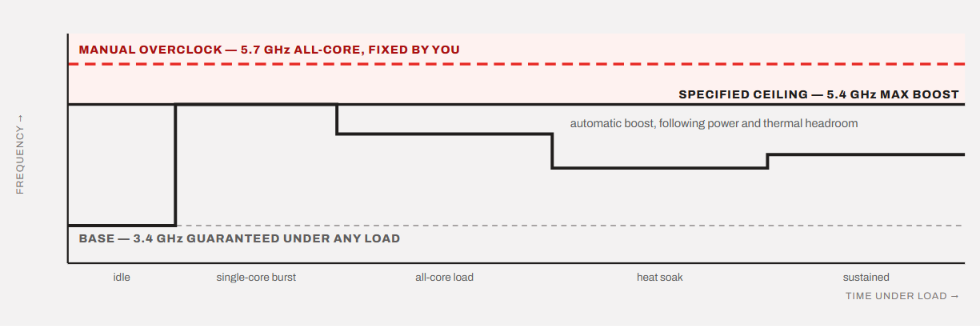
The processor voltage and frequency are automatically managed in the boost behavior, while in overclocking, the user tunes it accordingly.
CPU Boost is tried and tested by the manufacturer to work under different scenarios and adjust things accordingly. However, when you overclock, you have to stress test the whole computer for stability and temperature control.
Boost is the normal part of the CPU operation, while overclocking is the process of deliberately changing the operating parameters. So, when a CPU boosts, it is still inside its specified limits, but overclocking tries to take it beyond those limits. This is the reason it can be dangerous if not done carefully.
Types of CPU Overclocking
Most people think that overclocking means just increasing the CPU’s multiplier (ratio). But, this isn’t just it. Overclocking can be of many types. Let’s discuss.
1. Multiplier/Ratio Overclocking
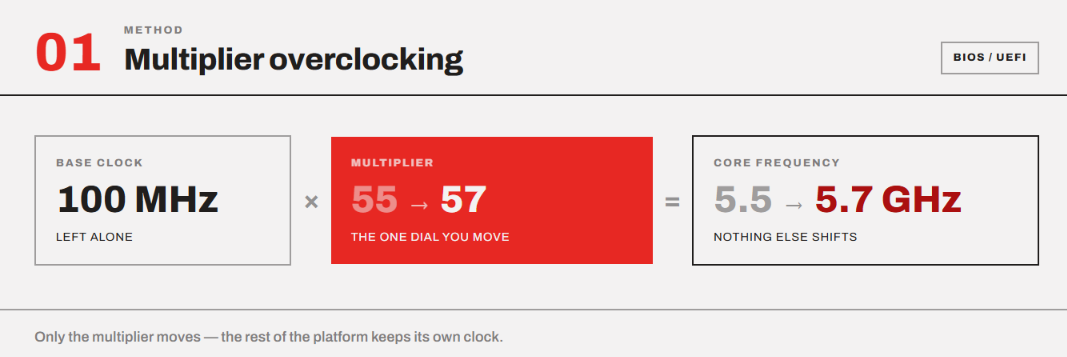
This one is the most popular and common overclocking method. In this, you just increase the CPU’s multiplier while keeping the BCLK at its normal.
BCLK is the common reference clock on a computer’s motherboard. It is used to determine the speed of the CPU, memory (RAM), and PCIe devices. On most modern systems, the default and standard BCLK is almost always 100 MHz.
For example, if a CPU has a multiplier of 50, it becomes
100 MHz BCLK × 50 ratio = 5.0 GHz
However, if we increase the ratio to 52, it gives us 5.2 GHz.
This is generally the cleanest and simplest form of CPU overclocking. It can be done either from the BIOS or the Ryzen Master (for AMD) and Extreme Tuning Utility (for Intel).
2. BCLK Overclocking
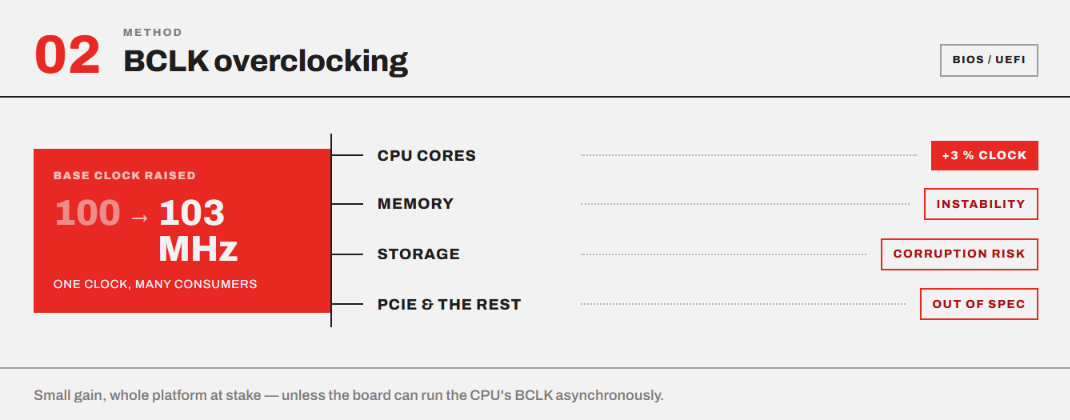
Because the resulting CPU frequency is the result of multiplication of the BCLK and the multiplier, we can also increase the BCLK to get a higher clock speed. However, because BCLK is linked to other clocks on the platform, it can affect memory and other components. So, it can result in storage corruption and memory instability as well.
BCLK overclocking is done mainly through the motherboard’s BIOS/UEFI. Some premium motherboards allow switching to asynchronous clocks, which basically isolate the BCLK for the CPU from other components.
All in all, BCLK can be the dangerous and tricky type of overclocking while generally providing lesser performance gains compared to the multiplier overclocking.
3. All-Core Overclocking
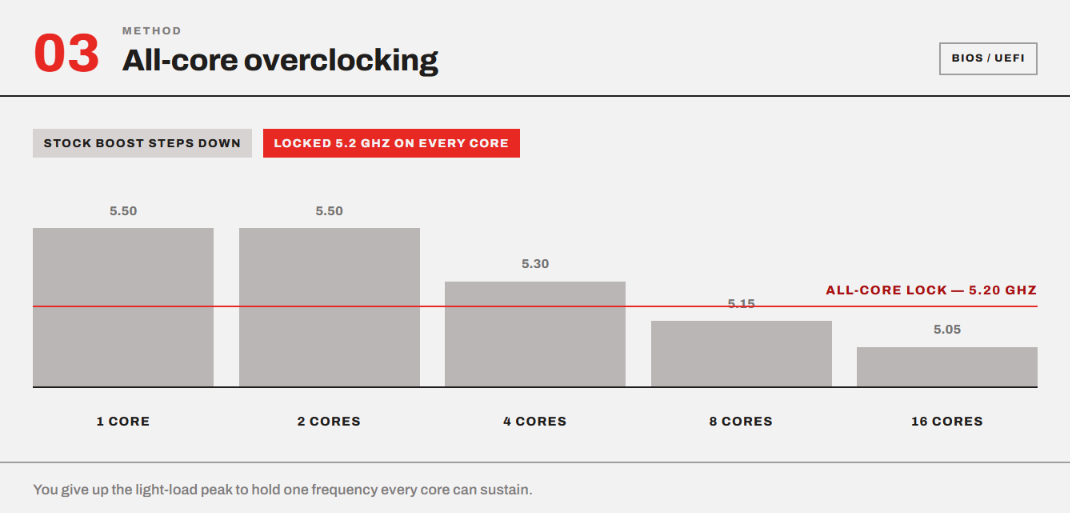
Not all cores in a CPU work at the same frequency. The CPU chooses different frequencies for individual cores to save power, manage heat, and improve performance based on the workload. For example, a CPU can easily pull 5.5 GHz at 1-2 cores loaded while reducing the frequency to 5.3 GHz with 4 cores loaded. To compensate for the power consumption and temperature, it has to reduce the frequency if the workload demands multi-core work.
So, if you want, you can adjust the all-core frequency to 5.2 GHz, and now you have optimized your CPU for multi-core load.
You have to understand that a modern CPU’s maximum advertised boost frequency usually applies to a small number of cores, that too under favorable conditions.
So, when we do all-core overclock, we set all cores to target a specific frequency rather than letting the CPU reduce the frequency as more cores are loaded. This can be really useful for workloads such as video encoding, 3D rendering, CPU-based simulations, compilations, and heavy scientific workloads. At the same time, your CPU loses single-core performance that the CPU would otherwise provide during its boost behavior.
You have to take special care of voltage adjustment because higher all-core frequency would require more voltage to remain stable. The additional voltage will increase the power consumption and hence the heat. So, you may have to upgrade your cooling setup as well.
4. Per-Core Overclocking
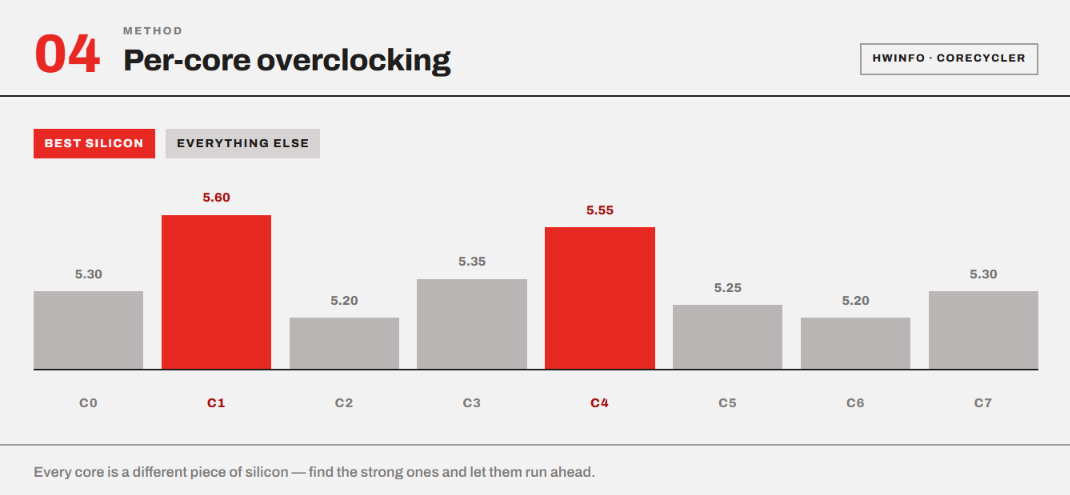
This one is much more complicated because we are assigning different frequency limits to individual cores. Because the silicon quality and the overall performance of individual cores can vary, we can find the best cores and make them work at their best potential.
For this, we use monitoring tools like HWiNFO to identify the best cores and then verify them by loading them separately using a tool like CoreCycler. Then we assign them the highest possible frequencies and test them for stability.
5. Dynamic/Adaptive Overclocking
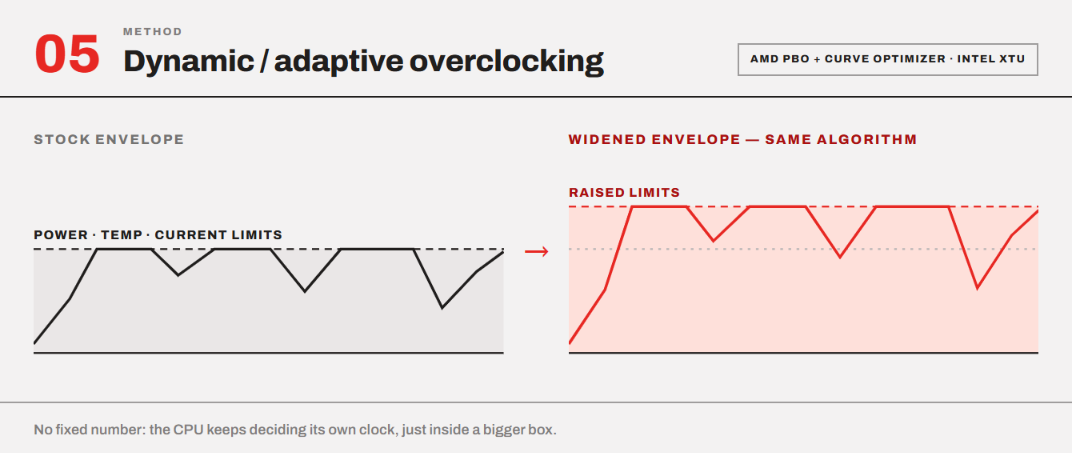
Instead of setting manual per-core or all-core frequency as strict numbers, we can modify the parameters of automatic boosting behaviors in our CPUs. AMD provides Precision Boost Overdrive (PBO) and Curve Optimizer, while Intel has XTU for this. We can modify the Turbo Boost behavior and voltage/frequency characteristics using these.
So, with what the manufacturers have already provided us, we can make that headroom much wider without sticking to specific overclocking numbers.
In other words, the CPU continues dynamically changing its frequency according to workload, temperature, power, and current, but we allow it to work under a more aggressive operating envelope. I think this is the most relevant and simplest type of overclocking for modern CPUs.
6. Undervolting for performance tuning
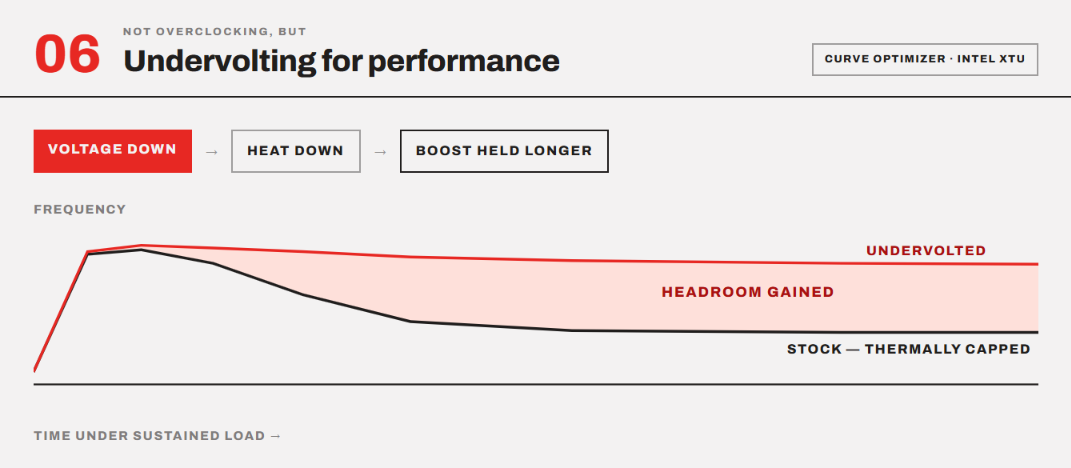
Undervolting can’t be called overclocking because we are reducing voltage rather than increasing the frequency. But it has become very popular in the modern systems. The idea is that we reduce the voltage required at a given frequency. This reduces the power consumption and hence the overall temperature.
That additional thermal headroom will allow the CPU’s automatic boost algorithm to sustain higher frequencies for much longer. This again relies heavily on your processor. It is possible that a voltage that is stable on one chip might cause a crash on another chip of the exact same model.
I have published undervolting guides for both Intel and AMD processors.
Can all CPUs be overclocked?
When you buy a CPU, you look for several features. Overclocking is one of those features. A CPU is tested and sold to operate within specified frequency, voltage, power, and thermal limits. Overclocking takes it outside those specifications. To perform overclocking, the motherboard, chipset, and CPU must support the required controls. Whether you will be able to overclock your CPU depends on whether the manufacturer allows it.
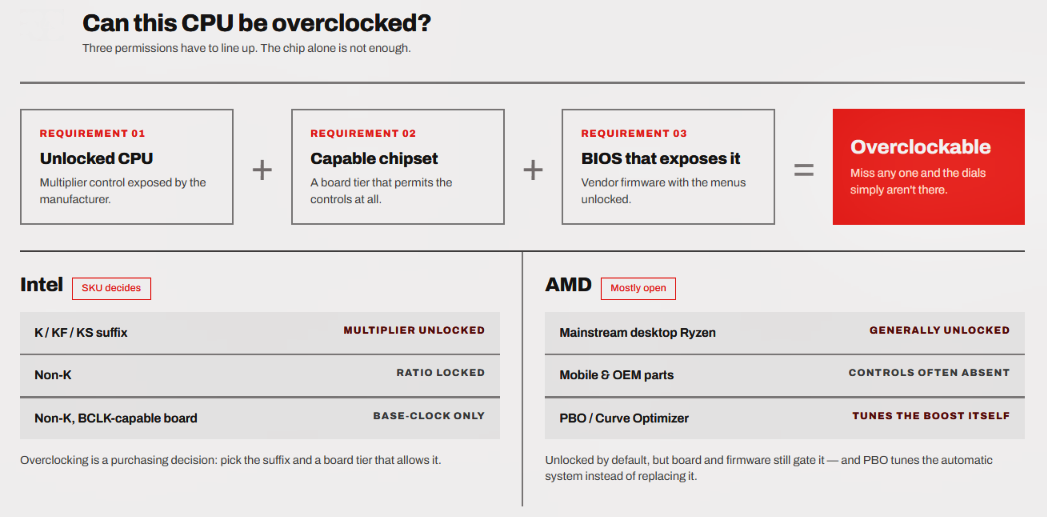
Intel vs. AMD in terms of overclocking
AMD is generous in this matter. Most mainstream desktop Ryzen CPUs are unlocked for multiplier overclocking, including many non-X models. However, some Ryzen mobile and OEM processors don’t provide overclocking controls. Also, an overclockable processor doesn’t mean every Ryzen CPU can be manually overclocked on every motherboard. BIOS and chipset support also matter.
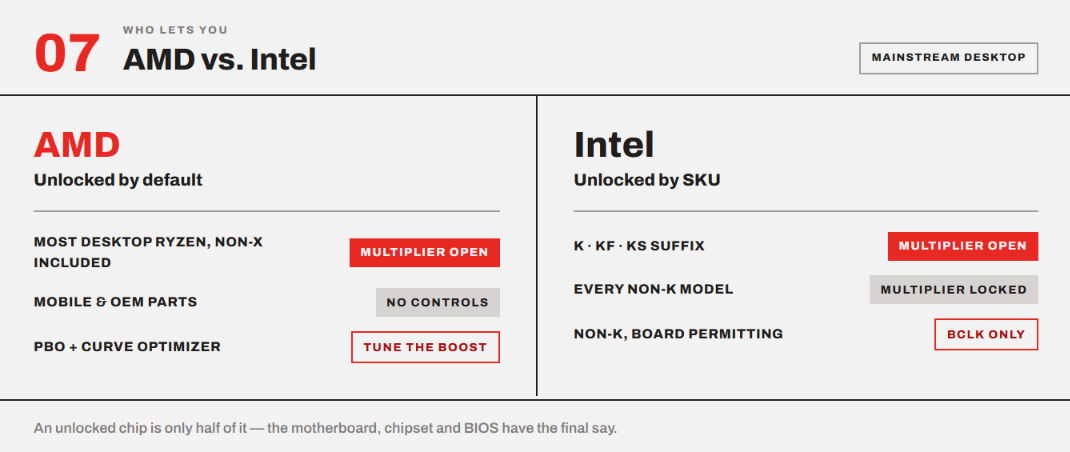
AMD also offers Precision Boost Overdrive (PBO) and Curve Optimizer, allowing users to tune the automatic boosting system rather than the traditional manual overclock.
Intel has separate SKUs in its mainstream desktop CPU range.
Intel CPU models with a K/KF/KS suffix generally allow overclocking when paired with a suitable motherboard.
Non-K Intel CPUs generally have their CPU multiplier locked. So, with these, you cannot simply raise the multiplier to overclock the CPU. You can still overclock non-K CPUs if your motherboard/platform allows BCLK overclocking.
Unlocked CPUs still have safety mechanisms.
At the end of the day, a CPU utilizes the hardware to provide you the performance it is designed to offer. So, if a CPU is unlocked for overclocking, it doesn’t mean you can overclock it indefinitely. The laws of physics restrict where you can take the frequency and voltage input to the processor. Unlocked CPUs still retain their normal hardware and firmware protection mechanisms.
What changes primarily are the user’s ability to control and modify certain values.
Why do manufacturers keep headroom for overclocking?
You might be thinking, “Why don’t the manufacturers make the overclockable frequency the default boost frequency?
The first reason is that CPUs coming off the same production line are never identical. One chip may easily reach and sustain 5.5 GHz, while another may need more voltage or just become unstable. So, the manufacturers try to keep all of the CPUs at the safe boost frequency. So, you can try if your CPU can be overclocked or not.
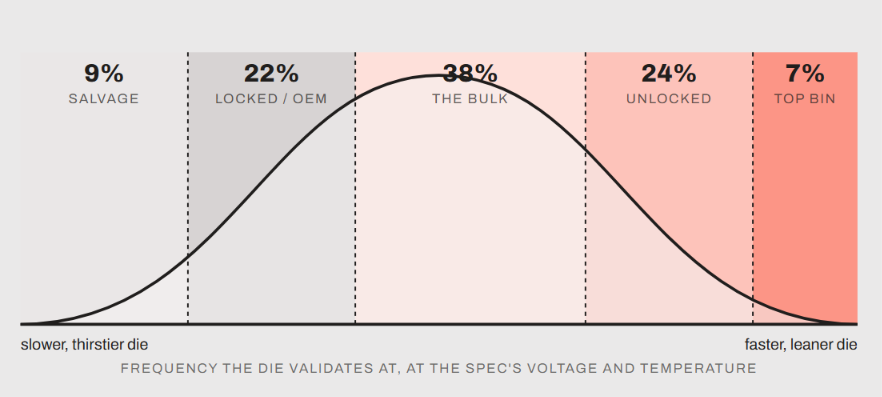
Higher frequency demand higher voltage, and power rises significantly with voltage. So, a manufacturer has to carefully choose settings that keep performance, thermal, power consumption, and reliability within an acceptable range. So, it is possible they give up some extra frequency, which can be utilized with overclocking.
Another big reason is the preparedness for worst-case conditions. The CPU must work reliably, not just on a test bench inside an air-conditioned room. It should be able to work in various ambient temperature ranges, workloads, motherboard conditions, and expected lifetime.
Processor manufacturers have to give guarantees with their products. So, they can’t simply use the best-performing chips as the standard for every unit.
The final thing is that taking your CPU to its highest limits is risky. When you overclock your CPU, you accept the fact that it will have risks of deadly temperature, more power consumption, instability, and potentially long-term degradation. A manufacturer can’t take those risks and make the same assumption for every customer. So, they keep things under acceptable ranges first. However, modern Boost algorithms are already very smart and can take CPU to it’s highest limits. So, the overclocking headroom that existed in the past is no longer there.
AMD Processor Overclocking Basics
For mainstream Ryzen processors, AMD has an unlocked multiplier. AMD says itself that “every AMD Ryzen processor is multiplier-unlocked from the factory.” However, this statement should be understood separately in the context of the Ryzen desktop/consumer lineup. You will find some processors that are listed as “Unlocked for Overclocking: No.” The Ryzen 7 Pro 9755 is one of the examples.
Which AMD processors are overclockable?
The Non-X3D chips (9600X, 9700X, 9900X, and 9950X) allow full manual overclocking with full PBO and Curve optimizer support. The 65W models, like the 9600X and 9700X, also offer a 105W TDP mode added via a BIOS update.
The current Zen 5 X3D chips, like 9800X3D, 9850X3D, 9950X3D, 9950X3D2, and 9600X3D, also have full overclocking support. However, the older X3D chips have no unlocked multiplier. The 7800X3D still supports PBO with a negative Curve Optimizer, which is usually enough. The 5800X3D is more restricted.
AM5 and AM4 chipsets and overclocking
The X870E, X870, X670E, X670, B850, B650E, and B650 chipsets in the AM5 range support CPU overclocking. The A620 doesn’t have CPU overclocking, but memory overclocking can be performed. The VRM quality limits you the most in the modern systems rather than the chipsets. VRM is the bulk of components near the CPU socket that converts the 12V coming from the PSU into the ~1.2V that the CPU actually utilizes.
So, a motherboard with an overclocking-supported chipset can have a poor VRM and can throttle a powerful Ryzen CPU long before the chip runs out of the headroom. So, a good motherboard with a B650 chipset will match an X670E with a poor VRM design.
So, if you have a 12- or 16-core chip and you want to push it hard, VRM quality is the thing to shop for.
Tools by AMD
The official AMD tools stack looks something like this:
Motherboard UEFI/BIOS for adjusting multiplier, core voltage, BCLK, PPT/TDC/EDC, PBO, Curve Optimizer, etc.
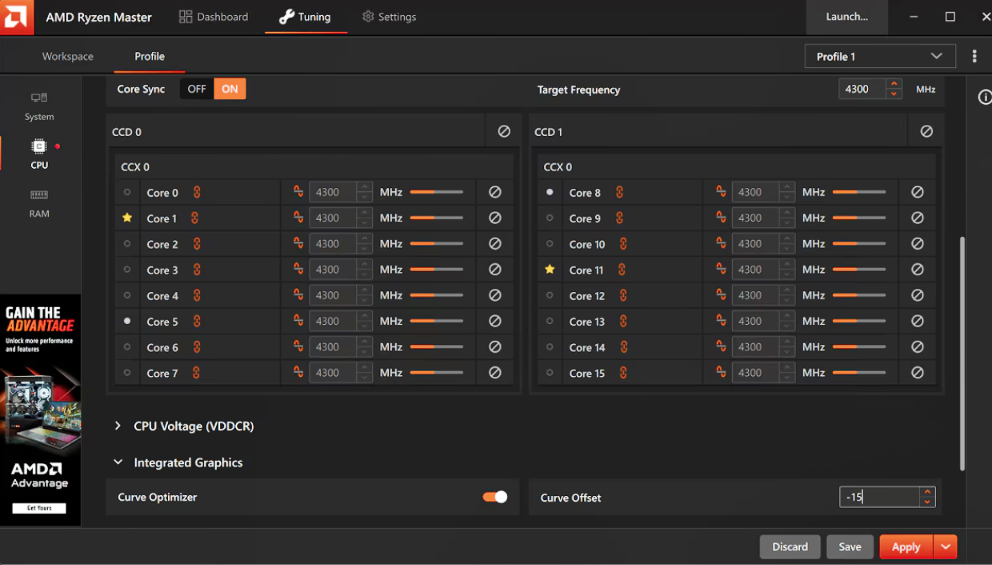
AMD Ryzen Master if you want to use AMD’s official tool for overclocking through your operating system. This makes things much easier for you rather than entering the BIOS and changing values. You can always utilize the automatic overclock feature, and it does the job without any manual adjustments.
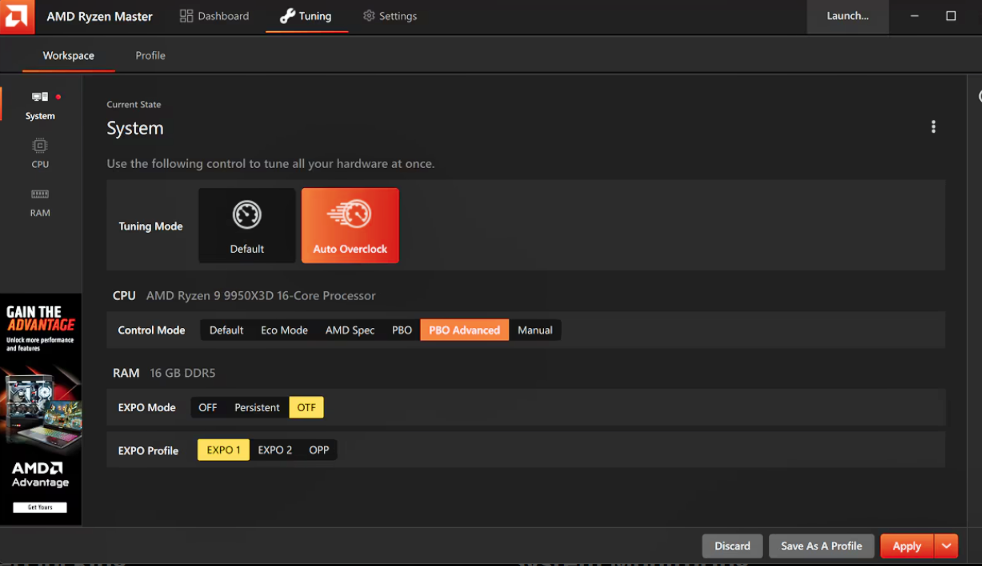
You will also require monitoring tools to monitor CPU temperatures, core clocks, effective clock, CPU package power, core voltage, thermal throttling, etc. You can use CPU-Z or HWinfo for that. For stability testing, you can include Prime95, OCCT, or Cinebench y-cruncher.
Keep in mind that even if you use Ryzen Master for tuning and use the automatic overclock, you still need to monitor the temperatures and stability. So, these third-party tools become a necessity.
For example, you might apply a Curve Optimizer -20 setting using the Ryzen Master. The CPU may boot normally and pass Cinebench but later produce a crash when a particular core enters a specific workload. Tools like CoreCycler or OCCT will be useful for finding this kind of marginal instability.
I will publish a detailed guide on AMD CPU overclocking later on where we will discuss everything in detail.
Intel Processors Overclocking Basics
As we discussed above, Intel is much stricter in its product segmentation around overclocking. If a CPU’s multiplier is locked, you can do nothing to overclock it except increase the BCLK, use an external clock generator, or play around with power limits. However, all these things can cause serious harms if not done properly.
So, it is better to perform overclocking only if you carry a K, KF, or KS CPU.
Intel Chipsets and Overclocking
In Intel systems, the motherboard chipset matters exactly how much having an unlocked CPU does. For conventional CPU multiplier overclocking, you are generally required to have a Z-series motherboard. Something like this:
- Z890: Core Ultra desktop
- Z790: 13th/14th Gen Core
- Z690: 12th/13th/14th Gen Core with appropriate BIOS support
- Earlier generations similarly used Z-series chipsets such as Z590, Z490, Z390, etc.
For VRM, the same principle applies here as with AMD. The VRM determines how well the motherboard can supply the CPU with power. A high-end K-series Intel CPU will consume way more power when overclocked. Therefore, a motherboard with a weak VRM can quickly become a limiting factor.
Tools by Intel
Intel offers the official software around overclocking, i.e., Intel Extreme Tuning Utility (Intel XTU). However, the motherboard UEFI/BIOS is the fundamental layer. It provides controls for CPU multiplier/ratio, per-core ratios, core voltage, BCLK, power limits, current limits, memory frequency, and timings.
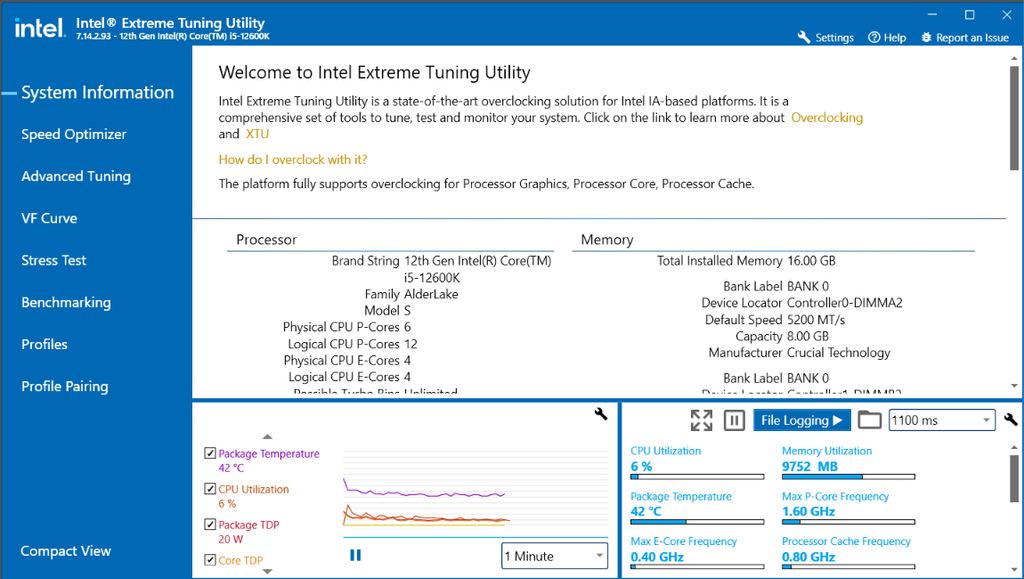
Just like how Ryzen Master is for AMD processors, Intel has XTU. It is Intel’s official Windows-based tuning utility. On supported processors and platforms, it allows you to adjust and monitor CPU parameters from within Windows rather than entering the BIOS.
For monitoring CPU temperature, frequency, effective clocks, voltage, package power, etc., HWiNFO and CPU-Z are great third-party tools. For stability testing, I would again recommend Prime95, OCCT, Cinebench, and y-cruncher.
On Intel XTU, you will find options for benchmarking and stress-testing. They are great for initial testing, but I would say independent stress-testing stays very valuable.
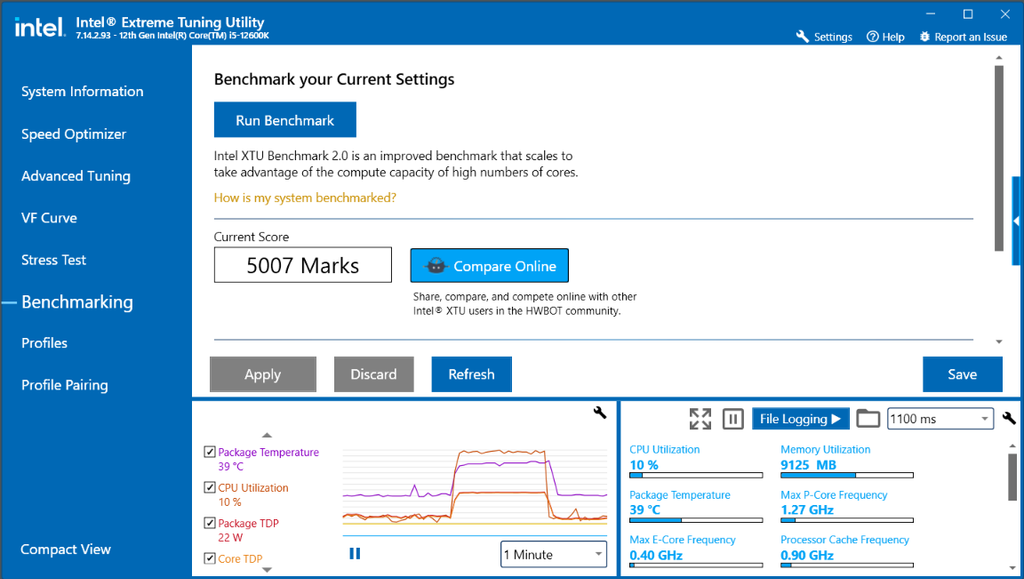
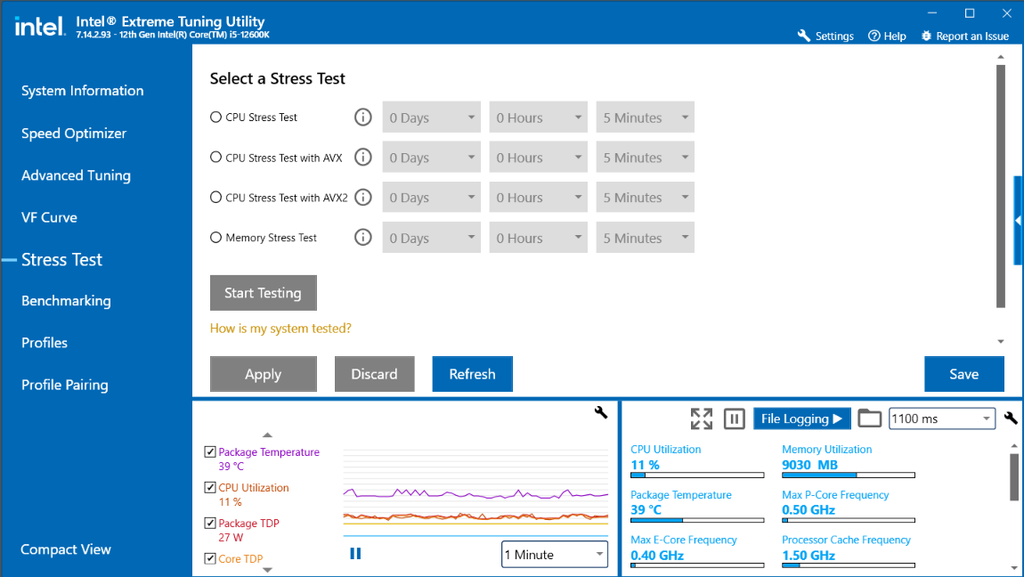
I have posted an Intel CPU overclocking guide separately talking in details about the XTU and settings.
Conclusion
This was a beginner’s guide on CPU overclocking telling you the basics. I wouldn’t recommend jumping into any of these steps blindly. Rather, it is an educational article for those who are new to overclocking. I believe modern CPUs are smart enough in handling their power input and adjusting the performance to keep within safe temperature limits.
There are hardly any cases where you can get significant performance gains in modern processors. Overclocking used to be a big thing in earlier times when manufacturers used to keep massive performance headrooms on the table. The biggest example is the Celeron 300A that could be pushed up to 50% faster than the stock speed. Modern chips push themselves to their absolute limits right out of the box. However, if you still want to do it, I would recommend using official tools as we discussed above and keep your adjustments minimal. Increase values step by step. Don’t shoot too high.
Although the CPUs are equipped to throttle and just shut down when they sense something seriously wrong, you should still be cautious with experiments.