

In my CPU overclocking beginner’s guide, I said that only unlocked CPUs can be overclocked and that AMD keeps most of its desktop chips unlocked. We then discussed how to actually overclock an AMD Ryzen CPU. Today in this article, we will discuss specifically the Ryzen X3D chips. They are already very powerful both for gaming and general tasks.
But what about overclocking an X3D chip?
Well, yes, you can overclock a Ryzen X3D CPU, but only on specific generations. The Ryzen 9000X3D chips (9800X3D, 9850X3D, 9950X3D, 9950X3D2, and friends) have a fully unlocked multiplier and support real manual overclocking. The older Zen 3 and Zen 4 X3D chips, like the 5000X3D and 7000X3D, have a locked multiplier and a hard voltage ceiling. So, with locked X3D chips, you are left with Precision Boost Overdrive, Curve Optimizer, memory tuning, and, on some boards, reference clock tuning.
There are strong reasons AMD didn’t give overclocking controls on their older chips but continued again with the latest X3D series, like the very popular 9800X3D. We are going to discuss all of that in this article. So, let’s get started.
Why did AMD lock the older X3D chips in the first place?
3D V-cache isn’t just a function or an improvement in the existing cache. It is an extra slab of L3 cache bonded onto the compute die. On the 5800X3D and the entire 7000X3D family, that cache slab sits on top of the cores.
But why am I saying that?
Well, this means a lot in terms of thermal design. Because this slab is sitting on top of the cores, the heat generated by the cores has to travel through the cache die before it reaches the heat spreader and your cooler. So, basically this cache is sandwiched inside the hot and cold parts. The cache die is built on a different, older process node than the cores, and it does not tolerate the voltage the cores do.
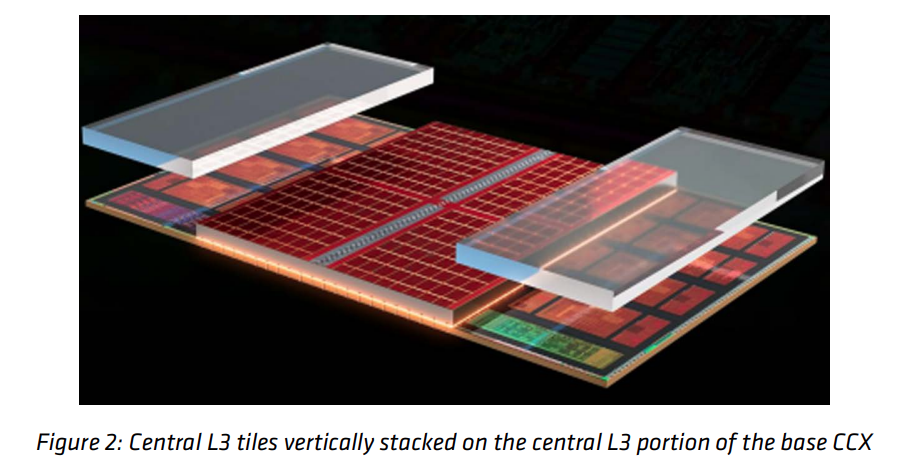
The cores and the cache are not on the same voltage rail, exactly. The external VDDCR rail feeds two internal regulators. VDDCR_CPU powers the cores, and VDDCR_VDDM powers the L2, L3, and the stacked V-Cache at a default of 0.95V. But you can’t touch VDDCR_VDDM because it is regulated internally. So, AMD cap what you are allowed to do to the core rail. Cache on top means heat has to cross the cache die to reach your cooler.
So AMD did the sensible and easier thing. It locked the multiplier (on Zen 3 and Zen 4 X3D chips), capped the core voltage, and lowered TjMax. The thermal problem was the secondary constraint here. The fundamental reason was the cache die’s voltage limit. They chose the easier path. The longer and costlier path was to change the electrical architecture of the CCD, power delivery, voltage regulation, power distribution, and validation of the 3D-stacked die.
For example, the maximum voltage for a 7000X3D processor is about 1.2V, no matter what you set in the BIOS.
Finally, with Zen 5, AMD put in the efforts and flipped the stack. On the 9000X3D chips, the cache die sits underneath the cores, so the cores have a direct path to the heat spreader. Better heat transfer means higher clocks, a higher TjMax, and, for the first time, official overclocking support on an X3D part.

All in all, the lock was technically a packaging problem, which AMD finally overcame with the Zen 5 microarchitecture. Now, if you have an X3D chip from the latest generation, you have all the overclocking stack available to use through Ryzen Master or BIOS.
So, which X3D CPUs can be overclocked?
I have dug a little into the specifics and created this table to help you get a better idea of different models.
| CPU family | Multiplier | PBO + Curve Optimizer | Curve Shaper | Reference clock (eCLK) | TjMax |
|---|---|---|---|---|---|
| 5600X3D / 5700X3D / 5800X3D (Zen 3) | Locked | Partial, board-dependent | No | BCLK only, risky | 90°C |
| 7600X3D / 7700X3D / 7800X3D (Zen 4) | Locked | Yes, negative offsets | No | Yes, on capable boards | 89°C |
| 7900X3D / 7950X3D (Zen 4) | Locked | Yes, per CCD | No | Yes, on capable boards | 89°C |
| 9800X3D / 9850X3D (Zen 5) | Unlocked | Yes | Yes | Yes | 95°C |
| 9900X3D / 9950X3D / 9950X3D2 (Zen 5) | Unlocked | Yes, per CCD | Yes | Yes | 95°C |
One thing to note is that the 7700X3D and the 5800X3D 10th Anniversary Edition that AMD carry have the same silicon and the same locked multiplier. They can’t be overclocked in the real sense. Also, the PBO + Curve optimizer is not overclocking in the real sense in the case of locked CPUs. With an unlocked CPU, they allow you more control and a broader tuning envelope than you get on a locked processor. We will talk more about the controls later.
What “overclocking” means on modern CPUs?
In the Ryzen overclocking article, we discussed a little that the modern Ryzen CPUs do not really have “a clock speed” anymore. It has a voltage-frequency curve and an algorithm called Precision Boost 2 that walks up and down that curve thousands of times a second based on power, current, temperature, and how many cores are busy.
Basically, the CPU is already overclocking itself within limits, and AMD fused into it at the factory. The headroom AMD leaves on the table is much smaller than it used to be. We are talking about collecting a few percent, not a few hundred MHz.
So you are left with two paths.
The first path is to loosen the limits and let the algorithm go further. This is Precision Boost Overdrive, Curve Optimizer, Curve Shaper, Scalar, and Fmax override. The boost behavior stays intact.
Path 1 is suitable for most people. It is best for gaming because games use one to four heavy threads, and you want those threads boosting as high as possible. A fixed all-core clock simply wastes the high single-core boost the V-Cache chips were designed around.
The second path is to simply kill the algorithm and set one fixed frequency and one fixed voltage. This is OC Mode, the classic manual overclock.
How to overclock a locked X3D chip (5000 and 7000 series)
Let’s start with the 7000X3D chips first, and then I will talk about the 5800X3D later on. To be clear, all these are not actual overclocks but some ways to get the most out of your chip. Because these chips are locked, we can do nothing to raise the multiplier. But, there are some things that can help.
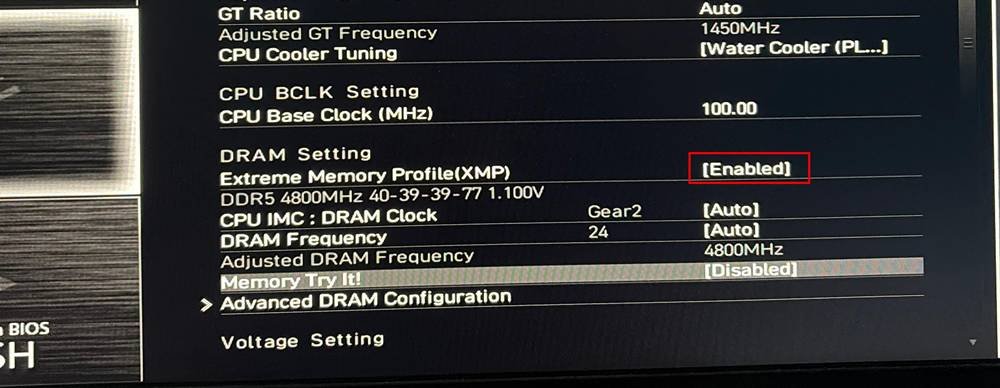
1. Enable EXPO before anything else
Go into the BIOS and find the AI Overclock Tuner or XMP/EXPO Profile and load your kit’s profile. If the full profile does not boot, drop the memory one or two speed grades and try again. That is normal, but in most cases, the XMP profile will just work. You can check your motherboard’s manual to know how do enable because the methods may vary.
2. Enable PBO
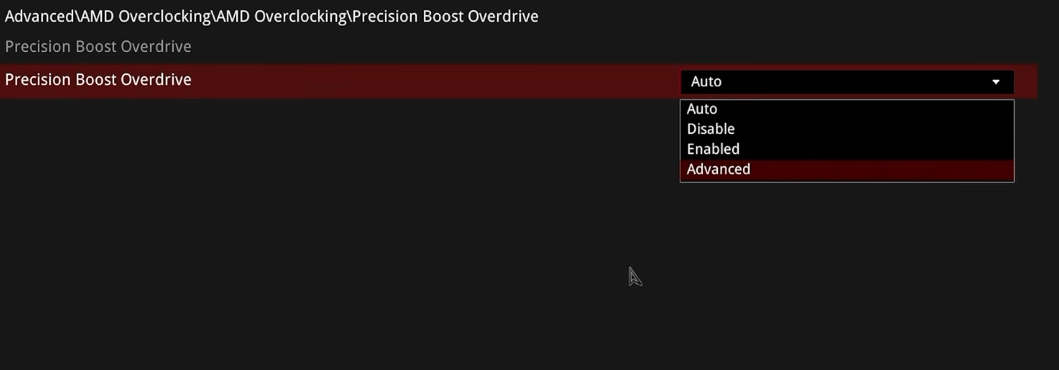
Yeah, enable Precision Boost Overdrive, but do not expect much. Doing this will just swap AMD’s stock power limits for your motherboard’s higher ones. On the locked chips like 7800X3D, this will do almost nothing. The chip’s rated PPT is 162W. In a heavy non-AVX all-core load, most tests find it pulling no more than 75W with 60A TDC and 60A EDC. It is nowhere near its power limits.
The 7800X3D is not power limited. It is voltage limited. So, raising PPT will do nothing at all. So don’t just start to chase PPT/TDC/EDC numbers you found on a forum. They are not your bottleneck.
3. Curve optimizer
Curve Optimizer shifts that whole voltage-frequency curve sideways. Each step is roughly 5 mV. A negative offset tells the CPU it needs less voltage for a given frequency. If you want to know the process of utilizing it, I have explained it here.
When you do this, two things happen. The first is that the CPU uses less voltage, draws less power, and hence runs cooler. Secondly, because it is cooler and further from its voltage ceiling, Precision Boost 2 hands it more frequency.
You undervolt, and you get an overclock for free.
This is the whole trick of “undervolting,” and if you do it properly, you can get the maximum possible performance from your CPU in a real manner.
If you do not want to go through the guide linked above, here is the path in the simplest manner.
Go to Advanced > AMD Overclocking > Precision Boost Overdrive > Curve Optimizer.
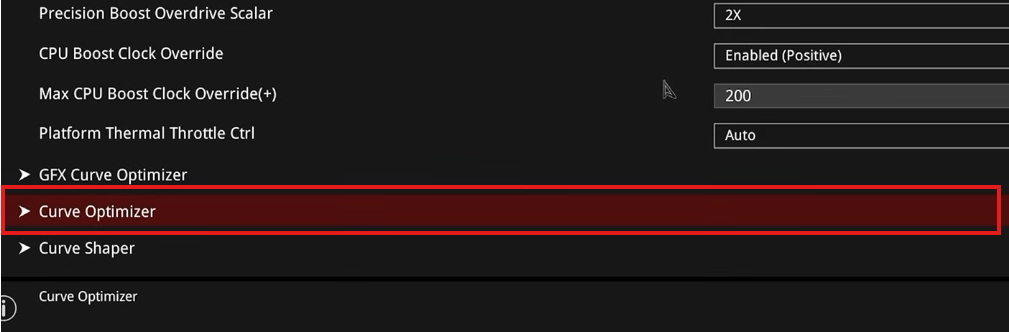
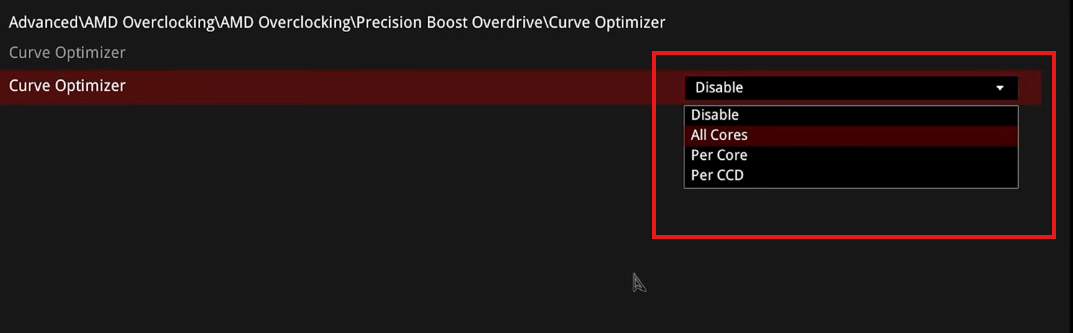
Set Curve Optimizer to All Cores
Set All Core Curve Optimizer Sign to Negative and Set Magnitude to 15 to start
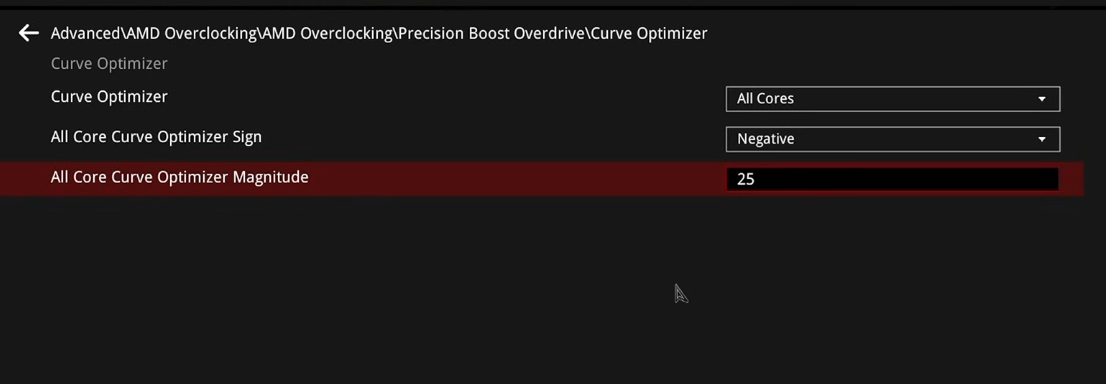
Then test, add 5 more, test again, and keep going until something breaks. When it breaks, back off by 5 and then validate properly. A simple testing procedure is here.
Where you land is the Silicon Lottery. If you are lucky, your 7800X3D can take -35 all core magniture, which can lift the whole boost curve by 200 to 300 MHz and get all eight cores to 5050 MHz. Most people land at -20 or -25. Some chips may just hate reaching -15. Your number is your number, and nobody else’s number means anything.
Once you have an all-core value that holds, you can go per-core and squeeze another few steps out of your better cores. However, keep in mind that it can take hours, and whether it’s worth it or not depends entirely on your needs.
4. Asynchronous eCLK (Only on supported motherboards)
This is an advanced option; some motherboards won’t expose it. eCLK is different from BCLK. BCLK is the standard internal base clock frequency (usually 100 MHz) that multiplies with your CPU ratio to set speed. Changing BCLK changes the clock speed for the entire system. The downside of increasing BCLK is that it overclocks PCIe lanes and RAM, which can quickly lead to system instability.
BCLK is in all the motherboards by default, but ECLK uses an external clock generator hardware chip on high-end motherboards. If it is not available on your board, you can’t adjust it. The core frequency is base clock x multiplier.
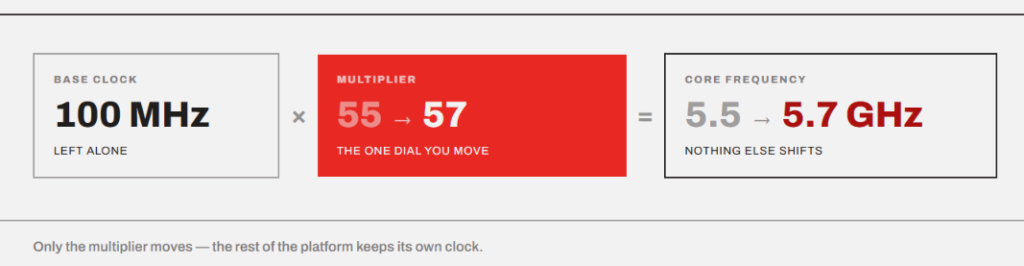
Let’s take an example of the 7800X3D again. Its fused Fmax is 5050 MHz, which is basically the ratio of 50.5. But, if we manage to run it at 107 MHz eCLK, that becomes 50.5 × 107 = 5403 MHz. However, to increase eCLK, you generally need a positive curve optimizer because we are asking for a higher frequency at a curve point that was voltage-tuned for a lower one.
We talked about the dependency of eCLK optimization on the motherboard you are using. So, take an example of the ASUS X670E motherboard. In this board, you get a preset called X3D OC Profile that just sets eCLK to 104 MHz for you. It gave a ~4% performance boost across every benchmark.
So, the point is that you can use asynchronous mode (eCLK1) if your board offers it. It makes sure the PCIe and SATA clocks stay at 100 MHz. However, if you want to play around with BCLK, the things can get really messy.
5. About the 5800X3D
The 5800X3D is locked the hardest by AMD. It shipped with no PBO support and no Curve optimizer. So, all you can do is adjust a negative Vcore offset in the BIOS. This is a safe and effective undervolt. Start with -0.05V. You can have Curve optimizer support if your board vendor added it in a later AGESA. Many 500-series boards had it. But, if your board doesn’t have it, you can use PBO2 Tuner, which is a community tool. It allows you to apply a negative curve from inside Windows, though you have to reapply it on every boot. Again, BCLK overclocking isn’t something I would recommend because the reference clock is shared with storage and PCIe. So, going to 105 MHz just from 103 can make your system really unstable or corrupt the storage, and things can be really hard to diagnose.
If I have a 5800X3D, I would just do a modest negative offset and tune my RAM to 3600 CL16 with FCLK at 1800. There is very little left in that chip.
How to overclock an unlocked X3D chip (9000 series)
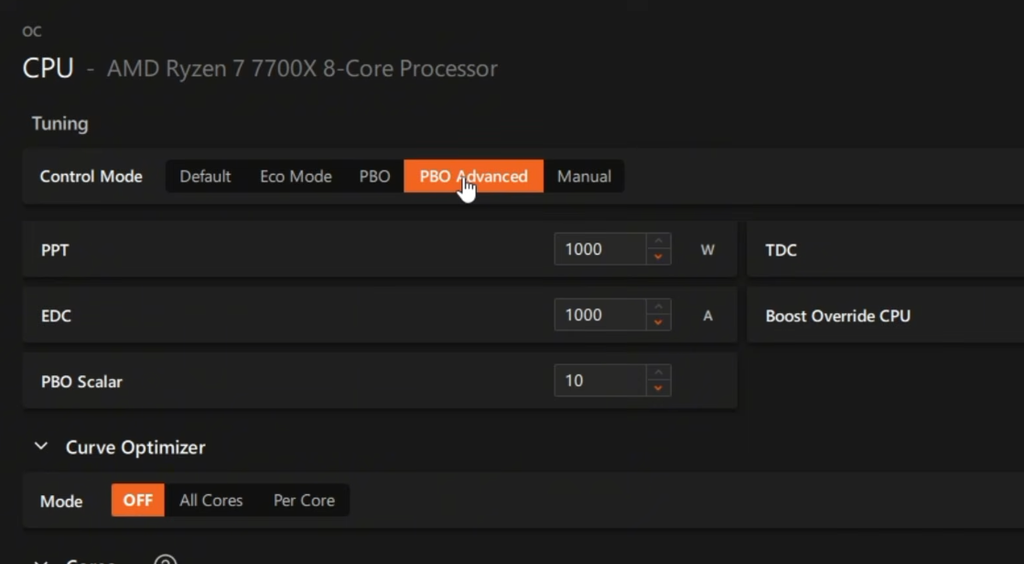
Ok, now let’s come to the real and official overclocking of the processors, which are capable of it. The Gen 5 X3D chips give you the full toolkit. You can adjust boost overdrive, utilize the curve optimizer fully, PBO scalar, and use manual all-core overclock. However, because I have discussed everything in a dedicated AMD overclocking article, I would not repeat it.
You can just click below and check it out.
Manual all-core overclock
I don’t think it is worth it if you apply PBO along with the curve optimizer. With a Zen 5 X3D CPU, you now have an unlocked multiplier. You can now move the ratios, and the motherboard overclock controls work for you. But you shouldn’t do it.
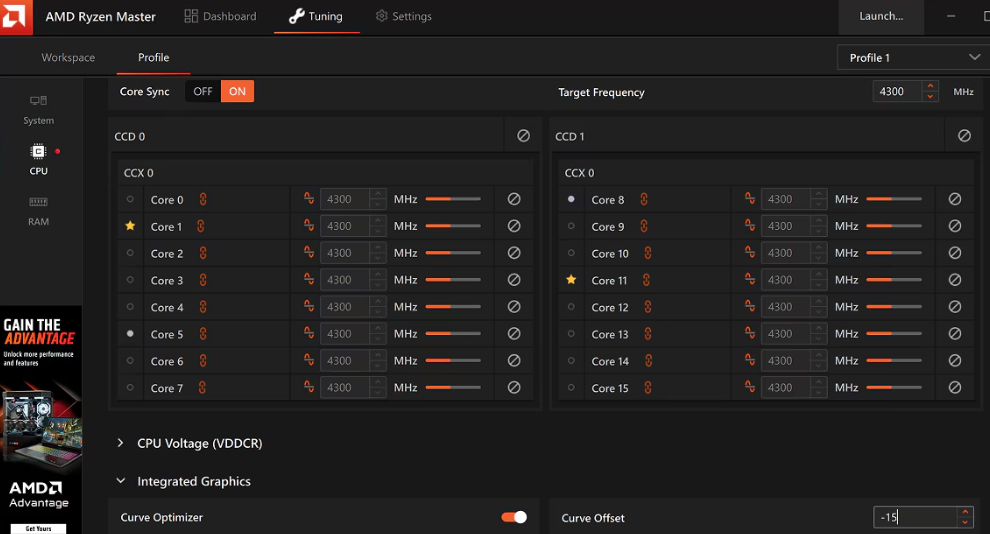
I have a great scenario to prove this thing.
The very popular SkatterBencher overclock of the Ryzen 7 9850X3D is a great example. For the 5075 MHz @ 1.100 V manual overclock, SkatterBencher reports a +3.59% geometric-mean performance improvement over stock and a maximum 9.73% slowdown in CPU-Z 1T. A gentler version at 5450 MHz and 1.2V got the geomean to +8.65% and still lost 2.97% in single thread.
The issue is that when you fix all-core to a specific clock, you trade away the exact thing that makes an X3D chip a gaming chip. So, manual overclocking is suitable for those who chase benchmark numbers. Another case is when you use your machine for heavy sustained all-core AVX workload. For a gaming PC, a manual all-core overclock is just a waste of time.
Another thing that I would recommend in case of manual overclock is going for much more rigorous stress testing. I am talking about tests like the heavy all-core OCCT CPU test and AVX-512 for 30 minutes. Maybe the y-cruncher standard and BKT test. 7-Zip and OCCT memory tests would be helpful. Keep HWiNFO open all the time and watch effective clocks, not requested clocks.
Voltage and Temperature Numbers
The TjMax in the 9800X3D and 9850X3D processors is 95°C. The maximum core voltage is 1.325V all-core. So, never exceed 1.30V on VSOC under ambient cooling on any AM5 chip. That rail is what killed 7800X3D chips in 2023. I would also not max out load line calibration. Extreme LLC settings fight the CPU’s own voltage regulation and can feed the chip far more than you asked for. It is better to keep in the mid-level. This applies mostly to manual overclocks on 9000X3D.
AMD’s boost algorithm treats TjMax as an operating target, not a red line. So, an X3D chip sitting at 85°C is not in danger. What can be worse is when the chip jumps directly to the TjMax as the load starts. This happens due to a high voltage, and it is a sign to back off immediately.
What performance should you expect?
On the Gen 5 processors like the 9850X3D, with a full tuning stack (PBO, Curve Optimizer, Fmax override, and a serious memory tune), you can expect about a +10% geometric improvement overall.
On the 7800X3D, Curve Optimizer at -35 gave +9.19% in Geekbench 6 multi and about +1.7% in CS:GO. Basically, the real wins are real in multi-threaded and memory-bound work. In games, the differences are very small.
AMD has prioritized the cache utilization with the latest chips. A 96MB L3 cache exists precisely to stop the CPU from going to main memory. So memory tuning, which pays big dividends on a regular Ryzen, pays noticeably less on an X3D chip.
And if you game at 1440p or 4K, your GPU is the limit, and a 3% CPU gain is a 0% gain on your screen. I have said this in the 16-core gaming article, and it applies here too.
After studying so many overclocks and all the specifications, I think the 9850X3D is almost a factory-overclocked chip.
Techspot tested the Ryzen 7 9800X3D with PBO Advanced, a +200 MHz boost override, and a -20 Curve Optimizer. Their configuration produced only a 2.5% increase in Cinebench multi-core performance. IDC got approximately 11.9% improvement in their 9800X3D test on Cinebench 2024 after enabling PBO, a +200 MHz boost override, and a -35 Curve Optimizer. They suggested that PBO is the best overclocking method for maintaining power efficiency.
Conclusion
If you own a Zen 5 X3D chip, it is best to enable EXPO, enable PBO, set Curve Optimizer to -15 all-core, set Max CPU Boost Clock Override to +200, and test properly. You do not have to get into manual overclocking because modern boost algorithms are now very smart. The chips are already coming up with their ultimate potentials. Undervolting is the modern form of overclocking. So, rather than running for higher frequencies, I would recommend finding the lowest voltage to get the same work done. Keep your temperatures low and let the PBO do its job.
If you own a 7800X3D or a 5800X3D, check your SoC voltage first, then set a negative Curve Optimizer or a negative Vcore offset, then stop. There is no multiplier for you, and there will never be. It is best not to play around with BCLK even if the motherboard allows you.