

“nm” stands for nanometer. One nanometer is one billionth of a meter. To give you an idea, a single human hair is about 80,000 to 100,000 nm thick. But we are not discussing hairs today. We will be understanding nm as a unit you see on every CPU spec sheet.
Ryzen 9000 is “4 nm,” Apple’s M-series is “3 nm,” and Intel uses names like Intel 7 and Intel 18A.
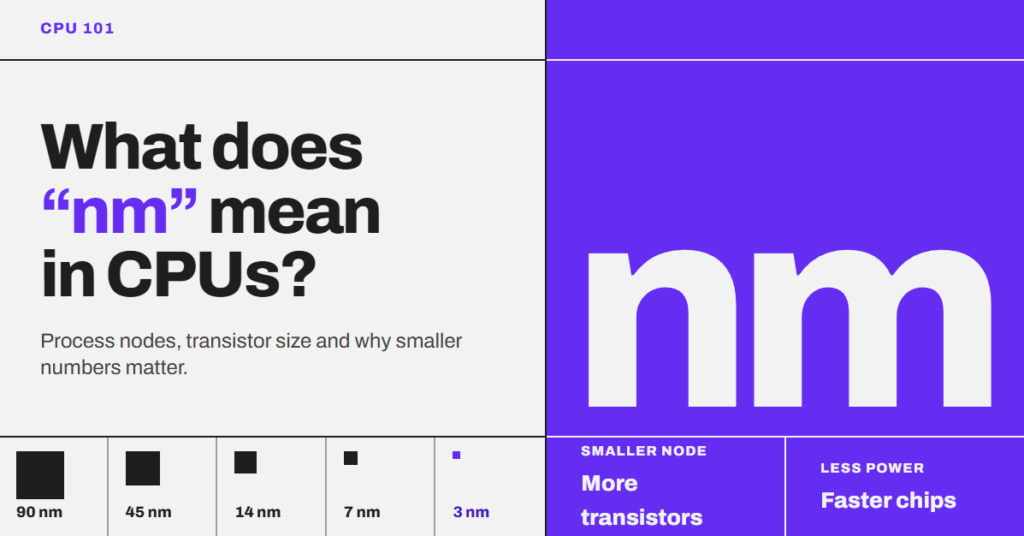
But what do they mean? This number is related to the transistors, and it should be because transistors are the basic building block of any CPU. They act as tiny on/off switches, and everything a CPU does, from opening a browser to running a game, comes down to those switches flipping. The smaller the transistors, the more of them fit on a chip, and the less power each one needs. So, CPU designers can eventually use those extra transistors to improve things, for example, build wider cores or bigger caches. This is how a newer node indirectly helps IPC. It also lets the same design run faster or cooler.
Now, let’s see what this nanometer actually is in your CPU. So, “nm” is the name of the manufacturing process (the node) used to make the CPU. Decades ago, it used to match the length of the transistor’s gate. Today, it does not match any physical part of the chip. It is a generation label, and a smaller number only means a newer process from the same company.
In this article, I will explain where the number came from. We will also understand why it stopped meaning anything physical and how lithography fits in. In short, you will get to know what the number actually tells you when you buy a CPU.
What did “nm” originally measure?
Originally, “nm” measured the length of the transistor’s gate. A gate is a transistor’s part that turns it on or off. The gate has a length, and the shorter it is, the less time the transistor will take to switch on or off a transistor. We are talking about a length of a few nanometers, and that might not sound like much. But it adds up very quickly because there can be billions of transistors, and even a very small difference adds up.
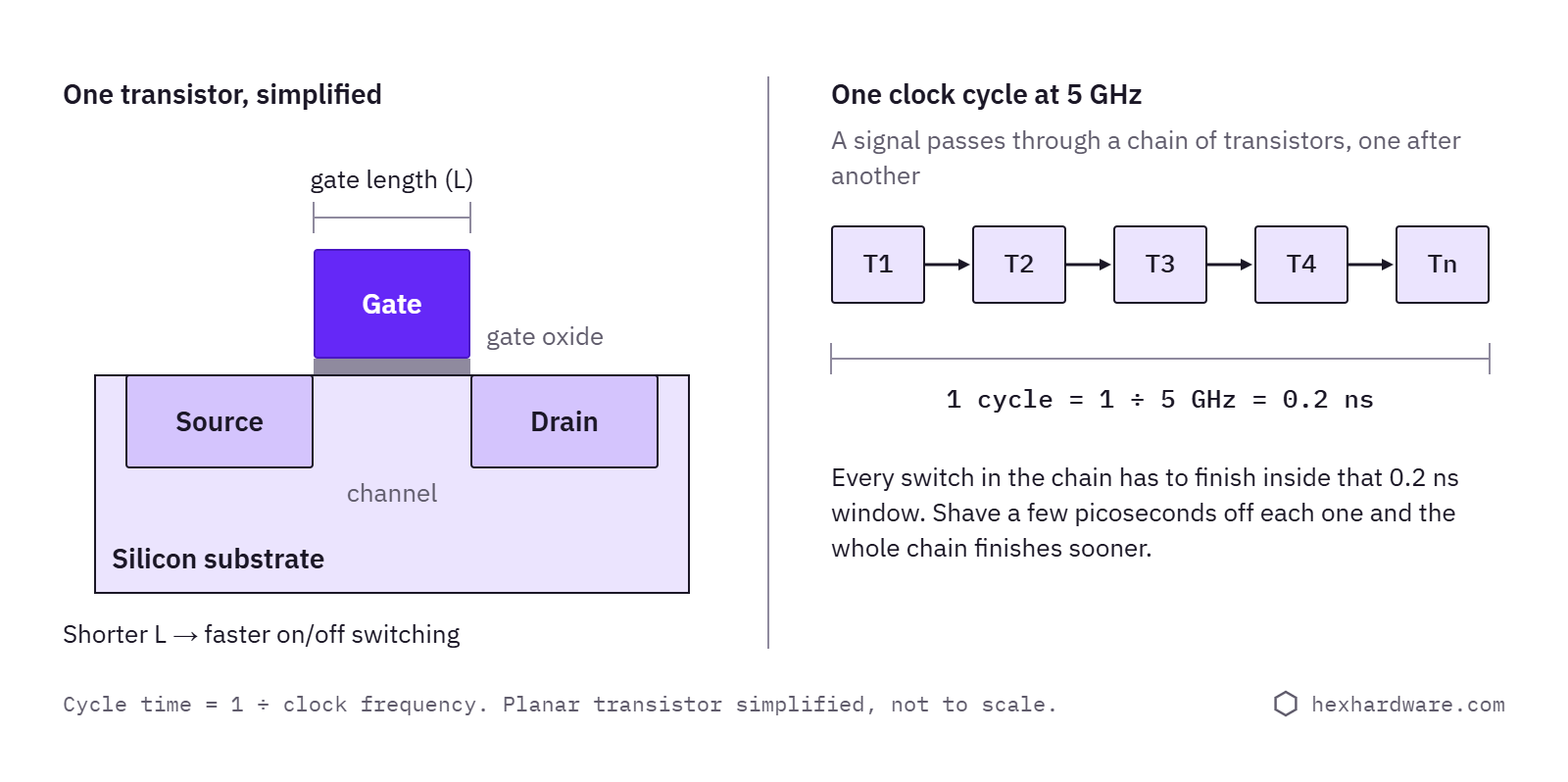
For example, a CPU running at 5 GHz goes through 5 billion clock cycles every second. That means one clock cycle lasts just 0.2 nanoseconds, and in that time, a signal has to pass through a long chain of transistors, one after another. So, even if a transistor switches a nanosecond faster, that calculates to the whole chain running significantly faster.
For a long time, gate length was the most important number in chipmaking, so naming the process after it made sense. A 0.5 micron (500 nm) process in the early 1990s really did print gates about 500 nm long. After that, every newer generation shrunk things by about 0.7x in each direction, roughly making the transistor smaller by half. This is why node names follow the familiar sequence: 180, 130, 90, 65, 45, 32, 22 nm. Each step is about 0.7 times the previous one.
The current scenario is that names kept that rhythm, but the gate has stopped following it.
Why did the number stop meaning anything physical?
From the mid-1990s, chip manufacturers started to shrink the gate faster than the rest of the transistor. They were doing this because it was easier to print the gate and then trim it thinner during etching. But packing transistors closer together needed better lithography and overall manufacturing improvements.
By Intel’s 65 nm process in 2005, the gate was only about 35 nm long (roughly half the name). But the wires in the lowest layer were placed about 210 nm apart, more than three times the name. So, “65 nm” was neither the size of the gate nor the size of the wiring. It was already just a name.
Then after reaching 25 nm, the gate hit the wall because of the simple laws of physics. Below about 25 nm, a planar transistor leaks current even when it is “off,” and that leakage resulted in heat. It is the same wall that stopped CPU clock speeds from climbing. Then, in 2011, Intel announced FinFET in which the channel stands up like a fin, and the gate wraps around three sides of it. Basically, it gave better control over leakage. After that, the gate length barely shrank, and in some nodes it even grew, while the node names kept counting down.
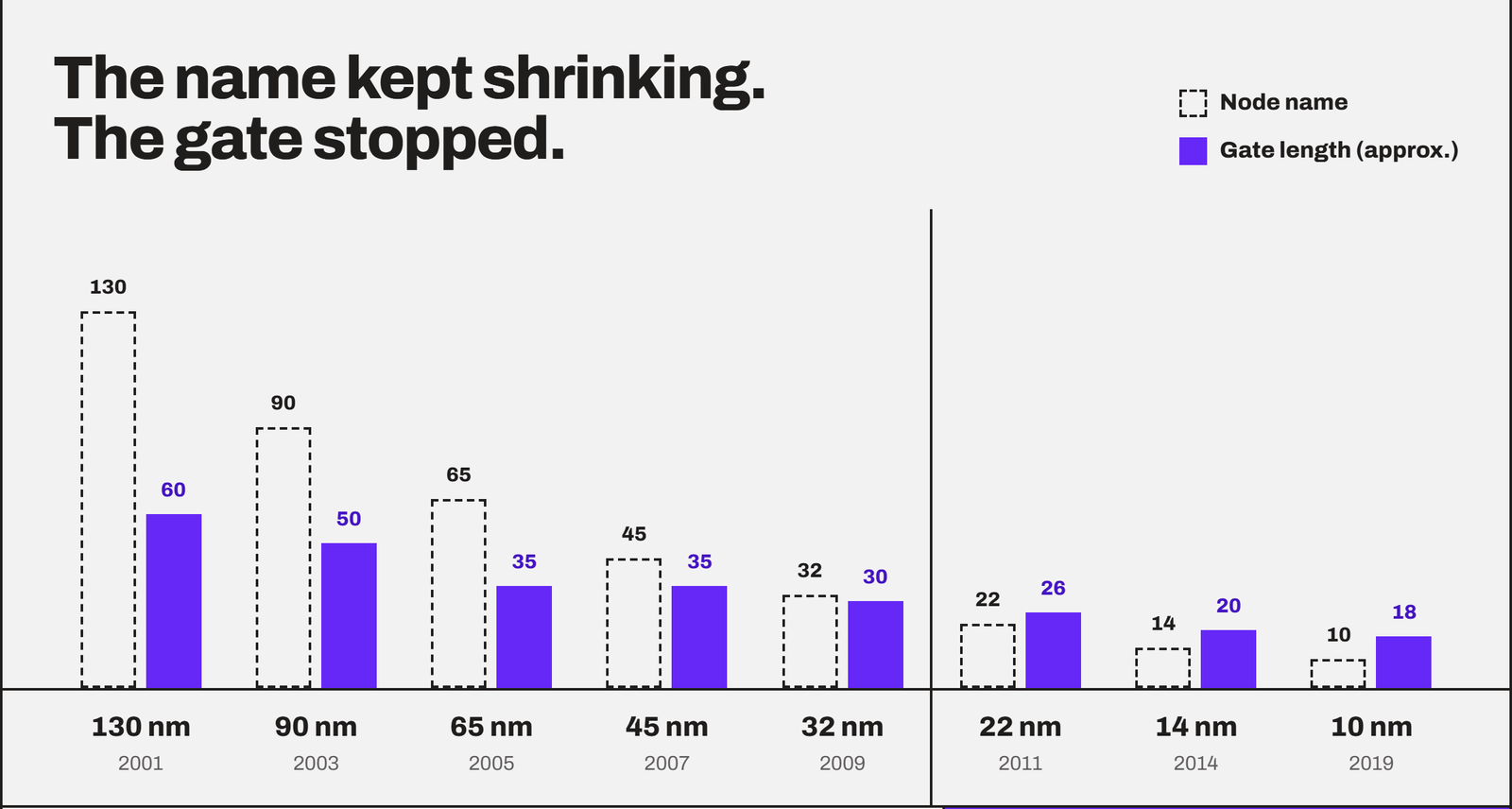
Now, only the gate pitch (the distance from one transistor’s gate to the next) and metal pitch (the distance between the tiny copper wires that connect the transistors) shrink and nothing else.
These two decide how many transistors fit in a square millimeter, and they are nowhere near the node name. In other words, the name kept shrinking by 0.7x every generation, but the chip stopped following it. This is how a measurement became a generation label.
A little on the processor node
Before I start, a node (or process node) is a chipmaker’s complete recipe for making any chip. It consists of the transistor design, the materials, and the manufacturing steps. Every new recipe gets a new name. Basically, the node decides how close together the transistors can be. For example, TSMC N4P uses FinFET transistors, while Intel 18A uses RibbonFET transistors and backside power delivery (PowerVia).
So, the node tells indirectly how many of the transistors will actually fit inside a chip. Not only that, a processor’s node decides how much power they use and how fast they can switch. So, in overall performance and IPC improvements, the node has a big role to play.
But people think that a newer node always means a higher performance. This is true partially but not in the way you think.
For example, TSMC says its N5 node gives about 1.8x the logic density as compared to the N7. They say that N7 gives either about 15% more speed at the same power or about 30% less power at the same speed. But the N49, which is a refined version of N5, gives a much smaller step of about 6% more density and 6% more performance, or 22% less power. So, not every name is a big jump. Sometimes, it’s just some refinement over the existing node.
Also, do not confuse a node with a CPU generation. A generation is a new CPU design (the microarchitecture), and the node is the factory recipe used to build it. Sometimes both change together, like from the Ryzen 7000 (TSMC N5) to Ryzen 9000 (TSMC N4P). But it is not mandatory.
Intel’s nm vs. TSMC’s nm
So, once this “nm” number stopped mattering anything, the companies started to name their next node relative to their own previous one. And they didn’t count the same way.
Intel is the best example to discuss here. Its 10 nm process packs about 100 million transistors per square millimeter, while TSMC’s 7 nm packs about 91 million, by the companies’ published figures. So, Intel’s “10nm” was slightly denser than TSMC’s “7nm.” But, if we look at the general consensus, Intel’s 10nm sounds outdated.

Now, Intel uses a different naming scheme. 10 nm Enhanced SuperFin became Intel 7, its 7 nm became Intel 4, and the nodes after that moved to ångströms (1 Å = 0.1 nm): Intel 20A and Intel 18A.
Does the same node mean the same number of transistors?
Node sets the limit to the number of transistors, not the result. Two brands using the same node can pack transistors differently and result in different number of transistors in the same area. There are three design choices that decide it.
- Cell type: Chipmakers offer small, dense building blocks (cells) and bigger high-performance ones that push more current and switch faster. A CPU built for 5+ GHz uses more of the big ones.
- Target clock: High-clock designs need extra space for wider wires, buffers, and power delivery.
- Cache vs. logic: SRAM cache packs much tighter than core logic, so a chip with more cache shows a higher density.
A good example can be taken from AMD. The Zen 4c uses the same design as the Zen 4 on the same TSMC 5 nm node, but each core is about 35% smaller because AMD built it with denser cells for lower clocks.
What does the “nm” number tells you as a buyer?
The “nm” number matters for sure but not in the way you think. Here is how you pay attention to it.
1. Compare it only within one company
Everyone agrees that TSMC N3 is better than TSMC N5, and Intel 18A is better than Intel 3. But they are better in terms of more transistors in the same area, less power at the same clock, or a higher clock at the same power. The chip designer has to make these decisions.
But when you compare TSMC’s “4 nm” vs. Intel’s 7, there is no single unit to compare. In this case, the parameters should be specified, and they can get really technical. The moment you compare node names across companies, you are comparing two different marketing systems. This becomes impossible unless you are aware of how those nodes are being implemented in practice.
2. Smaller node primarily means more efficiency
A newer node doesn’t give you more FPS in game on its own. What it gives is lower power and heat at the same speed, a little more clock headroom, and room for more cores and cache. Whether that turns into more FPS depends heavily on what AMD or Intel built with it. Where you will actually feel it is in power draw, heat, and battery life.
3. One CPU can use several nodes
Ryzen 9000 is called “4 nm”, but only its core chiplets (CCDs) are built on TSMC N4P. The I/O die, which handles memory, PCIe, and USB, is on TSMC N6 (6 nm), carried over from Ryzen 7000. From the image below, you can see that the product page itself lists different processor technologies.
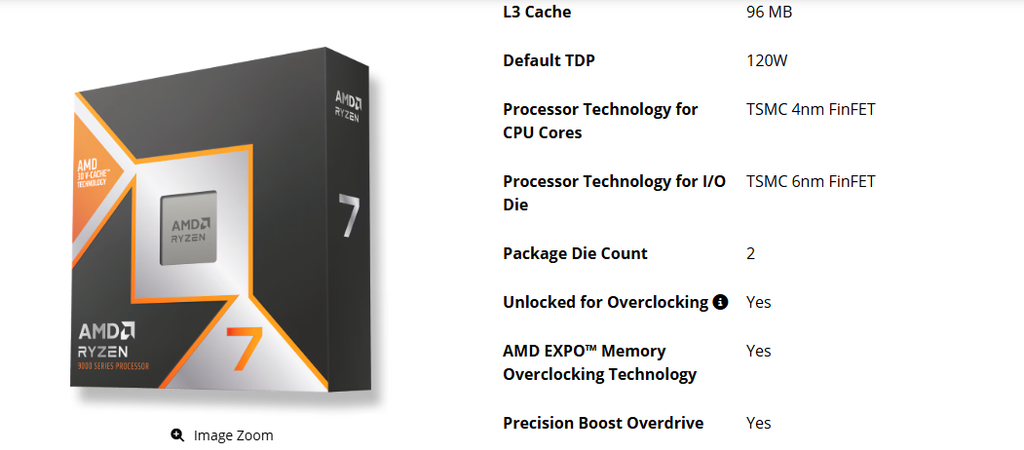
The company decides that two parts need different technology. The reasons are fairly simple.
The cores and their cache are logic and SRAM, and they gain a lot from a newer node. With more transistors packed in the same area, higher clocks can be achieved at lower power. On the other hand, the I/O die handles memory, PCIe, and USB. It includes analog circuits that shrink poorly on a newer node. So, it stays on the older and cheaper N6.
4. Is “nm” more important than clock speed, IPC, and other specs?
Think of the node as the tool. Clock speed, IPC, core count, and cache are what the tool builds. A newer node only gives the designer more room to work with. How this will be utilized for better performance depends on how designers use that space.
The proof is in Intel’s own 12th, 13th and 14th gen Core CPUs. They all use Intel 7, yet they differ in core count, clocks and cache, and so in performance. Same node, different chips.
So, as a buyer, when you compare two CPUs, check clock speed and IPC first, then cores and cache. At last, you can use the node only as a hint about power and heat.
Conclusion of this article
For a desktop CPU, ignore the node completely. Buy on benchmarks in the games and apps you use, price, and platform.
I will support my statement with the real-world examples.
The best proof is Intel’s own lineup. The Core Ultra 9 285K has its cores built on TSMC N3B, a newer node than the Intel 7 inside the Core i9-14900K. Yet in most game tests, the 285K does not beat the 14900K. And AMD’s Ryzen 7 9800X3D, on an older “4 nm” node, beats both in gaming because of its 3D V-Cache. That is design, not node.
However, laptops are where I may change my decision. This is where power and temperature can actually become your limits. This is exactly where newer nodes will pay off. So, between two laptops at a similar price and performance, I would pick the one on the newer node.
If you’re still deciding between brands, read my AMD vs Intel comparison and the CPU buying guide.