

CPU cache is generally given very little attention when we look for specifications in our gaming computers. But, after seeing the benchmark and actual improvements of the modern Ryzen X3D chips, people have started to understand the gaming improvements that we can achieve with good, fast, and large cache. Honestly, I believe AMD’s X3D is one of the greatest engineering breakthroughs in modern PC gaming.
So, if you don’t know, CPU cache is a small but extremely fast memory inside the CPU. It keeps the data your cores need right next to them. Games keep jumping between lots of small pieces of data, so a bigger cache means fewer slow trips to your RAM. That gives you higher FPS and, more importantly, better 1% lows. This is why AMD’s X3D chips are the fastest gaming CPUs. But, in case you are wondering, at 1440p and 4K, your graphics card still decides most of your FPS. Cache still has its place, and we are going to discuss it in detail in this article.
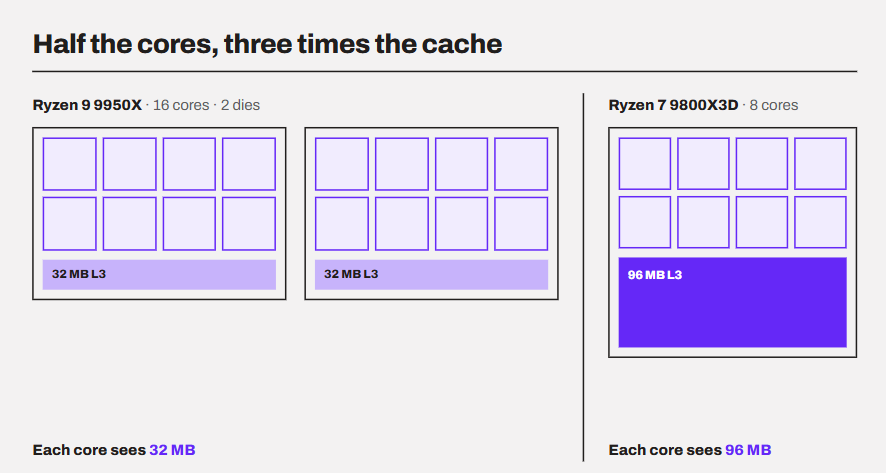
For example, the Ryzen 9 9950X has 16 cores, while the Ryzen 7 9800X3D has only 8. Still, the 9800X3D beats the 9950X in every single game. On top of that, the 9950X is a little more expensive than the 9800X3D. That price isn’t unfair, though. The extra money buys you eight more cores, and they really help in rendering, video encoding, and compiling. Games just can’t use them much.
It isn’t cores that we will be talking about in our article. As buyers, we always look at cores and clock speeds first, but for gaming, the L3 number deserves just as much attention. Let’s discuss why.
What is CPU cache?
Before going to the main memory (RAM), the CPU core dynamically checks the cache memory for requested memory addresses. Cache is built right inside the processor, and it tries to keep copies of data and instructions the cores are most likely to need next.
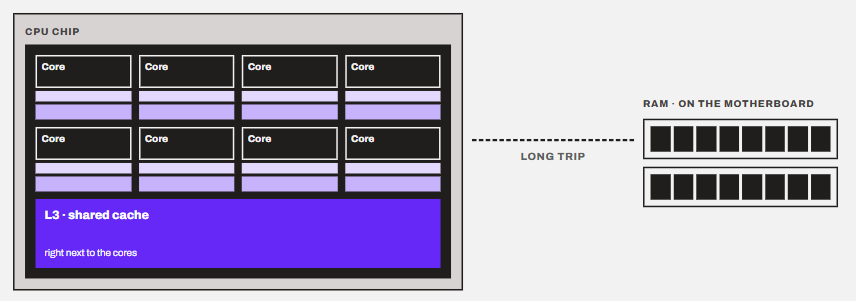
The reason to employ a cache is that the CPU cores are extremely fast, and the RAM, although it sounds so fast, isn’t generally capable of keeping up alongside the CPU.
I read this crazy article where a tuned DDR5-6000 CL30 kit took 71.6 nanoseconds to answer a Ryzen 7 9800X3D. This might sound like nothing, but the 9800X3D’s cores boost up to 5.2 GHz. At that speed, a core completes 5.2 cycles every nanosecond. If I do the calculations for you, they will look something like this.
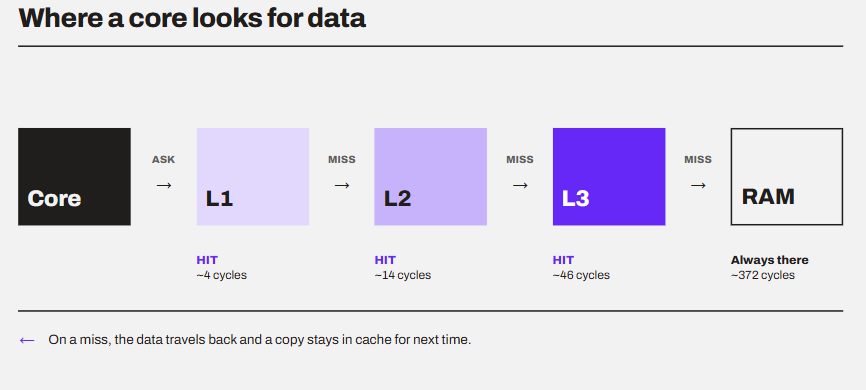
71.6 ns × 5.2 cycles per ns ≈ 372 cycles
This simply means that the CPU will have to make many trips to RAM for the data to work on. Every trip to RAM can leave a core waiting for hundreds of cycles, doing nothing. Cache is there to avoid as many of those trips as possible.
If we talk about the implementation, a cache is unlike your RAM. It is volatile in nature (loses data when switched off) just like RAM, but the special thing is that it has different levels. L1, L2, and L3, to be specific. It will take another article to explain the cache levels, but let me simplify it with a classic example.
Imagine you are a chef (a CPU core). The spices in your hand are L1. The rack next to the stove is L2. The fridge is L3. And the RAM is the market down the road. You cook fastest when almost everything is within arm’s reach. Every trip to the market stops the cooking.
Another thing I want to mention is that the cache is made up of SRAM as compared to the DRAM used in the memory sticks. SRAM is much faster, but it takes a lot more space on the chip. This is the reason your CPU carries just megabytes of cache, and we can’t scale it too much.
The cache layout image below is created from the specifications of the Ryzen 7 9800X3D.
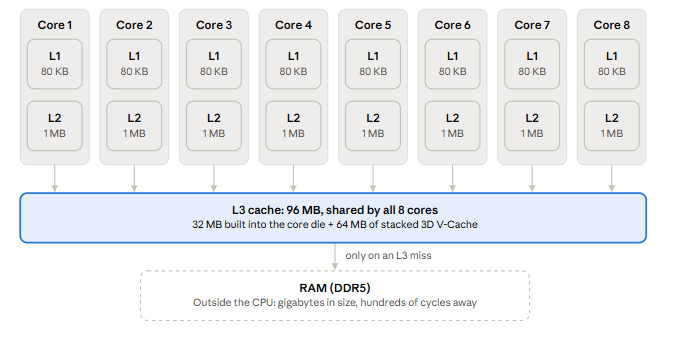
When a core needs something, it checks L1 first. If the data isn’t there, it checks L2, then L3, and only then goes to RAM. Finding the data in a cache is called a cache hit. Not finding it is a cache miss. The more cache hits a core has, the less CPU has to wait for the data. Unlike what most people think, cache has nothing to do with the actual core’s performance. However, it impacts the performance indirectly by deciding how quickly the demanded data will be provided to the core.
Why do games love cache so much?
Yeah, games aren’t only about GPUs and VRAM. Cache plays a big role, and there are strong reasons to do so. See, a game is not a big mathematical calculation. If it was like that, the CPU would have handled it perfectly. Games are sequential in nature. For every single frame, the CPU has to update the whole game world. It has to check where every character is, what the physics is doing, and what the GPU should draw next. All of this often overwhelms an ordinary 32MB cache. Obviously, it depends on the game as well, but I am talking about the most games that required a good enough graphics card to run on.
The data a game needs is big, scattered, and keeps changing. The CPU can’t predict it well because there is hardly anything to predict. A lot of things depend on the player’s input. So, with a small cache, the cores keep missing and keep waiting for RAM.
If we look at it from the frame point of view, it looks like this:
Frame time = 1000 ÷ FPS. At 144 FPS, the CPU gets 1000 ÷ 144 ≈ 6.9 ms to prepare each frame.
Every cache miss eats into that budget. If one frame hits too many misses, it arrives late, and you feel it as a stutter. This is why cache shows up most in your 1% lows (the slowest 1% of frames), not just in the average FPS. In Cyberpunk 2077, for example, TechPowerUp found that the NPC and crowd AI still don’t fit inside even the 9800X3D’s 96 MB of L3. So, its worst frames still react to memory latency.
The issue is that for this cache thing to work perfectly, most of the data should fit inside it. So, if you run y-cruncher or another benchmark using a working set larger than the CPU cache, you will see the X3D struggle as well.
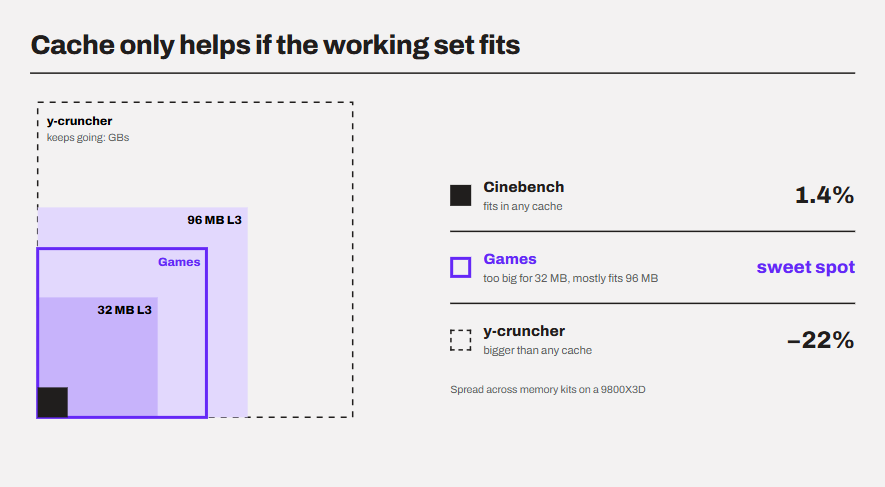
But games sit right in the middle. Their working set is too big for 32 MB, but a lot of it fits in 96 MB. That’s the sweet spot where extra cache pays off.
What does a bigger cache improve the most in games?
Average FPS is given the highest importance in gaming. But it isn’t where cache shows its real strength. A bigger cache helps your slowest frames the most, and those are the frames you actually feel.
1. The 1% lows (your stutters)
1% lows are a little complex to understand, but I will try to keep it simple.
Imagine one second of gameplay with exactly 100 frames. 99 of them take 9.6 ms each. One frame takes 49.6 ms because the CPU didn’t have the data in the cache and had to wait for the RAM for it. This calculates to
99 × 9.6 ms + 49.6 ms = 1000 ms (100 frames in one second.)
With this calculation, your FPS counter will happily show 100 FPS, and it is technically right. But for that one frame, the game ran at 1000 ÷ 49.6 ≈ 20 FPS. You will definitely observe that hitch, but the average will probably stay the same.
This is exactly what the 1% low number catches. It looks at the slowest 1% of frames instead of the average. In our example, the average says 100 FPS, but the 1% low says about 20 FPS.
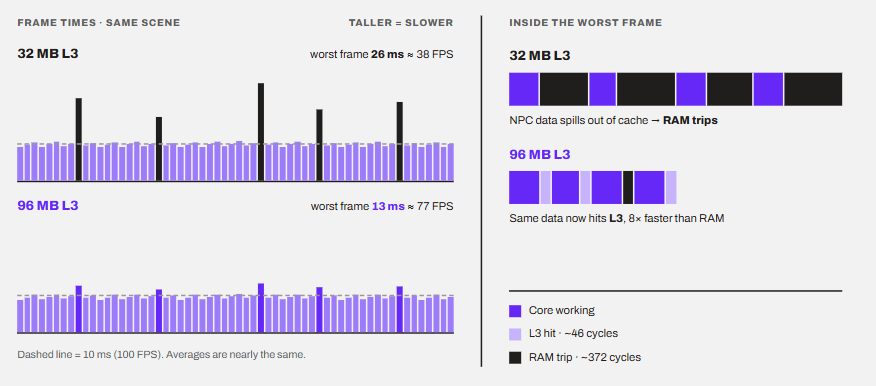
AMD itself pointed this out pretty well at the 9800X3D launch. In The Last of Us Part 1, AMD said the 9800X3D had a similar average frame rate to Intel’s Core i9-14900K, but 31% higher 1% lows. The average was the similar, but the game will surely feel much smoother because of the higher 1% lows.
2. Simulation games
Strategy games, city builders, big RPGs, and crowded open worlds track hundreds of NPCs, units, and objects every frame. In these games, the calculations can be fairly big for the CPU.
Remember Cyberpunk 2077 from above? TechPowerUp says its crowd and traffic simulation creates a demanding memory access pattern. On a 9800X3D at 1080p, changing only the memory moved the average FPS by less than 2% (239 to 243 FPS). But the 1% lows moved by 8.5%.
So, the slowest frames are exactly the ones waiting on memory. And that waiting is what a bigger cache cuts down.
3. Fast travel through big open worlds
When you swing, drive, or fly through a big world, the game keeps pulling in new areas and objects. TechPowerUp uses Spider-Man Remastered as its traversal stress test. There, memory changes kept the average FPS within about 2% but opened an 8.8% gap in the 1% lows.
What a bigger cache won’t fix.
Don’t expect a bigger cache on the CPU to cure every stutter. Some issues can come from other things like
- Shader compilation stutter
- Slow loading from a slow drive
- A graphics card that has run out of VRAM
- Scenes where the GPU is already the limit
What changes in AMD 3D V-Cache (X3D)?
With 3D V-Cache, AMD stacked an extra slice of L3 cache right onto the CPU. On a Ryzen X3D chip, a 64 MB cache die is bonded to the 8-core die, so the L3 goes from 32 MB to 96 MB. That’s three times more cache than usual.
What was happening before 3D V-Cache?
Before 3D V-Cache, CPUs were getting better for gaming in just two ways, i.e., higher clock speeds and higher IPC. Cache was given less priority.
Intel was ahead in this era with and after the launch of 9900K with a boost clock of up to 5.0 GHz and 16 MB of cache. AMD’s Ryzen chips had a higher core count, but Intel was still winning the gaming area. So, AMD started leaning on cache. X3D is known as the big hit, but, actually, in 2019, it even branded the cache on the Ryzen 3000 as “GameCache,” promising a dramatic drop in memory latency in games. Then, Zen 3 let all 8 cores share one 32 MB L3, doubling the L3 each core could reach directly. AMD finally called its chips the fastest gaming CPUs in the world.
But the lead didn’t last long. In late 2021, Intel’s Core i9-12900K took the “world’s best gaming processor” title back, with a boost clock of up to 5.2 GHz.
In this time, the boost clock went up by just 200 MHz (5.0 vs. 5.2 GHz). Basically, the clock speed had hit the wall. By the same time, AMD’s next architecture, Zen 4, needed a new socket and was still months away. So, AMD needed a gaming win without new cores and without higher clocks. The answer was cache.
The stacking game by AMD
Why stack the cache when you can just make the core die bigger?
A bigger die comes with many challenges like manufacturing, physical, and performance problems. The latency will increase and the yield will decrease. So, AMD looked at the problem from a different angle.
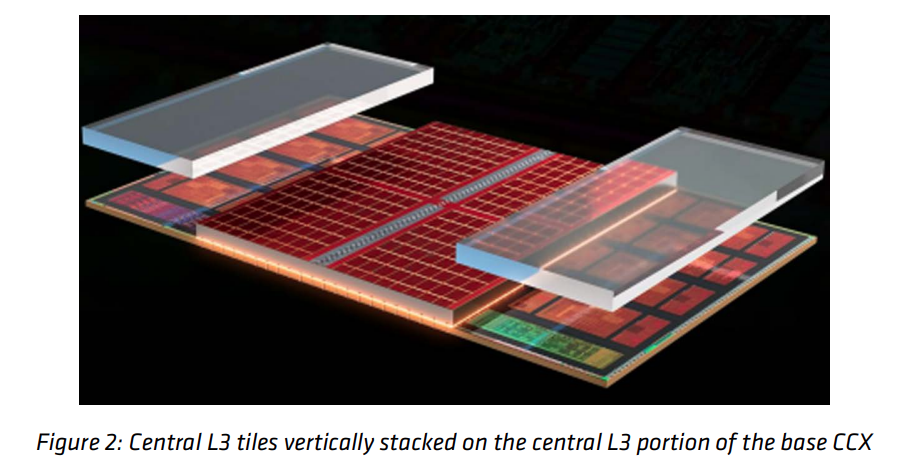
Well, as we discussed above, SRAM takes a lot of space. So, they stacked rather than adding another part in the side. Stacking let AMD add a lot of cache without making the core die itself bigger. The two layers are joined with a direct copper-to-copper bond and through-silicon vias. There are no solder bumps in between. In simple words, the two dies behave almost like one piece of silicon.
The second generation flipped the stack
Let’s not talk about the implementation more and discuss the latest improvements.
With the Ryzen 7 9800X3D, AMD moved the 64 MB cache below the core die. Now the cores sit right under your cooler. They run cooler, clock higher, and the chip is fully unlocked for overclocking.
AMD claimed up to an average 8% more gaming performance than the 7800X3D, and up to an average 20% more than Intel’s best at the time. In other words, X3D stopped being a trade-off and became the go-to choice for gaming-first builds.
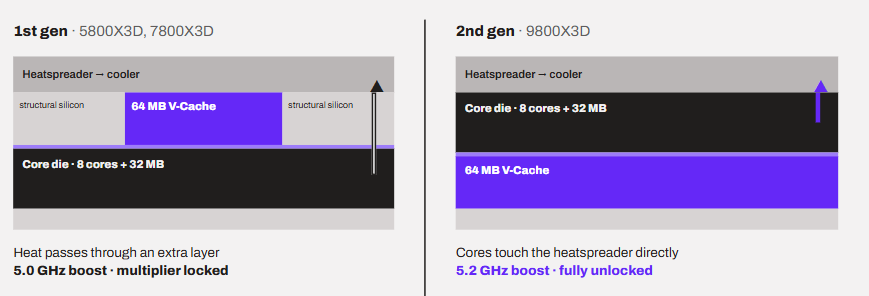
Basically L3 cache is what the AMD has worked on the most. It typically triples the amount of available L3 cache from the standard Ryzen chips. This is how the difference looks in the Zen 5.
| Level | Time to answer (Zen 5) | Compared with L1 |
|---|---|---|
| L1 | About 4 cycles | 1× |
| L2 | Between L1 and L3 | A few times slower |
| L3 | About 46 cycles | About 11.5× slower |
| RAM (DDR5-6000 CL30) | About 372 cycles (71.6 ns) | About 93× slower |
Latest Improvements in CPU Cache
The Ryzen 7 7700X3D launched in July 2026 at $329, bringing 96 MB of L3 closer to the mid-range. Also, Ryzen 9 9950X3D2 became the first desktop CPU with cache stacked on both of its chiplets, for 192 MB of L3. According to leaks, in the Nova Lake, Intel will have gaming models with a “big last level cache” (bLLC) of up to 144 MB on a single compute tile. However, Intel hasn’t confirmed it yet. Another thing about a bigger cache is that it’s a great return on investment. For example, on an X3D chip, a basic dual-channel DDR5 kit is more than enough. The whole idea of X3D is that the CPU is built to depend less on memory instead of making the memory faster. That’s real money saved, especially with memory in short supply right now.
How much FPS does extra cache actually give?
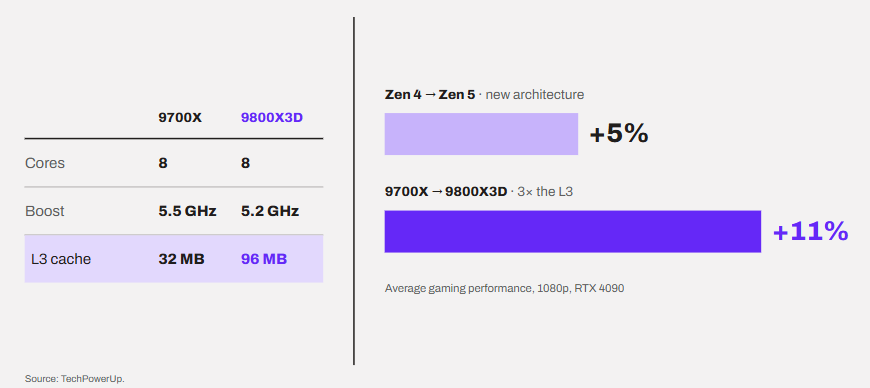
AMD’s numbers are one thing. But the cleanest way to see what cache alone does is to compare the Ryzen 7 9700X with the Ryzen 7 9800X3D. Both are 8-core Zen 5 chips. The 9700X actually boosts higher, up to 5.5 GHz, while the 9800X3D stops at 5.2 GHz. The big difference is the L3 cache: 32 MB vs. 96 MB. And this is what we are most curious about in this article.
Yes, the 9800X3D also has a higher power limit. But games rarely push CPUs to their power limits anyway, as I explained in my non-K overclocking guide.
So, what happens?
At 1080p with an RTX 4090, TechPowerUp measured the 9800X3D about 11% faster than the 9700X. This is the overall pattern. To put that in perspective, the whole Zen 5 architecture gained only about 5% in games over Zen 4. The cache alone gave more than twice that.
Now, raise the resolution. At 4K, even with that RTX 4090, the differences between top CPUs are minimal. The graphics card becomes the limit here, and the extra cache has nothing left to speed up.
So, cache gives you FPS only when the CPU is the thing holding you back. If you think the graphics card is limiting your performance, cache will do nothing.
Is the graphics card still the main priority for gaming?
Yes. For most people, the graphics card still decides most of your FPS. But the gap is getting smaller in a some cases. See, the CPU and the GPU work like a relay team. The CPU prepares each frame, and the GPU draws it. Your FPS is set by whichever one is slower. And you see clear signs if there is a CPU bottleneck.
At 1440p and 4K, drawing the frame is the heaviest part rather than the raw calculations. This is why, as we saw above, even a 9800X3D barely matters at 4K. But, if we look at what the global numbers are saying, we can have an idea what is happening in the gaming industry. In Valve’s August 2026 Steam survey, 50.52% of players were still on 1080p and 21.86% on 1440p. So, half of Steam players sit right at the resolution where the CPU matters most.
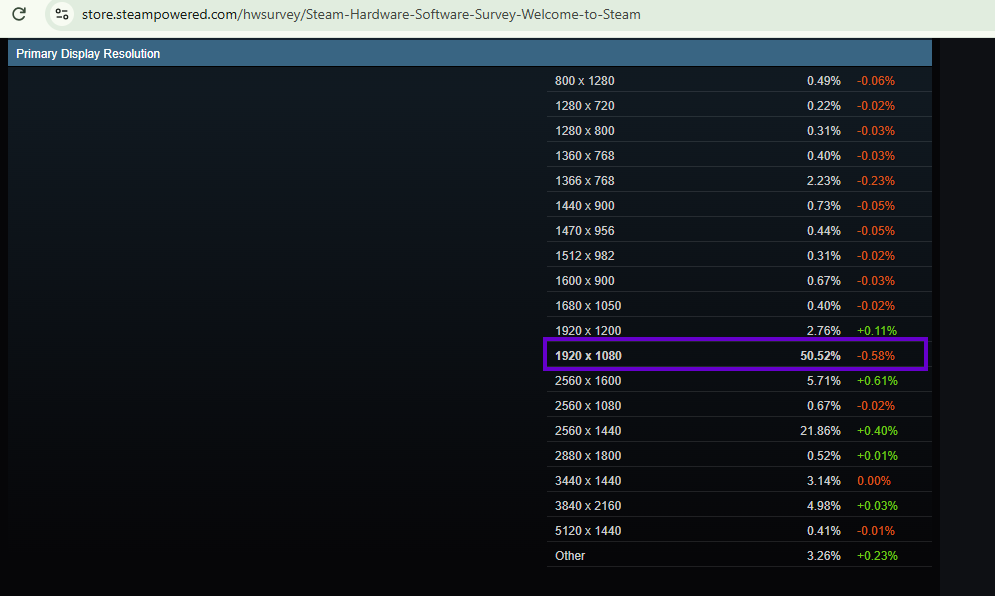
However, there are some shifts going on.
1. Upscaling moves the load back to the CPU
DLSS in Performance mode renders at 50% of your resolution on each axis. At 4K, that’s still 1920 × 1080 internally. So, the GPU finishes each frame much faster, and the CPU has to keep up with a lot more frames. In other words, a “4K” game with upscaling can hit a CPU limit just like a 1080p game.
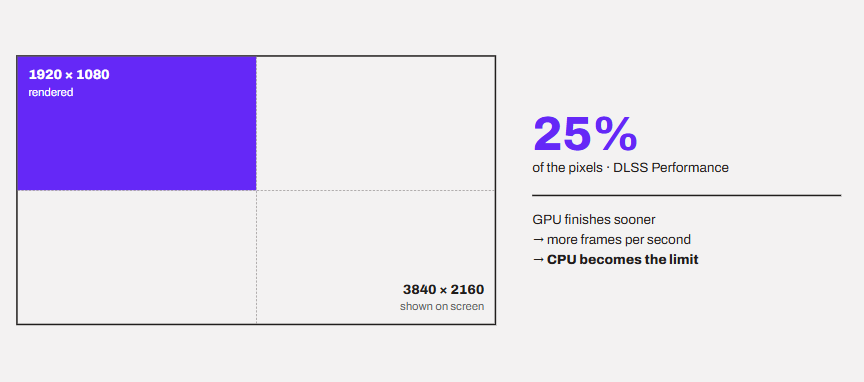
2. High refresh rates shrink the time per frame
At 240 Hz, the CPU gets 1000 ÷ 240 ≈ 4.2 ms per frame. That’s much tighter than the 6.9 ms we calculated for 144 FPS. Less time per frame means every cache miss hurts more.
3. VRAM needs keep growing
Games are asking for more video memory every year. They are getting heavier and demanding. In the same Steam survey, 16 GB cards (26.92%) have now overtaken 8 GB cards (25.74%).
8 GB is still enough for most games, but not for everyone. Some games will outright performance well with bigger VRAM . But, memory shortage is a real thing and even ASUS now suggests using upscaling to cut VRAM use on 8 GB cards.
A good graphics card is a good graphics card. No amount of CPU cache can fix a low-end graphics card or a low VRAM.
So, where should you spend your money?
A common mistake is buying the fastest X3D chip and pairing it with an entry-level 8 GB graphics card. The opposite mistake is just as common: a big GPU held back by an old CPU. So, your purchase should be all about a near perfect balance of things. Here is how I would spend my money today.
1. For 1440p and 4K gamers
Without any double-thought, your priority must always be a good graphics card. I wouldn’t buy a new card with less than 12 GB of VRAM for 1440p, and 16 GB is the safer pick for 4K. A modern 6- or 8-core CPU is more than enough here.
2. For competitive and high-refresh gamers
Here, the CPU sets your FPS ceiling. If you play esports titles at 1080p or 1440p on a 240 Hz or faster monitor, an X3D chip is worth the money.
3. For simulation, strategy and big open worlds
These are the games that juggle lots of units, NPCs or objects. All of them love cache. TechPowerUp calls Baldur’s Gate 3 a perfect candidate for the 9800X3D’s 96 MB, because much of its active game state can stay inside the cache.
4. For tight budgets
Give the GPU the bigger share of the money. Skip the expensive RAM kit, especially if you go X3D. A mid-range CPU with a strong GPU will beat a top CPU with a weak GPU in most games.
Frequently Asked Questions
Do Intel CPUs have 3D V-Cache?
No. 3D V-Cache is AMD’s technology. Intel’s answer, a big L3 called bLLC, is expected with Nova Lake, according to leaks.
Does an X3D CPU help at 4K?
Very little in most games, because the graphics card is the limit there. It helps more when you use upscaling or chase high refresh rates.
Do X3D CPUs need fast RAM?
Not really. A normal dual-channel DDR5 kit is enough.
Can more cache fix stuttering?
Only the stutters caused by the CPU waiting on memory. Those show up as bad 1% lows, and cache helps a lot there.
How much L3 cache do I need for gaming?
There is no magic number but a normal 32 MB L3 is fine for most people, especially at 1440p and 4K. 96 MB is the sweet spot for high-refresh and CPU-heavy games. Beyond that, games don’t gain much yet.
Is cache more important than clock speed for gaming?
When the CPU is the limit, cache usually wins. The 9700X boosts 300 MHz higher, and the 9800X3D is still about 11% faster at 1080p. But clocks still matter.
Conclusion
CPU cache doesn’t make your CPU think faster. It makes it wait less. That’s why a big L3 like AMD’s X3D can add more FPS than a whole new architecture, but only when the CPU is the thing holding you back.
For most people, the graphics card and its VRAM still come first. So, pick the GPU for your resolution first, and then spend what’s left on the CPU. If an X3D chip fits in that budget, take it. If it doesn’t, a normal 6- or 8-core chip paired with a strong GPU will serve you better than an X3D chip paired with a weak one.