

Modern CPUs are really complex and powerful machines. Being so small in size, they can consume hundreds of watts of power and get really hot. So, power management becomes a really important part of the processor design. Different manufacturers implement different strategies for this. Intel has traditionally used the PL1, PL2, and Tau strategy, which we have discussed in this article.
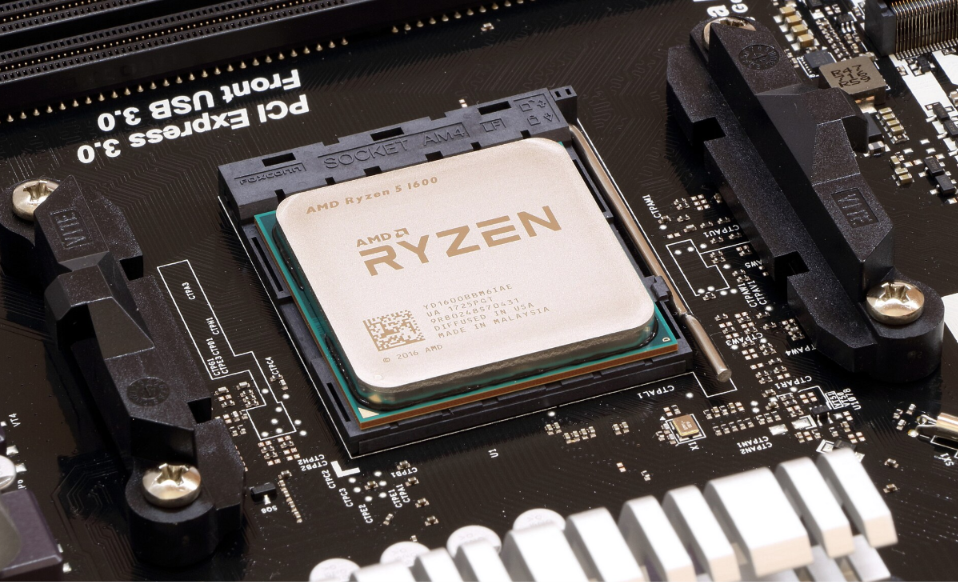
Today, we discuss AMD’s power management and specifically the three main ceilings called PPT, TDC, and EDC. For an end user, they are relevant mainly when you want to overclock, but it is worth knowing them if you use an AMD machine. Their purpose is mainly to decide how far the CPU can boost.
Your Ryzen CPU doesn’t run at a fixed speed all the time. It raises its clock speed until it runs into a limit and then stops there. PPT, TDC, and EDC are three of those limits. Let’s talk more about them.
The Three Limits
PPT (Package Power Tracking) is the total power the whole chip is allowed to draw. It is measured in watts. It covers the total power for cores, memory controllers, integrated graphics, and almost everything else.
TDC (Thermal Design Current) is how much current the motherboard’s power delivery can supply continuously, without overheating itself. It is measured in amps and is mainly about the motherboard, not the CPU.
EDC (Electrical Design Current) is how much current that same hardware can supply in a short burst. It is also measured in amps. It will always be higher than the TDC because it’s what the hardware can take for a moment compared to the TDC, which is the current the hardware has to take forever.
You can get a guess on what these limits do from the graph below.
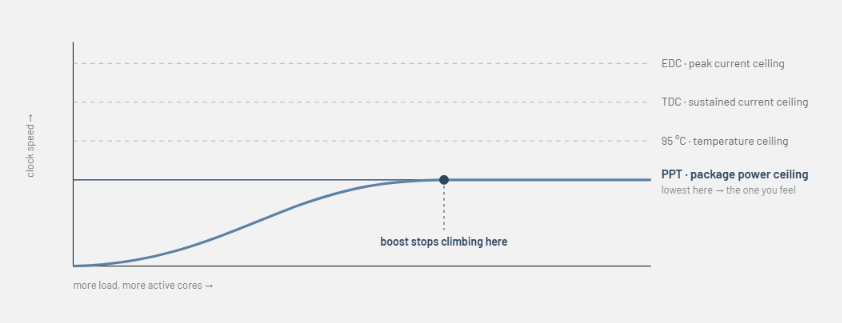
These limits work together with the temperature limits and decide how fast your CPU actually runs. No matter what workload you throw at your CPU, all modern Ryzen CPUs follow these limits to determine the performance.
Understanding watts and amps
So, PPT is in watts, while the TDC and EDC are represented in amps. So, whenever electricity is supplied to a chip, it will have two properties, i.e., voltage and current. Imagine voltage as the pressure, measured in volts, and current as the amount of current flowing, measured in amps. To get the power, you simply multiply voltage and current.
A CPU core will require a certain voltage to sustain a specific clock speed. If you want to push the clock higher, you will have to increase the voltage so that the transistors keep switching reliably. The more cores you load, the more current the chip draws. Voltage usually goes the other way. The CPU lowers the frequency and voltage as more cores light up, which is exactly why a wattage number alone can hide a current spike.
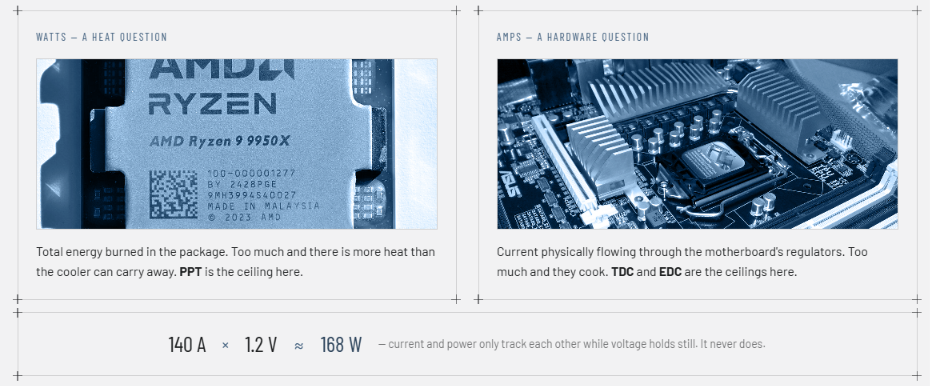
But there comes a problem. Watts tell you the rate at which the energy is being burned at a specific time. Current tells how much current is flowing through the wires, which basically answers the question of where the components melt. So, a watt limit alone can’t see the current spike coming.
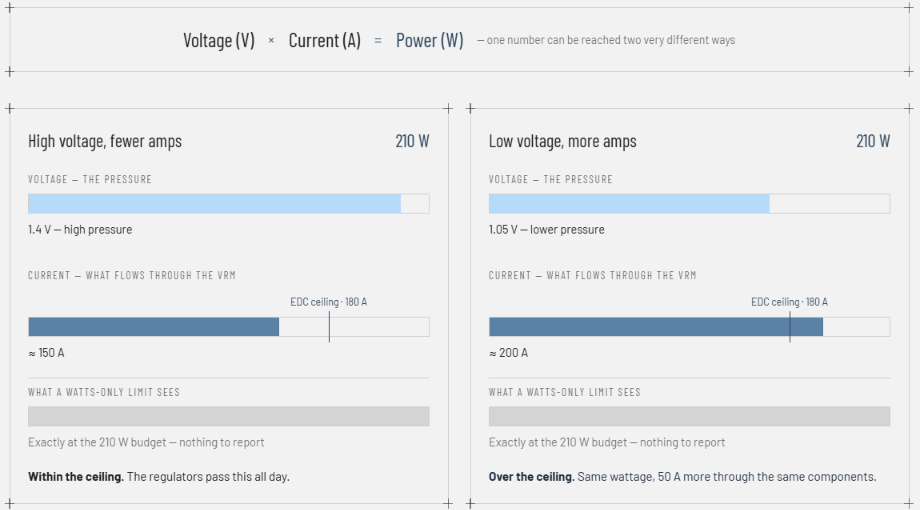
Let’s take an example.
210 watts at 1.4V is about 150A. 210 watts at 1.05V is about 200A. Both sit at exactly 210 watts, so a watts-only limit says both are fine. But one is pushing 50 more amps through the VRM than the other.
So, Watts is a loose summary because it compresses the voltage and current into one number. In short, a component doesn’t fail because of watts. It fails because of amps flowing through it.
PPT is for the CPU; TDC and EDC protect the motherboard
We saw above that two very different current levels can produce exactly the same wattage. That is the gap PPT alone can’t see.
Let’s take two situations here:
- 210 watts at 1.4V = 150 amps
- 210 watts at 1.05V = 200 amps
Now, from the PPT’s point of view, both are 210 watts, and both pass. But, if the VRM tops around 180 amps, the second one will destroy it while PPT reports everything is fine.
This generally happens when the chip shifts from a few cores at high voltage to all cores at lower voltage. TDC and EDC fill this gap.
Why PPT for CPU?
The reason AMD uses PPT rather than a simple temperature limit is because the power consumption affects several things simultaneously. These things are heat generation, VRM loading, socket limit, and how long the CPU can sustain higher frequencies.
AMD decides the default PPT values for each CPU.
So, for example, if your CPU has a PPT limit of 142 watts, Precision Boost can increase the frequency and voltage as long as the CPU remains under other constraints. Once the CPU reaches that wattage limit, it has to stop increasing the power consumption or may reduce the clocks.
PPT acts as a constraint, and that is why we generally refer to it as a ceiling. So, it isn’t something that is continuously calculated from temperature or workload. Rather, the CPU’s actual power consumption changes with workload, frequency, voltage, and core activity. PPT is just there as the upper limit.
TDC and EDC: Why two of them?
So, I told you earlier that TDC and EDC are for the motherboard. Heat in the VRM (on the motherboard) takes time to accumulate. A big surge in current for a second or so would hardly warm it, but the same current for a few minutes can easily cook it. Same current, different durations, different outcomes.
TDC is what the VRM can pass forever. EDC is what it can pass for a moment, and it is going to be bigger than TDC. These must be two limits because you can’t express “150A forever” or 250A for a heartbeat” in a single number. So, there are these two limits.
What do TDC and EDC do for you?
TDC allows your board’s real endurance to be used to handle sustained current for as long as possible. A good board with eight powerful power stages and a good heatsink can handle far more current for longer as compared to the cheaper board. So, TDC is the number that encodes that difference. Without this, AMD would have to set their reference at the worst board in the market and cap everyone there.
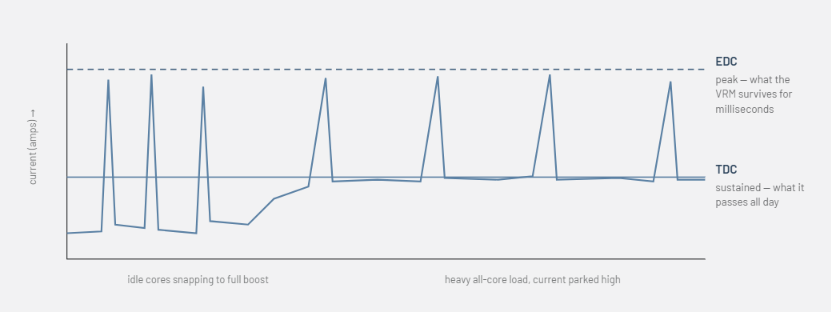
EDC is there to let short bursts run free. Whenever a core spikes from idle to boost behavior, the current spikes hard. Those spikes are short and mostly harmless. EDC’s main job is to allow them. However, it is also responsible to catch a spike big enough that it actually matters and may be harmful.
Where do these power limits come from?
These three ceilings are the parameters of AMD’s Precision Boost control system. CPU has thermal, electrical, and power capabilities, but precision boost is what constrains when deciding how aggressively to boost. For this, it uses the PPT, TDC, EDC, temperature, voltage, etc. as constraints.
Different CPUs have different performance characteristics and voltage/current requirements. They may generate more or less heat than others. So, these values come from AMD’s electric and thermal design specifications for specific CPUs and the platform. Precision boost, then use them as boundaries when deciding how much voltage, current, and frequency to apply.
How does Precision Boost use these limits?
AMD Precision Boost can be considered as the system doing the real-time monitoring and adjusting voltage and clock speed accordingly. PPT, TDC, and EDC are the limits that
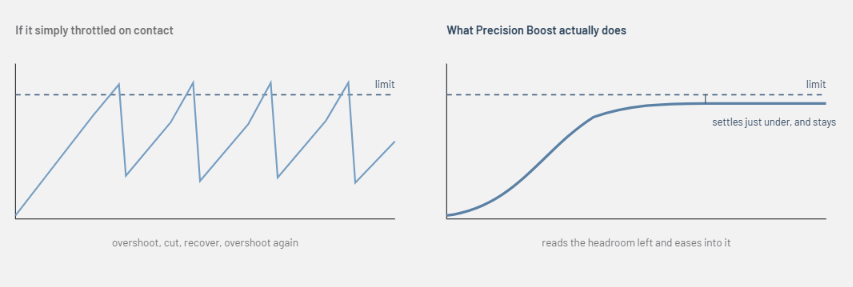
tell it how far it can push the CPU.
So, as the workload increases, the precision boost increases the voltage and clock. It keeps monitoring the power, current, and temperature to adjust clocks to stay within limits.
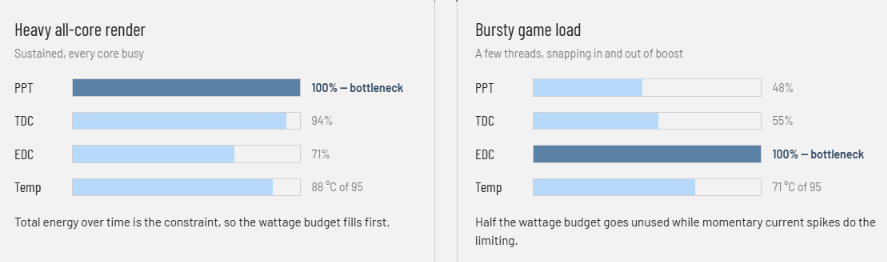
For example, if a Ryzen CPU is running a heavy workload and utilizing all the cores, Precision Boost may increase the clock until it approaches one of its constraints. If it reaches the PPT limit, it will stop increasing the total package power. If it reaches TDC, the sustained current will become its limiting factor. However, if it reaches the EDC, the peak current becomes the constraint.
One important thing is that Precision Boost isn’t waiting to reach the limits and then apply throttling. It manages the frequency and voltage based on the available headroom. It means it finds the highest practical performance while remaining within the CPU’s power, current, and temperature limits.
That is why the same CPU can behave very differently depending on the workload. A normal single-threaded workload will generally have a lot of power/current headroom to reach a higher clock. On the other hand, a heavy all-core workload will encounter PPT, TDC, EDC, or temperature limits much sooner.
Can users change them?
Yes, on supported AMD Ryzen platforms, the end user is allowed to change these limits. However, it is advised to do so through Precision Boost Overdrive in the BIOS or through Ryzen Master.
However, increasing the PPT from 150 to 200 watts will not make your CPU consume 200 watts immediately. It means the Precision Boost now has a larger operating space and can allow additional current and power in doing so. However, temperature is another major ceiling. So, having a good cooling setup is necessary if you want to play with these numbers.
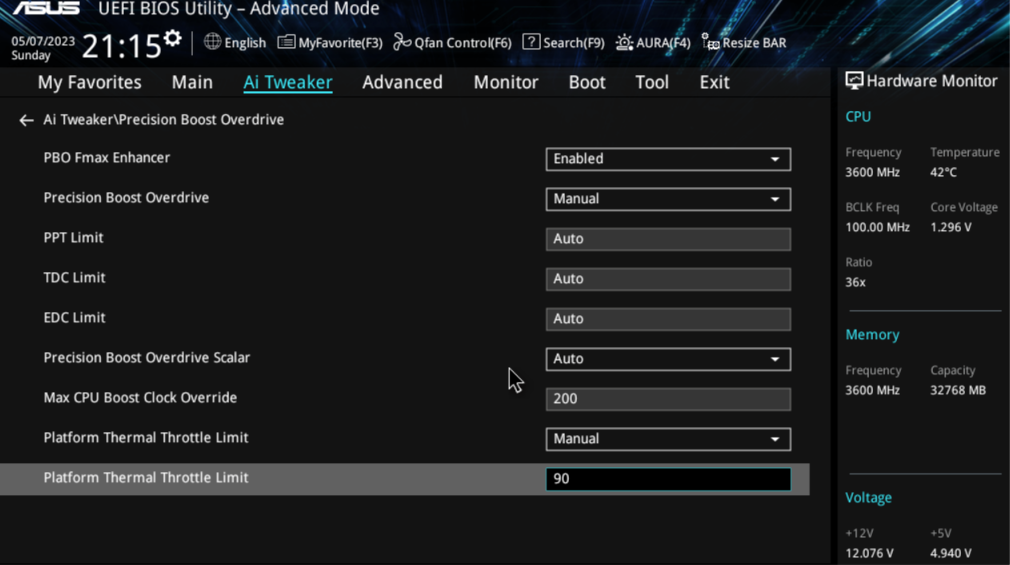
Some users may do the opposite. Lowering these values can be helpful for reducing CPU heat, power consumption, and noise. In older or entry-level platforms, you may get fewer options compared to the modern systems with full PBO support.