

Most people who know and learn about overclocking, undervolting, voltage, and CPU thermal behavior are generally the ones who want to get the most out of their computers. With undervolting, specifically, the first priority is definitely the reduction in CPU temperature. But the second question that comes to mind is the performance.
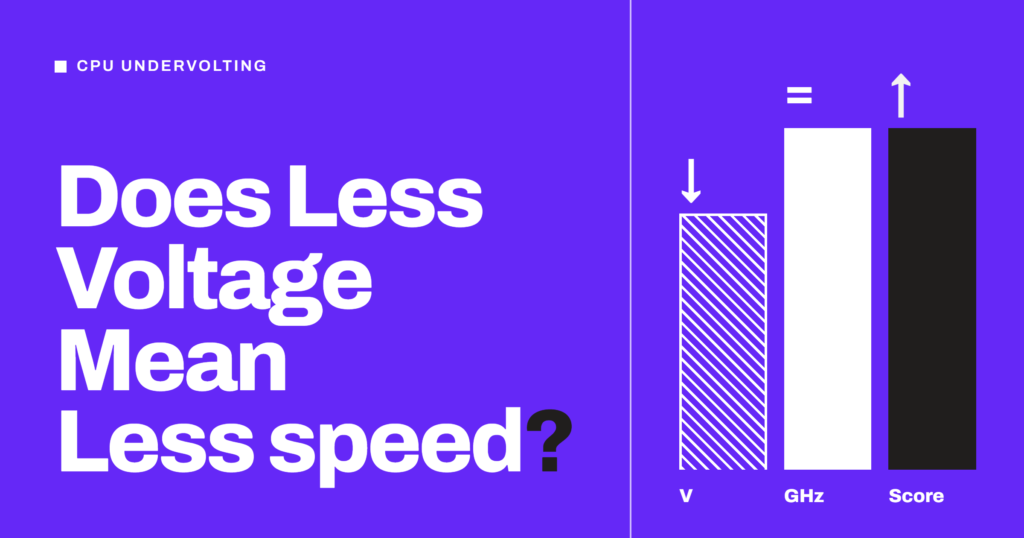
By its definition, CPU undervolting means running your processor at a lower voltage than the one it asks for by default. So, if we are giving it less voltage to work with, wouldn’t it automatically affect the performance negatively?
The fear is obvious and questions logical. But the answer is no.
A stable undervolt does not decrease CPU performance, because you are lowering the voltage and not the clock speed. In fact, if your CPU was hitting its temperature or power limit, undervolting will generally increase performance. Performance only drops when the undervolt is too aggressive. That is when AMD CPUs start clock stretching, Intel CPUs trigger Current Excursion Protection, or the system becomes unstable. More on these later.
In this article, we will discuss why a lower voltage doesn’t slow down the CPU and when it, in fact, makes it faster. Also, we will see the cases where it might actually cost you performance. If you want the undervolting guides, I have published them for both Intel and AMD Ryzen CPUs. Let’s get started.
What does undervolting actually change?
Most people think of the voltage as the fuel for the CPU. They believe less fuel means less speed. I have also heard people referring to the CPU voltage as its currency. But both of these things are wrong. Yes, voltage is required to get the work done, but the performance actually comes from clock speed and IPC. Voltage is only there to keep the transistors switching reliably at a given frequency.
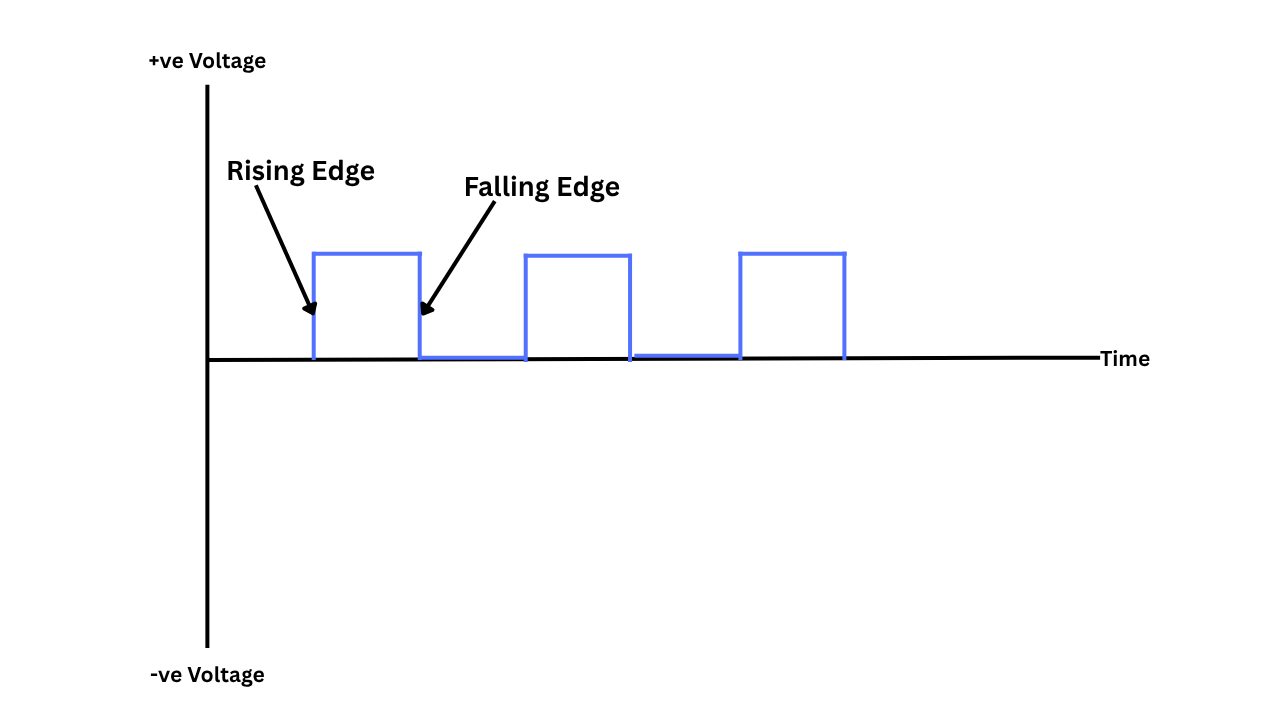
Transistors are doing the actual work inside the CPU, and their way to do it is switching. Clock Cycle is their deadline. Means they have to finish switching before the next clock cycle starts. They switch faster at a higher voltage, so a higher frequency needs a higher voltage.
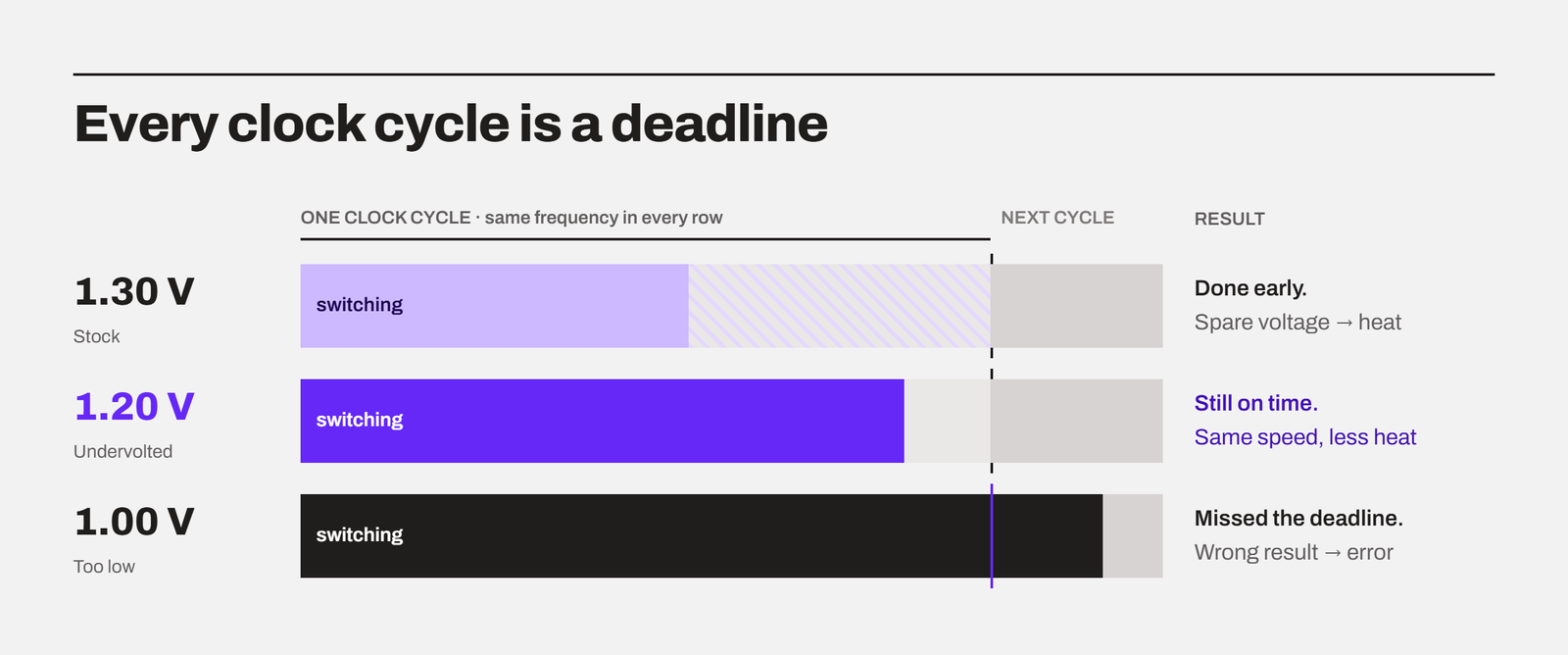
Modern CPUs change their clock speed all the time, so they keep a table to remember this. For every frequency, the table has the voltage the CPU should ask the motherboard for. But at a fixed frequency, any voltage above what the chip really needs does nothing for performance. In fact, it turns into the heat that adds nothing to the actual work.
The formula for the dynamic power of the CPU is like this:
PDynamic ≈ C x V2 x fHere, C is the capacitance being switched, V is the voltage, and f is the frequency.
The key point in the formula that I want to highlight is that voltage is squared. So, a small drop in voltage gives you a bigger drop in power and temperature while the frequency stays untouched.
Imagine your CPU is running at 1.30 V under load. You undervolt it to 1.20 V at the same clock speed.
(1.20 ÷ 1.30)² ≈ 0.85
So, the voltage went down by about 8%, but the dynamic power went down by about 15%. You get the same frequency, the same work done per second, and less heat. Leakage power also falls as we reduce the voltage. So, the overall saving is generally higher when we undervolt.
The reason there is extra voltage in the first place
In my CPU binning article, I have explained that no two CPUs are the same even if they are manufactured in the same plant at the same time. Due to their physical characteristics, they will need different voltage levels to sustain the same frequency. But, because manufacturers would not throw away the CPUs that are demanding a higher voltage than usual, they set a higher baseline for all the CPUs. Basically, they have to choose a voltage table that works for most every chip of the model. It is like a safety margin on the top.
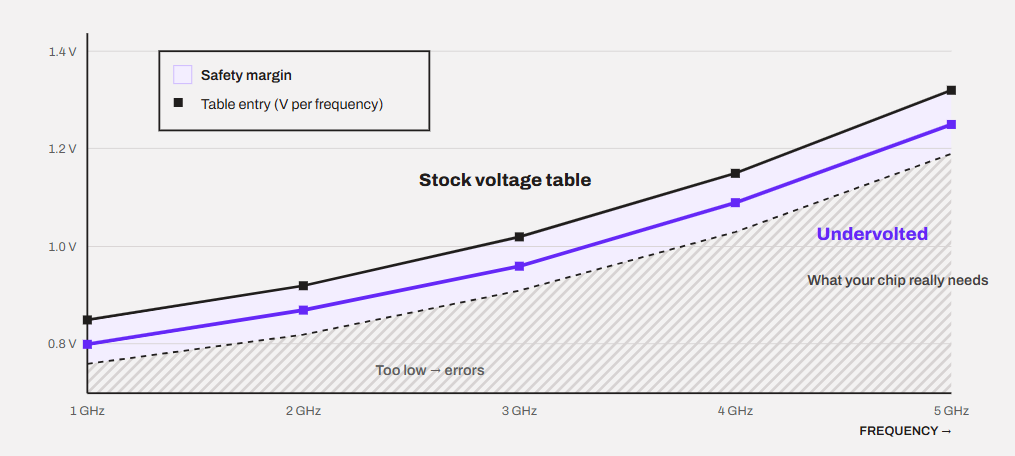
Your chip is most probably not the worst case, which means a part of that margin is wasted on it. Yes, it could be the worst case, and that is why undervolting is unpredictable just like overclocking. You never know what results you will get at what settings. It is all a lottery.
Undervolting is nothing but just a way to remove a part of this margin. That’s it.
When does undervolting increase performance?
The goal of undervolting is never to increase the performance directly. The goal is to get back the performance that the temperature and power limits are taking away.
So, if your CPU was thermal throttling, which is very common in laptops, the same clock speed now produces less heat. Also, the CPU holds it for longer because of the lesser heat accumulation over time. So, we are getting some performance benefits but indirectly. Not through raising the clock manually but by allowing the boost algorithms more thermal headroom to work in.
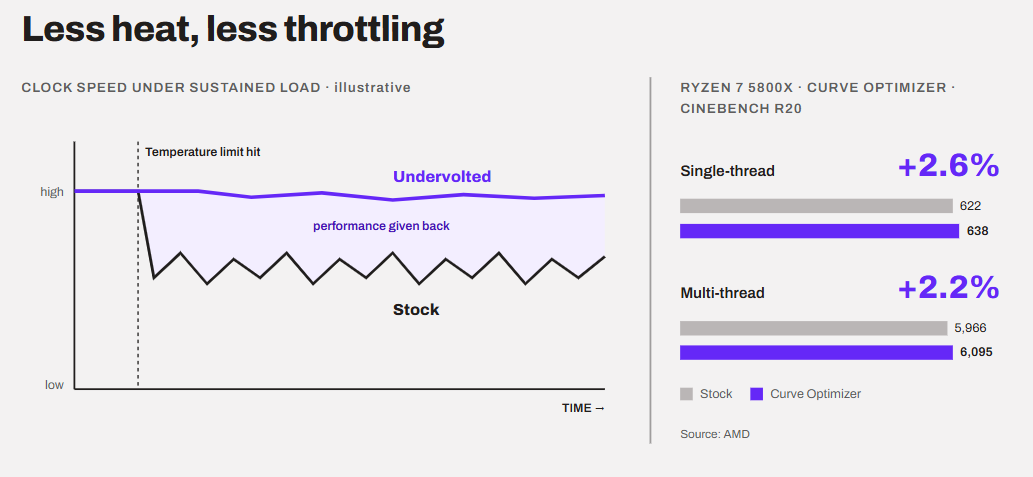
But keep in mind that if your CPU isn’t hitting any limit, nothing changes in performance. You just get lower temperatures and quieter fans.
When does undervolting decrease performance?
Okay! Let’s come to the point now.
The most popular undervolting path is something like this. Push the undervolt until the system crashes, go back one step, and call it done. But modern CPUs are really smart, and they don’t always crash when a low voltage is detected. They can simply get slower without telling you.
Just understand that the CPU doesn’t just lower its clock speed when the voltage is low. Modern CPUs are dynamic, and they change their clock speed based on load, temperature, power, and current. It generally doesn’t check whether the voltage is enough for that speed. It trusts its own voltage table.
An undervolt offset shifts that whole table down, and the CPU doesn’t know that. So, the CPU still jumps to its highest frequency, but if the voltage isn’t enough, the transistors will most probably miss the clock deadline. The calculation will surely come out wrong, and there will be an error. That is also why the result is a crash and not a clean shutdown.
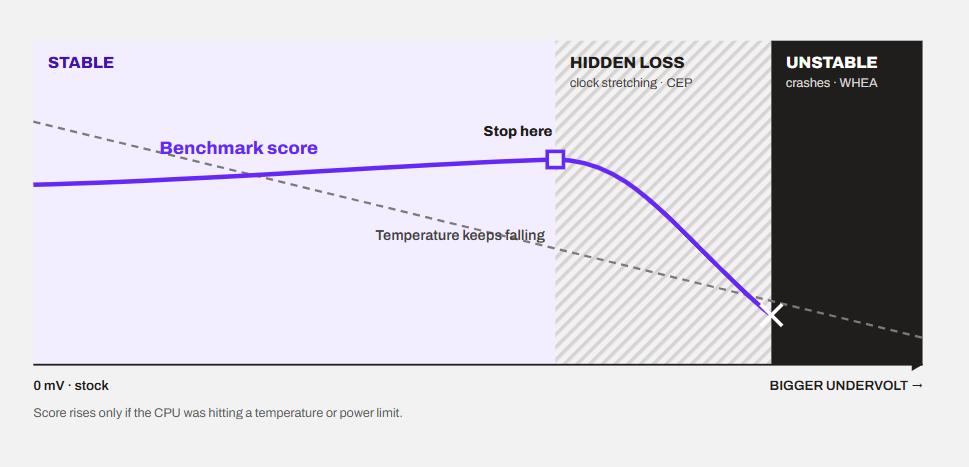
But there are some exceptions as well. AMD CPUs can stretch their clock cycles when they sense the voltage sagging, and Intel CPUs can throttle through CEP. But both of these work up to a point, and both are the reason behind the hidden performance loss.
To put it directly, there are four main cases when an undervolt will cost you performance, including clock stretching and Current Excursion Protection (CEP). Let’s discuss them in detail.
Case 1. Clock stretching on AMD Ryzen
When a Ryzen CPU doesn’t have enough voltage for the frequency it is running at, it can stretch its clock cycles to stay stable. In an AMD patent, the company describes adjusting the clock in response to voltage droop. They explicitly discuss the difference between the target clock and the actual clock after stretching.
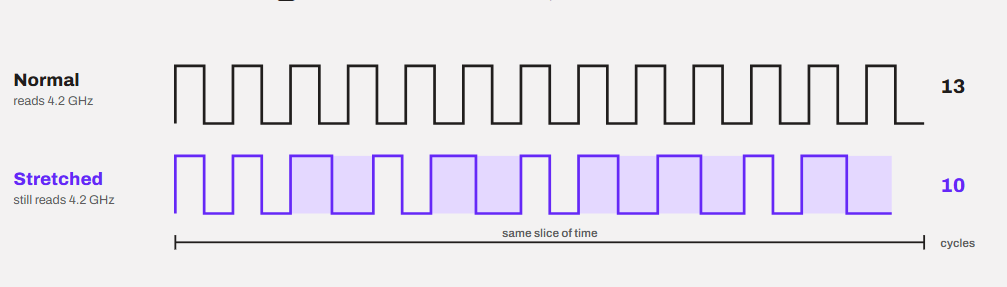
Let me explain with you an example.
Imagine you tell the CPU to run at 4.2 GHz with only 1.0 V. But the CPU said I can’t finish my work in this time. What I can do is to keep showing you 4.2 GHz but quietly take a little longer for each cycle. So, your monitoring software shows you exactly that. You also see temperature lowering, but, under the hood, it is the clock speed that is also being compromised because of the low voltage.
Gamers Nexus tested exactly this on the Ryzen 5 3600 and Ryzen 9 3900X. They set Vcore manually to 1.0V,, and the 3600 reported a constant 4.2 GHz and much lower temperatures. There were no signs of instability at all. But the Cinebench R20 scores were much worse than stock on both motherboards they tried.
This is the most dangerous kind of performance loss because every number on your screen looks better except the one that matters. The same thing can happen on newer Ryzen chips with Curve Optimizer. A voltage value that is too low for a core can lower your score first before it crashes. But I would like to add that this depends on the method as well. In the same test, a small negative offset behaved much more predictably than a fixed low Vcore.
How to identify clock stretching?
You can catch it simply with HWiNFO.
HWiNFO shows two clock readings for every core: Core Clocks and Core Effective Clocks.
Core Clock is calculated from the multiplier and the base clock. It is what the core is set to run at.
Effective clock is the average speed the core actually ran at, including the time it spent sleeping. You will have to open the sensor data and expand both Core Clocks and Effective Clocks dropdowns. But the CPU must be under a good multi-core load for this to work. I recommend running the Cinebench multi-core test when you take the readings.

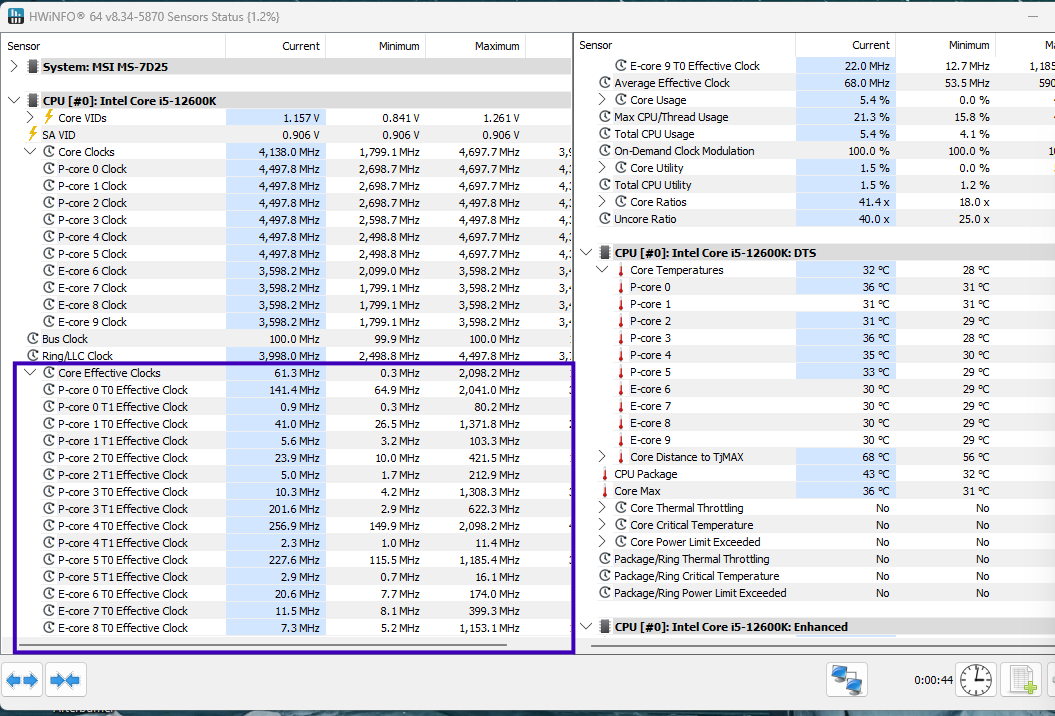
How do you confirm it?
Under a 100% all-core load, both the clocks should be close to each other. If the effective clock is clearly lower than the core clock and your score is also lower than stock, the CPU is clock stretching. Keep in mind that the effective clock is just a hint. The lower score is the proof. The effective clock will probably be very low at idle. That is normal. Wait a little for the cores to wake up.
Case 2. Current Excursion Protection (CEP) on Intel
Intel has its own version of a solution for this problem on 12th, 13th, and 14th Gen Core CPUs. CEP is a protection feature that throttles the CPU instead whenever it sees a voltage lower than what is expected. We do not have to talk a lot about CEP because the end result is the same as clock stretching. The mechanism is different, though. Clock stretching makes each clock cycle longer, while Intel only says that CEP throttles the CPU. But, from this, don’t confuse CEP with undervolt protection. Undervolt Protection on 12th Gen and newer CPUs simply blocks tools like ThrottleStop from changing the voltage.
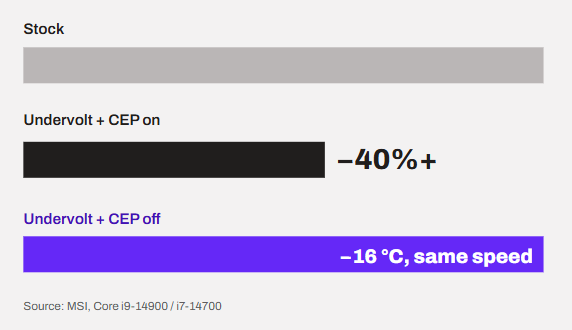
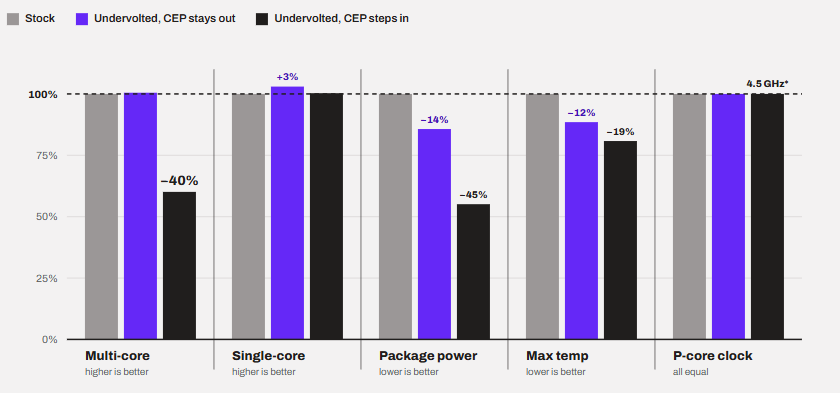
MSI tested this on the Core i9-14900 and Core i7-14700 and found out that lowering the CPU AC Load Line with CEP enabled cut the CPU performance by over 40%. With CEP enabled, the same undervolt ran 16°C cooler, and there was no impact on the performance. I have made this bar graph to help you understand the findings of this article.
On the 13-gen and older non-K processors, you do not get the option to disable CEP. However, on 14th-gen non-K processors, you can do it after updating the BIOS to the newer microcode. All K-series processors on the Z-series motherboard can disable the CEP through the BIOS/UEFI. But keep in mind that it is there for a reason. And with a minimal undervolt, it won’t even trigger.
How to identify CEP?
The process is a little different here as compared to AMD. We can’t use the effective-clock method as we did with a Ryzen CPU above. This is mainly because nobody exactly knows how CEP throttles. Clock stretching is much more simpler in that sense. So, we have to look for the symptoms of CEP on an Intel system. Some of the patterns that you can check are like this.
- The benchmark score drops by a big margin, not by 2% or 3%
- The CPU package power in HWiNFO generally falls along with the score
- The clock speed still looks normal
- There are no crashes or WHEA errors
To confirm it, keep the same undervolt and disable CEP in the BIOS. The option is generally named IA CEP. Then run the benchmark again.
If the score comes back, it was CEP.
And if your CPU doesn’t let you disable it, reduce the undervolt step by step. The point where the score returns to stock is the point where CEP stops stepping in.
Case 3. Instability and errors
If the voltage is too low, the transistors don’t switch with the pace they are required to. Because of this, CPU ends up making mistakes. Internally, there are inconsistencies and errors. What we get are some common problems that we are usually aware of. You will see it as:
- Wrong results or failed renders
- Blue screens and sudden restarts
- Games or apps closing on their own
- WHEA errors in the Windows Event Viewer
Also, an undervolt that passes a heavy benchmark is not automatically stable. A lot of Ryzen users find that their Curve Optimizer values survive Cinebench and then crash at idle or in a light game. So, a proper system stability test with multiple software and workloads is important. I have discussed it in detail in this article.
Case 4. When it isn’t really an undervolt
In the world of overclocking and undervolting, one thing is particularly recomended and it is that you change one thing at a time. Then you test and proceed for the next thing. Undervolting and also overclocking, for that matter, is a process of patience.
I have seen people taking shortcuts and bundling every tweak altogether. They will lower their power limits, turn on Eco mode, disable turbo boost, and lower the multiplier. Over that, they will reduce the voltage offset. Then they just give a restart and complain that the undervolt made their computer slow.
It isn’t that the undervolt reduced the performance. It is just that you lowered the frequency. For example, AMD’s Eco Mode takes a 105 W chip down to a 65 W profile, where the PPT is 88 W. That will reduce your multi-core score, with or without an undervolt. Please understand that underclocking and power limiting are one thing. Undervolting is another.
So, in all four cases, the lower voltage itself is not what’s slow. Either the CPU is protecting itself by doing less work, or you changed something other than the voltage.
How to check if your undervolt is costing you performance?
Most people think temperature and clock speed are the ultimate markers to see if the undervolt worked. Both can look perfectly fine while the CPU is actually slower, as we saw above. So, the only thing you should trust is a benchmark score. I assume you have HWiNFO and Cinebench installed. The process is pretty standard and can be followed easily. Let’s go through it.
1. Note your stock numbers before anything else
Do this before you touch the voltage. Run the Cinebench multi-core test three times and the single-core test once. Keep HWiNFO open and write down:
- Multi-core and single-core score
- Maximum CPU temperature
- CPU package power
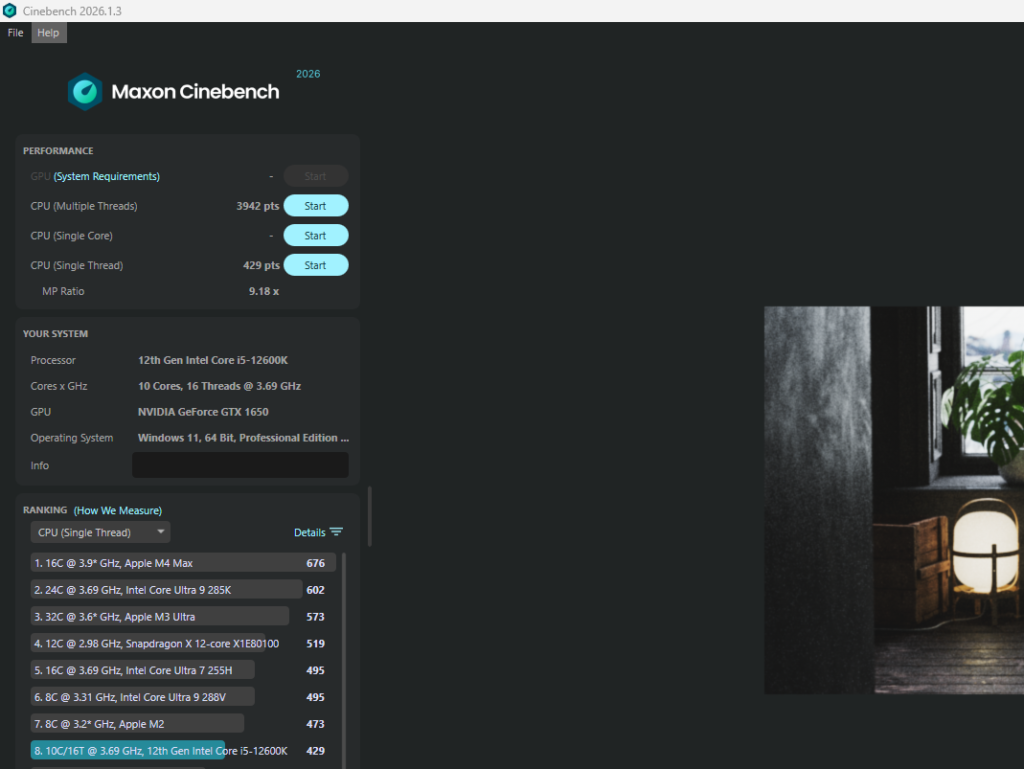
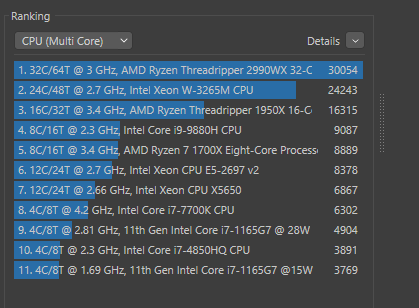
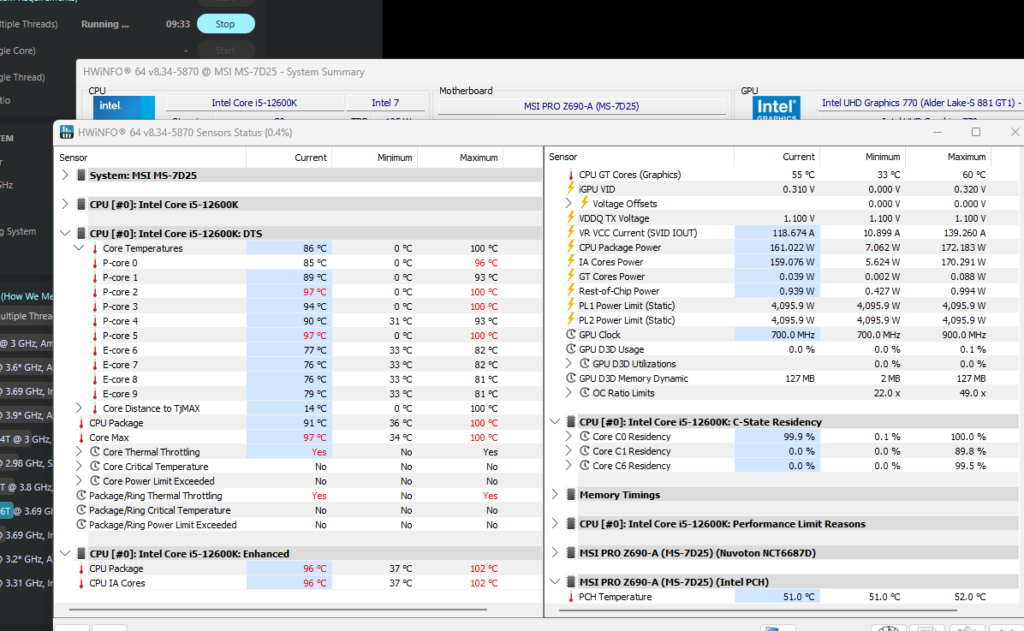
Three runs are important because the score moves by around 1% between runs on its own.
2. Apply the undervolt and run the same test
I am linking to the Intel undervolting and Ryzen Undervolting guides if you want to do it now. Try to keep everything similar to when you tested before the undervolt and after it. Same benchmark, same number of runs, same background apps, same room temperature if possible.
Now, calculate the change:
Performance change = (New score – Stock score) ÷ Stock score × 100
For AMD’s Ryzen 7 5800X numbers from above, it is (6,095 – 5,966) ÷ 5,966 × 100 ≈ 2.2%.
3. Read the Results
If you find out that the score is the same or higher but the tempature and power numbers are lowered, congratulations, your overclocking is working.
Another popular sight is when the score gets lower but the clock speeds look normal. You guessed it right. You have triggered clock stretching or CEP on Intel.
If nothing changes, including score, temperature, and power, probably the undervolt hasn’t been applied.
Lastly, in case of crashes, WHEA errors, restart loops, or BSODs, your undervolt is stable. Maybe you have to do some stability testing or reduce the undervolt a little bit.
4. Look for WHEA errors
Open Event Viewer > Windows Logs > System and look for warnings from the source WHEA-Logger. These are the hardware errors that the CPU caught and corrected by itself. They tell that your PC didn’t crash but the undervolt clearly took it to an edge. If you see them after undervolting, reduce the undervolt.
My Personal Experience: Undervolting an Intel i5-12600K
In a guide, I have undervolted my own PC and while doing that, I was aware of the fact that undervolting can reduce the performance and that too in a way that its hard to detect. So, I followed a process to find out the actual difference in the performance and be sure that I am not losing it in the name of undervolting.
My desktop has an Intel Core i5-12600K. It has 6 P-cores and 4 E-cores, which gives it 16 threads. Now, this is a good chip for this test. It is a 12th Gen CPU, so both CEP and Undervolt Protection apply to it. So, an undervolt can go two ways here. Either the score stays the same and the chip runs cooler, or CEP steps in and the score drops.
Test Setup
| Item | Details |
|---|---|
| CPU | Intel Core i5-12600K (6 P-cores, 4 E-cores, 16 threads) |
| Motherboard | MSI Pro Z690-A |
| CPU cooler | Cooler Master MasterLiquid 240 mm AIO |
| Undervolting method | Negative voltage offset in the BIOS |
| Undervolt applied | –100 mV |
| CEP | Enabled by default |
| Benchmark | Cinebench R23 |
Results
| Test | Stock | Undervolted, CEP stays out | Undervolted, CEP steps in |
|---|---|---|---|
| Cinebench R23 multi-core | 17,470 | 17,550 | 10,500 and even loweer |
| Cinebench R23 single-core | 1895 | 1,952 | 19,000 |
| CPU package power | 120 to 125 W | ~105 W (average) | 60 to 75 W |
| Maximum CPU temperature | 60 to 70°C | 5 to 10°C lower | 45 to 60°C |
| P-core clock under load | 4.5 GHz | 4.5 GHz | 4.5 GHz (reported normal clock) |
So, there were no performance drop in my case, as long as the CEP stays away. With the undervolt, the Cinebench R23 multi-core score moves from 17,470 to 17,550. That is a difference of about 0.5%, which is inside the normal run-to-run variation. The single-core score goes from 1,895 to 1,952.
At the same time, the package power comes down from 120 to 125 W to about 105 W, and the chip runs 5 to 10°C cooler. So, the performance stays the same while the CPU draws about 15 to 20 W less.
Conclusion
So the conclusion of this article is that undervolting lowers the voltage, not the clock speed. So, a stable undervolt should ideally give you the same performance at a lower temperature. If you CPU was throttling earlier, you shoul also expect a little more performance.
It only costs you performance when you go too far. On AMD, that shows up as clock stretching. On Intel, it is CEP. And on both, it is instability.
I would recommend a small undervolt to almost anyone whose CPU runs hot, and especially to laptop users. I would certainly not recommend chasing the lowest possible voltage, as we do with clock frequency when we overclock.
Frequently Asked Questions
Does undervolting reduce FPS in games?
No, a stable undervolt will not reduce your FPS. If your CPU was thermal throttling in games, the FPS can go up a little. But, don’t expect huge gains.
Is undervolting the same as underclocking?
No. Underclocking lowers the frequency, so it does reduce performance. Undervolting lowers only the voltage and leaves the frequency alone.
Can undervolting damage the CPU?
No. A lower voltage is less stress on the chip, not more. The worst that can happen is a crash, and you may lose unsaved work. You can always bring everything back to stock without any issues. In fact, the less heat may benefit in the long run reducing the silicon degradation.
How much undervolt is too much?
There is no univeral number even for two same processors. Too much is the point where your benchmark score starts dropping or errors start appearing. Go back a step or two from there.
Does undervolting increase the life of a CPU?
In theory, yes, because lower voltage and lower temperature both slow down the aging of the transistors. There is no study about it but if you think pure physics, lower temperatures should increase your CPU lifespan, not less voltage. Still, this isn’t the best reason to overclock.