

Whether CPU overclocking is safe or not depends on how you are overclocking your CPU. Not all CPUs are the same. Two same CPUs can behave differently on the same overclock and voltage ranges. Their behaviors were already decided when they were manufactured. You will find people saying overclocking is completely safe because they have run a 5.2 GHz chip for six years with no issue. You will also find people saying it destroys your processor.
So, there will always be mixed opinions, and nobody tells you exactly what actually is the “safe.” So, let’s get into it properly and help you understand the concept. We will have to get a little into the physics as well to have a fair idea of what really happens when we overclock. CPUs have their own safety mechanisms like thermal throttling.
Is Overclocking Safe?
I have posted basic overclocking guides for both Intel and AMD processors. But nobody can promise that they can take your CPU that far in terms of frequency and efficiency. If you increase the frequency, the heat will increase automatically because frequency demands voltage. You can now undervolt, but that too to a certain level. In other words, if you want to increase the performance, the CPU will demand more power. And more power means higher temperature. However, there are many caveats to it, and we will be discussing it in this article.
Frequency doesn’t damage your CPU. It is voltage and heat.
Raising the clock speed of your processor, by itself, causes almost no wear. What causes wear is the extra voltage you need to make that clock speed stable and the extra heat that voltage produces.
For a switching circuit, the basic power equation looks like this:
Dynamic power = C × V² × f
Where C is capacitance, V is voltage, and f is frequency.
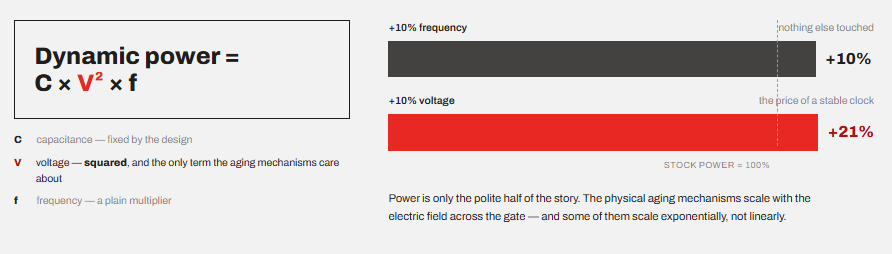
If you look at this equation, frequency sits on its own while the voltage is squared. Now, by raising frequency by 10% and touching nothing else, power goes up by roughly 10%. But, if you raise voltage by 10%, power goes up by roughly 21%. And heat follows power almost directly.
The damage to the silicon inside the processor because of the physical aging does not increase linearly with voltage at all. It happens with the electric field across the transistor gate. And this can be exponential in many cases.
In other words, an overclock that needs no extra voltage is nearly free, and an overclock that needs a lot of extra voltage is where your lifespan is affected the most. So, in this article, every risk I describe below traces back to voltage or temperature, never to the number of megahertz on its own.
What actually wears out inside a CPU?
I know this will sound very technical to most of you, but just stay here because once you understand these four things, every overclocking decision becomes obvious. It would be better if you read a little about how transistors work first. If you do not want to get into all this, you can jump to the next section after these four threats.
Because there is no friction in chips, they do not wear out like the mechanical parts in the machines. What happens is that the transistors slowly change their electrical behavior. They are nanoscopic in size, and the connecting wires are much thinner than them. The wires also start to get thin.
There are four mechanisms that engineers actually design around. A 2025 review of IC reliability lists these same four as the major reliability threats as chips keep scaling in frequency and voltage.
1. NBTI (Negative Bias Temperature Instability)
The voltage and temperature stress gradually break silicon-hydrogen bonds at the interface where the substrate and the gate oxide meet. This results in a jump in the transistor’s threshold voltage. Modern CPUs work with switching on and off of billions of transistors. This requires a specific amount of voltage. Threshold voltage is the minimum gate voltage needed to switch a transistor on.
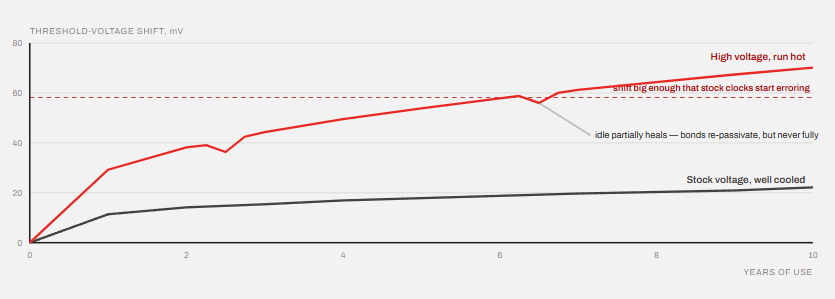
NBTI is driven by voltage and temperature together. Both.
What does this mean in the real world?
Your transistor now needs slightly more voltage to switch than it did when it was new. Do that across a billion transistors, and the chip needs more voltage to hit the same clock it used to hit easily.
However, NBTI partially recovers. When you remove the stress, some of those broken bonds get passivated again by hydrogen diffusing back. So an idle machine heals a little. Not fully, but a little.
2. HCI (Hot Carrier Injection)
We discussed that transistors switch in order for the CPU to work. This can happen billions of times per second based on the CPU frequency. HCL happens during this switching period. Electrons in the channel pick up enough kinetic energy from the electric field to jump the barrier and get stuck in the gate oxide. Once trapped, they sit there and distort how the transistor behaves.
Basically, HCL is the damage caused by the act of switching, which means it scales with how fast the switching happens. This is literally what the clock speed is. So this is the one mechanism where frequency genuinely does contribute. But it still needs a strong electric field to happen, and the field comes from voltage.
3. TDDP (Time Dependent Dielectric Breakdown)
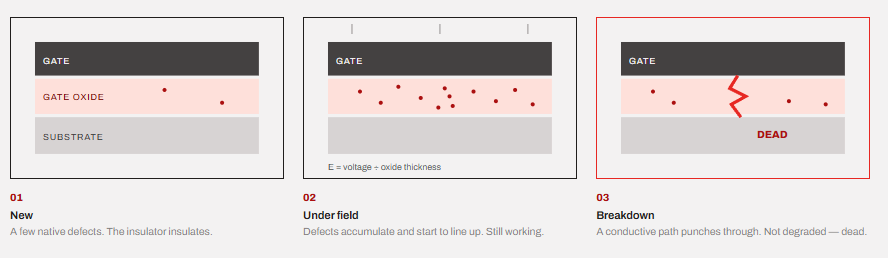
The gate oxide in a transistor is an insulator, which basically doesn’t allow the passage of current through it. It is important for the transistor to work in the way required. However, this layer is unbelievably thin (maybe some atoms wide). Over time, under a strong electric field, defects accumulate inside it until a conductive path punches straight through.
TDDB is driven by the electric field across the oxide, which is voltage divided by oxide thickness. Oxide thickness has hardly shrunk in years, while everything else got smaller.
When that happens, the transistor is dead. Not degraded. Dead.
This is the real reason modern CPUs have so little overclocking headroom. The voltage budget stopped growing a long time ago.
4. Electromigration
This one is mainly about the wiring inside the processor and not about the transistors. When you push high current density through the microscopic copper interconnects on a die, the moving electrons physically knock metal atoms out of place. Over time this thins out the wire in one spot and piles up metal in another. At a point, you get a void, and the connection opens up. In some cases, there can be a short circuit.
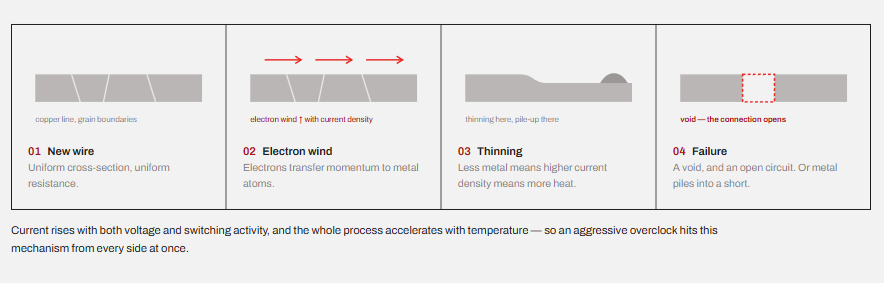
Electromigration happens mainly by current density and temperature. Since current rises with voltage and switching activity, an aggressive overclock hits this from both ends.
Three of the four things that we discussed above are primarily caused by voltage and temperature. The fourth needs a strong electric field to happen.
How much lifespan do you lose with overclocking?
What happens when you overclock isn’t that you are breaking any rules. You are basically spending the allocated budget faster.
Chip vendors do not ship a processor and hope. They budget a reliability lifetime at rated conditions, and they design the boost algorithm to spend that budget at a controlled rate. Intel holds patents specifically on controlling the “reliability stress rate” of a processor, which tells you how deliberately this is managed.
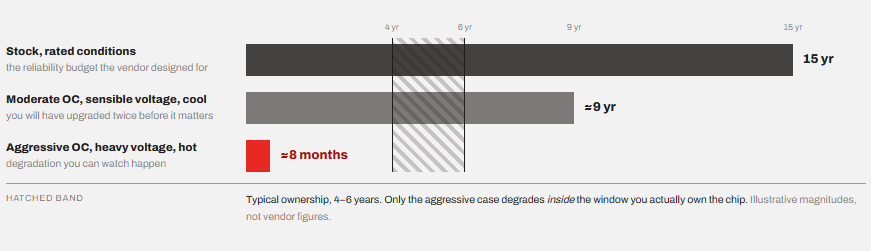
With overclocking, you are spending your allocated budget faster.
However, the real question is whether you will ever notice this age degradation or not.
Most people replace their processors in four to six years. Some may keep one for a decade. So, if a normal overclock at sensible voltage cuts a chip’s lifetime from 15 years to 9 years, you will never notice this change. However, there are no guidelines for a “moderate overclock.”
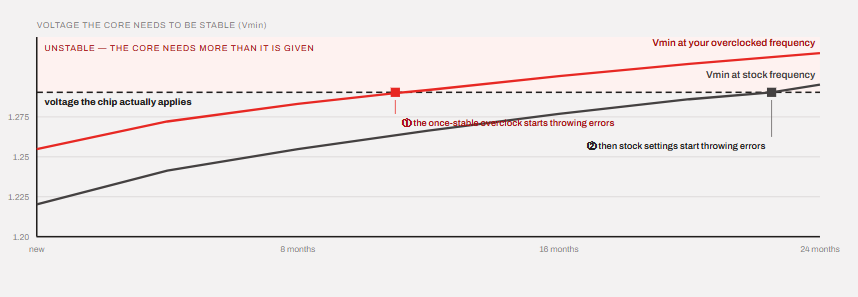
An aggressive overclock can show a different picture. Push voltage hard, run hot, and you can move degradation from years to months. It shows up as your once-stable overclock throwing errors, then your stock settings throwing errors.
The usual sign of failures due to overclocking is almost never a dead CPU. It is a CPU that keeps demanding more voltage every few months to do what it used to do for free.
The popular case study of the Raptor Lake
You do not have to overclock your CPU to put additional stress on it. Modern processors constantly adjust their voltage and frequency based on workload, temperature, and other conditions. There is a great case study that we can take as an example to understand better.
So, 13th and 14th Gen Core desktop processors started failing in the field. Intel eventually named the phenomenon Vmin Shift Instability and traced the root cause to a clock tree circuit inside the IA core that degrades under sustained heat and voltage. So, basically the chips were requesting excessive voltage on their own. The microcode was doing it automatically.
Intel then released a fix in four stages.
| Microcode | Date | What it addressed |
|---|---|---|
| 0x125 | June 2024 | eTVB algorithm issue |
| 0x129 | August 2024 | Capped maximum requested VID at 1.55V |
| 0x12B | September 2024 | Rolled up the previous two, plus elevated voltage during idle and light activity |
| 0x12F | May 2025 | Further improved conditions during multi-day low-activity operation |
22 of the total 28 chips spanning the 13th- and 14th-gen families were affected. If we look at Intel’s solution and make it concise, the solution was to stop letting the chip ask for so much voltage. However, none of the patches repair a chip that had already degraded because silicon damage is on the hardware level and is permanent. However, these updates prevented further harm.
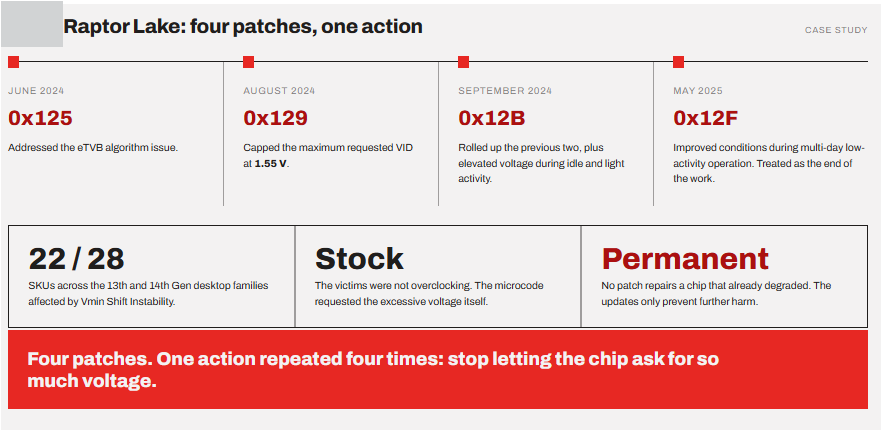
This whole case study provides a useful real-world example of what can happen when the electrical, thermal, and other conditions aren’t properly controlled.
Does overclocking void your warranty?
Yes, but there are some specific cases from both the brands worth discussing.
Intel’s standard warranty explicitly does not cover damage caused by overclocking. Intel used to offer the Performance Tuning Protection Plan, launched in January 2012, priced between roughly $20 and $35, which would replace a chip killed by overclocking exactly once. But it was discontinued in 2021. So, today there is no way to buy overclocking coverage from Intel at all. If you damage your new CPU while overclocking or by overclocking, you get no warranty coverage.
AMD also states that its product warranty does not cover damages caused by overclocking, even when overclocking is enabled via AMD hardware and/or software. That includes Precision Boost Overdrive and tuning down with AMD’s own Ryzen Master. On Threadripper 7000, AMD went further and added a fuse that permanently blows when you enable overclocking, although AMD has said this does not automatically void the warranty by itself.
Saying all of that, there is no serious problem in practice. CPUs fail at very low rates, and the RMA departments rarely have a way to prove what settings you ran. Again, a sensible overclock is unlikely to kill a chip inside its warranty period anyway.
Leaving all this aside, you should always be curious. If a CPU dying would genuinely hurt you financially, that alone is a reason not to overclock it
Undervolting on AMD and Intel CPUs also voids the warranty.
Before CPU, there are several things that can break.
From my own experience with hundreds of overclocks, the processor is hardly the first thing to start misbehaving. The processor has thermal throttling, automatic thermal shutdown, PROCHOT, power protection, and various other mechanisms to keep it safe from burning out. It is the motherboard VRM, power supply, and cooling that start to show their weaknesses.
VRM is mostly the first thing to cook itself. Cheap boards feed a 250W chip through undersized power stages with no heatsink worth the name. Same goes with the PSUs. An overclocked Core Ultra 9 285K can push past 300W on its own, and transient spikes are much higher than the average. A weak PSU produces crashes that look exactly like an unstable overclock.
The modern recommendation is quite different.
In my Intel overclocking guide, I discussed that the 13th and 14th generations of CPUs are already shipped with their maximum possible performance. However, there is good overclocking headroom in the 12th generation. Even though I got good results from undervolting my 12600K rather than overclocking it.
Why?
Because modern chips already boost aggressively on their own, right up to thermal, power, and voltage limits, and they do it dynamically per core. Manufacturers stopped leaving generous margin on the table years ago. A manual all-core overclock on a current chip often lands you below what the stock boost algorithm achieves on lightly threaded work.
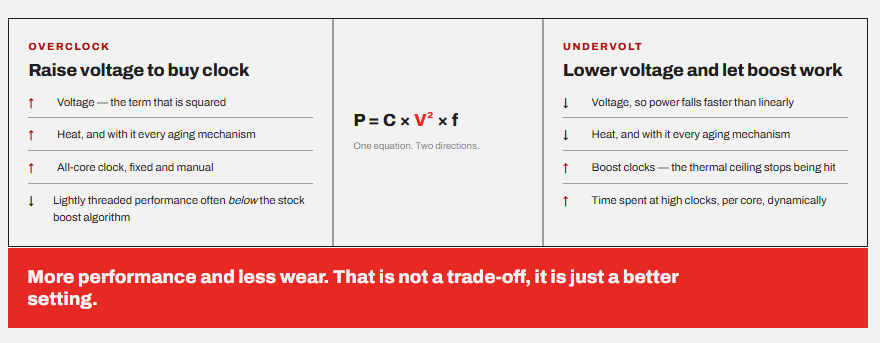
If we want to attack the dynamic power equation that we discussed above, we have to attack the voltage directly. Less voltage means less heat, less power, and less aging, and because the chip stops hitting its thermal ceiling, it frequently boosts higher for longer.
So, the modern processor lottery is all about finding the least amount of voltage to get the same amount of work done. You get more performance and less wear. That is not a trade-off; it is just a better setting.
Should you refrain from overclocking?
Overclocking is much more relevant on older and genuinely under-clocked chips with real headroom left. People who want to chase benchmark numbers can also go for it, but they will have to accept the cost, both in terms of hardware degradation and good components. A peak overclock on any chip will also require a suitable motherboard, cooling setup, power supply etc.
Some people do overclocking as a hobby, and they mostly accept the fact that they can lose that chip anytime.
But, if you are none of those, tune your power limits, undervolt, fix your cooling, and leave the multiplier alone.
Conclusion
A modern overclock at an adequate voltage, on a chip you can actually keep cool, will not affect your ownership experience. You will upgrade long before the chip actually hits degradation. A small overclock on any modern chip with good voltage optimization is in fact a great way to make your system run cooler while offering the same or more performance. If your CPU allows undervolting, you can try it even on stock settings, although it is not necessary.
However, what makes your CPU degrade fast is an aggressive overclock with heavy voltage. This directly results in very high power consumption. Combine this with a poor cooling setup and you are ready to degrade your processor within months.
At the end of the day, the rule is simple enough to keep in your head. Frequency is cheap, voltage is expensive, and heat is what turns voltage into damage.
So, if your question is whether overclocking is safe?
I would say it is safe as long as you are able to keep the temperature down and test the system for stability properly. However, the damage doesn’t happen just with overclocking. It happens when the power and heat are higher than what the CPU is able to sustain. It doesn’t matter how you reach there. If you are at those ranges, you are damaging your CPU.