

Let me just start with the old and repeated story first. ARM is RISC so it’s efficient, and x86 is CISC so it’s powerful.
Okay, let me fit the next possible sentence: ARM is widely used in mobile devices, while x86 is widely used in PCs and servers.
Is that it? Depends on how deep you want to go. If you just wanted an assurance, you can leave. If not, let’s proceed with our article.
Every processor understands exactly one instruction set. Intel and AMD processors understand x86. If you are not aware, an instruction set is the collection of commands that a CPU understands and can execute. These commands tell the CPU what to do, such as add numbers, move data, or compare values.
The chips in your phone, in every Apple Silicon Mac, and in a growing number of Windows laptops and cloud servers understand the ARM instruction set. A program compiled for one cannot run on the other without a translator between them.
x86 (Intel and AMD) uses complex, variable-length instructions and keeps decades of backward compatibility, while ARM uses simpler, fixed-length instructions and is licensed to any company that wants to build a chip. The instruction set decides which software runs natively. Battery life and speed come mostly from how the chip and the laptop are designed.
If you are here as a buyer, here is my short verdict. Pick ARM for battery-first everyday work, as long as your apps support it. Pick x86 for gaming, niche software, and anything you want to build or upgrade.
In order to grab these topics properly, you might want some context, which I have already given on Hex Hardware. I would recommend reading my ISA explainer and the comparison of x86 and x64. However, if you don’t want to do it, I will make sure to cover the basics in this article as well.
What do “ARM” and “x86” actually mean?
Both of them are ISA (Instruction Set Architecture), sometimes loosely called architectures. They define the instructions a processor understands and the rules software follows when communicating with the CPU.
ARM was originally known as the Acorn RISC Machine but later expanded to Advanced RISC Machines.
x86 is named after Intel’s 8086 processor from 1978 and the chips that followed it (80186, 80286, 80386, 80486). Every Intel Core and AMD Ryzen chip you can buy today is a direct descendant.
| What you’ll see written | What it means |
|---|---|
| x86-64, x64, AMD64, Intel 64 | The 64-bit version of x86, introduced by AMD in 2003. Every modern Intel and AMD PC chip. |
| x86 (on its own) | The whole family, or specifically old 32-bit x86. |
| AArch64, ARM64, arm64 | The 64-bit ARM architecture (Armv8-A from 2011, Armv9-A from 2021) |
| ARM or Arm | The family, or the company, which has styled its name “Arm” since 2017 |
So, when a download page asks you to choose between “x64” and “ARM64,” it is asking which of these two instruction sets your processor speaks. We will talk more about it later in this article. Again, for the basic overview of both, I recommend going to my ISA article. This article will cover the differences only.
How are the ARM and x86 instruction sets different?
The instruction set is a contract between the CPU and the software. It defines the instructions, the registers software can use, how memory is accessed, and what the CPU promises about all of it. Two ISAs can vary heavily, and this is true for ARM and x86 as well. So, let’s discuss what makes them different from each other. I am going to use the AArch64 and x86-64 for this comparison because AArch64 can broadly be considered ARM’s equivalent to x86-64.
1. Instruction length (fixed vs. variable)
Every AArch64 instruction is exactly 32 bits (4 bytes) wide, while x86-64 instructions vary in length. x86-64 also has varying encoding patterns. An x86 instruction can be as short as 1 byte or as long as 15 bytes.
It matters a lot in modern CPUs because they are capable of decoding several instructions every clock cycle.
Imagine the decoder receives 16 bytes of code.
The ARM decoder says, “16 bytes, so 4 instructions. Bytes 0 to 3, 4 to 7, 8 to 11, and 12 to 15. I’ll decode all four at once.”
However, the x86 behaves differently. It says, “16 bytes. How many instructions? No idea. Is byte 0 a prefix or an opcode? Is there an addressing byte after it? An immediate value? Basically it can’t know where the second instruction starts until it works out the first one.”
It isn’t that the x86 can’t decode many instructions per cycle. It is just that doing it takes more logic, more power, and more engineering effort.
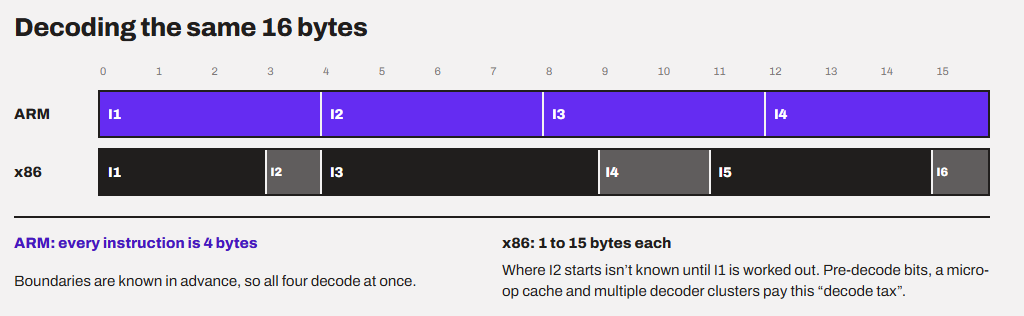
Intel’s Skymont E-core, for example, uses three decode clusters to handle 9 instructions per cycle. As Intel’s E-core lead architect explained, “In typical x86 code, a branch appears roughly every 6 instructions and a taken branch roughly every 12, so three 3-wide decoders are easier to keep busy than two 4-wide ones.”
So yes, x86 can go wide. Intel’s Lion Cove P-core decodes 8 instructions per cycle, the same width Apple’s M1 cores had back in 2020.
The question isn’t whether x86 can decode as fast as ARM. It is how much silicon and power it spends to get there. Basically, the variable-length encoding makes instruction boundaries harder to identify as compared to the fixed 32-bit fixed instructions. This results in additional power and hardware to achieve the same level of throughput for decoding.
2. The way instructions touch memory (load/store vs. memory operands)
I think an example would be required here. Let’s write a simple C function that adds a number to a value stored in memory.
void add_to(int *p, int v) {
    *p += v;   // read the value at address p, add v, write it back
}
On x86-64, the compiler turns it into something like this:
; x86-64: one instruction, just 2 bytes long (01 37)
add dword ptr [rdi], esi   ; read memory at rdi, add esi, write the result back to memory
On ARM (AArch64), the same thing happens something like this:
// AArch64: three instructions, 12 bytes
ldr w8, [x0]      // load the value at address x0 into register w8
add w8, w8, w1    // add w1 to it (arithmetic only works on registers)
str w8, [x0]      // store the result back to memory
If you look carefully (even if you know no coding), ARM follows a load/store model, where arithmetic works only on registers and memory is reached only through explicit load and store instructions. x86 lets many arithmetic instructions take a memory operand directly.
From the difference in the sizes of the codes above, you might be concluding that the x86 did much more work per instruction, right?
Not exactly! Inside a modern x86 core, that single add gets split into micro-ops: a load, an add, and a store. Basically, the same three steps the ARM code comes out directly. The engines that actually execute the work are far more alike than the instruction sets suggest.
In fact, this isn’t a theory but a well-established fact. A team at the University of Wisconsin measured real ARM and x86 chips. They found instruction counts were similar on both, meaning compilers mostly pick the simple, RISC-like x86 instructions. They also found x86 often produced fewer than 1.3 micro-ops per instruction. The same study found executed x86 instructions were on average up to 25% shorter than ARM’s, yet average binary sizes came out similar.
3. Register Count (16 vs. 31)
Registers are very fast but very tiny storage locations inside the CPU core. The more of them software can use, the fewer trips it makes to memory.
x86-64 gives software 16 general-purpose registers. AArch64 gives 31. An important nuance here is that “31 vs. 16” does not mean AArch64 is automatically faster. Modern x86-64 CPUs have very impressive register renaming and big numbers of physical registers internally, so the architectural register count mainly affects what the compiler has readily available to it. So, the registers are more about what is available for ordinary instruction.
However, things are changing now a little bit. Intel’s APX extension doubles the general-purpose registers from 16 to 32. Intel says code compiled for it performs 10% fewer loads and over 20% fewer stores.
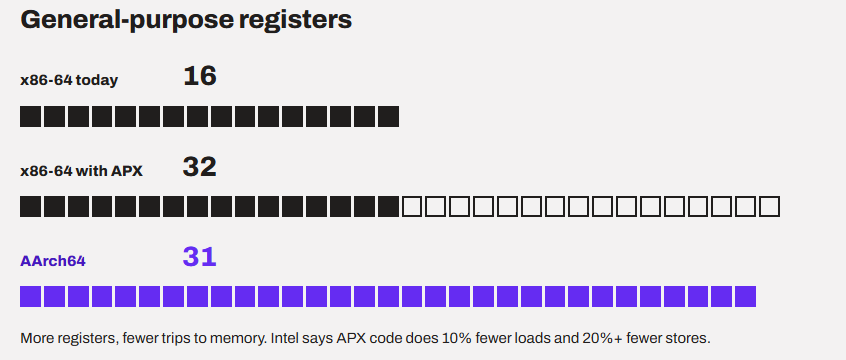
Register count helps only if it is causing a bottleneck for live values to benefit from. Once the compiler can keep most of those values in registers, adding even more registers produces diminishing returns.
16 architectural registers are often enough for x86-64 code, primarily because modern x86 CPUs hide much of the register limitation internally. Also, compilers are good at rearranging calculations, reuse registers, and temporarily spill values to the stack in case of register pressure. So, although x86-64 might sound a little conservative here, it is a mature ecosystem and has its own valid reasons to keep the register count low. Basically, you do not have to worry about it as an end-user.
4. Memory Ordering (Strong vs. Weak)
If you want to know the reason why running x86 software on ARM is hard, memory ordering is your answer.
In modern CPUs, there can be several cores, and each requires memory to work with. So, it is possible that one core’s write may be visible to another core. But it is important to have an order in which one core’s writes become visible to other cores. If there is no defined ordering, different CPU cores could observe memory operations in inconsistent orders, resulting in unpredictable behaviors. The instruction set has to provide the promise of ordered accessibility to the shared memory.
Let’s understand it with an example.
Think of x86 as a post office that delivers your letters in exactly the order you posted them. This model is called TSO, or Total Store Order.
ARM is a courier that delivers them in whatever order is fastest. The exception is a letter you stamp “deliver in order” with a special instruction.
For native ARM software, that’s fine. Compilers add the stamps where they are needed.
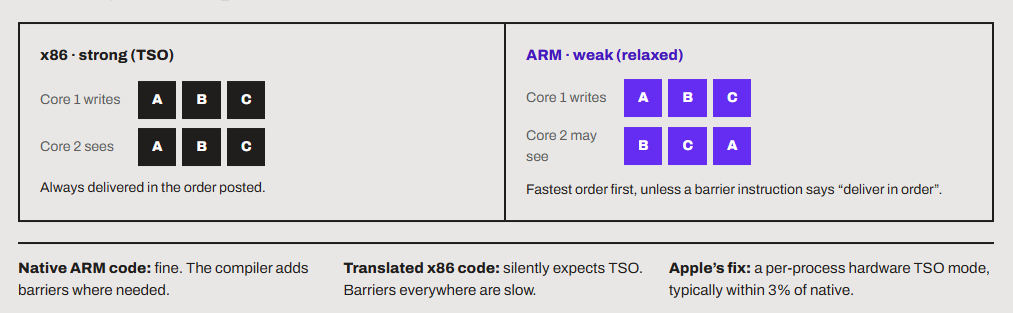
Basically, ARM has a kind of looser memory model, while x86 is much stricter. But both are great in their own applications. The real impact is on emulation, not on native performance.
x86 programs quietly depend on TSO. An emulator that ignores this breaks concurrent code, but adding memory barriers everywhere to mimic TSO costs a lot of performance. However, Apple solved it in hardware. Apple Silicon has an x86-compatible TSO mode, so translated loads and stores behave the way x86 code expects with little overhead.
5. Vector Instructions (AVX vs. NEON and SVE)
It is good if you understand vector instructions first of all. Let’s do it with an example.
Imagine you have to add four pairs of numbers.
A:  10   20   30   40
B:   1    2    3    4
Without SMD/vector instructions, the CPU would do something like this:
10 + 1  → 11
20 + 2  → 22
30 + 3  → 33
40 + 4  → 44
But a vector instruction allows the CPU to put those numbers into a wider register and perform the four additions with one instruction:
[10, 20, 30, 40]
+
[ 1,  2,  3,  4]
----------------
[11, 22, 33, 44]
This is called SIMD, or Single Instruction, Multiple Data. It is useful when the workload involves doing the same operation repeatedly on large amounts of data.
AVX is a family of SIMD/vector instructions for x86 while NEON is a SIMD/vector instruction extension for ARM.
x86’s vector instruction development path is something like this:
SSE → AVX → AVX2 → AVX-512
ARM followed a different evolutionary path:
NEON → SVE → SVE2
A program can be compiled to use a particular vector instruction extension. For example, a developer might compile a program using AVX2 instructions because they allow the program to process data efficiently. But, if your CPU doesn’t support AVX2, it cannot execute those instructions directly. So software can provide a fallback code, but that is not guaranteed.
So, AVX2 support can actually become a compatibility requirement. Plenty of x86 apps check for AVX2 and refuse to install without it. That blocked apps like Ableton Live 12 on Windows on ARM until Microsoft’s Prism emulator gained support for translating AVX, AVX2, BMI, FMA, and F16C.
On the x86 side, Intel and AMD have settled on AVX10 as the next vector extension across client, workstation, and server CPUs.
6. Legacy baggage (ARM cuts while x86 keeps everything)
x86 has a strong rule that the old software should keep working. ARM is far more willing to cut out things.
Intel did try to clean this up. It proposed a 64-bit-only design called x86S in 2023, then dropped it in late 2024.
Arm announced in 2020 that its big cores would be 64-bit only from 2022. Apple went further still. Its M-series chips don’t run 32-bit ARM code at all.
It is sort of a trade-off between compatibility and architectural simplicity. ARM is much more focused on removing legacy support to keep the CPU simple and potentially reduce its area and power consumption. x86 preserves decades of legacy software support.
I also feel like a marketing angle here. I think ARM’s willingness to drop legacy support gives it a cleaner and more modern image, while x86’s commitment to compatibility feels like they are trying to be relevant to all of their users.
Is ARM really more power-efficient than x86?
The common belief is that ARM laptops last all day because ARM is RISC. x86 laptops die in just six hours because x86 is CISC. This is part of the truth, but my biggest issue with the statement is that the reasoning is wrong.
The “Power Struggles” study from the University of Wisconsin (HPCA 2013), which I linked above, concluded that ARM and x86 processors are simply design points aimed at different performance levels, and neither instruction set class is inherently more energy-efficient. Their words are. “The ISA being RISC or CISC seems irrelevant.”
A 2026 study compared an Apple M3 laptop with an AMD Ryzen 7 3750H laptop. The Ryzen was about 23% faster (on a branch-heavy test). But the M3 used roughly 5.8 to 6.4 times less energy. What else do you need as proof that ARM wins in efficiency, right?
But, if you read the conclusion, the author says that this gap comes likely from a newer manufacturing process, lower platform power, aggressive SoC-level power management, and a much better/tighter integration, rather than just the ISA factor.
The graphs below are taken from the same study.
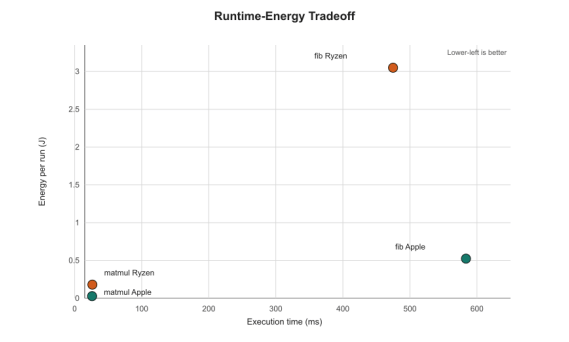
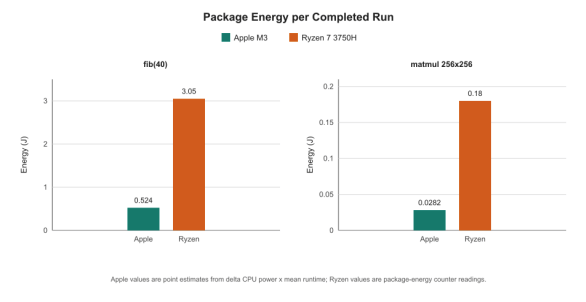
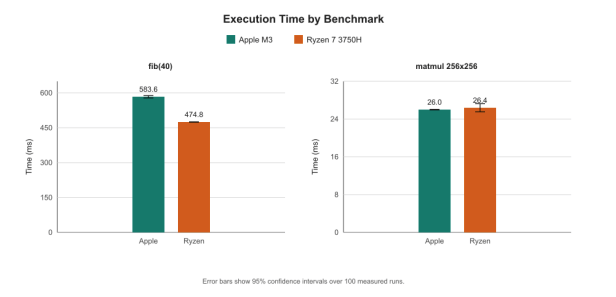
If you dig deeper into the devices, it was a comparison between a 3 nm chip from 2023 and a 12 nm chip from 2019. So, you can easily imagine where these differences are coming from.
Some more studies
I like reading laptop reviews and comparing the results side by side. I see a lot of patterns from there.
The first test that I am referring to is done by Tom’s Guide, where they ran a web-browsing battery test at 150 nits. It was between the 14-inch M5 Macbook Pro and Dell XPS 14, Intel’s Core 7 355 (Panther Lake), Asus Zenbook Duo with Core Ultra X9 388H, and two AMD Ryzen AI laptops. The results were like this.
| Laptop | Processor | Battery life |
|---|---|---|
| Dell XPS 14 | Intel Core 7 355 (Panther Lake) | 20:41 |
| 14-inch MacBook Pro | Apple M5 | 18:00 |
| Asus Zenbook Duo | Intel Core Ultra X9 388H | 14:23 |
| AMD Ryzen AI Laptop 1 | AMD Ryzen AI | ~11+ hours |
| AMD Ryzen AI Laptop 2 | AMD Ryzen AI | ~11+ hours |
To conclude, an x86 laptop lasted about 15% longer than an Apple Silicon MacBook Pro, and two x86 laptops finished about 9.5 hours apart.
In PCWorld’s Netflix streaming test, the Asus Zenbook A16 with the Snapdragon X2 Elite Extreme ran for 13 hours 4 minutes, while the Asus Zenbook Duo with Intel’s Core Ultra 300 (Panther Lake) lasted about 16.5 hours. On raw runtime, the Intel laptop lasted about 26% longer (990 vs. 784 minutes).
To conclude this one, the ARM laptop is about 12% ahead in per watt-hour consumption.
So, the power consumption and hence the battery life belong to the whole laptop, including its battery size, screen, firmware, and OS tuning, rather than the chip, leaving alone with the instruction set working inside the processor.
How did ARM chips earn their efficiency reputation?
ARM was built for the first time for Acorn’s desktop computers, but phones is where it grew. ARM cores grew in devices with tiny batteries and no active cooling (fanless designs). So, designers built wide cores to do a lot of work per clock at the lowest frequencies possible. Intel and AMD spent two decades chasing peak desktop clocks, so they had different design priorities.
Apple gets the newest manufacturing processes first. The M6, which debuted in the new Mac mini on September 22, is Apple’s first chip made on a 2 nm process. A newer node cuts power at the same performance, whatever the instruction set.
Another big reason is that the ARM laptop chip is a system-on-chip design. Basically, the CPU, GPU, NPU, and memory controller sit on one package, and often the RAM as well. Shorter wires mean less power spent to move data here and there. But, again, this is not an ARM or x86 feature. Intel’s Lunar Lake put the RAM on the package too. It is a design choice for thin laptops.
ARM chips are great at managing idle power and software tuning. Phones spend most of their time idle, so ARM chips and their OS are great at sleeping fast and waking up fast as well. Software matters more than what people imagine.
An interesting example is when the Linux laptop maker Tuxedo built a Snapdragon X Elite laptop, the long battery life the chip is known for didn’t show up under Linux.
So, ARM’s efficiency doesn’t come from ARM ISA only but how it is being implemented and on which devices it is being implemented.
Which one is faster: ARM or x86?
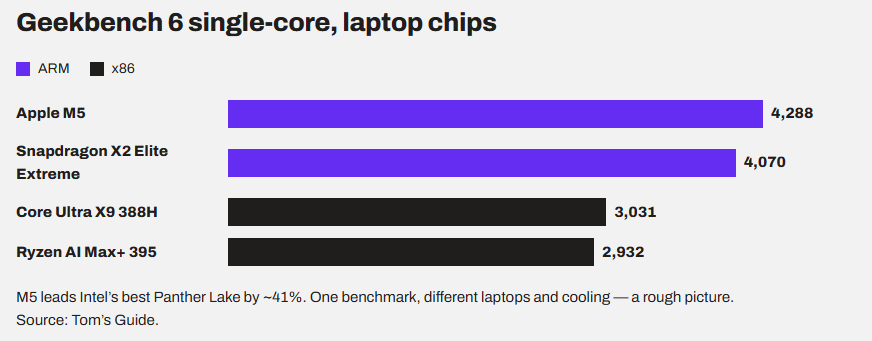
Again, it depends on the chip and not entirely on the instruction set. But, right now, if we look at the stats, the fastest single cores in laptops are ARM cores.
This depends on devices and whom you are comparing them with. I am going to list some of the best tests to help you conclude it by yourself. The internet is full of reviews and comparisons of different ARM-based and x86-based laptops. Here is one comparison that I found to be great.
In Tom’s Guide’s Geekbench 6 testing, the Apple M5 scores 4,288 in the single-core test, while the Snapdragon X2 Elite Extreme scores 4,070. Intel’s Core Ultra X9 388H scores 3,031, and AMD’s Ryzen AI Max+ 395 scores 2,932. That’s about 41% higher single-core performance for the M5 over Intel’s best Panther Lake chip.
In multi-core, the M5 Max reached 29,430, and the Snapdragon X2 Elite Extreme reached 23,407. The Ryzen AI Max+ 395 scored 18,407 and the Core Ultra X9 388H 17,283. The M5 Max wins here again.
In Geekbench AI, the Snapdragon X2 chips scored between about 86,500 and 88,600, ahead of the M5 and Panther Lake chips at roughly 55,000 to 57,000. But that is the NPU, a separate accelerator. Both ARM and x86 chips have one, so it has nothing to do with the instruction set.
What exactly changes on an ARM computer?
ARM laptops will generally feel faster and have a comparatively longer battery life. But it is possible that a game or a printer app doesn’t work. Let’s get into that.
1. Native apps work as they should
All major web browsers, including Chrome, now run natively on ARM. So do Slack, Spotify, WhatsApp, Lightroom, DaVinci Resolve, and Blender on Windows. Progressive web apps already run at native ARM speed. If we talk about Java, .NET, and Python apps, they are usually fine too, as long as the native libraries they depend on have ARM builds.
2. x86 apps run through a translator
Every ARM platform has a translator. We can loosely call them emulators as well.
- Rosetta 2 on macOS
- Prism on Windows 11 (24H2 and later)
- FEX and Box64 on Linux
The job of a translator is to read the x86 machine code, rewrite it into ARM instructions, and cache the results so the next launch is faster. Windows can even mix both in one app. Microsoft built its Office apps with Arm64EC, so they run natively on ARM while still loading older x64 plug-ins.
We often hear that ARM compatibility is solved. Microsoft says apps with native ARM versions account for about 90% of total user minutes on Windows on ARM. But the figure covers only non-gaming app use on laptops priced 800$ and more, in seven countries, from a February 2025 snapshot.
3. Drives can’t be translated
Microsoft says it plainly: “The kernel doesn’t include emulation.“
It means the kernel-mode drivers and user-mode print drivers have to be built as native ARM64 binaries, and an x86 or x64 installer can’t install an ARM64 driver. The only solution is that the manufacturer has to provide an ARM64 driver for Windows to use it.
4. ARM gaming is still improving
But the compatibility remains the bigger issue than the raw performance. Most Windows games can run through Prism, but kernel-level anti-cheat needs native ARM64 support. Even the supported anti-cheat needs native ARM64 support.
GPU performance is also becoming more competitive, while Nvidia and Valve are actively building better ARM gaming ecosystems.
But, until game, anti-cheat, driver, and emulator support become reliable enough, x86 with a dedicated GPU remains the more predictable choice for PC gaming.
Conclusion
From this article, you can conclude that ARM vs. x86 comes down to three layers. The instruction set decides compatibility, the chip design decides speed and battery life, and the ecosystem decides whether your stuff works.
As a buyer, you do not have many choices in terms of the ISA. So, my recommendations would be like this.
If you mostly write, browse, study, or travel, go ARM. If I were buying a laptop just for that, I’d happily pick one for their efficiency, less power consumption, and less heat. Just check your must-have apps, printer, and VPN before you buy.
If you game, rely on niche Windows software, or want to run Linux, stay with x86. Anti-cheat and drivers still block many games on ARM, and Linux support on ARM laptops varies a lot from model to model.
And if you build or upgrade your own PC, x86 is your only real option. There’s no ARM CPU you can drop into a motherboard.
Still, I would recommend researching the specific products rather than just looking at ARM or x86. First, read a battery test of the exact laptop, not just the chip, because two laptops with the same instruction set can finish hours apart. Second, when a download page offers ARM64 or x64, pick the one that matches your processor.
The only advice I might change soon is for gamers looking for ARM computers. Nvidia’s RTX Spark promises native anti-cheat support on ARM, so it’s worth watching the reviews.
Thanks for reading!