

In my CPU ISA article, I covered a little on how people get confused between x86 and x64. We discussed that both of these are closely related and do not require a comparison at all. I agree that x86 is a CPU architecture, or an ISA, to be specific, but x64 comes with it and is not a different thing. It is basically a 64-bit version of the x86 CPU architecture, although this relationship is much more nuanced.
The fundamental mode of operation is iterative in nature. It is also called the Fetch-Decode-Execute Cycle. This core mechanism is how a CPU executes all software instructions, starting from the booting up until the shutdown. Examples of these instructions are adding two numbers, moving data from one place to another, or just fetching data from the memory. Although a CPU ultimately executes binary machine code, the instructions it can understand are defined by its instruction set architecture (ISA), such as x86-64 or ARM64.
So, x86 simply means the CPU using this ISA will understand this specific language.
Now, let’s come to x64, and to be clear, it is neither an ISA nor a CPU architecture.
In short, x86 today means the 32-bit version of a CPU architecture, and x64 (also written x86-64, AMD64, or Intel 64) means the 64-bit version of the same architecture. x64 chips still run x86 code just like the x32 chips. x64 is an extension of x86 or x86-32, not a completely separate architecture. The main practical difference is how much memory each can address (4 GB for 32-bit versus far more for 64-bit). This also decides how much data the CPU can juggle at a time. If your PC was built in the last decade, you are on x64.
We already discussed the origin of the x86 in our ISA article. So, I am not going to discuss that here again. However, I thought the x64 required much more attention than what I gave to it. So, here I am with this article.
Where did the names come from?
86 in the x86 is really old. Intel coined this term back in 1978 with its Intel 8086 CPU. Intel went on to release more CPUs in the same naming scheme, such as 80186, 80286, and 80386. So, this 86 got stuck there.
To give you a context, the 80286 was a 16-bit CPU, and the naming was fine until then. But the 80386 was a 32-bit, offering a flat 4GB address space. So, its instruction set became the common denominator for every 32-bit x86 chip.
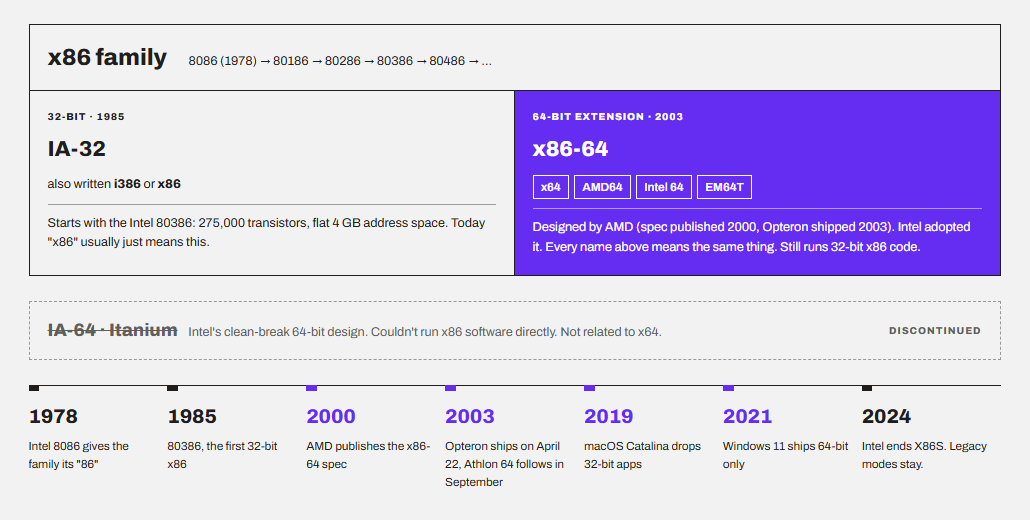
Now, jump to 1999-2000, when AMD was just trying to push x86 to 64-bit. Intel had a different plan called IA-64 (Itanium), a clean-break design that could not run old x86 software directly.
AMD went the complete opposite way. They extended x86 instead of replacing it. They published the full spec in August 2000 and shipped the first chip, the Opteron (K8 “SledgeHammer” core), on April 22, 2003, followed by the Athlon 64 that September.
AMD created 64-bit x86, and Intel just adopted AMD’s design. Intel called its version EM64T, then Intel 64. It is the same thing as AMD64. So, here is how I look at it to clear my confusions sometimes.
- x86 = the family, now shorthand for 32-bit.
- x64 = x86-64 = AMD64 = Intel 64 = the 64-bit extension.
For this article, when I write x86 only, I mean x86 (32-bit). The naming for 64-bit systems is much clearer, i.e., x86-64. I am highlighting this because it is true only when we are using the terminology commonly used in Windows/software distribution. It can be false in technical CPU/ISA discussions because x86 technically refers to the broader instruction-set architecture family, which includes both 32-bit x86 and its 64-bit extension, x86-64.
One instruction can be performed two ways (simplified).
Let’s write a simple C program as our example.
int add(int a, int b) {
    return a + b;
}
The purpose of this program is simple. It take two numbers, and hand back the sum. Now watch what the CPU does with it.
1. How the program runs on a 32-bit x86
In a 32-bit system, the two numbers get pushed onto the stack. A stack is basically a scratchpad on the memory, which can be used for many things. Here we are using it to write down our values. This is how the program goes.
mov eax, [stack]       ; get a
add eax, [stack+4]     ; get b and add it
ret
The main thing to look here at is that the arguments are sitting in memory, so the CPU has to load them from the stack before using them.
2. How the program runs on a 64-bit x86
In x64, the common calling conventions pass the first few integers in registers instead. For example, on Linux, the program goes something like this:
add eax, ediHere, a and b are already in CPU registers. The CPU can perform the addition without first fetching the arguments from the stack.
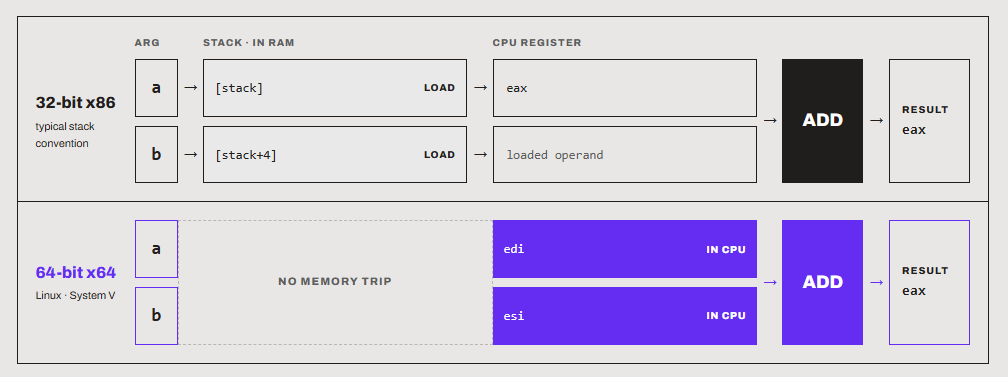
In the image above, you can clearly see that the x64 calling conventions provide more registers for passing function arguments, whereas traditional 32-bit x86 conventions commonly rely on the stack. However, that doesn’t mean that 64-bit inherently makes code run faster just because it uses registers for arguments. The performance relies on a bunch of other things, like calling convention, compiler, workload, optimization, and surrounding code. In fact, the 64-bit systems can sometimes use more memory because pointers and some data structures become larger.
So, the move to x64 changed more than the size of an address. It allowed more function arguments and intermediate values to stay in registers rather than being passed through memory. Because the 64-bit system doesn’t have to reach the memory for for its input everytime, it is the key reason why it is faster.
What actually changed with x64?
When we proceed from x86 (32 bits) to x86-64, we got many advantages in terms of performance how our programs actually run. This helped the most with memory management and scalability.
1. More and wider registers
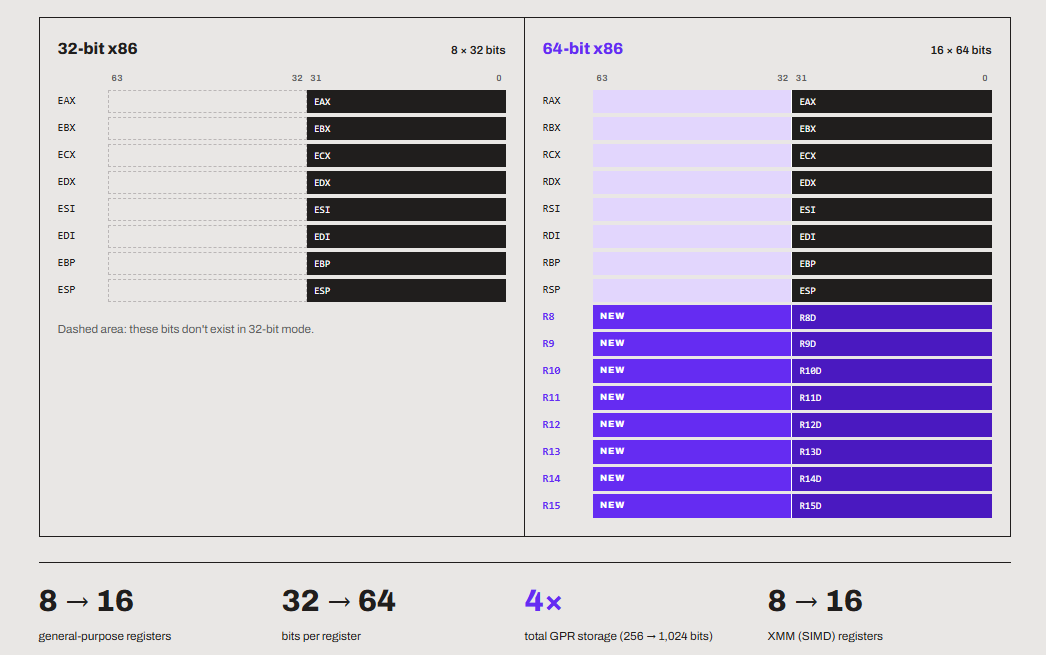
A 32-bit x86 CPU gives you 8 general-purpose registers (EAX, EBX, and friends), each 32 bits wide. The x64 widens those to 64 bits (RAX, RBX, and so on) and adds 8 brand-new ones, R8 through R15. Basically, you go from 8 to 16 general-purpose registers. The SIMD registers grow from 8 to 16 XMM registers.
Think of a register as a hand to hold things. So, with the x64, the CPU gets twice as many hands, and each of them is also bigger. Below is how you can visualize this.
2. A whole lot of memory
A 32-bit address bus is 32 bits wide. So the number of addresses is 2^32 = 4,294,967,296, which is exactly 4 GB, and that is the ceiling. Theoretically and practically, a 32-bit OS simply cannot see past roughly 4 GB of RAM.
There was a patch called PAE that let some 32-bit systems reach a bit past 4 GB, but a single application still hit the 4 GB wall.
A 64-bit address, on the other hand, could in theory point to 2^64 bytes, which is 16 exabytes. This is a very large memory space and nearly impossible for any CPU to implement. Today’s x64 chips typically use 48-bit virtual addresses, giving 2^48 = 256 TB.
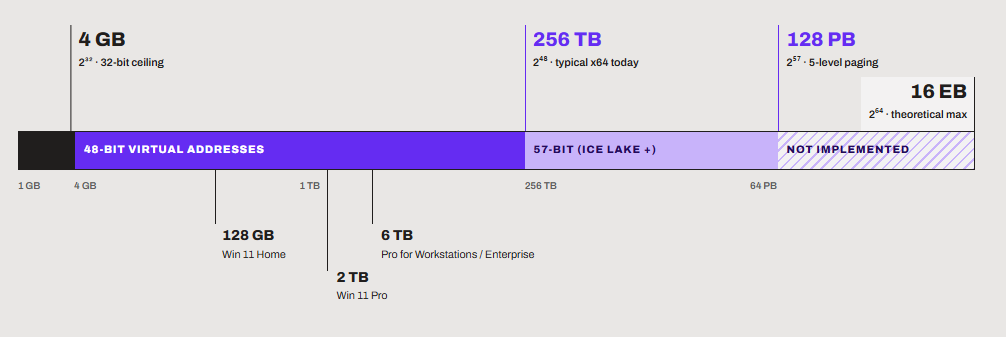
Some newer processors with 5-level paging (first shipped in Intel’s Ice Lake) extend that to 57 bits, or 128 PB.
Memory is closely tied to the operating system as well. For example, per Microsoft’s own “Memory Limits for Windows Releases,” Windows 11 Home tops out at 128 GB of RAM, Windows 11 Pro supports up to 2 TB, and Pro for Workstations and Enterprise reaches 6 TB.
3. Encoding: the REX prefix
I would not go very deep into the REX prefix, but to address those new registers and 64-bit operands, x64 introduced a new instruction prefix called REX.
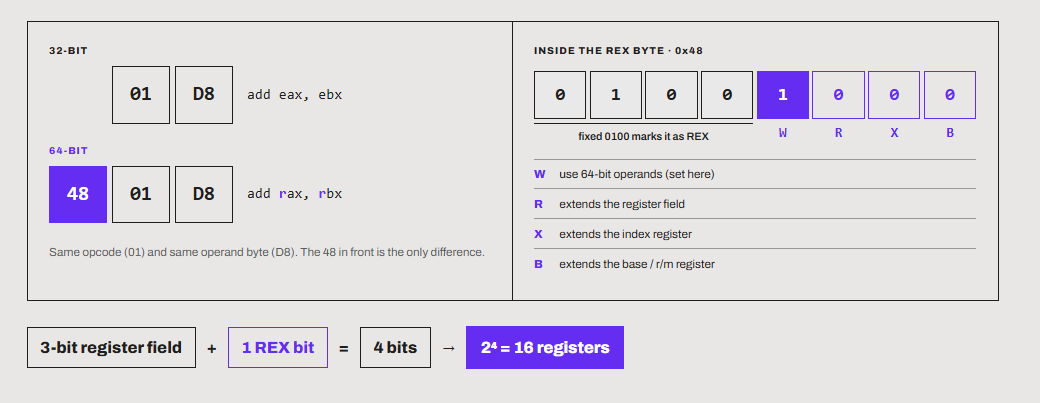
To put it simply, it is a one-byte tag glued to an instruction that says, “Use the 64-bit registers now.” It carries 4 bits of payload, which is exactly enough to reach 16 registers. It is proof that x64 was bolted onto x86 carefully rather than redrawn from scratch.
4. Calling conventions
We already say that the 32-bit systems lean heavily on the stack to pass arguments. x64 standardizes on passing the first few arguments in registers.
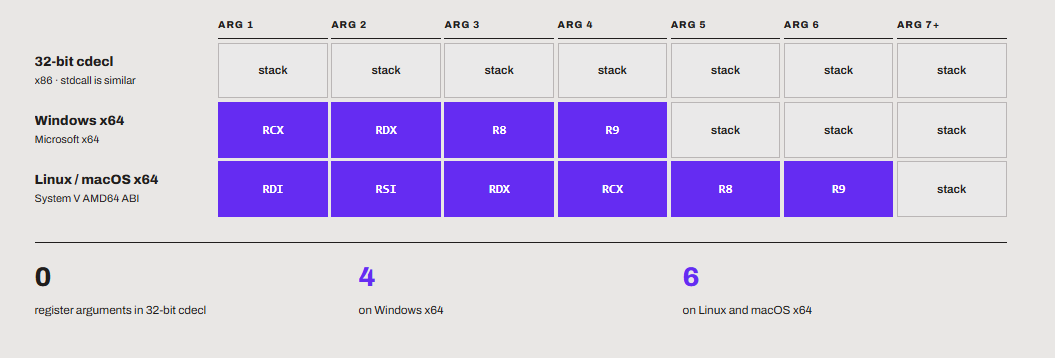
Windows x64 uses RCX, RDX, R8, and R9. Linux and macOS use six registers (RDI, RSI, RDX, RCX, R8, R9). The idea is simple. Fewer memory trips means faster calls and hence a faster execution.
The difference between x86 and x64 in one table
| x86 (32-bit) | x64 (64-bit) | |
|---|---|---|
| Register width | 32 bits | 64 bits |
| General-purpose registers | 8 | 16 |
| SIMD (XMM) registers | 8 | 16 |
| Address space | 2^32 = 4 GB | 48-bit implemented = 256 TB |
| Pointer size | 4 bytes | 8 bytes |
| Arguments passed via | Mostly the stack | Mostly registers |
| Runs 32-bit software | Yes | Yes |
| Runs 64-bit software | No | Yes |
| Also called | IA-32, i386 | x86-64, AMD64, Intel 64 |
If you look closely at this table, the only hard ceiling and the biggest difference is address space. Everything else is a matter of degree. That is why the jump to 64-bit happened when RAM got cheap, not when CPUs got faster.
Why call it x86-64 rather than 64x?
x is not a letter. It is a placeholder. x86 already means “the 86 family.”
When you write x64, you are indirectly saying “the 64 family, any generation,” which is a family that does not exist. The name loses its meaning.
x86-64 follows the normal naming convention instead: take the architecture name, then append the register width. The same pattern is followed by sparc64, ppc64, mips64, and later arm64.
Also, there is a historical reason behind it. AMD published the spec in 2000 under the name x86-64, precisely to signal that it was an extension of x86 and not a replacement. That was the selling point against Intel’s Itanium, which broke compatibility. This name served a strong marketing purpose for AMD.
x64 is a truncation. It dropped the “86” that explained the lineage, so now the two names look like rivals instead of parent and child.
Things that stayed the same between 32-bit and 64-bit
A lot of things did not change, and this is the key point of the 64-bit systems.
An x64 chip can still run 32-bit programs, although it does this through operating modes. So, when the OS is 64-bit, the chip runs in long mode, which has two sub-modes: 64-bit mode for new code and compatibility mode for old 32-bit apps. There is also a pure legacy mode that behaves like a plain old 32-bit chip.
So, yes, an old 32-bit app still runs on 64-bit Windows. Windows handles it with a layer called WOW64 (Windows 32-bit on Windows 64-bit). However, you will miss things like memory segmentation, and the memory model will be flat. Some ancient instructions, like the BCD math helpers (AAA, AAS, and friends), are simply invalid in 64-bit mode. The compatibility is true between 32-bit and 64-bit but not with 16-bit apps. So, 16-bit apps do not run on 64-bit Windows at all.
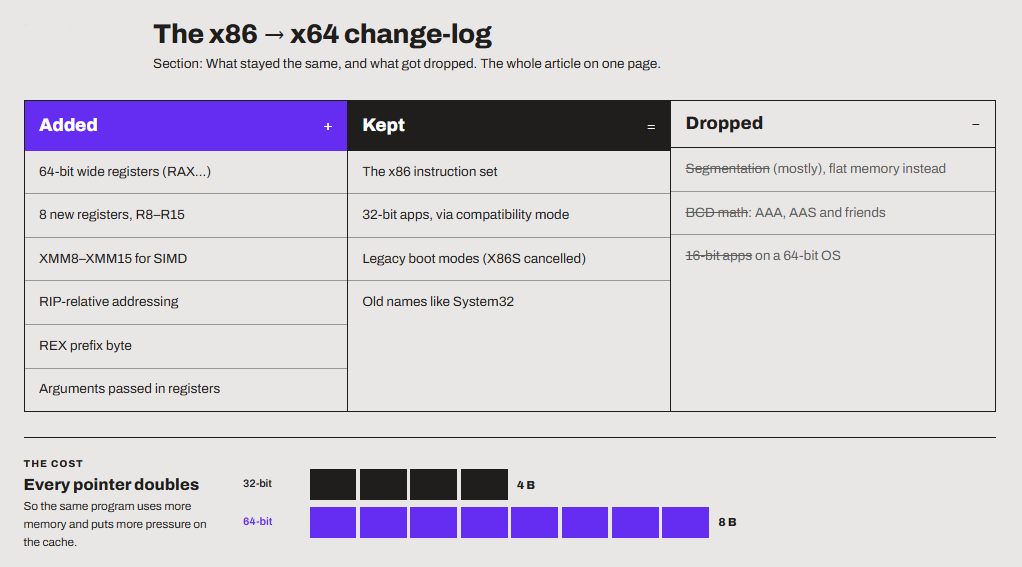
It isn’t that x64 threw x86 (32-bit) away. It is just that x64 kept the useful parts, added a lot, and quietly retired a few relics.
The improvements to 64-bit are not completely free, especially when we talk of memory. Pointers double from 4 bytes to 8 bytes, so the same program uses a bit more memory and puts more pressure on the CPU cache. For most work the extra registers and speed win easily, but I consider is like a trade and not a pure upgrade.
The naming mess on your Windows PC
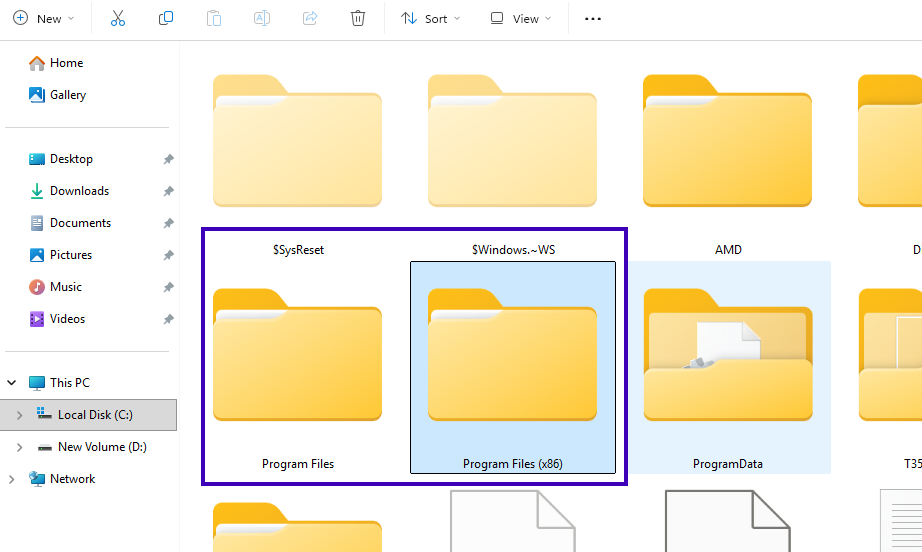
On a 64-bit Windows, you will have two program folders, i.e., Program Files (holding 64-bit apps) and Program Files (x86) (holding 32-bit apps).
But, if you go inside the Windows folder and see the System32 folder, it holds the 64-bits file system while the SysWOW64 will have the 32-bit ones.
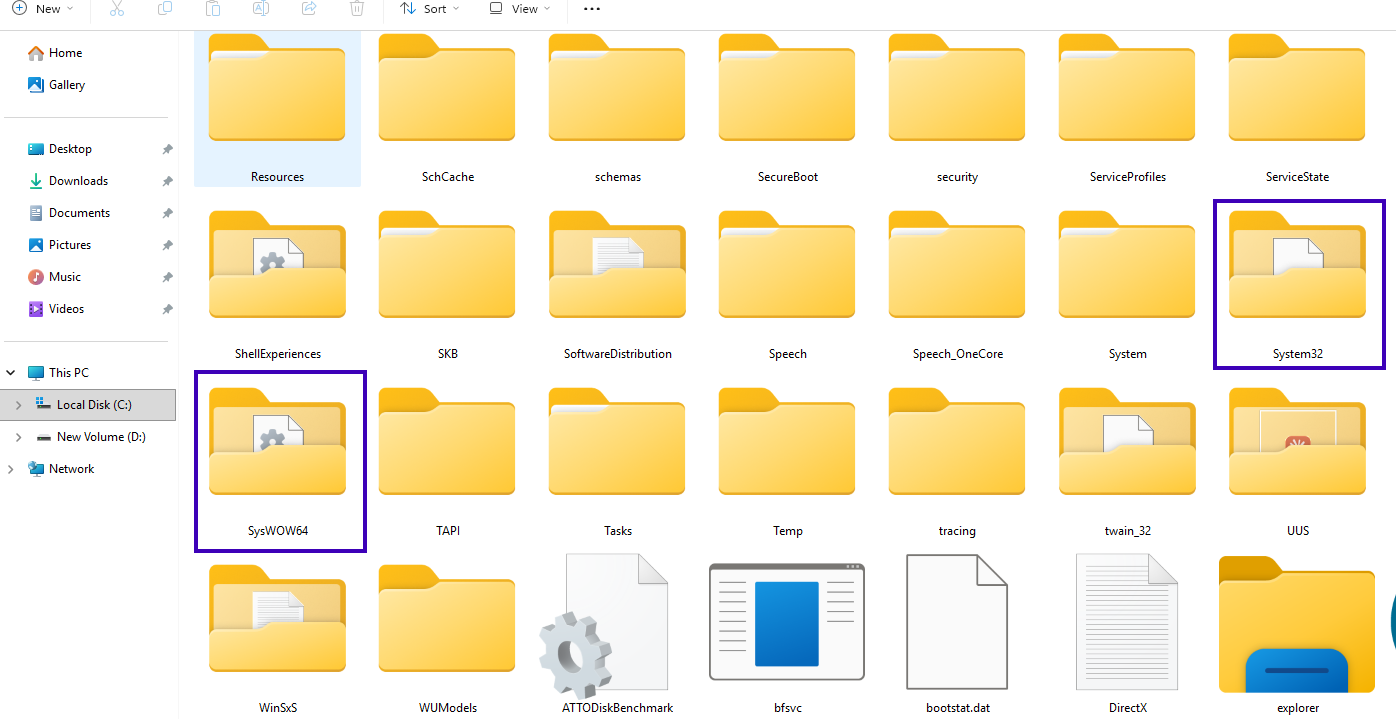
It clearly feels backward.
Why? Because “System32” is an old name that tons of software hard-codes and expects to find. Renaming it would break everything.
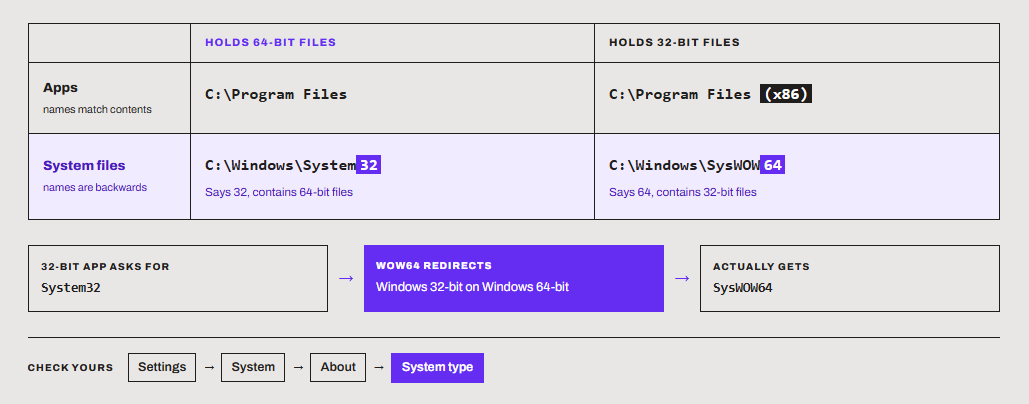
So Microsoft kept the name and, for 32-bit apps, quietly redirects calls to SysWOW64 instead. “WOW64” in the folder name literally means Windows 32-bit on Windows 64-bit. So, basically, the names here are describing the history, not logic. You will find nothing fighting it.
So which one should you choose?
Honestly, this choice mostly made itself already. You do not get to choose it normally, but there can be cases where you might have to make a decision.
1. Building or buying today. x64, and you will not think about it again. Windows 11 ships 64-bit only. There is no 32-bit edition.
2. Picking an installer. If your system is 64-bit, take the x64 build. It gets the extra registers and the full address space.
3. Running genuinely old hardware or one stubborn legacy program. This is the only real case left for x86, and it is shrinking. Apple dropped 32-bit apps in macOS Catalina, and major Linux distributions have been retiring their 32-bit builds for years.
The Current Scenario
On Valve’s Steam Hardware & Software Survey (August 2026), Windows totals 93.95%, split as Windows 11 64-bit at 70.97% and Windows 10 64-bit at 22.90%, with no measurable 32-bit Windows share.
There was even a proposal from Intel called X86S regarding the removal of legacy execution modes and OS-level architecture features. They didn’t simply say anything about the removal of 32-bit instructions, but their own description says that X86S would be a “64-bit mode-only architecture.” Later, Intel said that while we have pivoted away from the x86S initiative, our focus remains on driving innovation and collaboration within the x86 ecosystem,” via a new x86 Ecosystem Advisory Group formed with AMD, Google, and others. So the legacy modes are staying for now.
For any machine you buy or build today, the answer is simply x64, and you rarely have to think about it. The only time “x86 vs x64” still matters is when you are downloading software for a very old 32-bit machine or picking the right installer on purpose.
Conclusion
To put it simply, x64 is x86 that grew up. It still reads the past 32-bit programs, holds far more memory space, and passes work through registers instead of the stack. These are the key reasons why it is much faster.
If you are choosing today, choose 64-bit and move on. The only reason to touch 32-bit now is legacy hardware or one stubborn old program.
However, if you are still confused in naming, i.e., between x86 and x86-64, I would say stop treating them as two rivals. One is the family, and the other is that same family running 64-bit. If a download page offers both, and your PC is modern, take the 64-bit one. That’s it.
I hope this helps!