

When buying a new CPU or comparing them, you see different performance numbers. Especially in benchmarks, you see things like single-core or single-thread performance and multi-core or multi-thread performance. These are very important markers of how a CPU will perform under different workloads.
One processor may have excellent single-core performance but a lower multi-core score than another CPU with more cores. Another CPU can have many more cores but perform similarly in everyday applications.
But what does this mean? How does this impact your CPU purchase or upgrade decision? Let’s uncover.
CPUs do not perform every type of task the same way. Some work has to be done sequentially, meaning the next operation depends on the previous one (impacted by single-core performance). However, some tasks can be divided into many pieces (impacted by multi-core performance). This work can be processed simultaneously by multiple CPU cores.
So, two different types of tasks can be handled by a CPU in two different ways. The operation depends on whether the task can be shared with multiple CPU cores/threads or not. Know more about CPU cores in this article.
Why do we have multiple cores in the CPU?
In the past, chipmakers used to make CPUs faster by increasing the clock speed. More cycles per second means more work done. This happened until around 2005, and after that point, they were no longer able to push clock speed any higher.
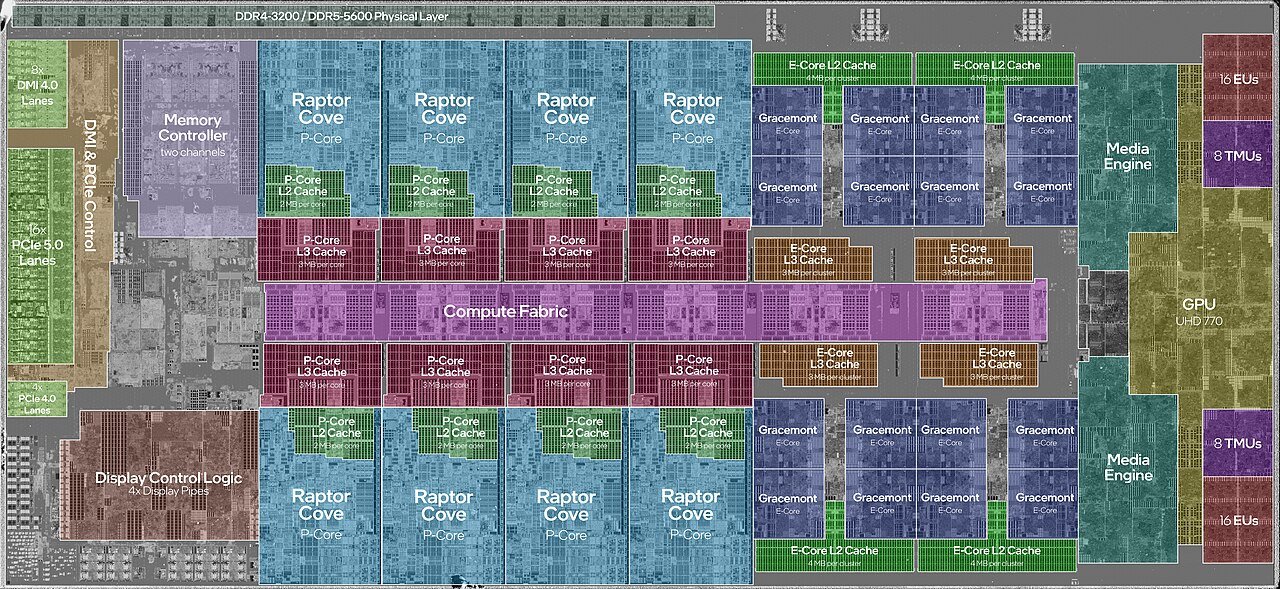
So, to scale the CPU performance, instead of one core running very fast and getting too hot, they started increasing the number of cores on one chip. Now, two cores and 3 GHz can do more total work than one core at 4 GHz. Also, they ran cooler.
Both Intel and AMD launched their two dual-core chips in 2005. And after that, the core count is increasing steadily. 8 and 12 cores are the new normal. We can even go for a workstation CPU with 96 cores.
Multi-core CPUs solve the power and heat problem. It allows the operating system and applications to utilize parallel operations if they want to. Otherwise, if software is good enough with a single-core utilization, it is free to do so.
A little on threads
So, the core is physical hardware. It resides inside the CPU. But thread is something software. You might have seen manufacturers highlighting the number of threads along with the core count. Yes, they are really important. So, a thread is a stream of instructions. How many instructions will happen per clock cycle depends on the IPC (Instructions per cycle) of the CPU.
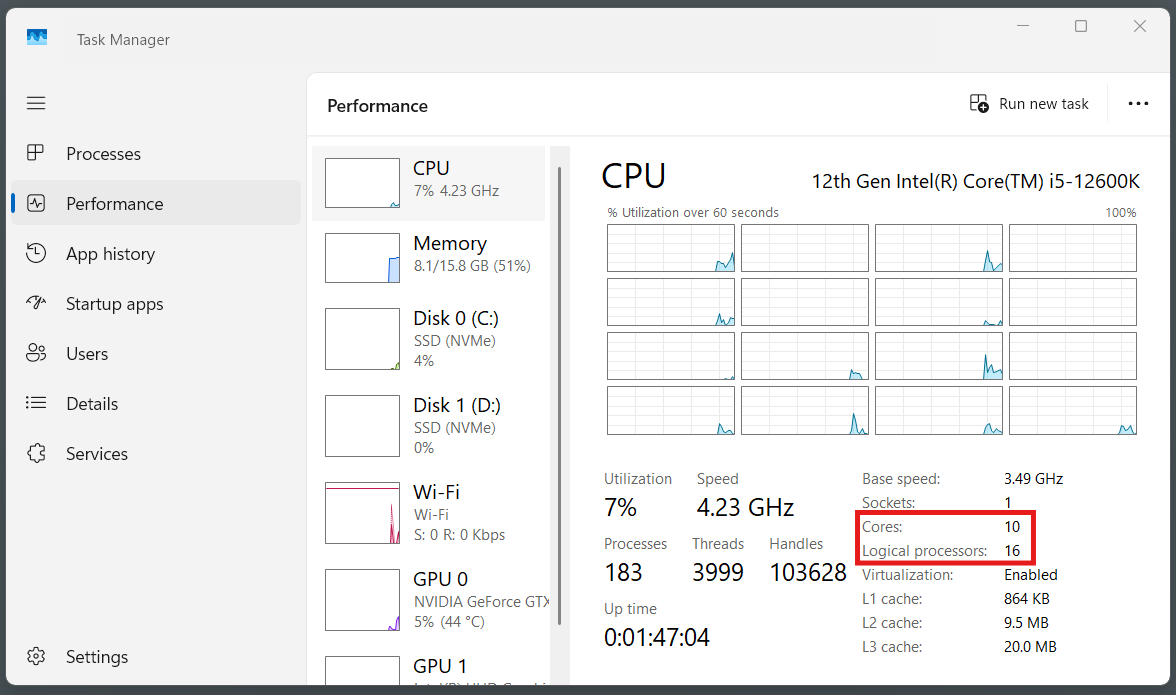
So, normally, each core can handle one thread at a time. But, with SMT (Simultaneous Multithreading) in AMD and Hyper-Threading in Intel, one physical core can juggle two threads by using its idle internal resources more efficiently. Normally, it adds somewhere around 10 to 30% more throughput, not a full doubling.
So, basically, if CPU cores allow for the CPU to work on multiple tasks at a time, SMT, or hyper-threading, allows a core to handle two threads concurrently.
What is single-core performance?
Single-core performance is how quickly a CPU can process a workload that primarily depends on one execution thread. It all comes down to two things multiplied, i.e., clock speed (GHz) and IPC (Instructions Per Clock).
Clock speed (GHz): how many cycles the core runs per second.
IPC (Instructions Per Clock): How much useful work gets done in each cycle. Newer microarchitectures typically get more done per cycle than older ones, even at the same clock speed.

This is the reason why a newer CPU running at 4.5 GHz can beat an older one running at 5.5 GHz. The newer chip simply does more work per tick.
Single-core performance matters most for work that can’t be split up. A chain of steps where each one needs the result of the last one before it can continue. Loading a level, a webpage rendering, or a single database query are some of the examples of single-core operation.
Here, the performance can be increased only by increasing the clock speed and IPC.
What is Multi-Core Performance?
Multi-core performance is the total work all the CPU cores finish together. It matters for the tasks that can be broken cleanly into independent pieces. Rendering, separate frames of a video, compiling separate files in a codebase, or simply multitasking. Different cores can be assigned different work in these operations.
In my college, my hardware teacher used to say that anything where you see a progress bar comes under multi-core performance. I still remember the sentence. However, there is an exception. The key distinction is between progress reporting and parallel execution. For example, a file-copy operation can show a progress bar while the actual work is largely handled by a single thread.

But what my teacher was indicating is that a progress bar often indicates a long-running workload. Most of these workloads such as video rendering, compression, and compilation can be divided among multiple CPU cores.
However, whether a task can be assigned to multiple cores depends on its nature and whether the programmers want to run the software that way. In fact, a lot of software, especially older or simpler programs, still runs mostly on one or two threads no matter how many cores are sitting idle next to them.
More cores doesn’t always mean more speed?
Amdahl’s Law states that “the overall performance improvement gained by optimizing a single part of a system is limited by the fraction of time that the improved part is actually used.“
What does that mean?
Every computer task has a portion that can run in parallel and a portion that can’t. No matter how many more cores you add, the part that can’t be split still runs at single-core speed. And that part sets a hard ceiling on how much extra cores can help.
If 90% of a task can be split across cores and 10% can’t, going from 1 core to unlimited cores can only ever make that task about 10x faster. You can never make it 100x.
This is the reason going from 4 to 8 cores usually helps, but going from 16 to 32 cores barely moves the needle on the same task. This is exactly why an 8-core CPU can feel just as fast as a 16-core CPU for gaming and browsing but noticeably slower for video rendering.
Rendering can be scaled because it is the perfect example of a parallel workload. However, a lot of game logic and everyday software has a very big unsplittable chunk. So, it stops scaling very early.
Single-core vs. Multi-Core Performance: Which one matters for what you do
It depends totally on your workload. I think it will be easier to have a broader picture with the help of a table.
| Use case | What matters more | Why |
|---|---|---|
| Gaming | Single-core, mostly | Game logic, physics, and AI lean on a few heavily loaded threads. Most titles use 6–8 cores. After that, except for no gains. |
| Web browsing, office work | Single-core | Tasks are short and sequential, mostly waiting on you or the network. |
| Video/photo editing, 3D rendering | Multi-core | Frames, pixels, and effects can be split easily across multiple cores. |
| Compiling code | Multi-core | Large projects compile many files in parallel. |
| Streaming while gaming | Both | The game needs single-core speed. However, encoding the stream needs spare cores. |
| Servers, databases, virtual machines | Multi-core, mostly | Many independent requests run at once, though any one slow query is still single-core-bound. |
| CAD, simulation, scientific computing | Multi-core | Calculations split cleanly across cores |
Now, you might use your CPU for a combination of tasks such as gaming and scientific computing. In that case, you just focus on getting a CPU with a higher core count but also with a good speed. But, if you know your use case well, you can easily save your money on the CPU. For example, for a gaming PC, you can go for a normal 6 or 8-core CPU rather than a 12-core one and invest the saved money on your graphics card.
How to read the benchmarks?
Every CPU review or the benchmark test will report two separate scores, i.e., a single-core score and a multi-core score.
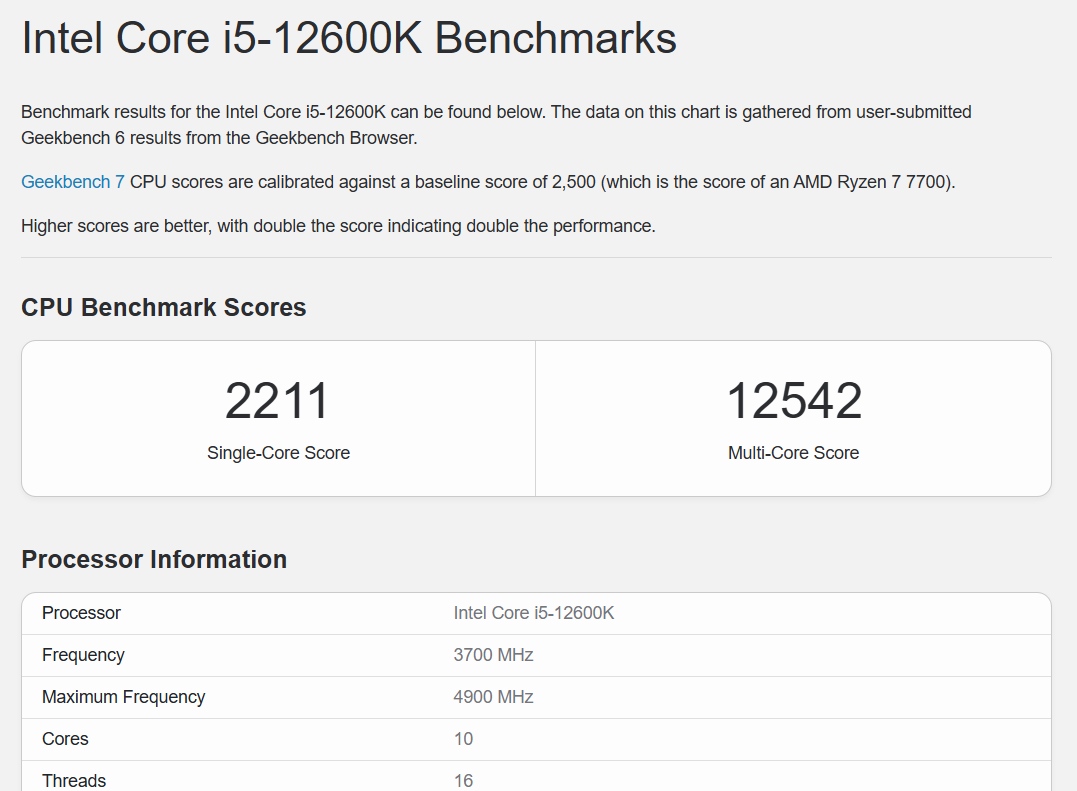
The single-core score runs the test on one core only. A reasonable marker for tasks like file compression, photo editing, browsing, text processing, gaming responsiveness, and everyday snappiness.
The multi-core score runs the test using every core at once. This one shows a CPU’s capabilities in tasks like rendering, encoding, and compiling throughput. As we discussed above, every task can be split across cores.
Never judge a CPU from just one number. A 16-core CPU can have a huge multi-core score, while its single-core performance is mediocre. Check both and weight them by what you spend your time actually doing on your computer.
Conclusion
Having a lot of cores in a CPU is almost always advantageous. However, sometimes having fewer but faster cores can be important. In other cases, you may need many cores but also work at a fast speed. It all depends on your requirements and what you choose. Just understand your workload and make the decision. I hope this guide would have helped you.