

GHz numbers in isolation say nothing about the performance. I will explain that later on, but if you are here to get some buying advice, I would recommend you go through our CPU buying guide.
CPU manufacturers highlight the clock speed prominently on their boxes, and for most of the people, it is one of the major specifications while buying a processor or laptop. And, in fact, the clock speed is the heart of a CPU. It sets the reference for even the smallest instruction to get executed. However, the actual performance depends on the CPU microarchitecture, mainly IPC. A new generation CPU with a lower clock speed can surpass the old generation CPU with the same or even higher clock speed. But that is the topic for another day. Today, let’s discuss the base clock and boost clock in CPUs.
Let’s take an example of my 12600K processor. It comes with Intel’s hybrid technology, which can be kind of confusing, but it has the boost clock speed up to 4.9 GHz and a base clock of 3.7 GHz.
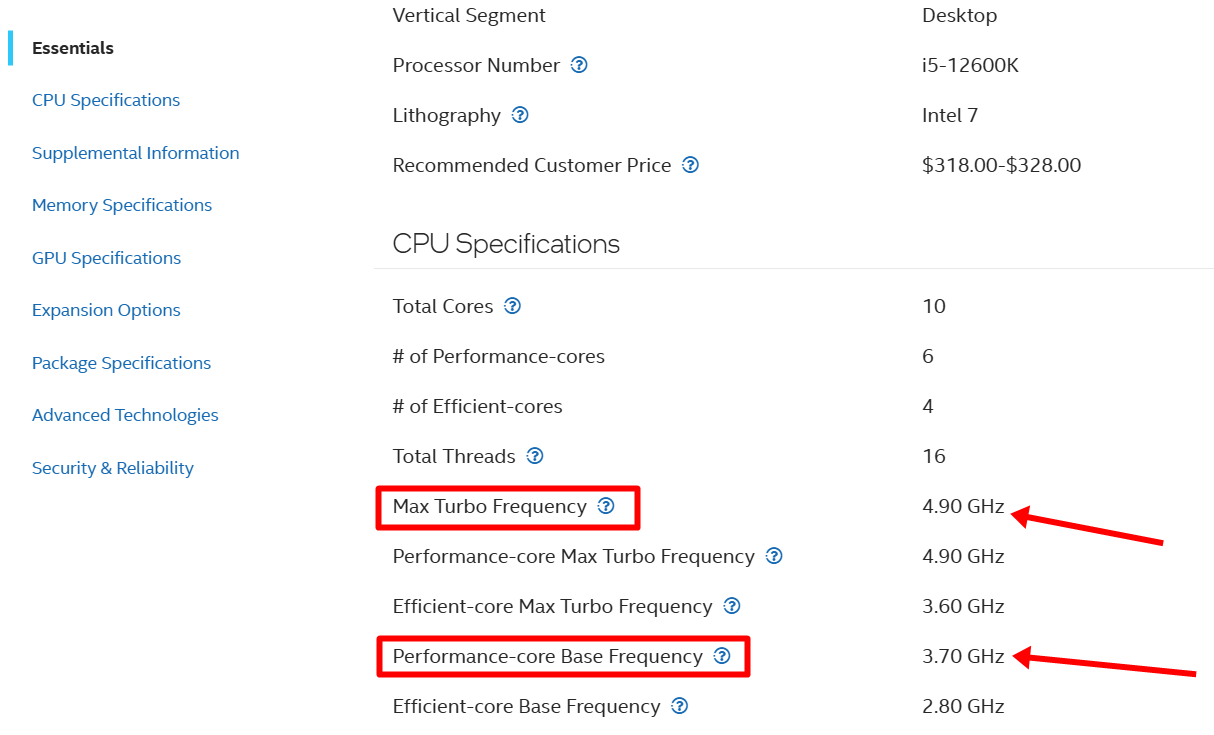
Now, let’s check the Task Manager for a second.
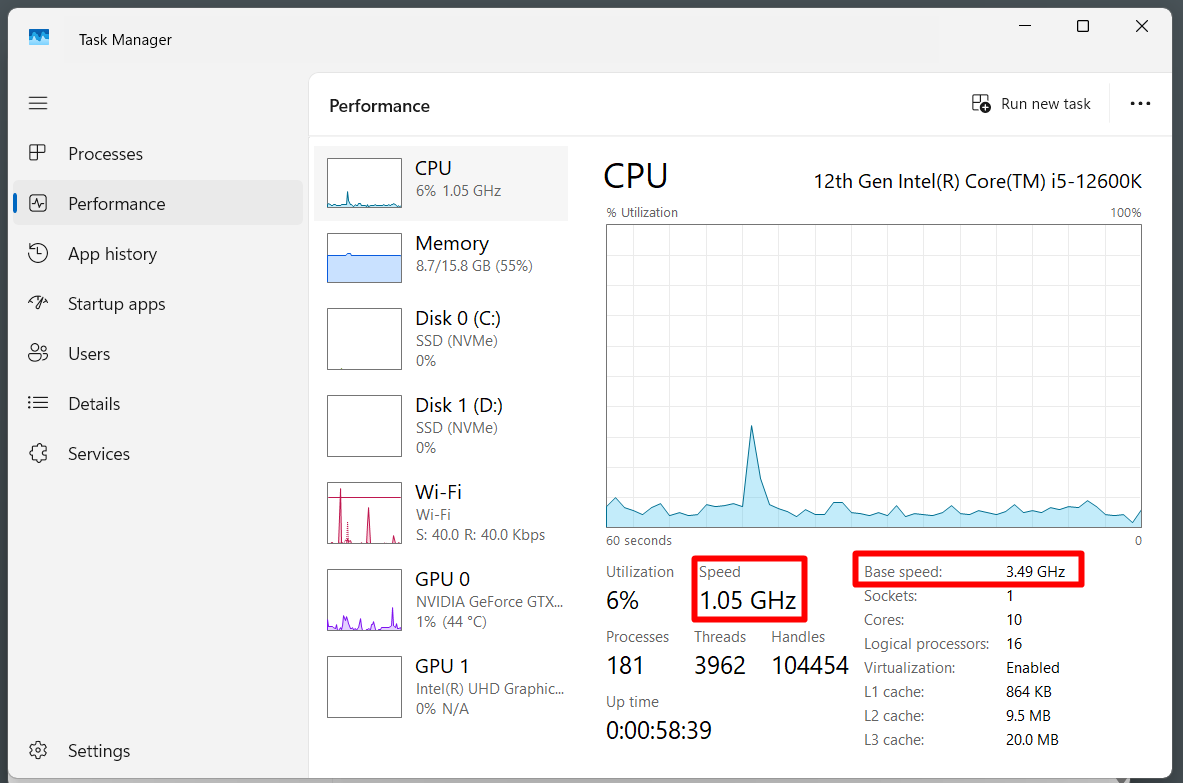
What is this? Why is the speed not set at the base clock of 3.7 GHz? The current speed is changing, and now, it is just 1.05 GHz.
Let’s discuss what is going on here.
What is clock speed actually?
The clock speed in any CPU tells you how many clock cycles the CPU’s clock signal completes in a second. So, if your CPU runs at 4 GHz, it is oscillating for 4 billion cycles per second. Now, because the CPUs work on digital signals, a clock is kind of a very precise electrical timing signal. Look at the simplified image below.
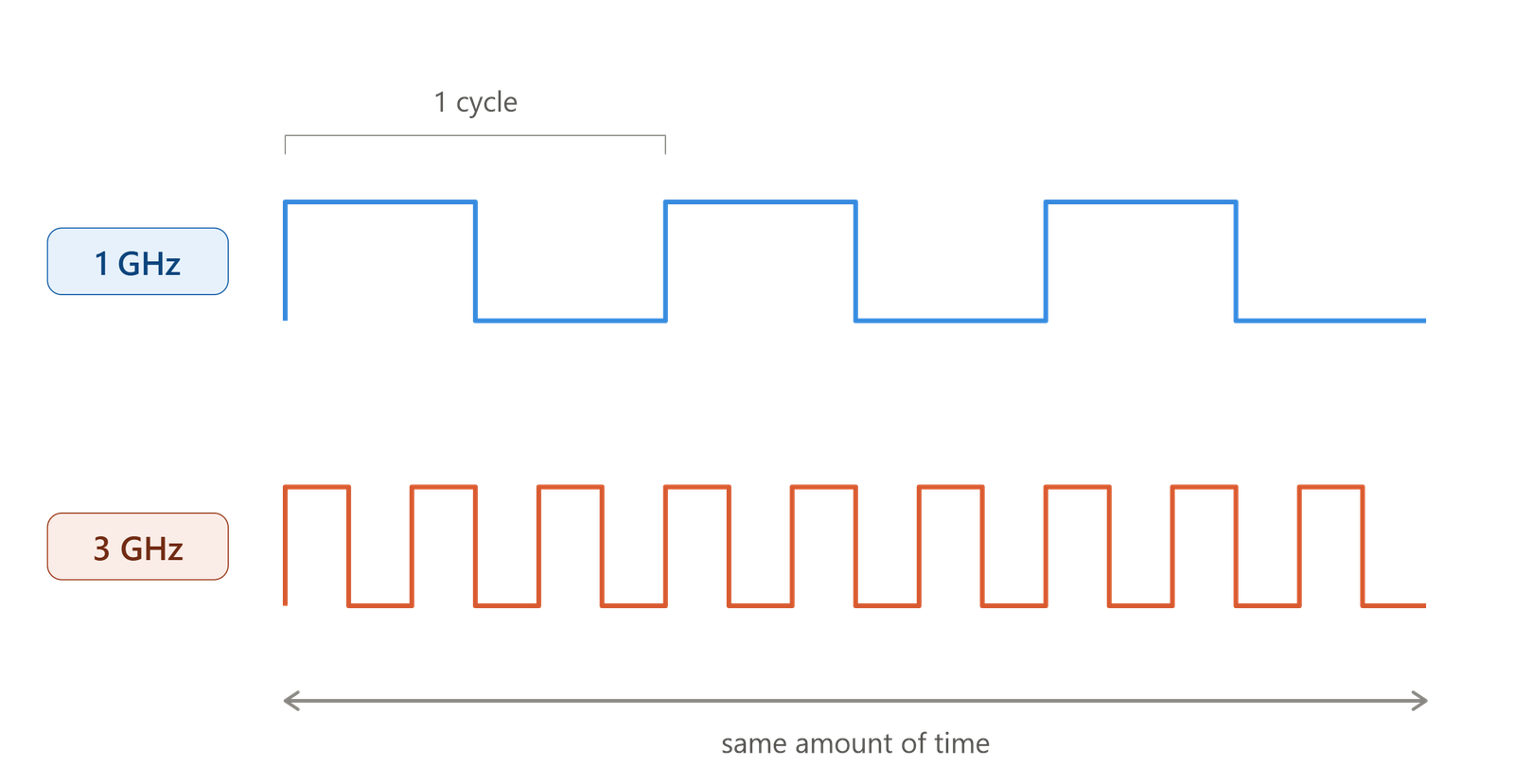
The clock does nothing on its own. Rather, it provides a synchronized reference for the digital circuits inside the CPU. Almost everything inside the CPU depends on and works on the basis of this clock. You can think of it like a metronome telling circuits when to advance to the next state. However, there is no single clock because modern CPUs run multiple clocks for cores, cache, memory controller, etc., each at their own speed. What we are referring to is the core clock frequency.
The Base Clock
Let’s clarify first that the base clock isn’t the speed at which the CPU always works. Modern CPUs can increase and decrease their performance as per the load, and it is good not to waste power and resources when we are well off with a lower clock speed.
So, the base clock is the frequency the manufacturer promises every core can hold, all the time, under normal cooling, without breaking the chip’s power budget.
So, if your Ryzen 7 9800X3D says that it has the base clock of 4.7 GHz, it doesn’t mean it will stay at this clock speed all the times and reach the boost speed when put under load. Most people assume the base clock is the lowest clock frequency that the CPU can ever hit. But that is not true.
It is simply the sustained speed under a defined power and thermal limit, not an absolute floor.
It all starts with binning
A CPU isn’t manufactured separately. It is done in a huge number. Hundreds of identical dies are cut from a single silicon wafer and then tested individually. The process of manufacturing is almost all automatic, and a die has to go through 500 to 1000 steps before they come out. Manufacturing at this scale is never perfect. So, some dies can never hit the desired speed. But the makers do not throw them away. They actually tune them to run slower and sell them as cheaper chips.
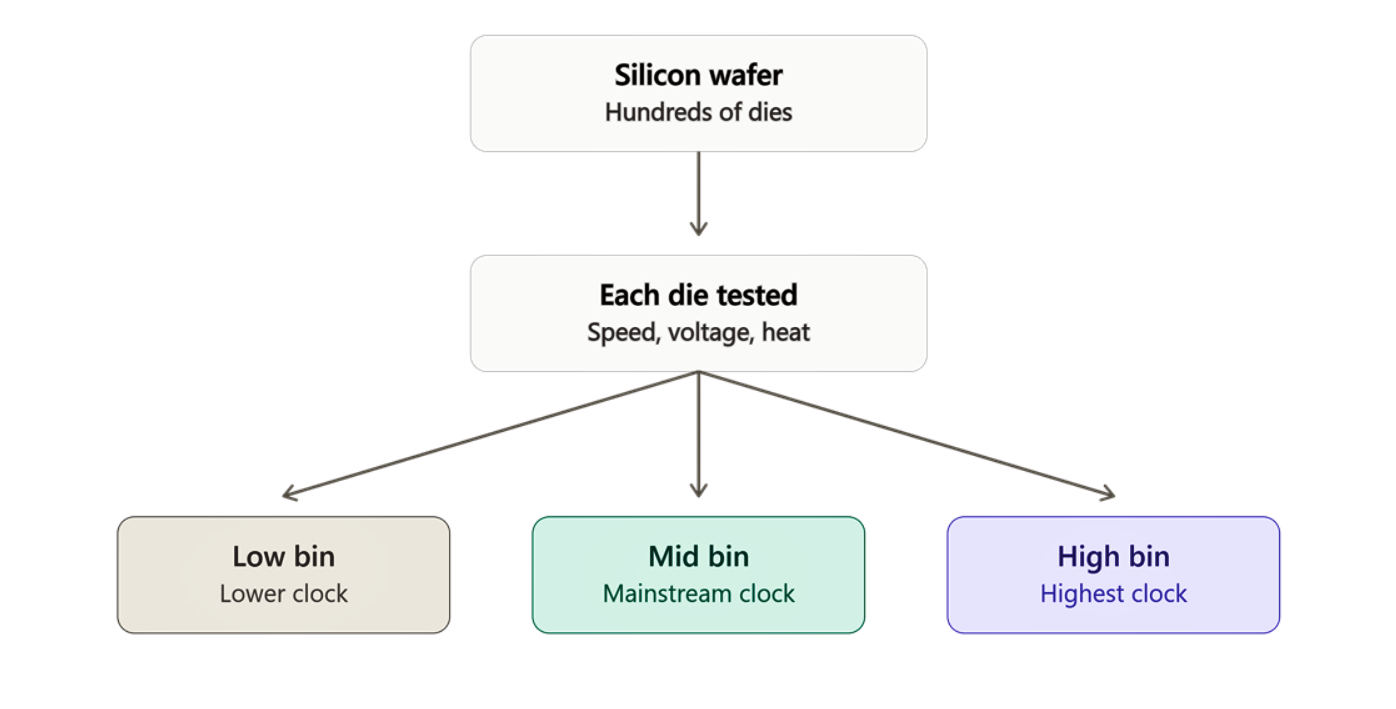
The best-performing chips become the high-end processors like the Intel K-series or AMD’s X3D. However, how it is done specifically can’t precisely be told. Only the manufacturers know.
What we know is that some chips are not able to hit the clock frequencies they were intended to. That is where the base clock speed comes from.
The voltage-frequency curve
Every chip has a voltage-frequency curve, which maps the voltage that specific piece of silicon needs in order to run reliably at each frequency. Increasing the frequency, voltage will have to go up and vice versa. High voltage means high heat. But, there will be a point in the curve that is fast enough to matter for performance while safe enough to run forever. You can imagine this curve something like this.
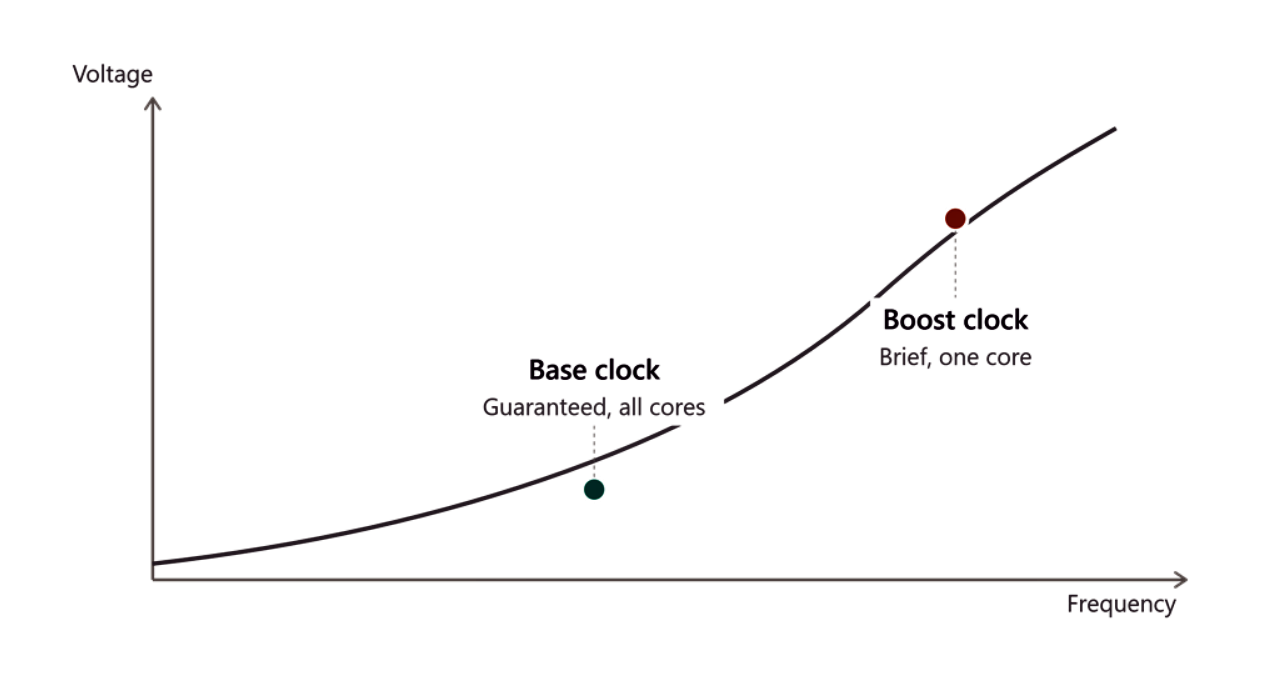
After the base clock point, the manufacturers generally leave some headroom for the boost clock. However, after the base point, the voltage consumption will increase along with the temperature. So, the boost clock can’t be sustained for longer periods.
Base clock vs. idle frequency
Base clock is an honest marketing number. You can say it is the guaranteed clock speed. But chips idle well below it to save power and keep changing the speed as per the workload. A weak cooling can push the base clock even lower. When your computer is sitting idle, the clock speed can come below 1 GHz, while during a heavy workload, it can go till the base clock or the boost clock as well. How that happens will be discussed later in the article.
Base Clock vs BCLK
We now know the base clock, but there is another clock in CPUs called BCLK. This one is called the base clock rate or reference clock. It is a very small physical signal, generally 100 MHz, and is generated by the clock chip on the motherboard (not the CPU).
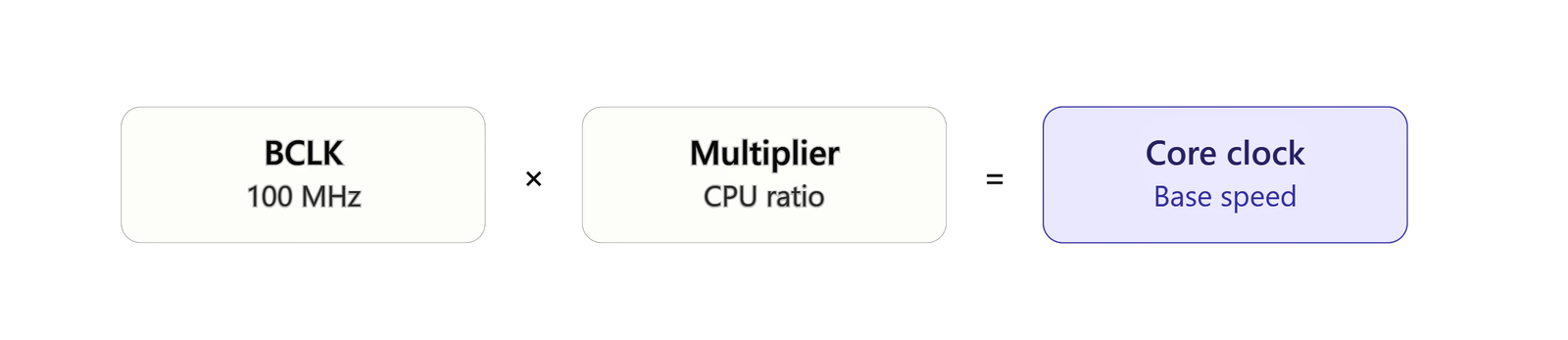
The CPU’s actual clock frequency will be the BCLK multiplied by a ratio. For example, a 100 MHz reference clock and a 36x multiplier give you 3.6 GHz.
The Boost Clock or Turbo
Let’s phrase it simply like this. Boost clock is the highest speed the chip can achieve on a small number of cores.
Now, the caveats.
Boost clock can be achieved temporarily and only on the cores where there’s spare power and thermal room to spend. The chip is the same, and there is no overclocking. It is just that the CPU is briefly spending the unused power that would otherwise stay unused if it sticks to the base clock only.
Now, let’s understand it from the angle of CPU power.
So, the CPU power limit is the power budget for the whole package. It is not fixed for individual cores. So, it is important to keep the overall power consumption under the specific limits, which basically keeps the heat under the limit.
Fewer active cores will require less power and generate less heat. So, this opens up more headroom for the few cores that are working on some task. So, it is almost impossible for any CPU to have all the cores loaded and hit the boost clock. It will result in a massive amount of heat.
However, some CPUs are now achieving what was impossible earlier.
Take the example of 9800X3D. The base clock is 4.7 GHz, and the rated boost is 5.2 GHz. But tests show that it can run at around 5.3 GHz even when all cores are working, which is unusually good. Most chips fall well short of their rated boost once every core is busy.
CPU’s PL1, PL2, and other power limits
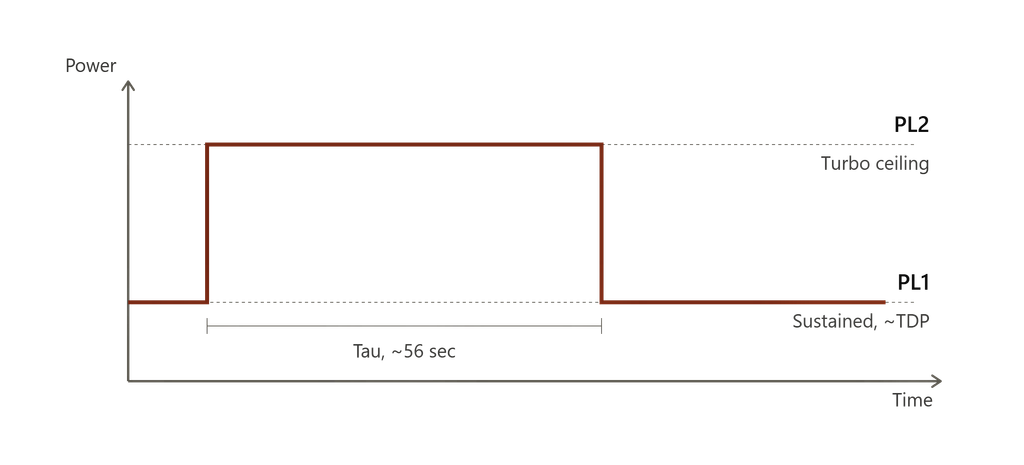
For Intel CPUs’ sustained load, the base power limit is called PL1, and PL2 is for the higher ceiling boost. Tau is the time that decides how long the PL2 will last. You can look at the graph below to understand it better.
Now let’s come to the manufacturers.
Intel doesn’t force the motherboard manufacturers to strictly follow those default numbers. So, most high-end motherboards set Tau to unlimited. This is why the exact CPU boost will vary depending on the motherboard.
AMD has its own slightly different power management techniques with PPT, TDC, and EDC ceilings.
But, if we try to simplify the mechanism, the boost clock is a spike in the clock speed with a countdown time.
Intel vs. AMD’s boost logic
On top of these raw mechanisms, Intel and AMD have their own boost systems. Intel has four separately named technologies, i.e., Turbo Boost 2.0, Turbo Boost Max 3.0, Thermal Velocity Boost, and Adaptive Boost Technology. Each just adds some extra features on top the other.
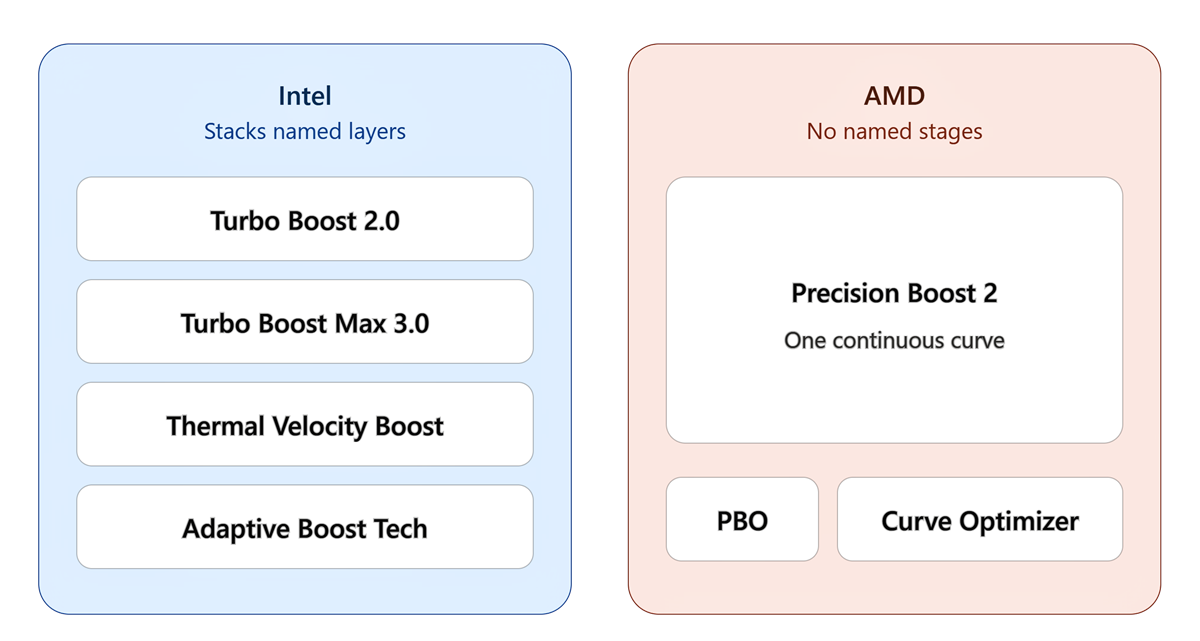
AMD skips these naming upgrades and sticks to their Precision Boost 2 as one continuous curve reading PPT/TDC/EDC and temperature live. They give PBO and curve optimizer as optional add-ons for enthusiasts.
Who introduced Turbo Clock first?
Intel announced Turbo Boost in a white paper in the year 2008. It was shipped in the same year in the Nehalem microarchitecture. Because a lot of software at that time utilized one or two cores, a lot of performance from the multi-core CPUs was left unused. Intel’s fix was its Turbo Boost technology. It basically utilized that unused core’s power to flow into one core doing the work rapidly. With their Sandy Bridge architecture in 2011, they introduced the Turbo Boost 2.0. Here is a timeline for you.
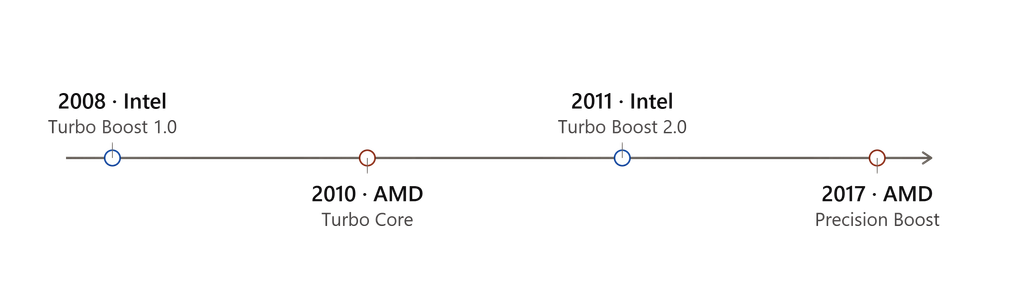
AMD launched its first version in 2010 as Turbo Core on the six-core Phantom ll X6. They then proceeded with Precision Boost in 2017 and then stuck to Precision Boost 2, which was launched in April 2018.
How does the CPU decide when to reach the boost clock?
Both Intel and AMD install dedicated controllers for this. Intel calls it the PCU (Power Control Unit), and AMD calls it the SMU (System Management Unit). This microcontroller has its own firmware, and it sits directly inside the CPU die.
The controller’s own logic is fixed by the manufacturer. Things like power, current, and voltage targets can be changes using tools like Ryzen Master and XTU. This controller check monitors the conditions and adjusts frequencies up to 1000 times per second.
When you launch a game or start exporting a video, all the workload is pushed into the CPU core by the operating system. Now, the CPU utilization starts, and the PCU/SMU starts to monitor the change. When the controller finds that the CPU is getting busy, that is when it reacts with the boost clock (only if the temperature and power system allow). But even these are the hints. Whether the CPU will go to the boost or not depends entirely on it.
Boost Clock vs. Overclocking
Here is how you can understand the difference.
| Boost clock | Overclocking | |
|---|---|---|
| Who decides? | The chip’s own controller (PCU/SMU) | You, in BIOS or software |
| Operates | Inside factory-validated limits | Beyond factory-validated limits |
| Behavior | Dynamic, re-evaluated every ~1 ms | Static, a fixed target once set |
| Reverts on its own | Yes, automatically. | No, it stays until you change it. |
| Warranty | Fully covered | Not covered |
Conclusion for a CPU buyer
The CPU clock is a very dynamic process and perhaps one of the most important working elements inside it. CPUs are smart enough to adjust the clock speed based on various things.
As a buyer, the first thing is not to compare clock speeds across generations. A modern 4.0 GHz chip will easily beat a three-year-old 4.0 GHz chip under the same load. Within generation, clock speed is a good deciding factor.
Ideally, you should focus on both the numbers. But focusing more on a higher boost clock is generally a better thing. This is because modern CPUs never actually sit at the base clock. Light and bursty work like browsing, and lightly threaded parts of games tend to run near the top of the boost range. Sustained all-core work sits well below it. So, a chip with a wide base-to-boost gap has more upside, assuming that you have a good cooling system for it. If the processor doesn’t get enough cooling when it is in the boost state, it will come back off really soon to a safe limit. So, cooling is a major deciding factor here.