

Let’s start like this.
The latest CPU with a clock speed of 3 GHz can beat an older generation one, which runs at 5 GHz.
Why?
Because of the microarchitectural improvements. Because of the higher IPC (instructions per cycle). Using the same clock cycles, one CPU can do more work compared to the other one.
See, a CPU performs tasks during each clock cycle. So, it is easy to believe that the higher the clock cycle goes, the higher will be the actions performed. But there is a caveat to it. A higher clock cycle does comparatively higher work only if the two CPUs are from the same generation. A new generation CPU can get more work done because the engineers have found ways to push more work using the same clock frequency.
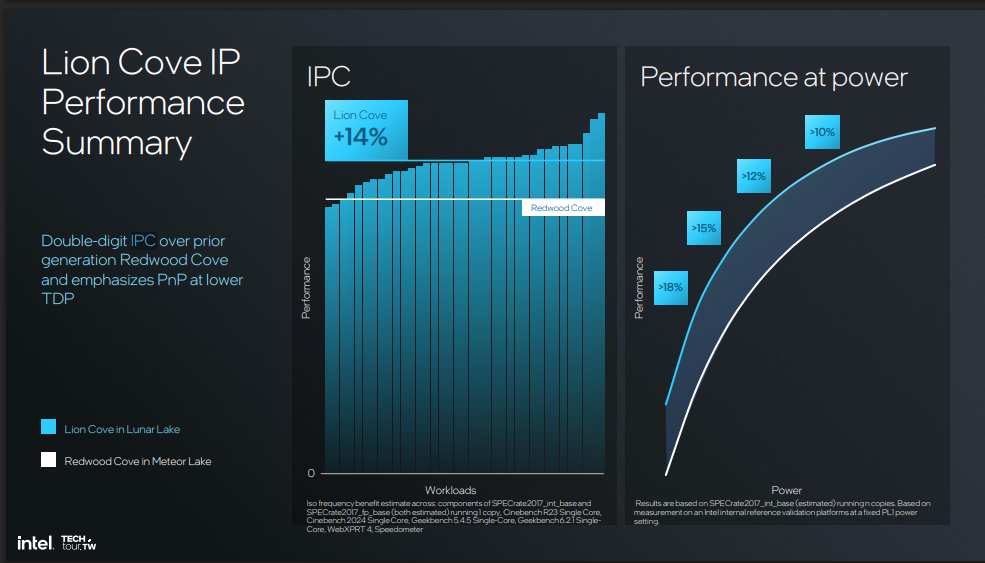
So, to be more precise, IPC is the average number of instructions a CPU core finishes in one clock tick.
Clock speed tells you how many ticks happen per second. Multiply the two together, and you get actual throughput.
To understand this, we have to go a little deep into how a CPU works. Software is converted into instructions before it ever reaches the CPU. The processor only understands machine code. Instruction is basically a very small, basic command given to a computer’s processor. It tells the hardware to do the very simple things like add two numbers, move data from one place to another, or jump to a different part of a program.
What does instruction mean in IPC?
The first word in IPC, Instruction.
It is a small and precisely defined command that the CPU’s instruction set architecture (ISA) understands and then executes. Some examples are
- ADD: add two values
- MOV: move/copy data between registers or memory
- LOAD: read data from memory
- STORE: write data to memory
Neither the CPU nor the operating system creates these instructions.
So, where do instructions come from?
Imagine you are a programmer and you write a C language code something like this
a = b + c;Now you compile the program, and the compiler translates the C code into machine instructions that belong to the CPU’s ISA. ISA is basically how the CPU designers define what instructions the CPU understands. So, the compiler converts your program to these instructions.
LOAD   R1, b
LOAD   R2, c
ADD    R3, R1, R2
STORE  a, R3
The actual machine code is binary bytes, not words like ADD or STORE. So, the CPU’s ISA defines what those binary patterns mean, and then the CPU does the operations.
For example, you open the calculator and enter:
123 x 45The calculator app (program) gets compiled into machine code. Windows loads that program into memory and asks the CPU to execute it. The CPU then fetches instructions from memory, decodes them, and executes them.
People are confused in the operating system (software) and CPU (hardware), but you have to remember that the OS itself is also a program made from machine instructions.
In simple words, if you want the CPU to add 5 + 2. It will convert it into instructions like
- LOAD the value 5.
- LOAD the value 2.
- ADD the two values.
- STORE the result.
Each of those is an instruction.
What does “cycle” or “clock” mean in IPC?
So, if your CPU runs at 4 GHz, its clock produces approximately 4 billion cycles per second. But a clock cycle itself doesn’t mean “the CPU executes one instruction.” The clock provides a common timing reference that has the key purpose of coordinating different parts of the CPU.

The clock provides the regular timing signals that allow the CPU’s circuits to move data, do calculations, or push instructions through the processor. Modern CPUs are much more complex than what we imagine. We imagine that one instruction starts and finishes on every tick. But they use instruction pipelining, which allows several instructions to be performed at different stages of execution at the same time.
What Does IPC Actually Mean? Connecting Instructions and Clock Speed Together
From the above sections, we have now established that:
Clock speed = how many cycles the CPU has per second
IPC = how much instruction work the CPU can complete per cycle
So, we can conclude that:
CPU performance ≈ Clock speed × IPC
So, if a CPU has a 4 GHz frequency and it performs two instructions per cycle, it can perform 8 billion instructions per second. However, the same CPU with 3 IPC can do 12 billion. So, a CPU running at 4.5 GHz could outperform a 5 GHz CPU if its microarchitecture can accomplish significantly more work per cycle.
IPC isn’t a static number like the clock speed
There is something much more important than the formula. The thing is that the IPC is not fixed for a chip. It changes depending on the workload.
Take SPEC CPU2017, the closest thing the industry has to a trusted, standard test. On one processor, some subtests score under 0.9 IPC. Others score over 3.0 IPC. That’s on the same chip, at the same clock speed. The only thing that changes was the code.
So, IPC depends on how predictable the branches are. It depends on how often the chip hits cache instead of the slower main memory. It depends on how much of the code can run in parallel.
The formula that actually matters
In most modern workloads, the CPU core count has a major role in deciding the performance. So, a much more accurate formula to understand the CPU performance will be something like this:
Performance ≈ IPC × Clock Speed × Core Count
A chip’s real performance comes from all three. Clock speed is one part of the story, and there are reasons why it is almost given less weightage than the IPC. This is because core count mostly helps multi-core or multi-threaded work, while IPC helps every single thread, all the time. This is why a 3.5 GHz Zen 5 core can beat a 4.0 GHz Zen 3 core at the same task. It’s why single-threaded work on a 4.5 GHz chip can beat a competitor clocked past 5 GHz.
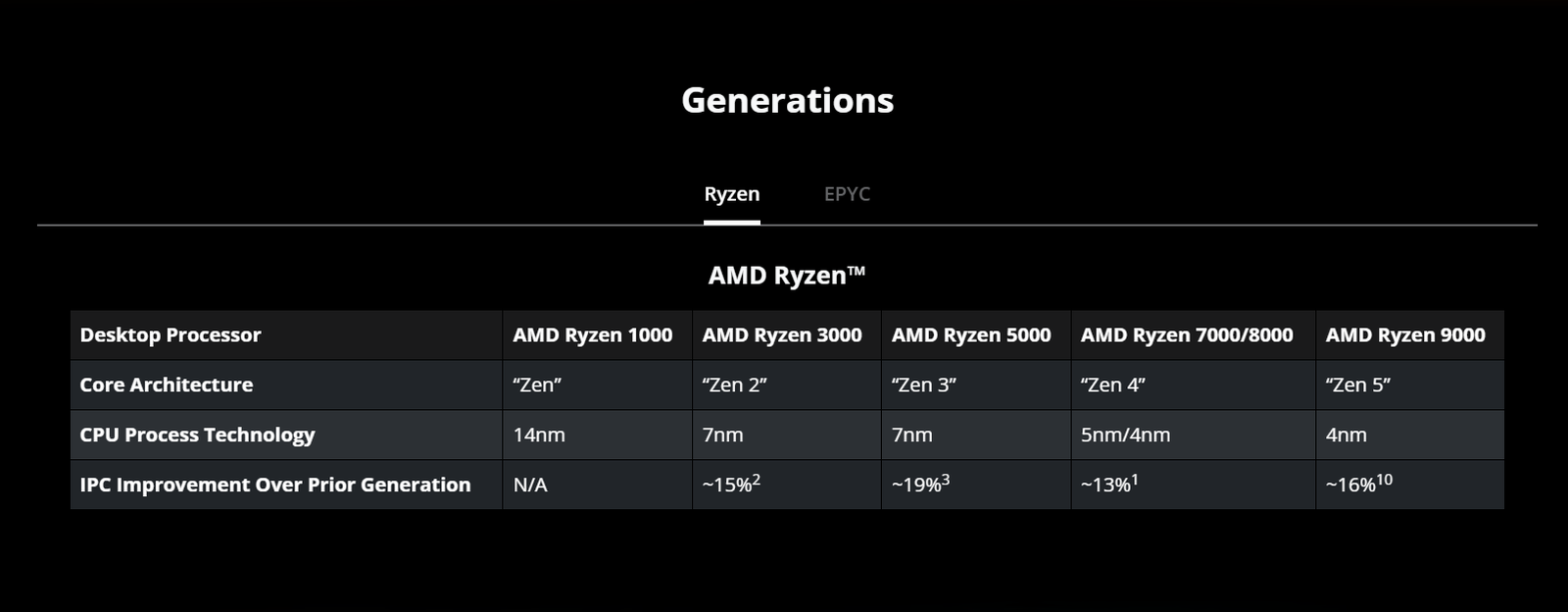
A higher clock with lower IPC loses to a lower clock with higher IPC. That’s happened over and over for two decades. The industry learned this the hard way, in public, with one famous failure.
The very popular Pentium 4 example
Back in 2000, Intel launched the Pentium 4 processor on its new microarchitecture called NetBurst. The public statement was bold. NetBurst was supposed to scale all the way to 10 Ghz over time. Intel’s plan was to make a very long and narrow pipeline. The instructions moved through 20 stages on the first chip, which then grew to 31 stages. They called it the “Prescott” version.
A longer pipeline means each stage does less work, so it can run faster, in theory. This increased the speed but created a major problem. Every time the chip guesses wrong about what instruction comes next, the whole pipeline has to be thrown out and refilled. This error is called branch misprediction, and it is bad when it happens at the 31st stage compared to the 10th stage.
And this is what happened. The Pentium 4 reached a genuinely impressive clock speed of its time, i.e., 3.8 GHz. But it did comparatively little work per cycle to get there. Meanwhile, AMD’s Athlon chips ran a full gigahertz and even lower but still matched or beat the Pentium 4 in real applications.
AMD realized soon that it can’t win the GHz number, and it stopped trying. AMD even started a marketing campaign called the “Megahertz Myth.” They said that the idea that clock speed alone tells you nothing reliable about the real performance.
NetBurst never got close to 10 GHz. Power and heat caught up with the design first. In 2004, Intel cancelled its next NetBurst chips outright.
What is architecture actually?
CPU architecture and microarchitecture are two really different things. CPU architecture decides what the CPU is required to do, while microarchitecture is how the CPU is internally designed to do it. “CPU architecture” is often used loosely to mean microarchitecture as well. But, here we are talking about microarchitecture mainly.
Ok, so we discussed that IPC isn’t a stable number, and it depends on various microarchitectural improvements over time. Companies just show the percentage improvements in IPC from the previous generation. So, what is this “microarchitecture,” and does it connect to the IPC?
The simplest definition is “CPU microarchitecture is the design and organization of a CPU that determines how it processes instructions.“
It is the blueprint of the CPU. So, when we say the CPU A has a better microarchitecture than the CPU B, we actually mean that the CPU A is internally well-designed to get more work done (using less, more, or the same clock frequency).
The CPU consists of many hardware blocks, including cores, registers, execution units, caches, instruction decoders, branch predictors, schedulers, and pipelines. All of these are part of how the CPU is designed to process instructions.