

Note: CPU architecture is a broader and somewhat ambiguous term. Its meaning depends on the context. So, people may use it to mean the ISA (Instruction Set Algorithm), the microarchitecture, or the overall design of the CPU. When I say CPU architecture in this article, I mean ISA. If you want, read more about CPU architecture vs. microarchitecture.
Have you ever wondered why there is a folder on your PC named as Program Files (x86)?
Or when someone says the smartphones run on ARM.
Or it is possible that your friend’s new Windows laptop might be running ARM as well. All these are ISA, or Instruction Set Architectures.
If we look at the definition of CPU ISA, it is the interface or contract between software and the CPU. It defines what the CPU understands and how it is expected to behave when those instructions are executed.
For most of us, this definition makes no sense, but we all have heard about ARM or x86. Those all are ISA. So, this article is all about simplifying the whole concept for you.
A computer, in itself, is a dumb machine. The CPU, or the Central Processing Unit, requires very specific, low-level instructions to get even the very basic things done. CPU ISA defines those instructions and the rules for what they mean and how the CPU should behave when executing them.
Still not clear?
Ok, different CPUs can be designed with different architectures. Why? Because a phone needs to have lower power consumption. So, ARM is designed around the much more efficient processors that are commonly used in mobile devices. Although ARM is now popular, it is being used in laptops as well. Similarly, a desktop/laptop may prioritize high performance and compatibility with existing software, and x86 architecture is common there.
In simple words, CPU ISA is the basic blueprint that decides how a CPU understands what it is being asked to do and how it carries out that work.
Now, we see all those visuals and beautiful software on our computers, but at the very basic level, computers only understand 0’s and 1’s. A CPU is an electronic device that makes use of the varying current states to identify binary bits. So, if we type “A” on our laptop, the CPU never knows it’s the alphabet “A.” It just understands the binary bits that are assigned to that alphabet. CPU architecture defines how the CPU interprets and works with such binary data.
These are just simplifications, and there is a lot more to it. So, let’s get started. Before we proceed, if you are a student or someone who wants to go really deep into this topic, I recommend the book Computer Organization and Design by David Patterson and John Hennessy.
The Four Terms You See Everywhere
Before we go deep dive into the technicalities, I want to show you the applications of different CPU architectures.
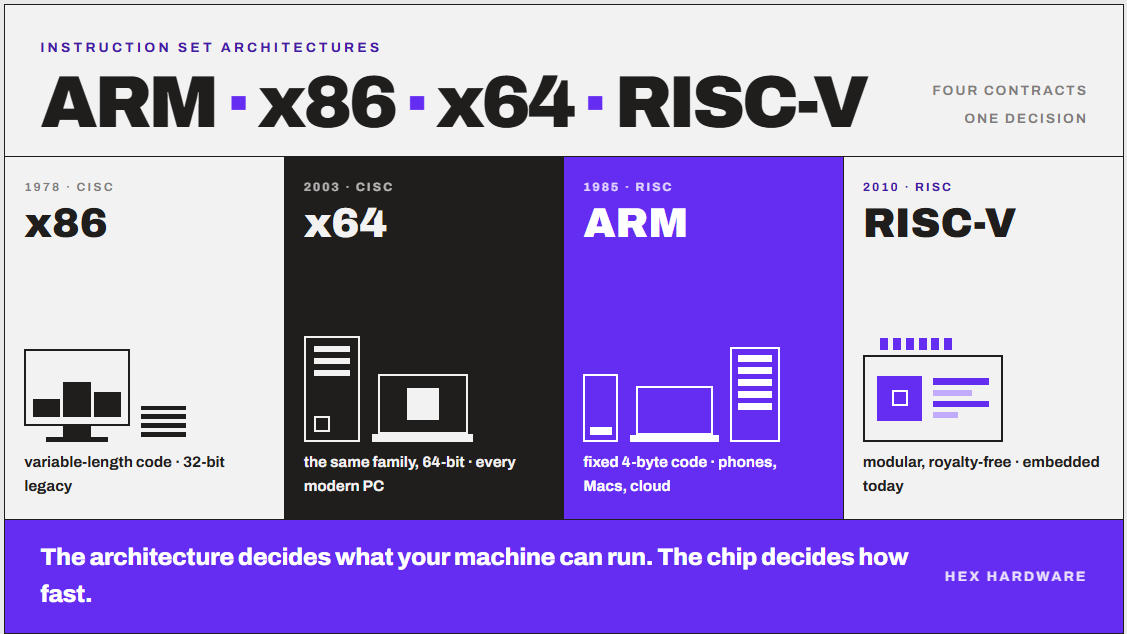
| Term | What it actually is | Who controls it? | Where you find it |
|---|---|---|---|
| x86 | An instruction set from 1978, usually called CISC | Intel and AMD | Desktops, laptops, servers |
| x64 | The 64-bit extension of x86. Not a separate architecture. | Same as x86 | Every modern PC |
| ARM | An instruction set from the mid-1980s, usually called RISC | Arm Holdings | Phones, Macs, arm laptops, cloud servers |
| RISC-V | An open, royalty-free instruction set from 2010 | RISC-V International (Non-Profit) | Embedded chips, controllers, early servers |
You might have also heard of RISC devices, but that is not in this table, and there is a reason for that. Basically, RISC and CISC are not architectures but design philosophies instead. Also, ARM, RISC-V, and x86 all fall under one or the other. I have given them a separate section later in the article. For now, let’s clarify some things.
The Purpose of CPU ISA
In my college, when we were taught the basics of digital electronics, we also got introduced to CPU design, architecture, and ISA as well. I always had a question in mind: why do we need this architecture or ISA thing? Why not just build a chip and write software for it? If a company like Intel or AMD can design and manufacture a chip, why does it have to rely on others for x86 licensing?
But now, when I was doing the research on this, I found out that this is exactly how companies started doing it.
In the 1940s and 50s, every computer was essentially a one-off. Each new machine had its own instruction set, even when it came from the same manufacturer. So software written for one computer was worthless on the next one. This was normal at that time.
In 1964, IBM invented this idea when it announced the System/360. What IBM did was announce a whole family of machines instead of one machine. They all were using the same instruction set.
To explain the concept to the public, Gene Amdahl, Gerrit Blaauw, and Fred Brooks wrote a paper called “Architecture of the IBM System/360,” and in it they defined the term. This is where the word “architecture” in our sense actually comes from.
The idea was fairly simple. The thing that programmers see is one layer. The thing the engineers build is a different layer. Separate them, and both sides can move independently.
So, the purpose of a dedicated ISA was three things:
- Software outlives hardware. Your program keeps working on a chip that did not exist when you wrote it.
- One design scales across many products. A phone chip and a server chip can share an instruction set and still be completely different products.
- Two industries can work in parallel. Chip designers and software developers agree on a contract and then stop needing to talk to each other.
So CPU ISA can be imagined as a contract. The ultimate purpose is the abstraction. The software developers just have to focus on making their software work well rather than thinking about the transistors or moving data here and there manually. The architecture hides the implementation details, and that creates stability and freedom.
For example, an x86 processor’s ISA is documented by companies such as Intel and AMD. An ARM processor implements the ARM ISA, which is specified by ARM.
CPU ISA as an interface between software and CPU
Yeah, to be simple but exact, this is the purpose of a CPU architecture.
Whenever we give a program to a computer to get something done, it broadly goes like this way.
Program → compiler → CPU instructions → CPU hardware
A compiler can translate the code from human-written code to machine language that the CPU understands. But it needs to know what language the target CPU speaks. That’s the purpose of the ISA.
So, when I write:
a = b + c;I don’t have to write an x86 instruction myself. A compiler such as GCC will translate my C/C++ code into machine instructions that the CPU understands.
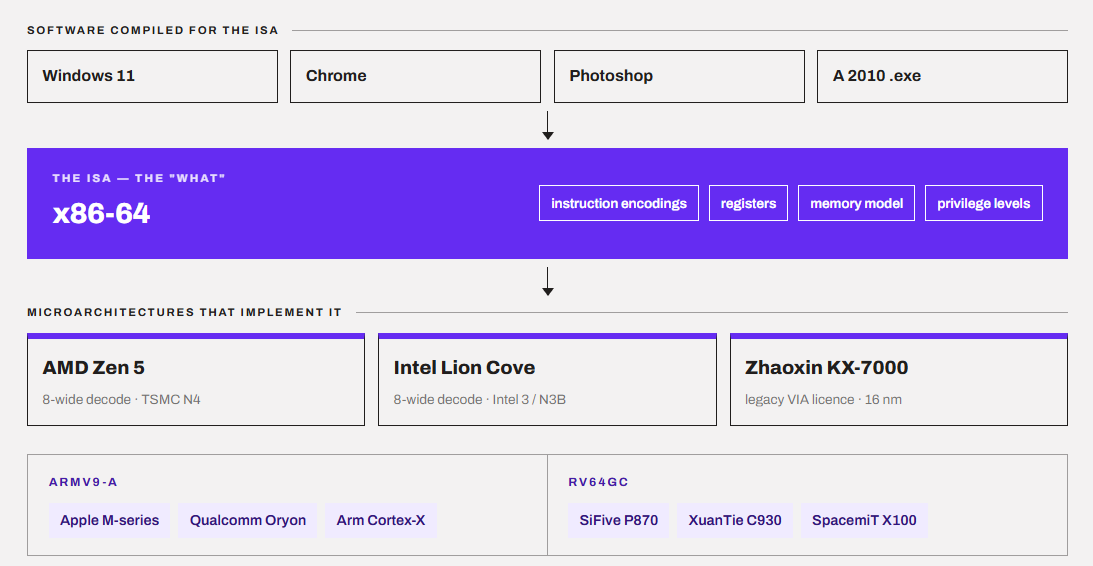
For an x86-64 CPU, those instructions might include things like MOV, ADD, SUB, IMUL, CMP, JMP, etc. These instructions can differ depending on the ISA, even though the underlying operations a program needs to perform remain the same.
The x86-64 ISA makes sure that these instructions mean something and how the CPU must behave when it encounters them. So, when Intel or AMD makes a CPU, they say that “our hardware can execute the x86-64 instruction set.” Now, this is the best thing for programmers. They now just have to compile for x86-64, and the program can run on CPUs from different manufacturers provided the OS and other requirements are satisfied.
ISA and microarchitecture are not the same thing.
As we discussed above, when people say “CPU architecture,” they usually mean instruction set architecture, or ISA. ISA is basically the list of commands a processor understands. Every program the computer runs, no matter what language it was written in, ends up as a stream of these commands.
ISA is sort of the vocabulary of the processor. The software has to speak using the same vocabulary; otherwise, the chip has no idea what you are talking about. It decides things like what instruction the CPU understands, how to add two numbers, how to load data from the memory, or how the instructions should look. Basically, ISA sets rules for the very basic things.
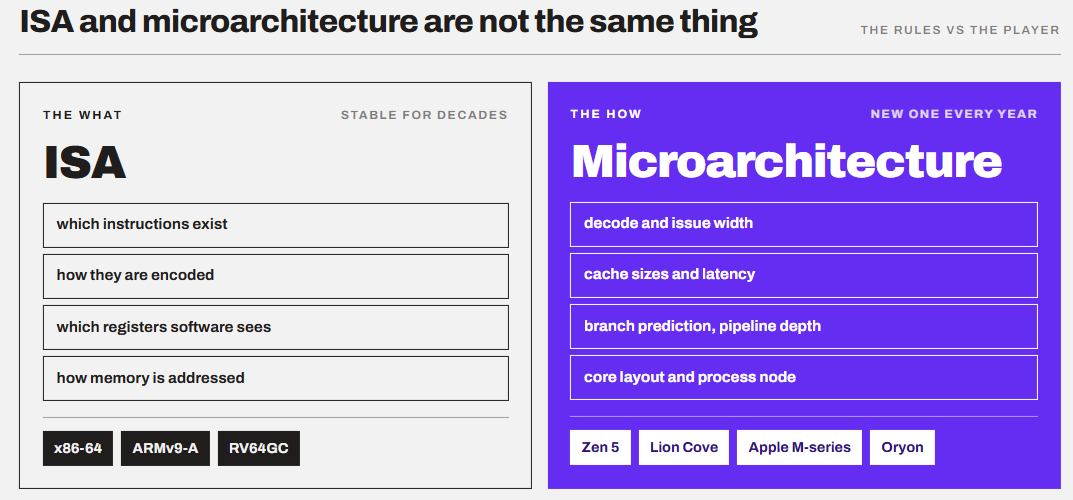
Now, two CPUs can implement the same ISA while using very different microarchitectures to execute those instructions. A good example I can remember is AMD’s chiplet-based design implementing CCD (Core Complex Dies), while Intel’s Performance Hybrid Architecture combines different types of CPU cores (P-Cores and E-Cores) on the same processor. They both have different microarchitectures while using the common ISA.
I think of ISA as the rules of the chess while microarchitecture is the player. Two players can follow the exact same rules and still play at completely different levels.
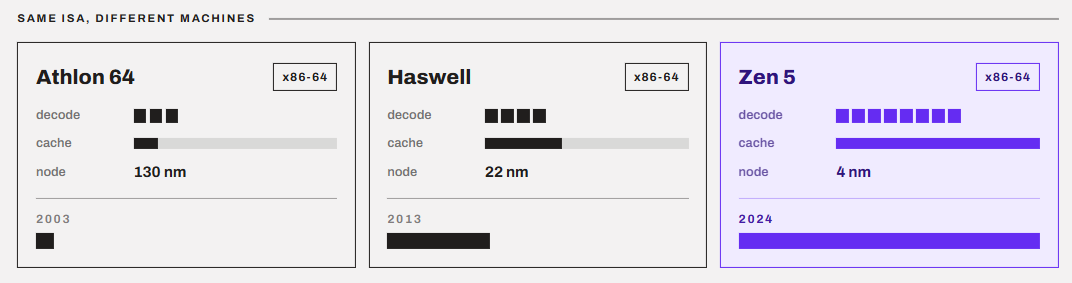
So, when someone says “ARM is faster than x86,” they are probably comparing two specific chips, not two architectures. Things like IPC, CPU pipelining, branch prediction, cache size, and the manufacturing node live in the microarchitecture. And they largely decide the performance and thermal characteristics of the chip rather than the architecture alone.
Why does the ISA matter at all?
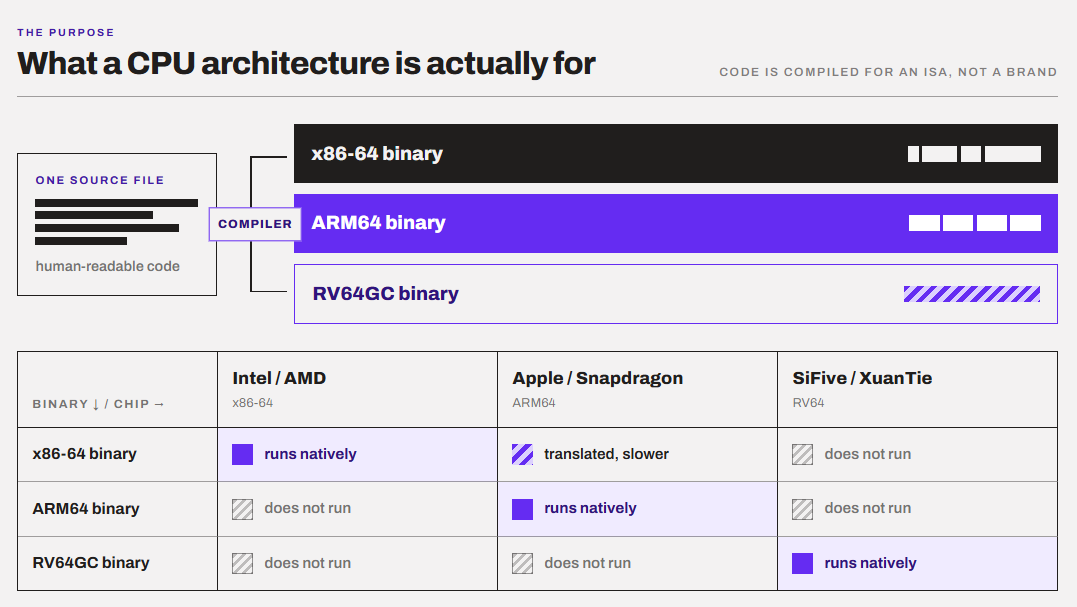
ISA matters because the software is compiled for an ISA, not a brand or a specific CPU design. As we discussed above, when a developer compiles an app (converts the code), the compiler turns human-readable code into machine code for one specific instruction set.
An x86-64 binary is a program containing machine instructions that an x86-64 CPU understands.
Programmers use languages like C, C++, or C# to write software that runs on the computer. The computer cannot understand them directly and has to convert them to something that they understand. A compiler turns it into machine instructions. At the end, all of the code gets converted into binary data representing operations the CPU knows how to perform. The data is also in the form of binary.
For an x86-64 CPU, those instructions follow the x86-64 instruction set. An ARM chip can’t read it directly, the same way a French speaker can’t read a Japanese book just because both are books. So, we are left with three options:
- The developer compiles a separate native version for each architecture.
- The operating system translates the program on the fly (emulation or binary translation).
- The program simply doesn’t run.
Ok, enough about explaining the basics of architecture. We come again to the same place. I hope you have understood it now. Let’s get into the specifics now.
CISC vs. RISC: Let’s clear the old debate first.
Most people confuse CISC and RISC as CPU Instruction Set Architectures, but they are not. They are design philosophies. CISC (Complex Instruction Set Computer) favors a larger and more complex set of instructions, while RISC (Reduced Instruction Set Computer) generally favors a smaller, simpler set of instructions that can be executed more efficiently. To give you some context, x86 (generally desktop computers) is traditionally associated with CISC, while ARM (generally mobile devices) is based on RISC principles.
CISC, or Complex Instruction A set computer has many instructions, and a single instruction can do a lot of work. A single instruction can read a value from memory, do math on it, and write it back. Instructions also have different lengths, and on x86 systems, one instruction can range from 1 byte to 15 bytes in size. This implementation was great back in the time when memory was expensive. This way, we were able to pack more work in fewer bytes of code.
RISC came out from the Stanford and Berkeley research in the early 80s. It used a different idea of keeping instructions small, simple, and uniform. The compiler then had the job of combining them. RISC architectures follow a load-store design, which means only specific instructions touch memory (load and store). Everything else works on registers. In RISC, instructions generally have a fixed length, which makes them easy to decode. ARM and RISC-V and both RISC architectures.
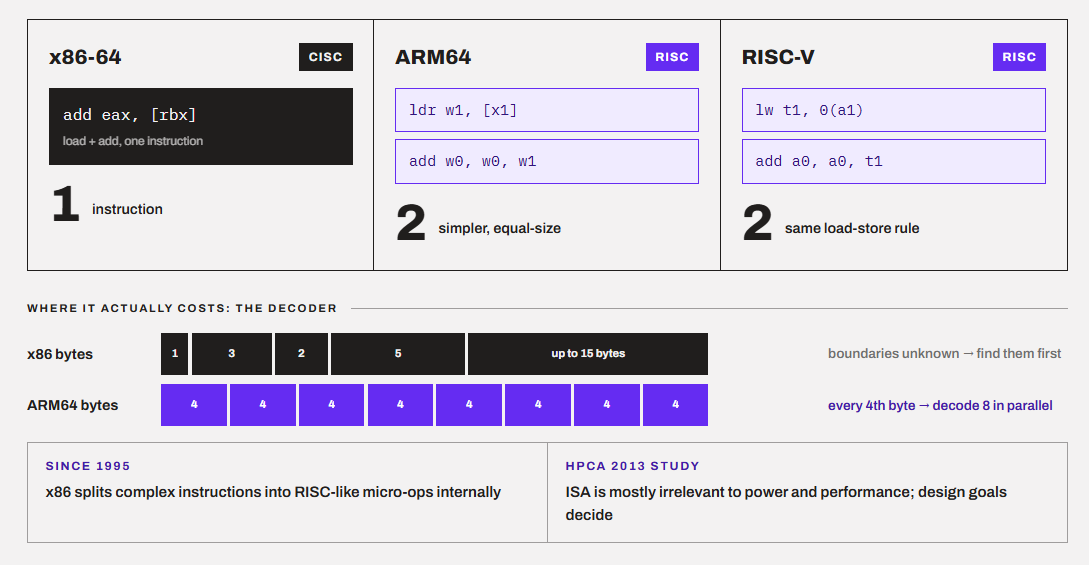
We were taught assembly language in our college, and I still remember this classic code example showing the working of RISC and CISC architectures.
; x86-64 (CISC): one instruction reads memory AND adds
add   eax, [rbx]        ; eax = eax + value at address rbx

; ARM64 (RISC): load first, then add
ldr   w1, [x1]          ; w1 = value at address x1
add   w0, w0, w1        ; w0 = w0 + w1

; RISC-V (RISC): same load-store pattern
lw    t1, 0(a1)         ; t1 = value at address a1
add   a0, a0, t1        ; a0 = a0 + t1
Do not go into the technicalities of the code above. Just see how x86 did the same job in one instruction while both ARM64 and RISC-V took two.
x86 Architecture: the one inside your PC
x86 Architecture/ISA started with Intel’s 8086 in 1978. The name came from chips with the names that followed 80186, 80286, etc. The “86” got stuck from there. The reason x86 became dominant in PCs is because of decades of software compatibility, hardware compatibility, and ecosystem momentum.
Keep the variable-length instruction, CISC front-end, and RISC-like micro-ops in the x86 aside for a minute. What I think the best thing about x86 is a huge set of extensions like MMX, SSE, SSE2 to SSE4.2, AVX, AVX2, AVX-512, and more. Those extra capabilities are always great to have.
However, the backward compatibility is the most defining feature of x86. Intel and AMD have kept old instructions alive for over 45 years. A modern Ryzen still boots in 16-bit “real mode” at power-on, the same way an 8086 did. However, the firmware then smartly switches it into 64-bit mode.
Now, you might be thinking, why do the big companies like Intel and AMD have to rely on x86 when they have all the technical ability to create something on their own? But it is almost impossible to do so because the entire PC software ecosystem is built around it. In case a company decides to make its own architecture, they have to first accept that the existing x86 Windows applications would not automatically run on it.
Let me give you an example. My computer has an Intel 12600K. My CPU doesn’t have to know whether Windows was written for Intel’s internal CPU design. Windows produces/uses x86-64 instructions, and the processor implements the x86-64 ISA. Developers have spent decades building x86, so it has become a sort of rule that both the companies have to follow.
Why do you think Apple transitioned from Intel Macs to Apple Silicon (ARM64)? It wasn’t that they were actively escaping x86. They wanted total control over the processor and the whole platform. The performance-per-watt improvements in the new MacBooks are all the result of Apple’s ARM-based designs.
Who can make x86 chips?
You guessed it right.
Only AMD and Intel. VIA (and the Chinese company Zhaoxin through VIA) holds a legacy license. So, you can’t just walk up to Intel or AMD and buy an x86 license. The reason is that x86 is largely a historical intellectual property, rather than because the instruction set itself is technically difficult to understand. This closed club is a big reason why Apple, Amazon, Google, and Microsoft went to ARM when they wanted to design their own chips.
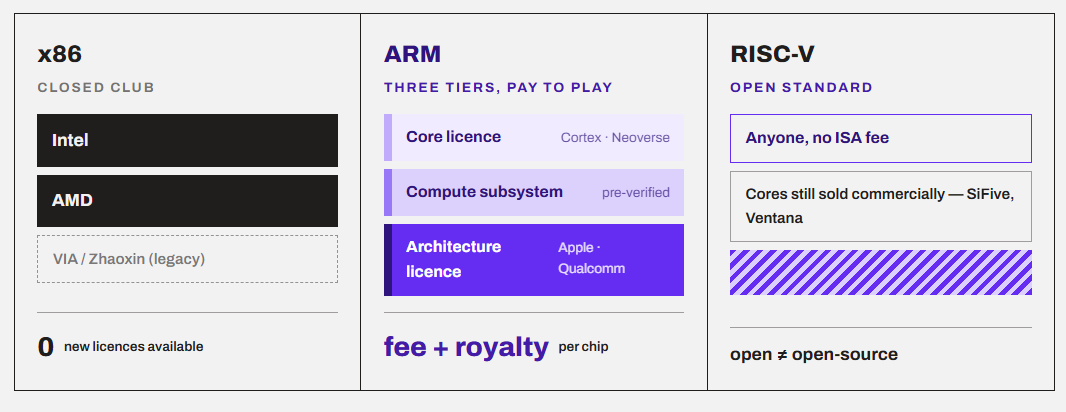
So after Intel made the x86, it built a large portfolio of patents around the processors that implement it. However, AMD became an x86 competitor pretty soon through licensing and cross-licensing agreements with Intel. However, VIA later acquired x86 rights through its acquisition of companies such as Cyrix and Centaur. All in all, the legal ability to make an x86-compatible processor involves a complicated collection of patents, licenses, cross-licenses, and contractual restrictions.
So, because Intel and AMD are deep inside this closed group, they are the only companies that can make those chips.
Intel and AMD are now coordinating the future of x86
Interestingly, Intel and AMD are cooperating now. They formed the x86 Ecosystem Advisory Group in October 2024, announcing 4 features: FRED, AVX10, ChkTag, and ACE. You can read more about it here.
The takeaway is that x86 is evolving by adding features in a coordinated way, instead of Intel and AMD each doing their own thing. This simply means less fragmentation for developers and more software that uses these features in your PC.
x64: not a separate architecture
x64 is the 64-bit extension of x86.
In fact, x64, x86-64, x86_64, AMD64, Intel 64, and EM64T all refer to the same thing. Different companies just named it differently.
But what does this mean? (Forgive me if I am going in the history a lot).
So, by the latest 90s, 32-bit x86 was hitting the wall. A 32-bit CPU can address only 2³² bytes of memory, which is 4 GB. Servers had started to demand much more than this.
Intel came up with a solution called the Itanium (IA-64). It was a brand new 64-bit architecture that was non-compatible with x86. If you had to run the old software, you had to run it through simulation (which was slow).
As usual, AMD took a different route. It extended x86 itself to 64 bits while keeping full compatibility with 32-bit code.
Guess which one was loved by the market?
The public chose AMD’s approach. Intel eventually adopted AMD64 in 2004 under the name EM64T (later Intel 64). So, the 64-bit x86 in your Intel laptop today is technically AMD’s design. Intel and AMD cross-license it.
Why do people still say “x86 vs. x64”?
This is clearly a confusion for most people because Windows uses these terms that way. I don’t know why, but on Windows, “x86” means 32-bit and “x64/AMD64” means 64-bit. This is the reason you see two folders named Program Files (64-bit apps) and Program Files (x86) (32-bit apps). A 64-bit Windows runs 32-bit apps through a compatibility layer called WoW64.
Keep in mind that Windows 11 is 64-bit only. There is no 32-bit Windows 11. So, if you have a Windows 11 PC, you have an x64 (or ARM64) system. That’s it.
In other words, “x86 vs x64” is not a battle between rivals. It’s the same family, and 64-bit won more than 20 years ago. This is the question only when you are downloading something and you get two options. You pick x64 unless you are on a very old machine.
ARM: The efficient and licensed architecture
ARM started as Acorn RISC Machine in Cambridge, UK, for the first time. The first ARM chip ran in 1985. But, in 1990, Apple, Acorn, and VLSI Technology came together and made it a new company called Advanced RISC Machines, or simply ARM.
The main philosophy of ARM was low-power from the very first day. That is why it became very popular in phones, tables, smartwatches, and embedded devices.
As discussed above, ARM is a RISC, load-store design. It has fixed-length 30-bit (6-byte) instructions in 64-bit mode (called ARM64 or AArch64). There are 31 general-purpose registers in AArch64, almost twice x64’s 16. Memory Tagging Extension (MTE) is there for catching memory-safety bugs in hardware. The same idea is now copied by x86 in ChkTag.
The 64-bit version arrived with ARMv8-A in 2011. Apple shipped the first 64-bit ARM phone chip, the A7, in 2013.
The business model of ARM is totally different from x86. The company ARM itself sells only license designs and not any chips. So, if you want, you can buy a ready-made design like Cortex-A or Neoverse and build a chip around it. Mediatek and many others do the same. You get the Compute Subsystem (CSS) which is a bigger pre-verified package from Arm. It allows you to get to the market faster.
With the ARM architecture license, you get the right to design your own cores that follow the ARM ISA. Apple an Qualcomm do exactly the same. For example, Apple’s M-series and Qualcomm’s Oryon are custom designs based on the ARM architecture. This model is the main reason why ARM is everywhere.
Why is ARM so efficient?
There are several reasons for it and I found 5 of the main ones for this article. Only some of them come from the ISA.
- Design goals. ARM cores were built for battery-powered devices for decades.
- Integration. Most ARM chips are SoCs, with the CPU, GPU, NPU, memory controller, and more on one package. Apple even puts RAM on the package (unified memory), which cuts latency and power.
- Manufacturing node. Apple and Qualcomm often get TSMC’s newest node first.
- Decoder simplicity. Fixed-length instructions make wide, parallel decoding cheaper, as we discussed above.
- Aggressive power management. Heterogeneous cores (big.LITTLE, introduced by Arm in 2011) were an ARM idea first. Intel adopted a similar hybrid design with Alder Lake years later.
So, ARM’s efficiency is the real thing, but it is the whole package and not just the instruction set. In fact, Intel’s Lunar Lake and AMD’s efficient mobile chips have shown that x86 can close much of the battery-life gap when it’s designed with that goal in mind.
ARM is now used in Windows laptops as well. Qualcomm’s Snapdragon X series brought ARM to mainstream Windows in 2024. The second generation is here now. Snapdragon X2 is Qualcomm’s second-generation Windows PC platform, introduced in September 2025, and the X2 Elite family includes 12-core and 18-core variants, so the processor name alone does not identify a laptop’s performance, battery life, or price
At Computex 2026, NVIDIA has joined as well with its first Arm-based laptop processor called N1X. It pairs a 20-core Arm CPU with an RTX 5070-class Blackwell GPU.
RISC-V: the open architecture
RISC-V, or risk-five, started in 2010 at UC Berkeley as a research project. The V here simply means the fifth design to come out of Berkeley. The non-profit RISC-V Foundation formed in 2015, and in 2020 it moved to Switzerland and became RISC-V International.
What makes RISK-V different is that it is an open standard. Anyone can design and sell an RISC-V chip without paying royalties or license fees to anyone for the ISA itself. However, it doesn’t mean every RISC-V chip is open-source. A company like SiFive can still design an RISC-V core and sell it under a commercial license, just like Arm does.
RISC-V is modular in nature. There is a comparatively smaller instruction set, and everything else is an optional extension named with a letter.
- RV32I / RV64I: the base integer instruction set (32-bit or 64-bit)
- M: multiplication and division
- A: atomic operations (needed for multithreading)
- F / D: single and double-precision floating point
- C: compressed 16-bit instructions for smaller code
- V: vectors (RISC-V’s answer to AVX and SVE)
- H: hypervisor support for virtualization
Modularity in RISC-V is also its biggest risk. If one chip has the V extension and another doesn’t, an app compiled to use V won’t run on both. Multiply that by dozens of extensions and you get a mess. This makes a problem for software vendors because they can’t target “RISC-V” because there are too many RISC-V variants.
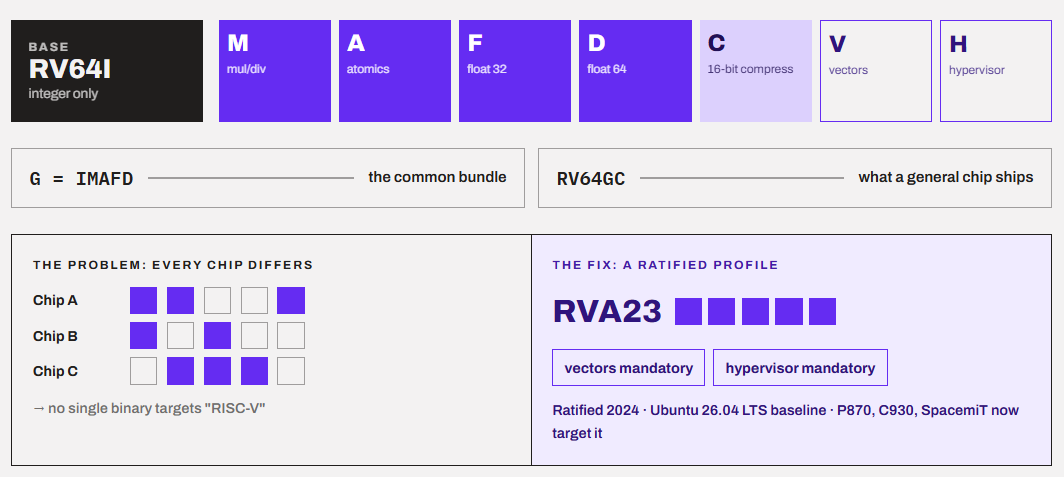
The solution is profiles. A profile is a fixed bundle of extensions that a chip must support. The important one for PCs, phones, and servers is RVA23.
RISC-V is mainly used in microcontrollers and embedded chips these days. You will also find it heavily in storage controllers, AI accelerators, etc. We can also see big companies paying attention as well. Qualcomm, one of Arm’s largest customers, intends to continue the development of Ventana’s designs in parallel with the custom Arm-based Oryon cores used in its Snapdragon X-series of chips. It also acquired the RISC-V designer Ventana Micro Systems in December 2025.
ARM vs. x86 vs. x64 vs. RISC-V: side-by-side comparison
| Feature | x86 (32-bit) | x64 (x86-64) | ARM (AArch64) | RISC-V (RV64) |
|---|---|---|---|---|
| Design philosophy | CISC | CISC | RISC | RISC |
| Instruction length | Variable, 1–15 bytes | Variable, 1–15 bytes | Fixed, 4 bytes | 4 bytes (2 bytes with C) |
| General-purpose registers | 8 | 16 (32 with APX) | 31 | 31 usable (x0 = zero) |
| Max addressable memory | 4 GB (more with PAE tricks) | 16 EB theoretical | 16 EB theoretical | 16 EB theoretical |
| SIMD / vectors | MMX, SSE | SSE, AVX, AVX2, AVX-512, AVX10 | NEON, SVE, SVE2 | V extension |
| Who can build it | Intel, AMD (VIA/Zhaoxin legacy) | Intel, AMD (VIA/Zhaoxin legacy) | Any Arm licensee | Anyone |
| Licensing cost | Not available | Not available | Licence fees + royalties | No ISA fees |
| Main uses today | Legacy software, old PCs | Desktops, laptops, servers, consoles, handhelds | Phones, Macs, Windows laptops, cloud | Embedded, AI accelerators, dev boards |
| Software ecosystem | Huge (legacy) | Largest for PCs | Largest overall (mobile), growing on PC | Early, mostly Linux |
If we have to conclude this table, we can do it something like this.
x64 is a winner in software compatibility. Decades of Windows apps, games, and drivers target it. ARM wins on reach and efficiency, and it’s the only architecture that runs in both your pocket and a huge chunk of the cloud. RISC-V wins on freedom, but it has the least mature software for everyday users.
If you’re buying a computer, you are really choosing between x64 and ARM. RISC-V is for developers and hobbyists right now.
As the end user, CPU architecture hardly matters for you. You are good by just looking at your smartphone or computer specifications and the operating system. You just need to know your application or software that you want to use and choose the device on that basis.
The architecture becomes important when there is a software-compatibility distinction. So, if you are buying an Intel or AMD laptop, you generally don’t need to think about x86-64 because most of the Windows desktop software is already designed with that ecosystem in mind.
It becomes much more relevant when considering Arm-based Windows laptops. Windows on ARM can run many traditional x86/x64 applications through emulation. But the software with native ARM64 support will behave better.
Why does the architecture matter for you?
As an end-user, there are some cases when you will have to think about the CPU architecture before making a buying decision.
1. App Compatibility
For example, you bought an ARM-based laptop and installed your important tool (a game, printer utility, or VPN software), and it doesn’t work. You assume “Windows is Windows.” But that is not the case.
On an ARM computer using the Windows operating system, there are three groups.
- Native ARM64 apps run at full speed. Chrome, Edge, Firefox, Microsoft Office, Zoom, Spotify, Photoshop, and many more have native versions now.
- Emulated x64/x86 app run through Microsoft’s Prism Translator. The support for more and more x86 extensions is rapidly improving.
- Things that can’t be emulated and run at all. Kernel-mode drivers must be native ARM64. Also, some printer and scanner drivers, older VPN clients, virtual audio devices, and many game anti-cheat systems.
Microsoft also created ARM64EC, a special format that lets a developer mix native ARM code and x64 code in the same app. This helps big apps with old x64 plugins move over gradually.
On macOS, Rosetta 2 is there to run Intel apps on Apple Silicon.
On Linux, most open-source software is already compiled for ARM64.
2. Gaming
If gaming is your priority, x64 is still the safe choice. A good AMD or Intel computer with a proper GPU. Qualcomm does claim that Snapdragon X2 laptops can run 90% of top Windows games. But “run” isn’t the same as “run well.”
Nvidia’s N1X laptops could change this equation because of Nvidia’s strong driver team. But I would wait for real-world testing before recommending them to anyone.
3. Battery Life and Heat
This is where you prioritize ARM-based systems. ARM laptops generally idle at very low power, wake instantly, and stay cool during browsing, documents, and video calls. MacBooks are the best example, especially the fanless ones.
However, the difference shrinks under heavy load, and emulated apps will consume much more power than native ones. Modern efficient x86 laptop chips have also narrowed the gap a lot.
The difference is real for light and medium work. It is much smaller when you are rendering, compiling, or gaming.
4. Performance
Performance depends heavily on the chip design/microarchitecture rather than just the architecture. A top Apple M-series or Snapdragon X2 Elite chip beats a budget Intel chip. A Ryzen 9 desktop beats a phone chip. Nothing surprising.
CPU architecture can matter when we talk about performance under emulation. A native x64 app on an x64 chip always runs at full speed. The same app emulated on ARM will lose some performance.
5. Upgradability
Most ARM computers use SoCs with memory soldered to the board or placed on the chip package. You buy it with the RAM you’ll live with forever.
x64 desktops are the real winners in this. They have got sockets, DIMM slots, PCIe slots, and a massive DIY ecosystem. AMD’s AM5 socket is a good example. AM5 motherboards bought today will still work with Zen 6, so there is no forced platform jump.
So, if you like building and upgrading your own PC, x64 is basically the only real choice.
6. Content Creation
It depends on your tools. On Mac, Apple Silicon is excellent, and most pro apps are native. On Windows, check each app and every plugin. Audio producers especially should check VST plugins and audio interface drivers, since those are common problem spots.
If you rely on CUDA-based tools, x64 with an Nvidia GPU is still the safe bet today.
Conclusion
In a nutshell, the architecture, or ISA, decides which software your computer can run natively, while the specific ship decides who is fast and efficient.
x86 and x64 are one family, and 64-bit x64 is what every modern Intel and AMD PC runs. ARM is the efficient, licensed alternative that already dominates phones and Macs and is now serious on Windows and in the cloud.
My personal recommendation is simple. If you are a gamer, build your own PC, or depend on niche Windows software, stick to the x64. If you mostly browse, write, study, and travel, an ARM laptop is a very good choice.
Some other tips before you make a buying decision for a specific workload.
- Search “[app name] ARM64” for every app you can’t live without.
- Check your printer, scanner, and VPN vendor for ARM64 drivers.
- For games, check anti-cheat compatibility, not just “does it launch.”
- On a Mac, check About This Mac or the Intel-app list in settings for apps that will break when Rosetta 2 goes away.
Thanks for reading!