

I didn’t test any CPUs for this study. It combines the overclocking results from launch reviews of 20+ Intel and AMD CPUs since 2011 with Silicon Lottery’s binning data.
We often hear that overclocking headroom is no more there in the modern processors than it used to be. I am not going to give into the why here but actually tell you how much exactly it has been reduced. I was recently searching for this data on the internet just out of curiosity. I wanted to know how the companies are not making sure their CPUs already run at full, and then I got into this rabbit hole of how much overclock people are actually able to do these days.
So, I dug into hundreds of overclocking articles of the old CPUs and the modern CPUs, and I found a pattern. The modern CPUs are coming with very little headroom.
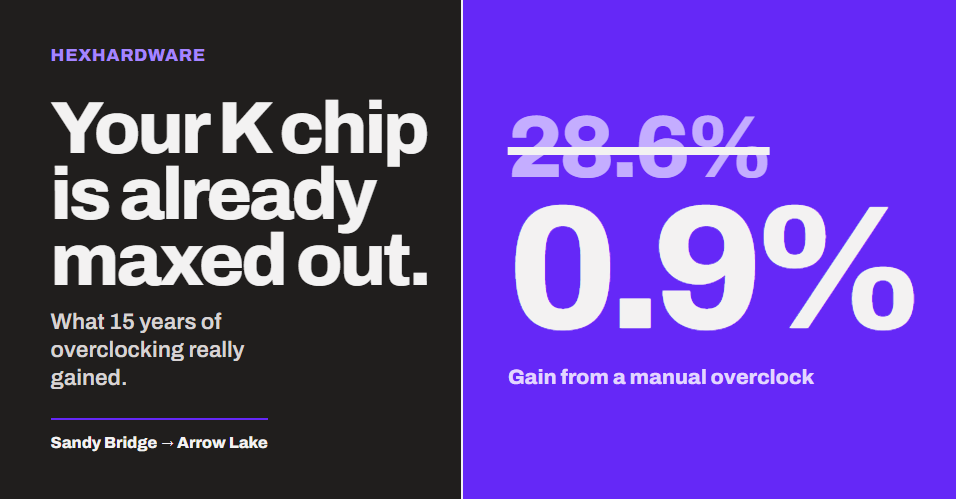
In short, manual overclocking headroom has almost disappeared. Intel’s top unlocked chips from 2011–2013 gained about 27.5% all-core clock from a typical overclock. The 2020–2024 flagships gain about 1.5%. AMD went from 20% on the FX-8350 to low single digits on the Ryzen 9000.
I thought of creating this report and using my research skills at some place. So, here is this article.
Now, this is a research article, and I have to gather this data from multiple sources and websites. So, expect a lot of external links to the sources of the information that I have put here. However, I have double-checked all the numbers. So, you don’t have to worry. Let’s get started.
Key findings
- Intel’s flagship all-core headroom fell from 27.5% (2011–2013) to 13.2% (2014–2018) to 1.5% (2020–2024).
- The i7-2600K gained +28.6% all-core clock from a typical manual overclock. The Core Ultra 9 285K gains +0.9% on its P-cores.
- AMD’s FX-8350 gained +20.0%. The Ryzen 9 9950X gains +3.6%, and the Ryzen 9 7950X’s best manual all-core OC (5.1 GHz) sat below its own stock all-core clock (−1.9%).
- Since the i9-10900K, every Intel flagship’s typical manual all-core overclock is lower than its own stock single-core boost (−1.9% to −8.3%).
- Silicon Lottery found 30% of i7-8700Ks could run 5.2 GHz on all cores. Only 3% of i9-9900KS chips could.
How did I measure the overclocking headroom?
1. All-core headroom (the main number).
All-core headroom (%) = (typical manual all-core OC ÷ stock all-core boost − 1) × 100
For the i7-2600K, that is 4.5 GHz ÷ 3.5 GHz ≈ 1.286, so about 28.6% headroom.
In other words, how much faster can all cores run after a manual overclock compared to how fast they already run at stock under full load? It’s really simple.
2. Headroom vs. single-core boost.
Headroom vs 1-core boost % = (typical manual all-core OC ÷ stock max single-core boost − 1) × 100
This one can go negative. Do not get confused here. A negative number simply means that when you lock all cores to one manual frequency, your fastest core runs slower than it would at stock. So, you gain in tasks like rendering but lose in lightly threaded tasks.
3. Performance headroom.
This is the measured multithreaded and gaming gain that reviewers reported for the overclock. Unfortunately, this is the thinnest part of the dataset, and I will be honest about that below.
A few rules I followed:
- Ambient cooling only (air, AIO, custom water). I stayed away from LN2, dry ice, chillers in this.
- “Typical” = the median of the launch-review results for that chip.
- Stock all-core = Intel’s official all-core turbo ratio. AMD publishes no all-core spec, so I used a reviewer’s measured all-core clock under full load.
- Hybrid Intel chips (12th gen onward): P-cores and E-cores are counted separately. The headline number uses P-cores.
You can find the full method at the end in the methodology section. If you want a refresher on the basic terms first, read Base Clock vs. Boost Clock and CPU Binning.
Overclocking headroom by generation
Intel: from 28.6% to under 1%
The trend is not subtle. Intel’s headroom went from roughly a quarter of the stock clock to roughly nothing.
| CPU | Year | Cores/Threads | Stock 1-core boost (GHz) | Stock all-core (GHz) | Typical manual OC (GHz) | All-core headroom | vs 1-core boost | n |
|---|---|---|---|---|---|---|---|---|
| i7-2600K | 2011 | 4/8 | 3.8 | 3.5 | 4.5 | +28.6% | +18.4% | 3 |
| i7-3770K | 2012 | 4/8 | 3.9 | 3.7 | 4.8 | +29.7% | +23.1% | 2 |
| i7-4770K | 2013 | 4/8 | 3.9 | 3.7 | 4.6 | +24.3% | +17.9% | 2 |
| i7-4790K | 2014 | 4/8 | 4.4 | 4.2 | 4.7 | +11.9% | +6.8% | 2 |
| i7-6700K | 2015 | 4/8 | 4.2 | 4.0 | 4.8 | +20.0% | +14.3% | 1 |
| i7-7700K | 2017 | 4/8 | 4.5 | 4.4 | 4.8 | +9.1% | +6.7% | 1 |
| i7-8700K | 2017 | 6/12 | 4.7 | 4.3 | 5.1 | +18.6% | +8.5% | 2 |
| i9-9900K | 2018 | 8/16 | 5.0 | 4.7 | 5.0 | +6.4% | 0.0% | 3 |
| i9-10900K | 2020 | 10/20 | 5.3 | 4.8 | 5.0* | +4.2% | −5.7% | SL only |
| i9-11900K | 2021 | 8/16 | 5.3 | 4.8 | Unknown | Unknown | Unknown | 0 |
| i9-12900K (P) | 2021 | 8P+8E/24 | 5.2 | 4.9 | 5.1 | +4.1% | −1.9% | 2 |
| i9-13900K (P) | 2022 | 8P+16E/32 | 5.8 | 5.5 | 5.6 | +1.8% | −3.4% | 1 |
| i9-14900K (P) | 2023 | 8P+16E/32 | 6.0 | 5.7 | 5.5 | −3.5% | −8.3% | 1 |
| Core Ultra 9 285K (P) | 2024 | 8P+16E/24 | 5.7 | 5.4 | 5.45 | +0.9% | −4.4% | 2 |
The Sandy Bridge, Ivy Bridge, and Haswell i7s averaged 27.5% headroom. That was the golden era of Intel CPU overclocking. You could buy a 3.5 GHz chip and run it like a 4.5 GHz chip on a decent tower cooler.
From Devil’s Canyon to Coffee Lake Refresh (4790K to 9900K), the average fell to 13.2%. And from Comet Lake to Arrow Lake (10900K to 285K), it fell to 1.5%.
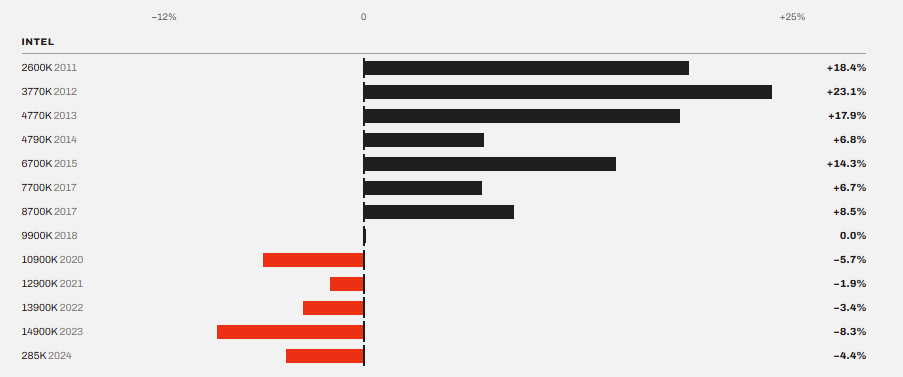
One thing to note is that the fall is not a straight line. The 6700K (+20.0%) and 8700K (+18.6%) bounced back up. There was a solid reason behind this. The 6700K had a conservative 4.0 GHz all-core turbo. And the 8700K had six cores with a big gap between its 4.7 GHz single-core boost and its 4.3 GHz all-core turbo. The 4790K and 7700K were already pushed close to the edge from the factory, so they had less left.
The i9-14900K result is not a typo.
TechPowerUp’s stable manual overclock on the i9-14900K was 5.5 GHz on the P-cores and 4.4 GHz on the E-cores. But Intel’s all-core P-core turbo ratio is 5.7 GHz.
This doesn’t sound right, right?
Well, the stock 5.7 GHz ratio is a ceiling, not a promise. It will run only if the power and temperature allow. The rule is that a manual all-core overclock has to be stable in every workload, all the time. So, a manual lock can land below the stock ratio. TechPowerUp raised the thermal limit to 115°C and still found the result slower than stock in light loads, which boosted to 6.0 GHz on two cores.
What does this mean?
It means the 14900K was already overclocking better than a human could.
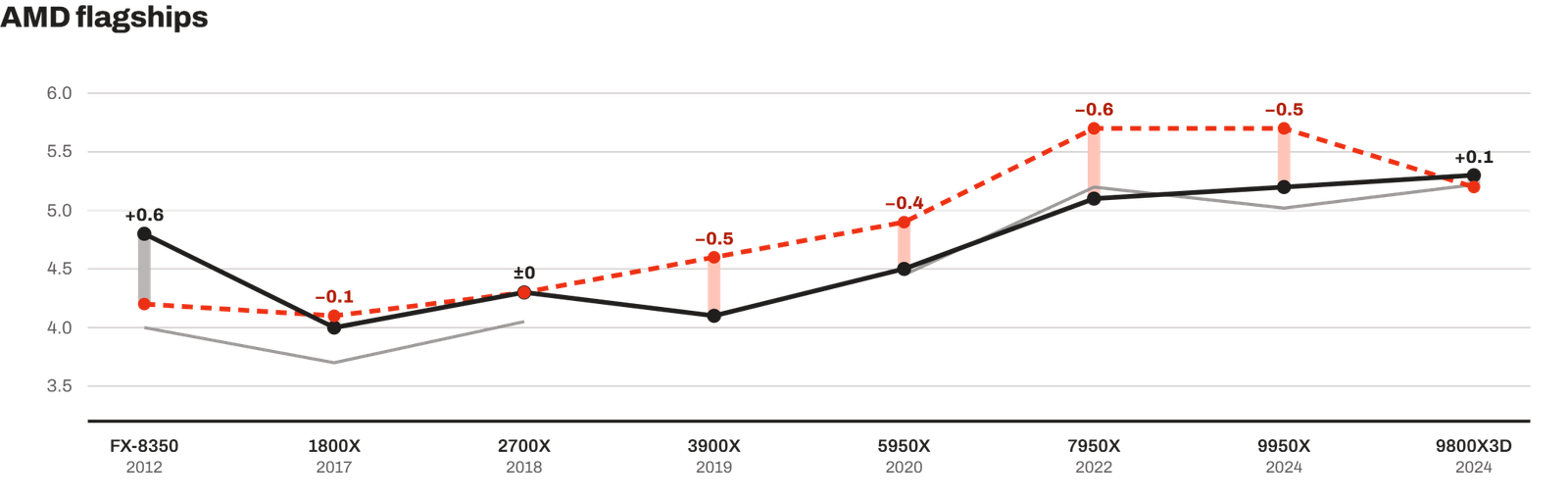
AMD: from 20% on FX to low single digits on Ryzen
The golden era that Intel provided to its user was never given by AMD.
| CPU | Year | Cores/Threads | Stock 1-core boost (GHz) | Stock all-core (GHz) | Typical manual OC (GHz) | All-core headroom | vs 1-core boost | n |
|---|---|---|---|---|---|---|---|---|
| FX-8150 | 2011 | 8/8 | 4.2 | Unknown | Unknown | Unknown | Unknown | 0 |
| FX-8350 | 2012 | 8/8 | 4.2 | 4.0 | 4.8 | +20.0% | +14.3% | 3 |
| Ryzen 7 1800X | 2017 | 8/16 | 4.1 (XFR) | 3.7 | 4.0 | +8.1% | −2.4% | 3 |
| Ryzen 7 2700X | 2018 | 8/16 | 4.3 | 4.05 | 4.3 | +6.2% | 0.0% | 2 |
| Ryzen 9 3900X | 2019 | 12/24 | 4.6 | Unknown | 4.1* | Unknown | −10.9% | SL only |
| Ryzen 9 5950X | 2020 | 16/32 | 4.9 | 4.45 | 4.5 | +1.1% | −8.2% | 1 |
| Ryzen 9 7950X | 2022 | 16/32 | 5.7 | 5.2 | 5.1 | −1.9% | −10.5% | 1 |
| Ryzen 9 9950X | 2024 | 16/32 | 5.7 | 5.02 | 5.2 | +3.6% | −8.8% | 1 |
| Ryzen 7 9800X3D | 2024 | 8/16 | 5.2 | 5.22 | 5.3 | +1.5% | +1.9% | 1 |
The FX-8350 was the last AMD chip where you can call a manual overclocking did any meaningful improvement. PC Perspective reached 4.8 GHz at 1.5 V with AMD’s liquid cooler. TechSpot reached 4.7 GHz at 1.475 V. 9800X3D gave some improvements but not worth it.
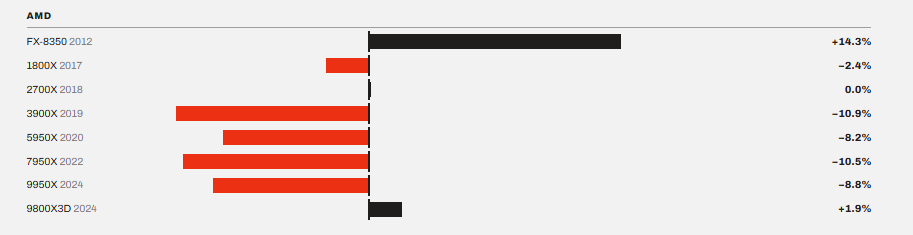
Ryzen arrived in 2017, and the first Ryzen 7 1800X hit its limits with 4.0–4.1 GHz on all cores. AMD itself said that most chips would land between 3.9 and 4.1 GHz and suggested a 1.35 V ceiling.
From Zen 3 onward, AMD’s normal all-core headroom sits between −1.9% and +3.6%. That is basically inside the margin of the silicon lottery.
The gap between stock and overclocked clocks has almost closed.
The new trends are, as you might know, vendors putting the chip’s best clock into the single-core boost, where a manual all-core overclock cannot reach it.
In 2011, a typical i7-2600K overclock (4.5 GHz) was 0.7 GHz faster than the chip’s best single-core boost (3.8 GHz). Every core ran faster than any core could at stock. Now look at 2023. A typical i9-14900K overclock (5.5 GHz) is 0.5 GHz slower than its best single-core boost (6.0 GHz).
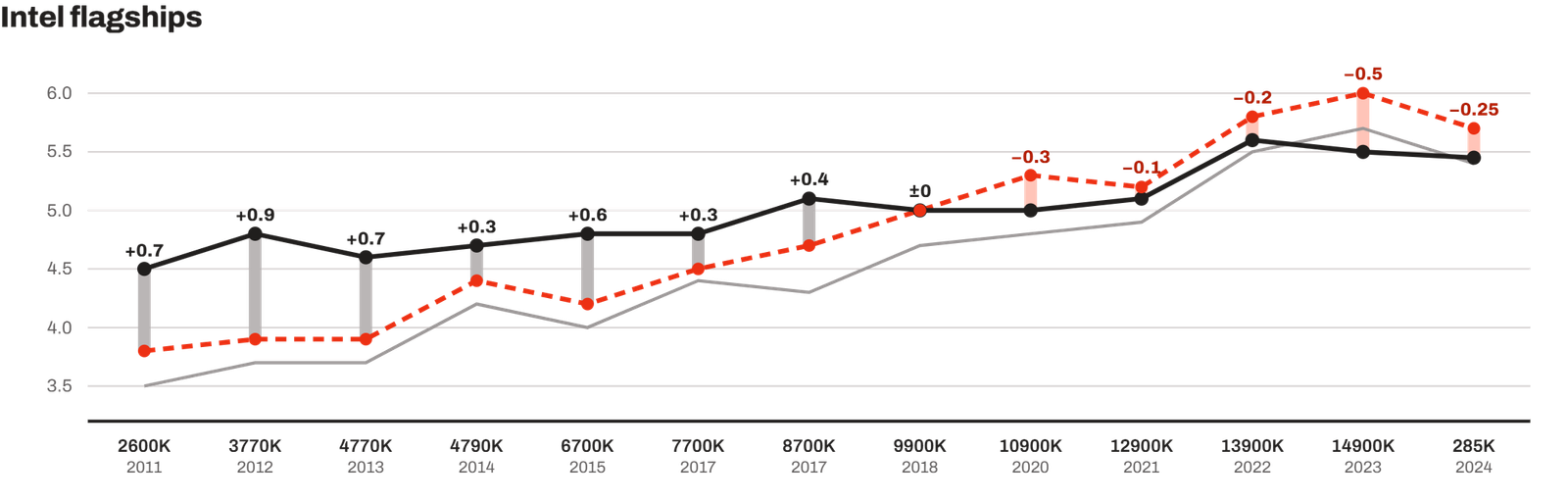
AMD shows this much clearly. TechPowerUp’s best manual all-core OC on the Ryzen 9 7950X was 5.1 GHz. The chip boosts to 5.7 GHz on its own.
Again, it isn’t that these chips are bad overclockers. It is just that the factory already does the overclocking, core by core, in real time.
The only exception is the 9800X3D, as you can see in this table above. Its stock all-core clock (5.22 GHz, measured by TechPowerUp) already matches its 5.2 GHz rated boost. So, a 5.3 GHz manual overclock is above both. But the gain is tiny, and we can expect no meaningful improvement in performance from this.
If you want to understand the single-core vs. all-core trade-off in plain terms, I’ve covered it in Single-Core vs. Multi-Core Performance.
How much performance does overclocking add now?
Most people pay too much attention to the frequency, but for a normal person, performance is what matters the most. But there is an issue with the available data here. Most launch reviews report the overclocked frequency but don’t report the overclocked benchmark result against stock in a way I could reuse for this article. So, I only have a handful of clean data points.
| CPU | What was changed? | Measured gain |
|---|---|---|
| i7-8700K | 5.2 GHz all-core | +15% (Corona render) |
| i9-9900K | 5.0 GHz all-core | +5.7% (Cinebench R20: 5,266 vs 4,984) |
| Ryzen 9 7950X | 5.1 GHz all-core | Negative (slower than stock) |
| Ryzen 7 9800X3D | 5.3 GHz all-core | “No significant gain” |
| Core Ultra 9 285K | Intel 200S Boost (memory/fabric) | +7.5% average gaming |
In simple words, the only reliable modern gain comes from the memory and fabric side, not from the cores. In gaming, cache improvements are proving to be great, like the Ryzen X3D Chips.
What does the silicon lottery data say?
So, the reviewers get a single unit for testing. And press samples may be better than retail chips. So, although these benchmark and overclocking results are great findings, they do not give the whole picture of the silicon lottery. We can’t conclude properly that whether this lottery is still there in modern processors or not.
However, it was a US company that bought CPUs in bulk, tested each one, and sold them binned by guaranteed all-core frequency. It published the percentage of tested chips that reached each tier. Here is what they found out.
Now, if you look at the graph above properly, on the 8700K, the worst chip Silicon Lottery tested still ran 4.9 GHz on all six cores. That is 14% over the 4.3 GHz stock all-core turbo. Every single one. On the 9900KS, every chip ran 5.0 GHz. But 5.0 GHz is the stock all-core clock. Only 31% could go 100 MHz higher, and just 3% could go 200 MHz higher.
See, the 9900KS is the clearest example of the vendor selling the headroom itself. Intel picked the best 9900K dies, set them to 5.0 GHz from the factory, and charged more for it. One thing to note is that the spread between the worst and the best chip shrank too. The lottery still exists, but the prizes got smaller.
Why did overclocking headroom shrink?
The first and main reason why overclocking headroom is not there is the smarter boost algorithms. In 2011, Turbo Boost 2.0 on Sandy Bridge added a few 100 MHz bins on top of the base clock. Modern boost systems do know how good it’s own silicon is. AMD’s Precision Boost 2 (2018) and PBO2 with Curve Optimizer (2020) adjust clocks in small steps based on temperature, current and voltage. Intel has Thermal Velocity Boost that adds extra performance when the chip is cool.
Second reason is that the binning is getting smarter and smarter. Old chips used to run every core at the same stock clock. But, modern chips know which of their cores are best and which aren’t that great. So, Intel marks favoured cores for Turbo Boost Max 3.0, and AMD marks preferred cores. On the Ryzen 9 9950X, SkatterBencher reported that the two CCDs even have different frequency limits: 5,750 MHz on CCD0 and 5,450 MHz on CCD1. So, the best cores already run at their best clock from the factory. A manual all-core overclock forces every core down to what the worst core can handle. So, you are basically underclocking it by doing so.
Modern CPUs come with many cores but still have the same thermal budget as a CPU that released 15 years ago. You have to understand that an all-core overclock is limited by the weakest core and by how much heat you can pull out of the die. More cores means more heat and a higher chance of one weak core. TechPowerUp couldn’t keep a fully loaded 7950X under 100°C at 5.1 GHz, even with a large AIO.
Because of the denser nodes, the transistors are getting smaller and they are packing much more heat into very small areas. Even a 6-core Ryzen 5 7600X hit 95°C in Cinebench R23 on a 360 mm AIO. So, most modern processors will hit the thermal wall before they hit the voltage wall.
Also, there is a mindset shift by the vendors. Earlier, the manufacturers used to give bigger baits to people with their overclocking promises. Now, the chip is supposed to use all of its thermal headroom by itself. There is nothing left on the table for you.
Many boards shipped with Multi-Core Enhancement or unlimited power limits enabled at “stock”. That means many reviews and many users were already running an “overclocked” chip without touching anything.
So, the lessor is simple. The vendors are already selling their chips at the edge. The “free” headroom is not actually free. It shows up later as instability or degradation.
What does overclocking mean today?
Modern overclocking is not manual overclocking anymore. It is more about tuning the fabric and memory. Intel’s own 200S Boost profile for Arrow Lake raises the die-to-die (D2D) and NGU fabric clocks up to 3.2 GHz and allows memory up to DDR5-8000 at 1.4 V. And the best part is that Intel says eligible Core Ultra 200S chips keep their three-year limited warranty with 200S Boost.
On AMD, the PBO and Curve Optimizers are exactly what you need to take your CPU at its highest limits. Instead of forcing a fixed clock, you let AMD’s boost algorithm work harder. On the 9950X, PBO can add about 40% extra power budget in all-core workloads.
Undervolting is the new overclocking. The new silicon lottery is about finding the lowest voltage to operate the CPU as the same clock speeds.
Intel’s E-Core are great when overclocked per-core. 285K’s E-cores can easily be taken from 4.6 to 4.9 GHz which calculates to around 6.5% enhancement. On the Core Ultra 7 270K Plus, the E-cores reached 5.1 GHz, 400 MHz above their rated maximum.
If we talk about the modern CPUs that overclock well, they are Arrow Lake E-cores, Ryzen 7 9800X3D. With deep tuning and external clock generators, most CPU can be overclocked pretty well over their limits. But, this can be risky and require huge efforts to get stable results.
Is it still worth paying for an unlocked CPU and an OC motherboard?
For core overclocking only, no. The reasons are already discussed above. The typical manual all-core overclock are not worth it anymore. I will consider unlocked chips and good boards for other reason.
- Memory tuning and 200S Boost (Intel Z-series only)
- PBO and Curve Optimizer (AMD, most boards)
- Better VRMs for sustained all-core loads at stock
- Higher stock clocks on K/X SKUs anyway
The only time I will change my decision is if you are a tuner who enjoys the process itself. Like an enthusiast who just love to tweak things and see what happens.
For a gamer, gamers who just want more FPS, a better GPU or an X3D chip helps far more. For non-K Intel chips, I’ve covered the alternatives in non-K overclocking guide.
Methodology
Source of Data: For most chips, the numbers come from the overclocking page of each chip’s launch review. I have selected the pages from reliable websites where the reviewer lists stock clocks, the best stable all-core overclock, voltage, and cooler. TechPowerUp’s overclocking pages covered most chips from 2020 onward. Older chips came from bit-tech, HEXUS, Hardware Secrets, Vortez, KitGuru, Overclockers.com, PC Perspective, TechSpot, and Tom’s Hardware.
SKU selection: The primary series is the top mainstream unlocked desktop chip per generation. I left out HEDT and laptop chips.
Stock all-core clock. For Intel, I used the official all-core turbo ratio. For AMD, I used a reviewer’s measured all-core clock under full multithreaded load. When I only had one measurement, that chip is flagged.
Typical OC: The median of the best stable ambient-cooled all-core overclock from each source. Where a review had both an air and an AIO result, I used the best ambient result.
Cooling rules: Air, AIO and custom water are allowed. LN2, dry ice and chillers are excluded.
Hybrid chips: P-cores and E-cores are counted separately. The headline number uses P-cores.
Era averages: A simple average of chip headroom within the era:
- Intel 2011–2013 (2600K, 3770K, 4770K): (28.6 + 29.7 + 24.3) ÷ 3 = 27.5%
- Intel 2014–2018 (4790K, 6700K, 7700K, 8700K, 9900K): (11.9 + 20.0 + 9.1 + 18.6 + 6.4) ÷ 5 = 13.2%
- Intel 2020–2024 (10900K, 12900K, 13900K, 14900K, 285K): (4.2 + 4.1 + 1.8 − 3.5 + 0.9) ÷ 5 = 1.5%
- AMD FX (FX-8350): 20.0%
- AMD Zen/Zen+ (1800X, 2700X): (8.1 + 6.2) ÷ 2 = 7.2%
- AMD Zen 3–Zen 5 (5950X, 7950X, 9950X, 9800X3D): (1.1 − 1.9 + 3.6 + 1.5) ÷ 4 = 1.1%
From each review, two numbers went into the dataset: the stock all-core clock and the best overclock that stayed stable on normal cooling (air, AIO, or custom water). Then, as I said above, I took the median for each chip and worked out the headroom from it.
The large-sample numbers come from Silicon Lottery’s published binning statistics. And for the “why” part, I used Intel’s and AMD’s own statements wherever they exist.
In this article, I will not explain why clock speeds stopped climbing in general. I have already covered that in Why Did CPU Clock Speed Stop Climbing?. I will also stay away from GPUs, laptops, and HEDT chips. But I may cover these as well in another article.
Limitations
I want to be upfront about what this data can’t tell you.
- Small samples. Many modern chips have only one or two reviewer results. One unusually good or bad review sample can move the median a lot.
- Press samples. Review chips may be better binned than retail chips.
- Different standards. A 2011 reviewer running a quick Cinebench pass is not the same as a 2023 reviewer running Prime95 AVX.
- Stock coolers. Two of the three 2600K results used Intel’s stock cooler, so its “typical” number is probably conservative.
- Stock is not constant. Motherboard defaults changed what “stock” meant, especially on Intel chips from 2017 onward.
- Silicon Lottery bias. It sold binned chips, so it had a business reason to publish these numbers. Its test settings also changed over time.
- Thin performance data. I only have five clean performance data points.
I could be wrong on individual chips. But the overall trend is consistent across every source I found.
Conclusion
To conclude this article, the headroom didn’t die. Actually, the vendors took it. The Sandy Bridge era gave you 25–30% headroom for free. Today’s chips hand you almost all of that at stock. If you still want to squeeze something out, the last few percent live in memory, fabric and PBO tuning. My recommendation is simple. Don’t buy an unlocked chip and a premium board expecting a big manual overclock. Buy them for memory tuning, good VRMs, PBO, and better sustained performance.
Use this data
If you have your own overclocking results for any of these chips, send them in. I will add them to the next update, marked separately from review data.