

A CPU core is a single processing unit inside your processor, and there can be many of them. It is the part that actually does the work and runs your programs or games. To be concise, its job is simply to fetch an instruction from a program, understand what that instruction wants, do the work, and save the result. But the same process is done billions of times per second. One core can handle more than one task at a time, which I covered a little in my CPU pipelining article. The main idea is the more cores you have, the more work can be done in the same time.
For years, every core in a processor was identical. They were uniform and had similar performance characteristics. But, with its hybrid core design, Intel changed this. Intel started this hybrid design with Lakefield in 2020 and took it mainstream with 12th Gen Alder Lake on November 4, 2021. Its newer chips have two kinds of cores.
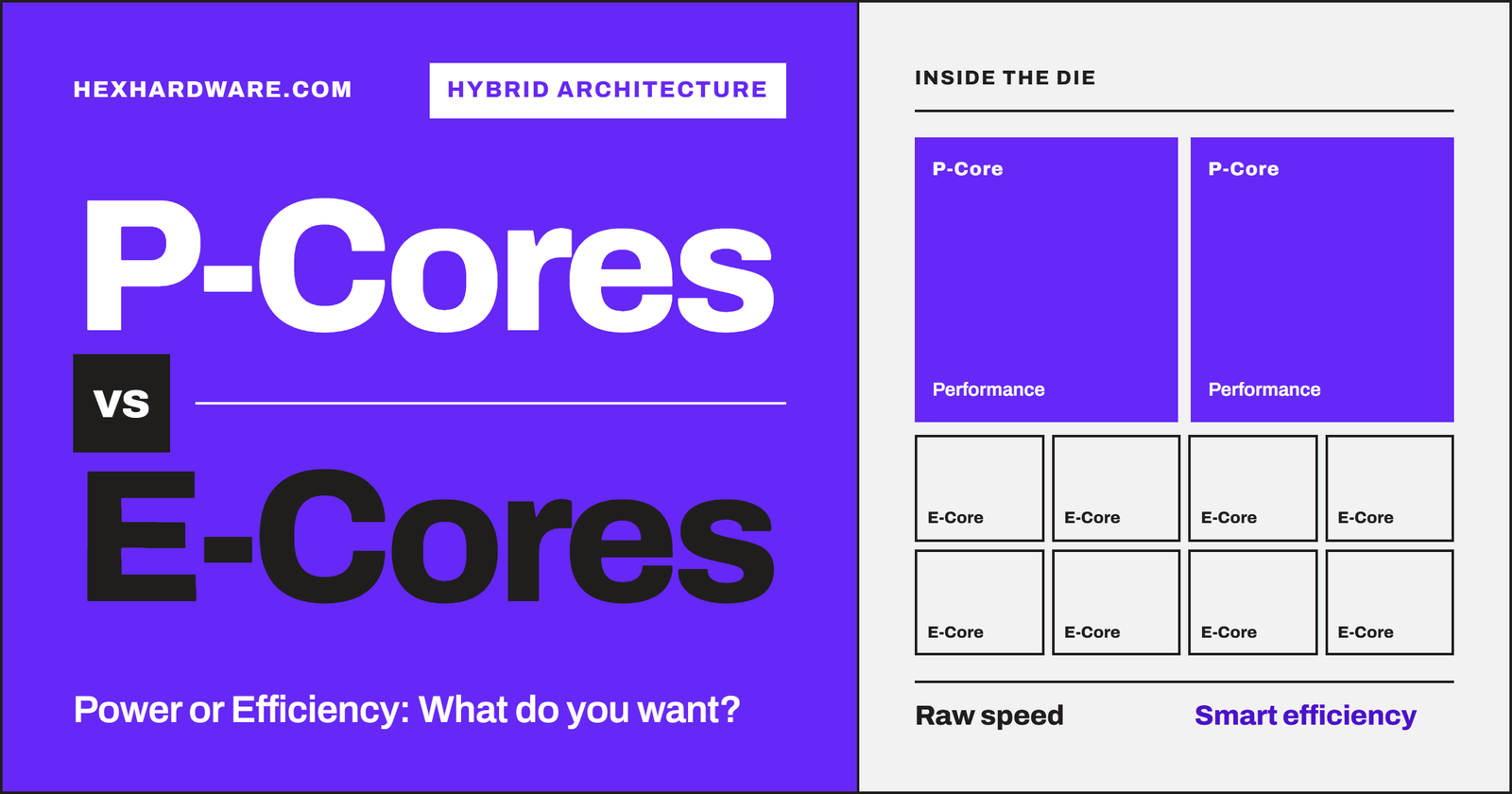
A P-core (performance core) is a big and fast core built to finish one task as quickly as possible. An E-core (efficient core), as the name suggests, is a small core built to do as much work as possible for each watt and each square millimeter of silicon. In short, P-cores are Intel’s big cores for tasks like gaming and snappy single-threaded work. E-cores are small cores that handle background tasks and contribute mainly to the multi-threaded performance.
The reason for the hybrid core design by Intel
The reason Intel released this microarchitecture is mainly because they were stuck. Intel spent around seven years on 14nm, roughly from 2014 to 2021, but AMD was still winning the core count race. Also, Apple’s M1 had just shown how efficient a laptop chip could possibly be. Intel was still not able to fit in 16-bit cores utilizing a reasonable power and space. So, they added the smaller cores.
In my opinion, the strategy was impressive by Intel, but they messed up the execution a little bit. The hybrid architecture surely won in multi-threaded performance, but it cost them AVX-512 and made Windows 11 nearly mandatory. Also, it confused a lot of buyers on what they actually are. If you are one of those people, I am here to clear your confusion.
This article isn’t necessarily a comparison between the P-Cores and E-Cores but also a try to explain them simply so that you can compare them yourself as well.
What is a P-core?
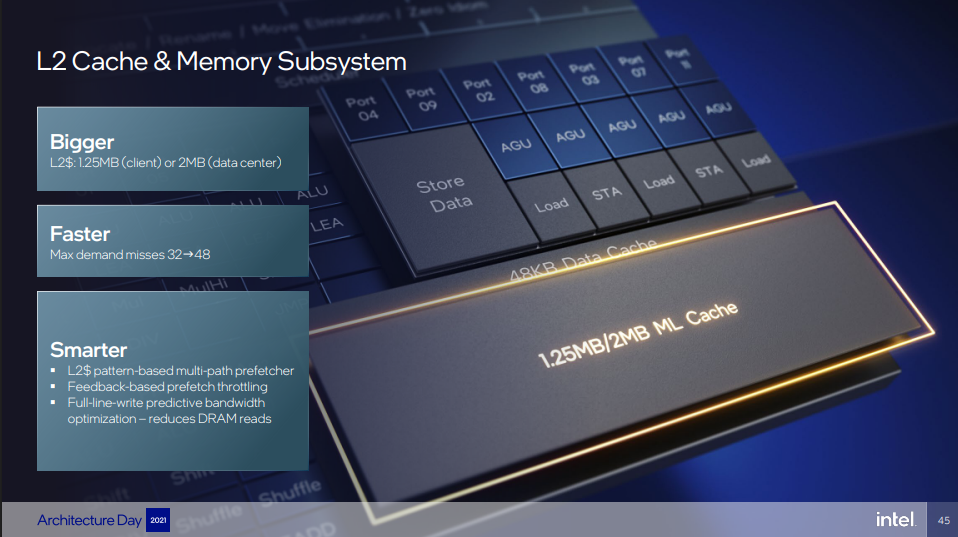
A P-core is Intel’s high-performance core. It is the same core that power Intel CPUs for years before this hybrid design. It supports Intel hyper-threading, and its main job is to finish a thread as fast as possible. To do that, a P-Core has a wide design, higher clock speeds, and a bigger and more private L2 cache.
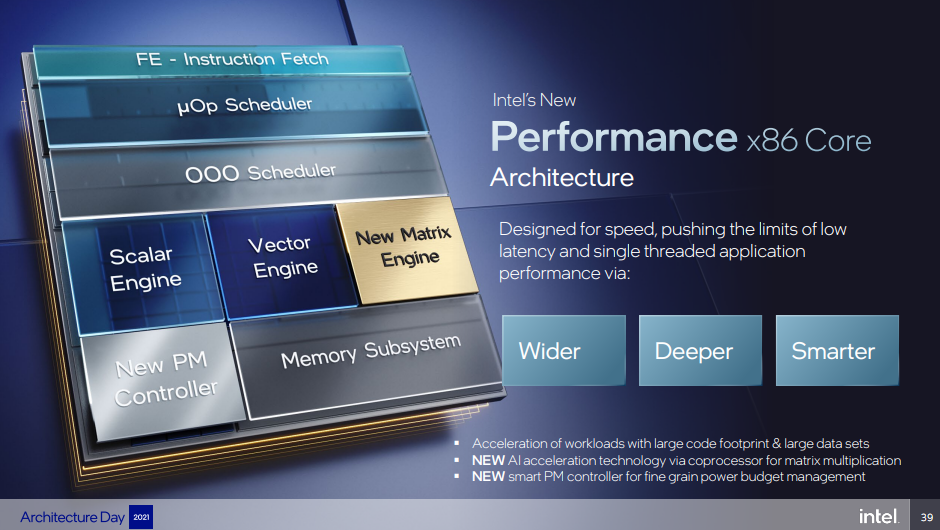
The word “wide” is important to discuss here. We aren’t necessarily talking about the area here; these cores are surely larger than the E-Cores. It means that a core can work on many instructions and get them done faster. In Golden Cove microarchitecture, for example, the P-Core can decode 6 instructions per cycle and keep track of 512 instructions at once. P-Cores have the highest clock speed on the whole processor. For example, they boost up to 5.2 GHz on the Core i9-12900K and up to 6.0 GHz on the Core i9-14900K. Without the dedicated L2 cache, this performance is hard to achieve. It was 1.25 MB per core on Golden Cove but grew to 3 MB per core on Lion Cove in Arrow Lake.
I know that the naming can be confusing when we discuss Intel CPUs. Every generation brings a new P-core with its own codename. Golden Cove in 12th Gen, Raptor Cove in 13th and 14th Gen, and Lion Cove in Core Ultra 200S. And each one of these is faster than the previous one. Basically, for P-Cores, Intel uses the “Cove” suffix, and for E-Cores, the “Mont” suffix is used.
One thing to note is hyper-threading. P-cores on 12th, 13th, and 14th Gen have it, so each P-core runs 2 threads. From Lunar Lake and Arrow Lake onwards, Intel removed it, so each P-core runs 1 thread. I will explain why later in this article.
What is E-Core?
An E-Core (Efficient Core) is a small and simple core whose history can be traced back to Intel’s Atom family. The key point is that E-Cores doesn’t support hyper-threading. They run on comparatively lower clock speeds than the P-Cores, and that’s one reason they are efficient. On Alder Lake and Raptor Lake, the E-cores are called Gracemont cores. They come in clusters of four, and the four cores share one L2 cache. On my 12600K, that is a single cluster of 4 E-cores sharing 2 MB of L2. But, on 13th and 14th-gen Raptor Lake chips, that shared L2 grew to 4 MB per cluster.
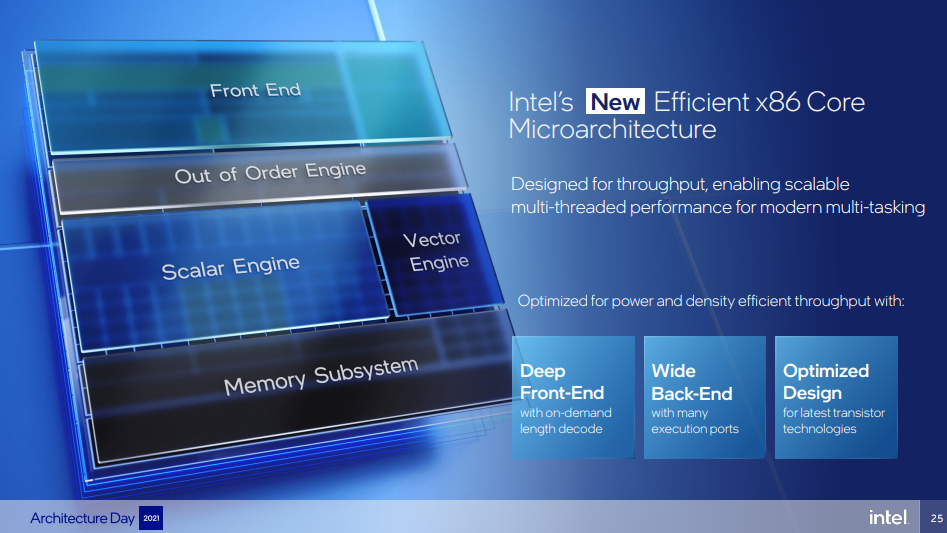
From “Atom” and “Efficient-Core” in general, you might imagine slow cores. But that is not the case. They can be slower for the work that the P-Cores are supposed to do, but the E-Cores are built for a different work, and they do well in that. If we talk about the specific tasks, they mostly get background work and heavy multi-threaded jobs like rendering. The job of assigning this work is of the OS scheduler, using hints from Intel Thread Director, but this is the topic for another day. If I have to connect it somewhere, I would say an E-Core is roughly a Skylake-class core (possibly i7-6700K per clock) in a much smaller space.
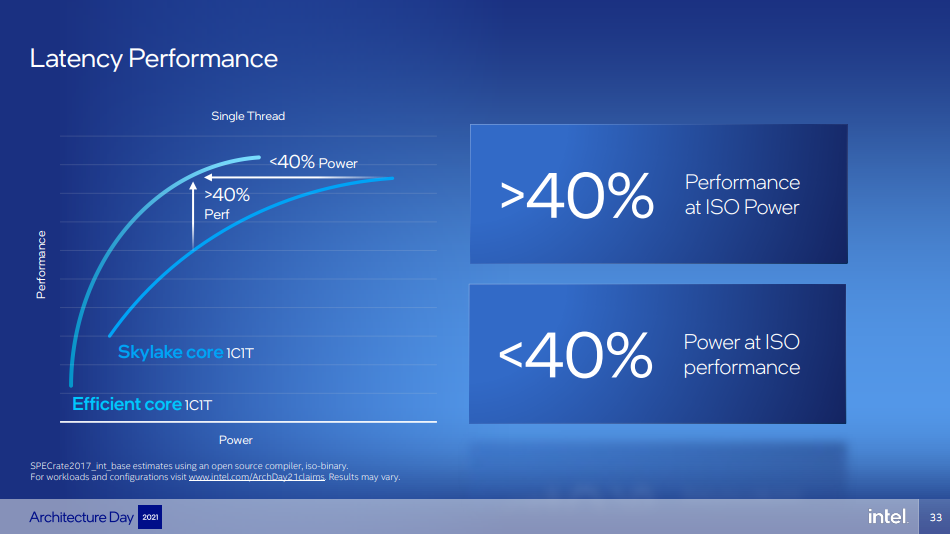
In its Architecture Day 2021 presentation, Intel said that one Gracemont (E-core) delivers 40% more single-threaded performance than one Skylake core at the same power.
The Need for E-Cores
As we discussed earlier, P-Cores are the ordinary cores equipped with hyper-threading and do their work as they used to do before the hybrid microarchitecture was introduced.
The Pllack’s Rule and the Amdahl’s Law
First, I would like to talk about the Pollack’s Rule. It says that a microprocessor’s performance increase is roughly proportional to the square root of its increase in complexity.
For example, if you double the size of a core, you get about 41% more performance (√2 ≈ 1.41), not 100%. But, at its place, if we have two smaller cores in a smaller area, it could give us 2x more performance. The condition is that the work must be splittable. The point is that big cores are great for single-threaded speed. But they give less performance using the same power and silicon in multi-threaded throughput. E-Cores were introduced to handle those multi-threaded tasks.
The almost opposite of it is Amdahl’s law. According to this law, some part of almost every program cannot be split into threads. The serial processing is limited by your fastest cores. Mark Hill and Michael Marty looked at this in their “Amdahl’s Law in the Multicore Era” paper. This model showed that a few big cores combined with many small ones can beat a chip made of identical cores. Basically, the solution was to give the serial work to a few big cores but give the parallel work to the E-Cores. And Intel applied it in it’s hybrid architecture. If you want to know more single-core and multi-core performance, you can read my article.
The idea might sound modern, but it was introduced back in 2003 in the MICRO-36 conference. I was in school that time, and I sometimes got amazed at where the technology had already reached. If you read this paper, the idea is to put cores of different sizes on one chip but make them all run the same instruction set. Then let software move each program to the most suitable core. If you are curious, ARM is big.LITTLE in 2011, pairing big and small cores in phones. Intel was the one that brought it to x86 desktop PCs
How big is a P-core compared to an E-core?
The general idea is that four E-cores fit in the space of one P-core. But Intel’s claim was a little different. They said that four Gracemont cores fit in a similar footprint as one Skylake core. But the die-shot gives us a better overview, and I found a great article on this. Based on it, the Golden Cove core is about 5.37 mm² without its L2 cache, while a Gracemont core is about 1.59 mm².
If we do the math, 1.59 ÷ 5.37 = about 29.6%. So one E-core is under a third of a P-core. And 4 × 1.59 mm² = 6.36 mm². This is around 18% more than one Golden Cove core (excluding L2). So, four E-cores take slightly more space than one P-core.
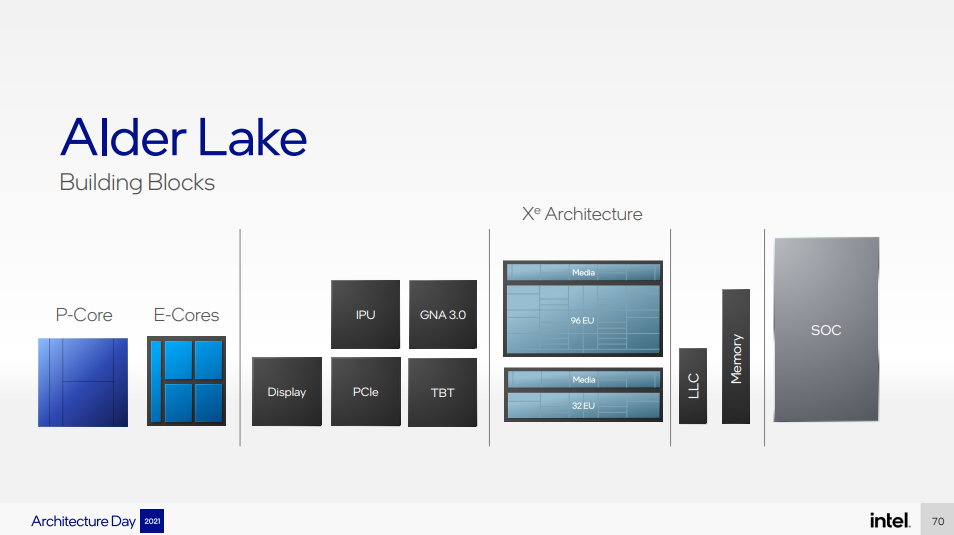
So, the “4 E-cores = 1 P-core” rule is roughly true, but not exactly true. But the point is still the same. You get four cores of Skylake-class throughput for about the area of one big core.
The arrangement of P-Cores and E-Cores inside the chip
A typical layout of a hybrid Intel chip looks something like this:
- P-cores: one private L2 per core
- E-cores: grouped in clusters of 4, one shared L2 per cluster
- All cores: one shared L3 cache
- P-cores on 12th–14th Gen: Hyper-Threading (2 threads)
- E-cores: no hyper-threading (1 thread)
So, on Alder Lake’s 12900K, you get 8 P-cores and 2 E-core clusters of 4, all sharing 30 MB of L3. I have made a mock diagram for how a 12900K CPU is structured.
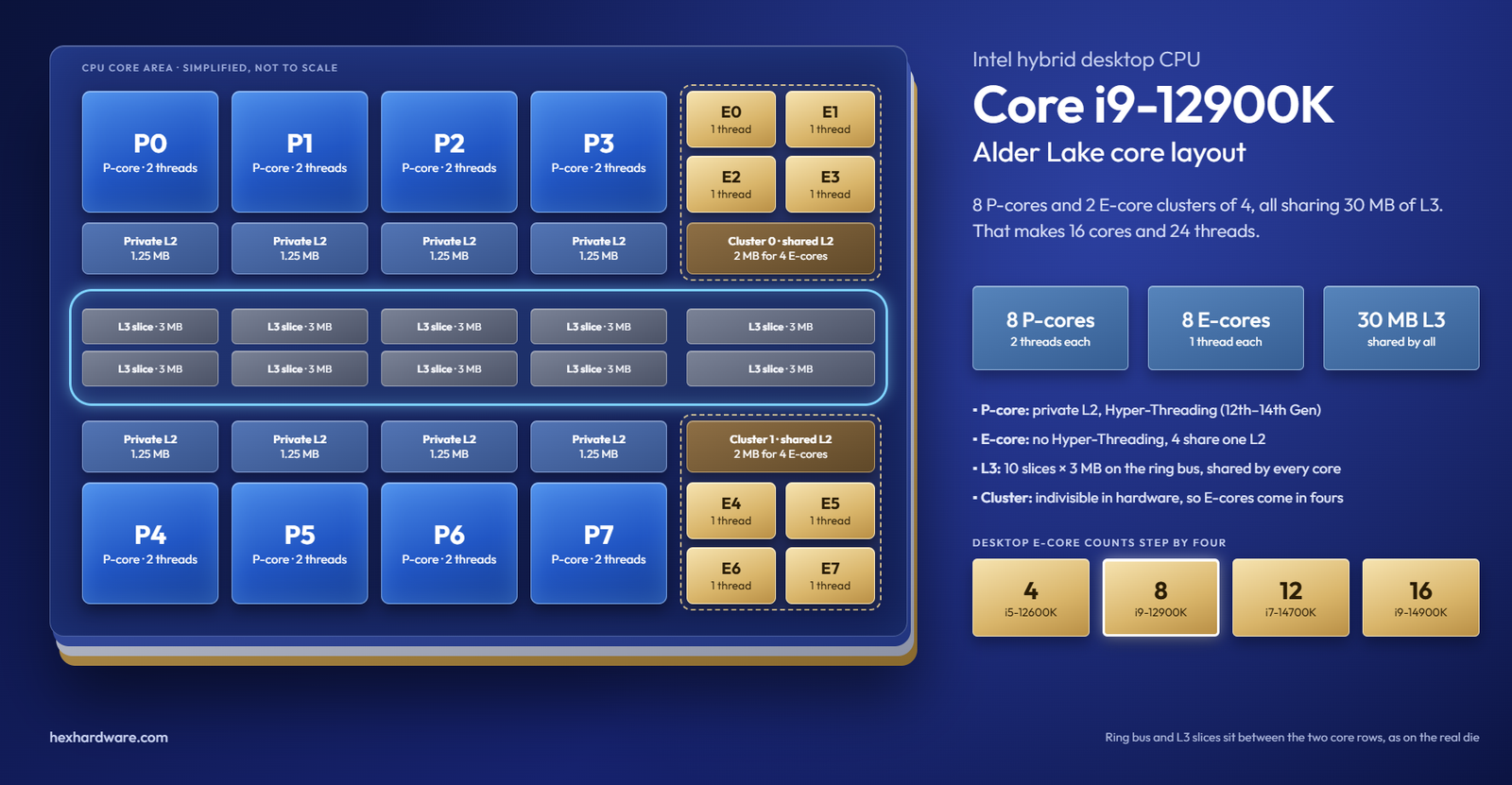
One thing to note is that an E-core cluster is indivisible in hardware. That is why you see E-core counts in steps of four on the desktop: 4, 8, 12, and 16.
On some laptops, there is a third kind of core. Intel calls them LP E-cores (low-power E-cores). They sit on a separate “low power island,” away from the main compute cores. They are optimized for very specific background tasks like email sync or music playback.
Thread Count in P-Core and E-Core CPUs
Threading is used to utilize a core’s resources fully. In non-hybrid CPUs, a single core generally has two threads allocated to it. One thread appears as one logical processor in the Task Manager. But, when we introduce E-Cores, it can get confusing for some people. But the rule isn’t that complex. On 12th, 13th, and 14th Gen processors, each P-core gives 2 threads and each E-core gives 1 thread.
In my case, the i5-12600K has:
6 P-cores × 2 threads + 4 E-cores × 1 thread = 16 threads.
Similarly, a Core i5-13600K or i5-14600K has 6P + 8E:
6 P-cores × 2 threads + 8 E-cores × 1 thread = 20 threads from 14 cores.
But, as we discussed above, this rule has changed in the Core Ultra 200S (Arrow Lake). Intel has removed hyper-threading from the P-Cores. So, a Core Ultra 9 285K with 8P + 16E is:
8 P-cores × 1 thread + 16 E-cores × 1 thread = 24 threads from 24 cores.
Why Intel removed Hyper-Threading from P-cores?
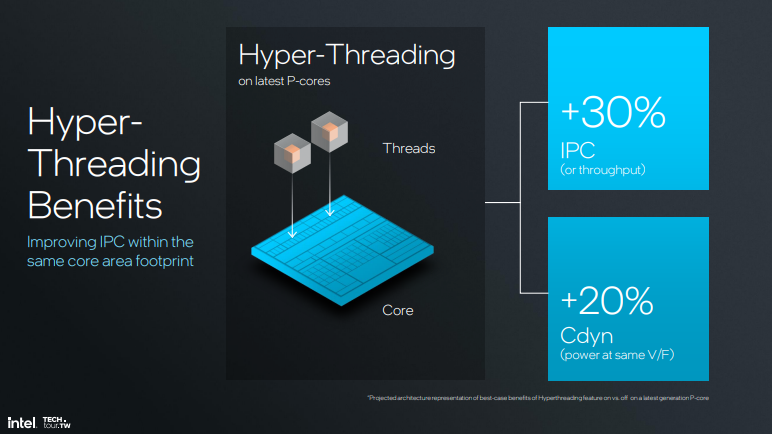
With Lunar Lake and Arrow Lake in 2024, Intel’s new Lion Cove P-cores dropped Hyper-Threading. Most people looked at it as a downgrade. But, Intel’s own slides from its 2024 Tech Tour say Hyper-Threading adds about 30% throughput for about 20% more dynamic power. That is a good deal on a chip with only big cores.
But on a hybrid chip, Intel argued that E-cores are a better way to add threads. Intel’s lead client CPU architect Arik Gihon put it simply: “We can scale using E-cores and therefore we have decided to actually not use Hyper-Threading.”
Intel claims that a Lion Cove core designed without Hyper-Threading gives:
- +15% performance per watt (vs. the same core with HT disabled)
- +10% performance per area (vs. the same core with HT disabled)
- +5% performance per watt (vs. a core with HT on)
- -15% performance per area (vs. a core with HT on)
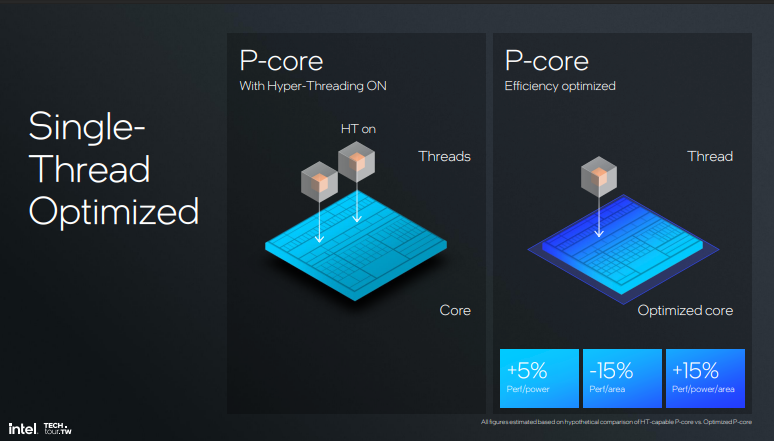
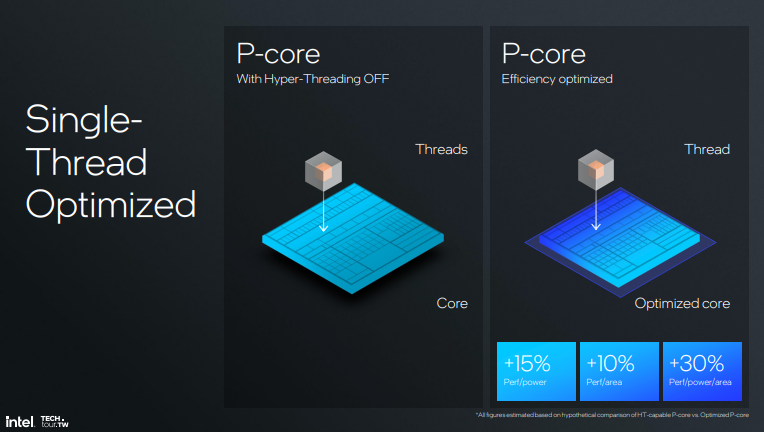
But, if you look closely, it is not free. You lose some multi-threaded throughput per mm² compared to a Hyper-Threaded core.
Was hybrid a good thing for Intel?
The gains from the hybrid design were real. The 12900K traded blows with AMD’s 16-core Ryzen 9 5950X in multi-threaded benchmarks while winning in games. The hybrid helped Intel compete on core count without having a better process node in hands. In laptops, the idea is working clearly. Panther Lake’s LP E-cores and Lunar Lake’s E-core island are a big part of how they are offering an improved battery life.
But, Intel lost a lot of things as well. The first is definitely the simple marketing. It was not easy for buyers to understand the threads especially when this new architecture came.
In terms of performance and software compatibility, hybrid caused new problems. When all cores are identical, the operating system can put any thread on any core, and go on with the work. But, Golden Cove P-cores physically had AVX-512 hardware. Gracemont E-cores did not. Both core types must support the same instructions, because Windows can move a thread from one core to another at any time. If a thread using AVX-512 landed on an E-core, it would crash.
Gamers also faced issues with it. When Alder Lake launched in November 2021, some games using Denuvo DRM refused to start. The DRM saw the P-cores and E-cores as two different computers and assumed piracy. Titles included games like Assassin’s Creed Valhalla and Football Manager 2019. Even on Windows 11, some games put heavy threads on E-cores. Intel’s own answer was APO (Application Optimization).
In my opinion, hybrid was the right call from Intel at that time but I also think it is the time to change. It helped intel in desktop competitiveness between 2021 to 2023. But, this solution created new problems. So, if Intel works on it’s unified cores, I think we might see much more overall improvements and a better alignment with the existing software ecosystem.
How to see P-cores and E-cores on your own PC
1. Task Manager
Open Task Manager > Performance > CPU. Right-click the graph and choose Change graph to > Logical processors.
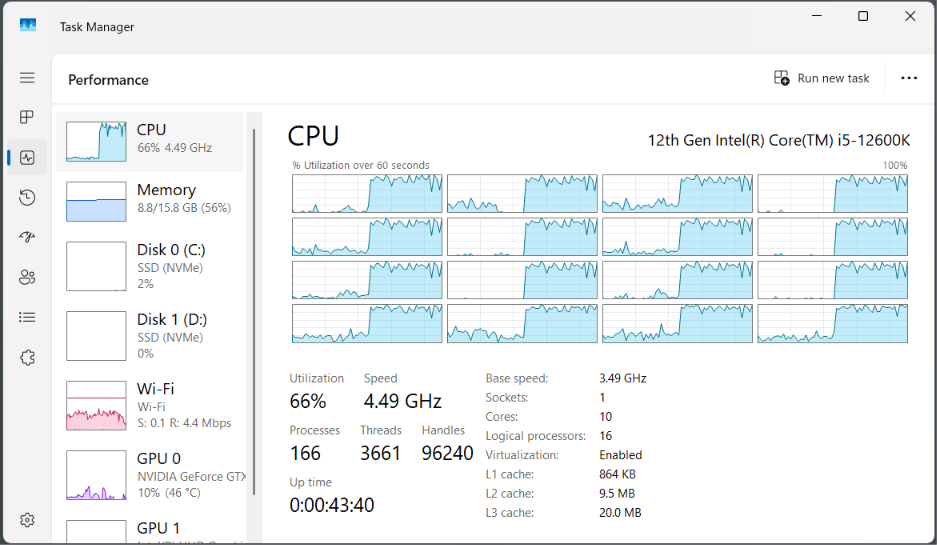
In my case, the i5-12600K shows 16 logical processors (check the image above). The first 12 (CPU 0 to 11) are the 6 P-cores with 2 threads each. The last 4 (CPU 12 to 15) are the E-cores.
Windows lists P-core threads first, then E-cores.
2. HWiNFO
HWiNFO shows each core’s clock, and the P-cores and E-cores will show different clock speeds. On my 12600K, the P-cores boost up to 4.9 GHz and the E-cores up to 3.6 GHz.
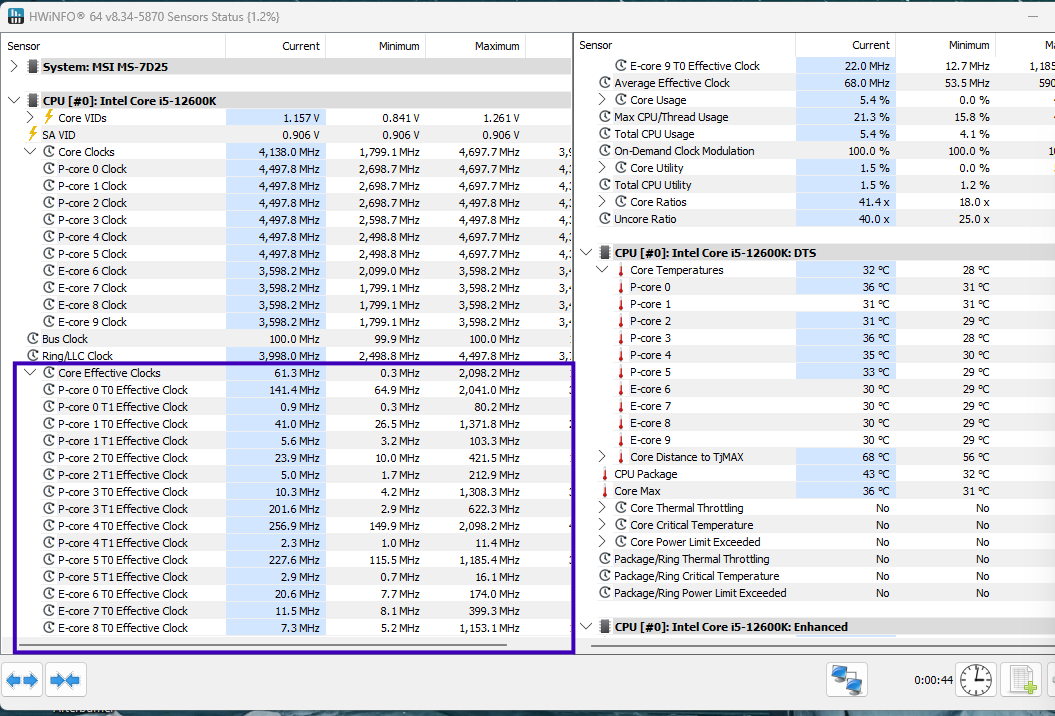
Conclusion
P-cores make your PC fast, and E-cores make it efficient and wide. In simple words, P-cores are for the thing you are doing, and E-cores are for everything else. My personal recommendation is simple. Use Windows 11, leave E-cores on, and only use affinity or Process Lasso if one specific program misbehaves. In my case, my i5-12600K runs with all 10 cores enabled. And I face no issues at all.
Frequently Asked Questions
Do P-cores and E-cores matter for overclocking and power?
Yes, per core, P-cores are fasted. On Alder Lake, a P-core was about 50% faster than an E-core in TechPowerUp’s Kraken test. Newer Skymont E-cores closed the IPC gap, but still run at lower clocks.
Do E-cores hurt gaming?
No, not in a way people thing. But, they don’t expect any improvement as well. E-cores mostly help by keeping Discord, your browser and Windows background tasks off the P-cores.
Should you disable E-cores?
Leave them on unless you have a specific problem, like an old software crashing in hybrid mode or a game stuck on the E-cores in Windows 10.
Which operating system works the best with P-Cores and E-Cores.
Windows 11. It has supported Intel Thread Director since launch, so it knows which threads belong on the P-cores.
Does AMD have E-cores?
Not in Intel’s sense. AMD’s Zen 4c and Zen 5c are compact versions of the same core with the same IPC.
Do E-cores help battery life?
Yes. Windows moves background and minimised work to E-cores to save battery.