

It is 2026, and most people are overly obsessed over the clock speed numbers. If you are one of those, let me say something to you. “A modern chip running at only 4 GHz can crush an older chip running at 5 GHz.” In fact, Gigahyetz was never the whole story. It is one half of the equation, multiplied by a much harder-to-advertise number called IPC.
Clock speed (GHz) is how many cycles a CPU runs per second. IPC (instructions per cycle) is how much work gets done in each of those cycles.
The real CPU performance is roughly IPC x clock speed x core count. If you want one word to remember: care about IPC. It’s the reason a 2026 laptop chip beats a 2005 desktop screamer despite a lower clock speed. It is what separates a good CPU generation from a bad one.
Core clock is one of the prominent specifications any manufacturer wants to highlight. But you will never see a CPU’s IPC written anywhere.
Why?
Because IPC is not a single fixed property of a CPU, unlike the clock speed. IPC is much more complicated. Intel’s own documentation defines IPC as “instructions retired per cycle.” They say that the observed IPC value will be affected by things like memory latency, floating-point/SIMD, brand mispredictions, and front-end instruction starvation. So, there isn’t really one number.
Also, IPC is not a function of the CPU. It depends on how software uses the available core. So, benchmarking the IPC and comparing the results is the real mess. This is why it is hard to compare two CPUs on the basis of IPC because neither the manufacturers give any numbers nor will the reviewers benchmark them.
IPC still stays a very important specification if you want to buy a new CPU. You can find the IPC improvements in newer CPU generations from both AMD and Intel. More on that later on.
What clock speed actually is?
Clock speed is how many times per second a CPU’s internal clock ticks. It is measured in gigahertz, meaning billions of ticks per second. A quartz crystal inside the CPU sets the tempo, and every operation on the chip is broken into steps that are synchronized to that beat.
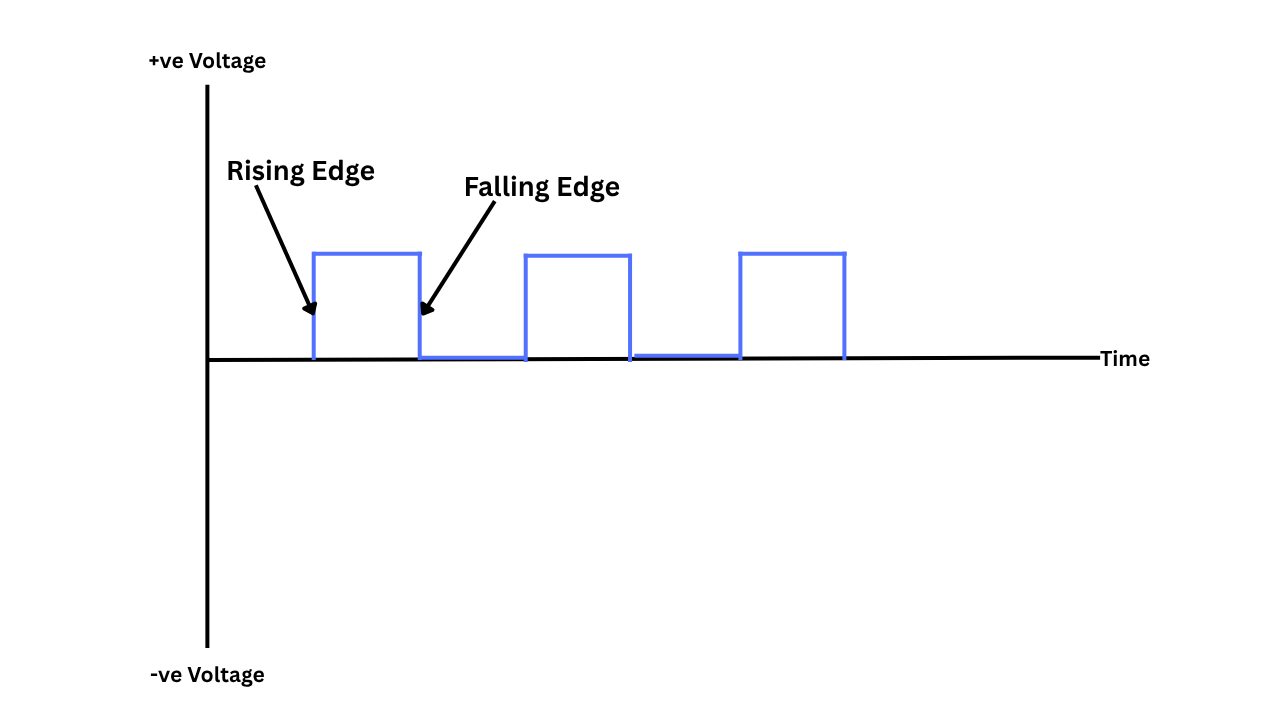
So, a 4 GHz chip ticks 4 billion times per second. It is easy to understand and convey to the user. However, the issue is that the tick doesn’t have a fixed amount of work attached to it. What happens during each clock cycle depends entirely on the chip’s internal design. How many instructions get fetched, decoded, and finished in each tick will depend on how the CPU handles it.
Below is an example of how a high and low clock frequency look and vary. Basically, there are more ups and downs in a higher clock frequency over a period of time as compared to a low clock frequency. Which means there is more room for the total work done.
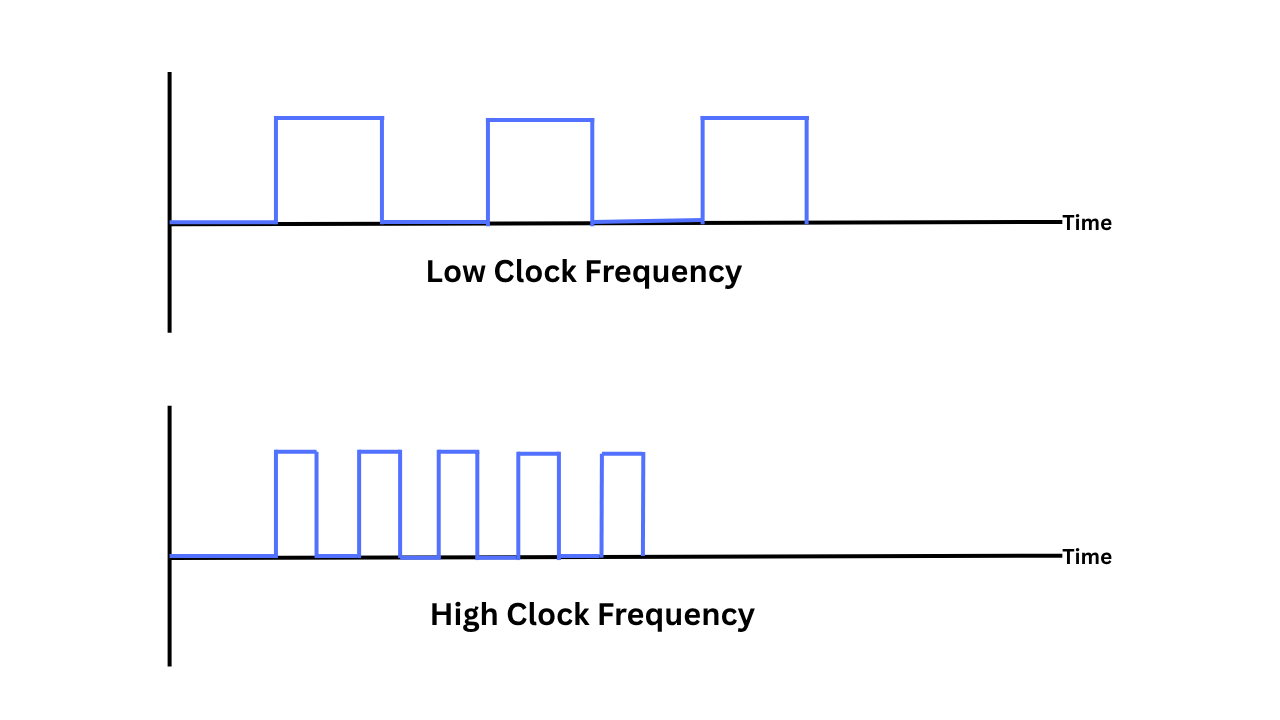
So, two CPUs with the same 4 GHz clock frequency can produce very different amounts of work because clock speed is just the measure of how often a chip tries to do something. How much work gets done is how the CPU utilizes that clock cycle.
Clock speed moves constantly.
If you open up the Task Manager in your Windows computer and go to the CPU section in the performance tab, you will see the current (changing) clock speed and the fixed base speed.

Modern CPUs adjust the clock frequency in real time. It can ramp up under load and drop when idle to balance heat, power draw, and performance. This change in clock speed is managed by the chip and OS together through a process called dynamic frequency scaling.
Base Clock vs. Boost Clock
Whenever you go to a CPU’s product page, you will see two clock speeds, i.e., base clock and max. boost block.
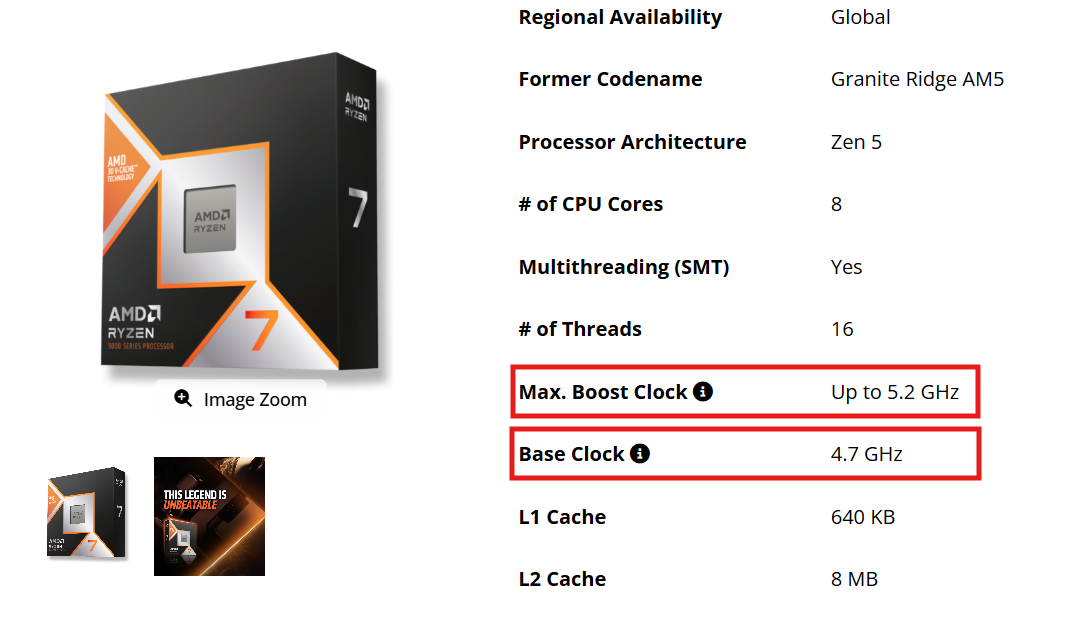
Boost clock is the higher frequency the CPU can reach when conditions allow it. It is a short-term peak the chip can hit when it is cool and has power headroom. The base clock is the guaranteed sustained speed. It is the speed at which the CPU is designed to sustain, typically with all or many cores active and within its rated power and thermal limits. When you use your computer for any task, most chips will settle somewhere between the two, not the advertised peak.
What is IPC actually?
IPC, or instructions per cycle, or instructions per clock, measures how many instructions a CPU finishes, on average, in a single clock cycle. Above, we discussed that clock speed only decides how fast a CPU ticks. Now, IPC is what really decides how much work will get done in a given time for certain clock cycles.
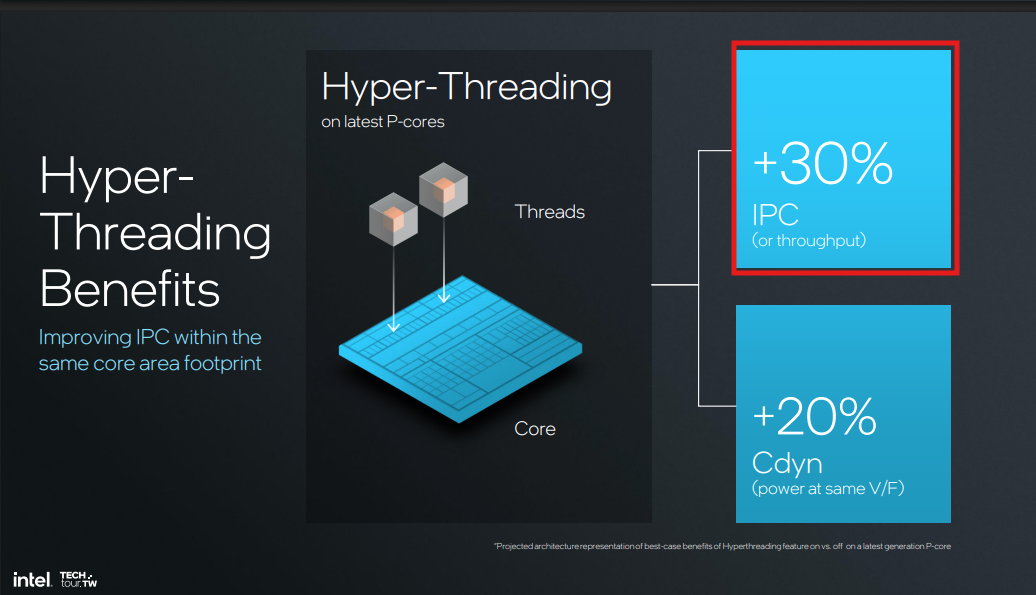
But, unlike clock speed, IPC isn’t fixed by the manufacturing process. It is a product of the chip’s internal microarchitecture. Basically, it is a combination of multiple things. So, don’t think of IPC as someone just throwing tasks to each clock cycle. It is much more complex than that.
IPC depends on many things.
CPU break instructions into stages and work on several at one. You can imagine a factory line. How that factory line is laid out changes how much can move through it per cycle. This is called the pipeline design, and IPC depends heavily on it.
The second important thing is the execution units. More and wider arithmetic and floating-point units let a core continue more instructions in parallel in each cycle.
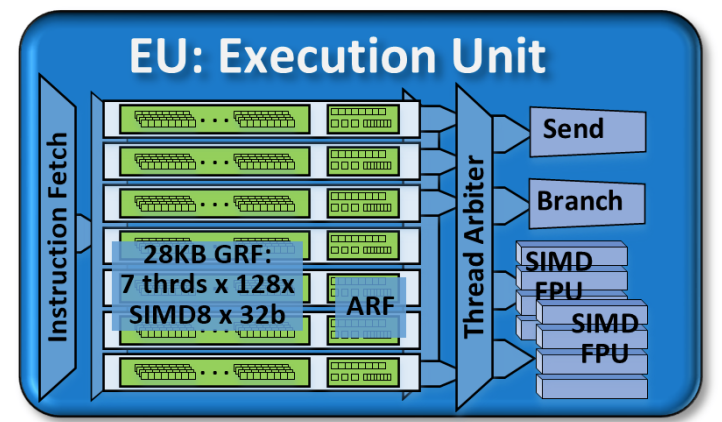
Modern CPUs don’t run instructions strictly in the order the program is throwing at it. They run whatever is ready and reorder the results afterwards. A bigger reorder window means more opportunities to keep those execution units fed. So, the IPC will vary depending on the workload as well.
Branch prediction keeps the instruction pipeline full, but every if statement forces the CPU to guess which way the code will go before it actually knows. A wrong guess will ruin all the work, and the process will start again. This also impacts the IPC not directly but indirectly.
Another big reason why IPC can’t be fixed is the other hardware resources, mainly cache and memory latency. If the data an instruction needs isn’t sitting in a nearby cache, the core can stall for dozens or hundreds of cycles waiting on memory.
The real problem with IPC
Ok, so we discussed that IPC isn’t a single number and depends heavily on various external factors. But the biggest factor is that there are no IPC numbers marketed by the manufacturers. The reviewers are not benchmarking for IPC because it isn’t as simple as running the Geekbench test.
So, although IPC is a much more important factor for deciding the CPU performance compared to the clock speed, the unavailability of scores makes it irrelevant for the end users.
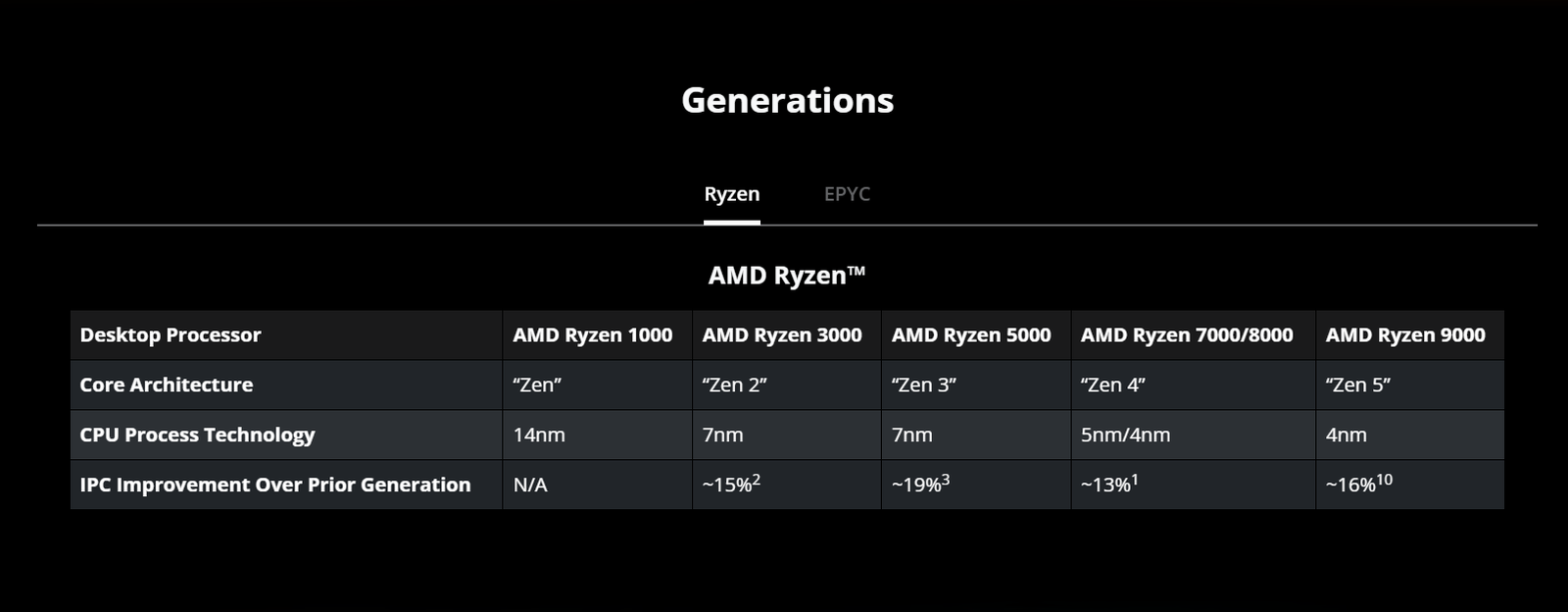
However, Intel and AMD do publish IPC as a % gain over their own previous generation. For example, Zen 5’s 16% IPC improvement over Zen 4.
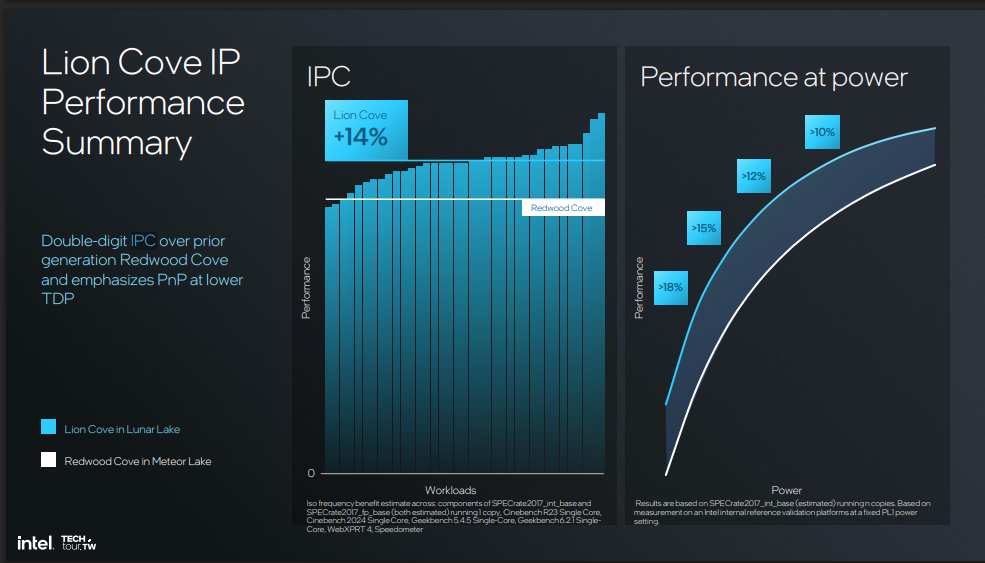
Or Intel’s IPC improvements of 14% in Lion Cove from Redwood Cove in the Lunar Lake processor family.
My point is that if you are looking for the direct IPC numbers to compare of two CPUs, you won’t find them just like you find the base and boost clocks.
How does this affect you?
Gaming and Single Core Performance
Most of the games still rely heavily on one or two CPU cores. So, IPC x clock speed on that one core matters directly for your framerate. It’s much more important for frame-rate consistency (the “1% lows” that determine whether a game feels smooth or stuttery, rather than just its average FPS).
Chips with large 3D-stacked caches, like AMD’s 9800X3D and 7800X3D, are currently dominating gaming benchmarks. They do not have high clock speed. But that extra cache keeps the data close to the core, cutting the wait for memory and otherwise wasted cycles.
This will happen mostly with other single-core CPU tasks.
Content Creation and Multi-threaded Performance
Tasks like video exports, 3D rendering, code compilation, and batch processing are usually multi-threaded. So, the total throughput will depend also on the core count along with the IPC and clock speed.
This is exactly where Zen 5’s biggest real-world gains are pointing out. Basically, more cores at a slightly lower clock speed usually beats fewer cores running hotter and faster.
Laptop battery life and CPU heat
A chip’s dynamic power draw is roughly capacitance times voltage squared times frequency. (P = C x V(squared) x f). This means that voltage has to rise to keep a chip stable at higher frequencies. Even very small frequency gains near the top of a chip’s range will cost huge amounts of power and generate a lot of heat.
IPC gains don’t carry that tax because doing more work per cycle doesn’t require the same voltage as doing more cycles per second. This means the IPC is a far cheaper performance to buy. This is also the reason the industry has backed off from increasing the clock speed and is rather focused on microarchitectural development, which basically means they are focusing heavily on the IPC gains.
So, which matters more? My Take
This can be really subjective, and there is no perfect answer here. But, in my opinion, IPC matters more. Even if you do not understand the IPC gain percentages over generations, picking a CPU with the latest generation will generally do you more work with less power and lower heat. All thanks to improvements in IPC, efficiency, and other microarchitectural changes. Keep in mind that CPU architecture and microarchitecture are different things.
Where clock speed really helps is to decide a CPU between a single generation and microarchitecture. It is genuinely a good way to pick between SKUs. For example, if you are confused between 9950X and 9700X, clock speed can be a good specification to compare.
In my opinion, whenever you buy a new CPU, ignore GHz comparisons across brands, microarchitectures, or generations. These numbers are nothing unless you are comparing two chips from the exact same family.
If you want to decide between the brands, you can read this guide or our detailed CPU buying guide.